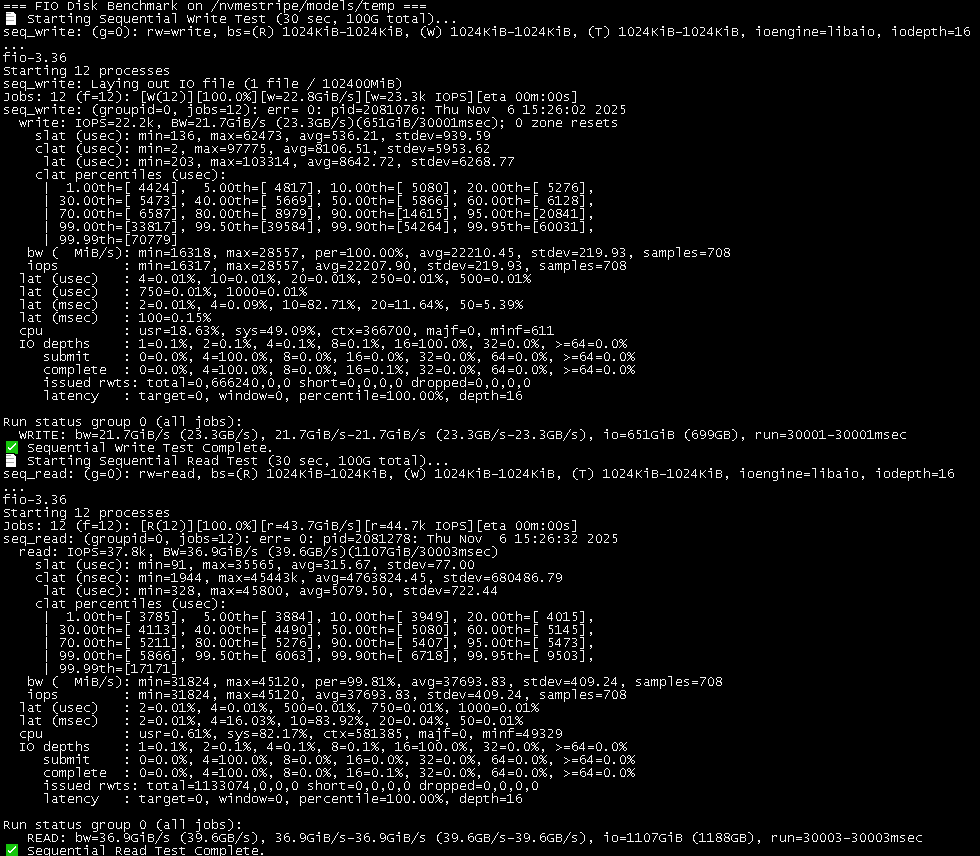
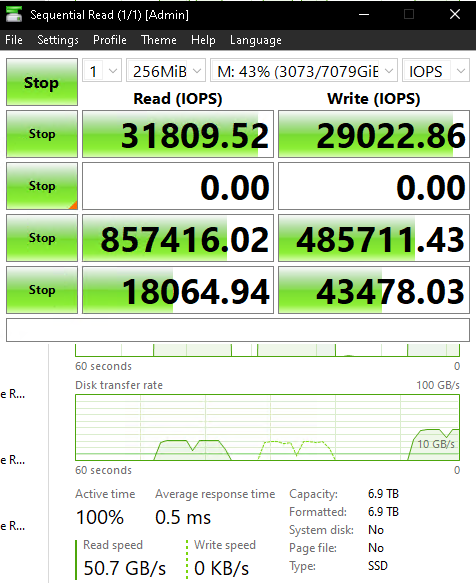
If it loaded at the max sequential read speeds, it should have been able to load 28 GB of data in about 8 seconds.
But according to the log/console output from said docker run command, it actually loaded said 28 GB of data in about 14 seconds:
(VllmWorker rank=0 pid=51) INFO 11-02 15:43:58 [loader.py:458] Loading weights took 14.10 seconds
(VllmWorker rank=1 pid=52) INFO 11-02 15:43:58 [loader.py:458] Loading weights took 14.13 seconds
(VllmWorker rank=0 pid=51) INFO 11-02 15:43:58 [gpu_model_runner.py:1347] Model loading took 13.9477 GiB and 14.280900 seconds
(VllmWorker rank=1 pid=52) INFO 11-02 15:43:58 [gpu_model_runner.py:1347] Model loading took 13.9477 GiB and 14.310833 seconds
That means that at best, it is only reading at about 2 GB/s.
(When I monitor htop, it is nominally slower than that.)
So, my question is does anybody ever observe that when they are loading large(r) files from their NVMe SSD, whether they’re actually getting anywhere close to realising the faster read speeds, or is getting faster NVMe SSDs (e.g. NVMe 4.0 x4/NVMe 5.0 x4) just marketing BS/a waste?
(i.e. don’t really bother with the NVMe generation/speed, and just go more for the best “bang for the buck” in terms of $/GB or $/TB?)
Would love to hear about your experiences in terms of what kind of load speeds you’re actually observing when it comes to loading LLMs, especially the larger models.
Right now, out of 2 TB, I’m using I think something like maybe 300 GB. Something like that.
I think that I passed the NVMe drive once to a Windows VM, and then ran Crystal Disk Mark on it and it was able to get something like 3.4 GB/s sequential read.
But more generically, I am wondering if/what are other people’s experiences with NVMe SSDs, in terms of loading really large files like the larger LLMs, and whether they’re getting anywhere close to the advertised max sequential read speeds, in actual, practical, real world usage scenarios.
My thinking is that if the PCIe generation doesn’t really matter, because you’re not getting anywhere close to the advertised speeds anyways, then perhaps my money would be better spent optimising for capacity rather than trying to get the latest PCIe/NVMe generation of NVMe SSD.
(Then again, I’m also asking to see if anybody else has bothered to check/confirm when they’re reading/loading in large files like the larger LLMs to see what kind of read speeds they were actually getting from the hardware/NVMe SSD that they’ve purchased.)
I should have mentioned- the limiting factor for PCIe 5.0 nvme will be the CPU. If the i/o is a single thread, you will tend to top out at around 2GB/sec
This is what I’ve seen in PCIe 5.0 m.2 drives, somewhere around 2GB/second with one thread. Up to 12-14GB/sec when adding threads. It can be seen pretty clearly in tools like fio
Is it a multithreaded read? FWIW my experience is app code that needs to actually do something with data (as opposed to a benchmark only ticking off a kernel’s claim it’s gotten to memory) tends to struggle to get past ~2 GB/thread-s on current cores.
I can’t answer this in an LLM context. I can say it’s my large sequential experience sustaining ~6-7 GB/s on 4x4 often isn’t too hard with multithreaded read from compiled code. 5x4 I haven’t coded to as 4x4 is good enough but, for workloads that might be crudely similar to unpacking and passing coefficients through to GDDR, 12+ GB/s seems plausible.
GB/thread-s declines as more threads are piled on the drive, though, and benchmark style async IO both benches below sync and consumes more DDR bandwidth. Even single 4x4 can end up dual channel DDR4 limited if you’re not careful with IO buffering and app code access patterns, so 5x4 kinda goes with DDR5. And, if it’s not DirectStoragey kind of data movement, I’d expect it’s not hard to keep a couple CCDs busy since it’s easy to end up with ~1 GB/s core throughput.
For a different model, on a different backend running directly on host OS, I think I’ve seen 4-5GB/s from btop on my gen4x4 setup when loading the model. That was with one of the R1 quants, and ik_llama.cpp. Sorry about not being able to retest; I do not have ready access to that machine anymore.
The R1 megathread on this forum had info from people trying to run very large models off the SSD, though that use case is more bottlenecked by memory management, and not directly comparable to initial model load on a different backend fully into VRAM.
I expect that different backends handle model loads differently.
This has a lot more to do with docker and the processes inside requesting IO than it does with the drive. If I write code like:
Request 100MB
Process 100 MB in code
Request 1GB
Process 100 MB
Request 800MB
Process 1.7GB
then you’re not going to see peak drive speed because all the time I spend processing only happens after a read is completed, and it doesn’t start the next read until it has had time to (presumably) figure out what it needs to request from storage next.
Now, the programmer can use threads or asyncIO to sometimes hide this delay. But very few programmers know or understand how to handle threading correctly. It takes something of an instinct for about how much work can be done in the time it takes to do another task in order to hide latencies. And even then, with such a wide gamut of technologies (HDD to NVMe), what works for one won’t work for another.
Also, peak read speeds from NVMe often require some level of queue depth. Meaning parallel reads. So if the programmer literally does a read(buffer, 1024* 1024* 1024, fp) to read 1GB of data, that will not hit the full read speed of NVMe. Instead, they would need to either:
Have 4 threads and request 250MB from each at the same time
Use asyncIO and issue multiple smaller reads with a sufficient number of async ‘slots’ (there are different ways asyncIO is handled, but one way to think of it is an array of requests that might be in flight at any time).
But, again, all of this is the programmer’s job to fix/implement. You don’t really have a way to speed it up yourself without the source code.
Likely neither, actually, since buffers that large introduce L3 contention between threads and throughput drops on the resulting DDR latencies in every scenario I’ve profiled or benched. Other major thing that happens is NVMe 4 kB latencies of ~30-40 μs plus a 4x4’s ~7 GB/s throughput lead to last byte latencies of ~175 μs for SEQ1M workloads, increasing at ~140 μs/MB with larger buffers. Since that’s well below a scheduler’s 10-16 ms quantum, both sync and async throughput get rather sensitive to details of how the kernel does threading, filesystem internals, and the programming language’s IO stack connection of kernel to app code.
Generally what I see is having enough sync threads to saturate the drive outperforms async’s more complex thread transitions and callbacks. Async seems better aligned to lower rate IO with millisecond latency that’s less demanding of the scheduler and carries lower penalties for loss of L2 or L3 affinity. But, even there, if there’s hardware threads available sync’s likely to be the higher performance choice in my experience. So I tend to look at async as more of a server doing internet requests kind of thing.
Q8T1 drive benchmarks miss this app code preference towards Q1T8 because all they do is tick off that the IO completed.
Yeah. Or, more specifically stated, the programmer’s job to build a performance predictor that tries to figure out optimum threading for whatever combination of hardware, kernel, libraries, and data requests it’s getting handed. It’s rare to know enough about workload, data, and hardware state to be able to make truly good predictions, few programmers have the needed understanding of control theory anyways, and of the ones that do I know of exactly zero who’ve had time to develop, test, and maintain the machine learning capability needed to consistently approach optimum throughput.
The most common workaround is to let the user specify some fixed number of threads, e.g.robocopy /mt, and let sufficiently motivated folks search for their optimum as they run their workloads. Among the ones I bench it’s usually like an 80 or 85% solution. It’s frustrating though, like you’ll see your code reach above most 4x4 drive specs and move 7.4 GB/s for several seconds, then drop down to ~6 GB/s, and there’s just no way to tell the OS to go back threading your threads the 7.4 GB way even though the drive’s still only at like 55 °C.
So I end up with a good bit of stuff that tends to run at 5-6 GB/s even though I know it can do 7 GB/s just fine. For our workloads that’s not wrong as the amount of time I’d spend tuning exceeds the amount of time spent waiting on the somewhat slower IO. But it’d be nice to have the resources to build a better threading engine.
It’s my expectation that when 5x4 pricing becomes more competitive with 4x4 mostly what I’ll see is a wider gap between achievable and practical. That’s desktop core count and memory channel constraints plus the difficulty of getting good airflow at M2_1 but a good part of it is reducing sync IO last byte latency to ~70 μs/MB looks well into diminishing returns.
At 4x4 I’m already optimizing mostly against the kernel, IO stack, and in app code. And if it’s dual channel DDR5 at 70 GB/s bandwidth writing 1 MB from the drive into memory and then reading it into L3 takes ~30 μs. So DMA rather than DL3A might also be getting to be a significant contributor to core downtime.
Given Python being Python it wouldn’t surprise me if moving down to calling libtorch directly was also beneficial.
So, to give you a reference, I used to test enterprise storage arrays. Circa 2016 I was testing an NVMe storage device back before consumers had their hands on NVMe at all. I had written a little 10MB program (10MB was its runtime memory usage) that could push 75GB/s. yes, big B, to this storage array entirely with asyncIO. The array was supposed to do 100GB/s, but they never got the firmware where it needed to be in order to actually get 100MB/s. The project ended up getting scrapped because it was CRAZY expensive.
You’re right, if you’re issuing 4k reads/writes to storage, you’re going to get ass performance. Internally, the smallest unit of addressable memory is anywhere between 128 and 512kb. Most consumer chips I’ve seen are 256k. Meaning if you write or read any less than 256k, the controller is reading or writing 256k to the physical chips and just giving you the smaller bit you asked for.
Knowing little facts like that is why I was able to get 75GB/s out of a program that used less memory than a smartphone app.
Oh, and before you ask, no. The data was not all 0s or some other easy to predict pattern. The data was completely random. To the point that deduplication and compression algorithms couldn’t touch it. But I was not CPU bound, because, again, I understood what the hardware was doing, and I understood how much ‘random’ I needed to send to get the drive to work a certain way. On modern storage, with 4k sector sizes, you only need to change 1 bit (I did 1 byte; faster) every 4k bytes. This is how you can make TB/s of random data with minimal CPU overhead and no caching will be able to cope with it. Think I’m joking? Try it out.
I went down the whole zfs stripe across a bunch of gen5 nvme devices trying to get the performance I needed to load huge models into trays of GPUs. It was meh.
Then fell down the rabbit hole and started patching the actual inference engine and libraries… I got about a 4x performance speed up here. The limiting factor was how the code read the file and wrote to the GPU in series horribly inefficient.
Then I gave up and did what all insane infrastructure guys do. just jam it all into ram on boot and load from there:
You can see that under link status, it is connected at 8 GT/s, x4 width.
The GPU has a PCIe 3.0 x8 link when it is the running, so that should be faster than a PCIe 3.0 x4 link.
In terms of how the LLM is loaded into VRAM, that, I am less familiar with as that gets more into how the software (vLLM/ollama) runs.
But I would also imagine that unlike ZFS, where it might have some hard coded timers for I/O pacing (since HDDs can’t react to I/O requests as quickly), NVMe shouldn’t have this issue. I formatted the partition using XFS.
Not yet, but it is more difficult to be able to measure the speed of the I/O from a RAM disk vs. a NVMe SSD.
(There’s also no guarantee that the DDR4 RAM that’s in the system (with the 6700K) is that much faster than a NVMe SSD.)
It would be surprising (a little bit) and a little bit “false advertising” if you need multithreaded I/O to be able to achieve the advertised read speeds.
No idea. That would require digging into the code of how vLLM/ollama works, when it is reading the LLM.
(I was hoping that people who were working in the AI/LLM space might be able to comment on their experiences, loading a LLM from a (single) NVMe SSD, to see what kind of speeds they were getting as well.)
Yeah, I’m using a 6700K with an Asus Z170-E motherboard for the time being. It’s slated to move over to my 5950X with 128 GB of DDR4-3200 RAM on an Asus ROG Strix Gaming WiFi II I think, but I haven’t migrated the guts of the system yet.
As for the Intel 670p NVMe SSD itself, it’s a NVMe 3.0 x4 SSD, so the newer generations isn’t nearly as applicable. (And that’s a part of this question as to whether moving to NVMe 4.0 x4 would be even worth it, because if it can’t really hit even half of the advertised speeds, then getting a faster drive would be a waste. And at that point, it would be better for me to invest in capacity over speed, if it can’t hit the speeds when loading said LLMs anyways.)
Yeah, I don’t know if vLLM/ollama uses llama.cpp underneath (or some variant thereof). Again, that would require digging into the code to be able to ascertain that, which I am not qualified to do.
Yeah - I dunno. That would require digging into how vLLM/ollama is written, which I am not qualified to do.
In the early days of flash there was a whole hubbub about write amplification. I remember a ton of Anandtech articles back then.
Then controllers got better and it died down. People considered it a solved problem, I guess?
From your post it sounds like it may be rearing its ugly head again.
Since you seem to know the technology, let me ask: How is the situation these days?
But at some point, even on boot, you’re loading the LLM from stable storage to RAM.
It would be interesting to see what kind of performance you, when you’re reading from said stable storage to RAM load.
(For my case, I don’t even remember what speed my DDR4 is running at. I would like to be able to say that it’s DDR4-3200, but I can’t be certain that it’s not DDR4-2133 only. (Again, I was going for capacity, and speed was less of an issue, overall. But given the age of the CPU, motherboard, RAM, this predates the boom of AI/locally/self-hosted AI/LLMs right now.)
Short answer is my NFSoRDMA nic is only 100gig so im reading from stable storage at 10GB/s give or take. I just parallel rsync all the files at once and it moves very quickly.
Putting storage inside the inference rig itself seemed unnecessary when I could just use external disk I already had shared out.
If you want I can FIO test to the shared disk tho. Its a pcie gen5 stripe in zfs.
I haven’t done testing on this in years. The company I worked for outsourced the job to West Taiwan. I don’t have access to the same documentation I once did.
Samsung 990 Pro 4 TB Specs | TechPowerUp SSD Database Claims a page size of 16KB for the 4TB model (each NAND package is going to have a different page size). If that’s true, it means writing < 16k causes the full 16k to be written. The drive will still report a 512 byte block size to the OS, but that’s more about maintaining compatibility with hard drives than talking about reality.
The situation these days…from what I can find with 20 minutes of google, it’s better than it was. Back when I was testing nothing had a page size smaller than 128k, and 256k was ‘the standard’. So 16k is a dramatic improvement from that. But it still means if you have some idiot at a company named after someone’s dick (micro-soft) or after someone far greater for humanity (shockingly, tesla) who write 100-300 bytes to storage every few seconds, then yeah, it’s going to burn the SSD out very quickly.
There is a version of reality where I’m less damaged and more comfortable on camera where I make a youtube channel to explain all this stuff, because nobody else is. Where I create IO storage testing tools that give more meaningful results than what other channels have. I’m not where I need to be to make that a reality today though. And not anytime soon.
I wonder if there’s any gains to be had setting cluster size = page size in windows? (Ah, but when I think of the average node_modules folder, probably not…)
TBH I wish consumer drives would come in 4Kn by now. I know windows has understood 4Kn drives since at least windows 10, maybe earlier.
I have my nas EXOS drives in 4K mode (and I have fio benches that show some decent performance gains), but none of the consumer drives (HDD or SSD) in my daily rig can be switched to 4K.
It’s so dumb too. There’s several layers of obfuscation and deobfuscation that simply could not exist things would be simpler for everyone!
When SSDs came along, NVMe was introduced, as a protocol more friendly to the underlying technology. But instead of shedding static sector sizes, everyone doubled down on 512…