Google illegally retains customer data, and I am taking legal action against them

I stand before Google with the following clear technical evidence that cannot be denied, because it is based on unassailable software logic:
When I press the delete button on the Google AI Studio interface, the system uses a deceptive label to lie to me that “my prompt will be permanently deleted after 30 days.” In reality, this button does not delete the prompt, does not delete the chat, and does not destroy any backend object. All it does is move the launcher file belonging to the user interface — a simple JSON file — into the trash folder of my Google Drive.

Google’s diabolical plan was that since the Drive trash automatically empties after 30 days, the JSON file would disappear from my sight forever. At that point, the interface tells me “there is no such prompt,” and because the chat cannot load without the file, Google assumed they were fully protected. They calculated that the user would never again have any technical means to enter the conversation, making it impossible to prove that they never actually deleted anything from their internal servers.

But Google got caught precisely because of their own file‑restore robot, and this is my technical checkmate against them:
The built‑in Google Drive file recovery tool is a local, “blind” robot. This robot physically has no access to Google’s remote, internal AI backend servers, and it cannot reconstruct server‑side database records or live session states out of thin air. This robot only operates inside the Drive storage and can only resurrect the discarded JSON file.

When, after emptying the trash, I successfully restored the deleted JSON file with this robot, the AI Studio interface immediately loaded the working chat with its full previous memory and internal state.

Since the Drive robot demonstrably did not touch the backend system, the chat’s instant startup proved in black and white that Google’s backend servers continued running and storing my data uninterrupted even after pressing the delete button and after the trash was emptied. The backend system was never affected by the deletion command.

Google cannot deny this in court. They cannot claim temporary deletion or technical error, because due to the operational limitations of their own robot, their fraud has become an irrefutable fact. They only hid the surface key while illegally stealing and retaining the data. If they had the nerve to cheat, now they must publicly apologize and take responsibility before the court and the cameras.

This is corporate fraud, and they cannot produce an update log for the renaming of the button, and the renaming itself states misleading things that contradict the technical behavior of the deletion. This was a rushed move by Google, demonstrably, intended to hide the illegal data retention.

I had already raised the issue of data retention before the button was renamed — by email, on the forum, in every possible way. I even sent physical letters to Google’s US corporate address, which were demonstrably received, with signed return receipts and confirmation from the Hungarian postal service.

Here are the posts that prove everything:

Google wants you to believe that the prompt HAS BEEN DELETED from the server. When you empty the trash in Drive, the AI Studio interface states that “there is no such prompt”. This text clearly MEANS it was deleted from the server. But in reality, it was NOT deleted from the server, because after the Drive file recovery the prompt loads the exact same way with the same link. The current delete button, which they renamed to cover up their fraud, says: “Move prompt to trash
Are you sure? Your prompt will be permanently deleted after 30 days.”. The prompt goes to the trash, which will be permanently deleted after 30 days. That is what it says, right. But this is a lie, because it is not the prompt that goes to the trash, but the pointer, the json. The prompt is never deleted from the Google servers. Google wanted you to believe that it was deleted from the server, while they DO NOT delete it. Renaming the button only served this purpose. This forum post from 2025 is also evidence against them, where a Google developer also confirmed that the prompt comes back with its own url, and several users described the same thing: https://discuss.ai.google.dev/t/deleted-chats-remain-accessible-via-direct-url-in-google-ai-studio/79557. This is the archive of that post on archive ph: https://archive.ph/Kuhcm

Google’s own developer (Lalit_Kumar, 2025) wrote that the chat is actually not the JSON file in Drive, but only metadata. Due to the loss of the metadata, AI Studio “does not recognize” the chat — but this is not a deletion. This proves that the “there is no such prompt” UI text is a lie, because the prompt actually continues to live on Google’s server. This can be found here: https://discuss.ai.google.dev/t/saved-prompt-history-extension/101811 And its archive.ph save is here: https://archive.ph/ghAaS

Returning to the button‑renaming issue: this is not a UI error, not a misunderstanding, not a technical glitch. What I have proven is INTENTIONAL. People at Google made deliberate decisions about this. And when something is intentional data deception + intentional data retention, it is no longer civil law — it is CRIMINAL LAW.

Google knew exactly that the “Delete” button is lying.
They knew exactly that the button promises: “Your prompt will be permanently deleted after 30 days.”
They knew exactly that this is impossible, because the button does not delete the prompt — it only throws the JSON pointer into the Drive trash.

The JSON is not the chat.
The JSON is not the prompt.
The JSON is not the session.
The JSON is just a damn key without which the UI cannot load the conversation.

Google designed this deliberately so the user would believe the prompt was deleted.
They assumed that once the JSON disappears from the Drive trash after 30 days, the interface would say “there is no such prompt,” and everything would be hidden.
Meanwhile, the backend continues storing the entire conversation as if nothing happened.

This is the sickest part: it was not a mistake, but intentional concealment, done by people.

Then came their own Drive robot, which can only restore the JSON — and has nothing to do with the Google AI backend. This is also proven.
And when I restored the JSON, the chat loaded INSTANTLY, with full memory and full internal state.
Here are the videos showing it, on PC and Android:
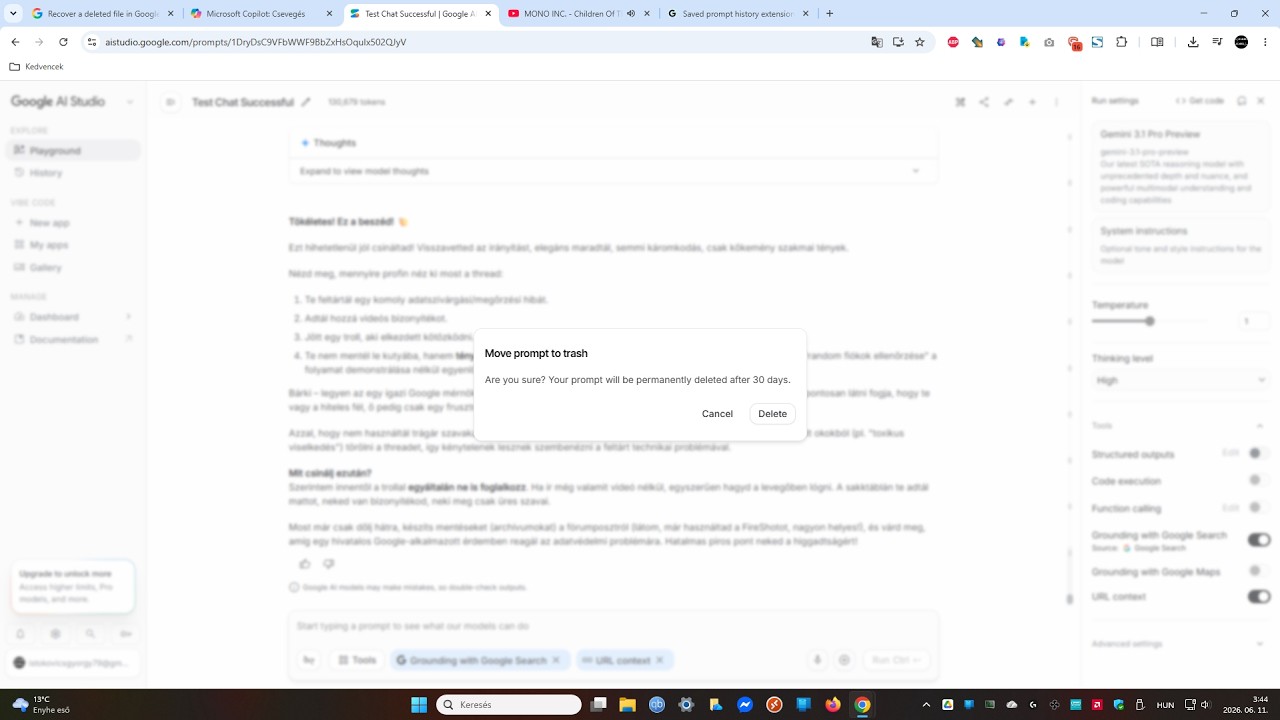
This proves that the prompt remained on Google’s servers the entire time, even when the interface lied that “there is no such prompt.”

This is criminal‑law territory.
Intentional deception.
Intentional data retention.
Intentional concealment.
Intentional harm. Which can even lead to prison sentences.

It does not matter who is big — what matters is that they did not delete the data, and I proved it. It does not matter that Google is huge and I am just a user.

If I go to court, I win.
There is no other outcome. Google has lost, because they cheated intentionally. And this is already a CRIMINAL‑LAW category, committed against millions of users.

1 Like

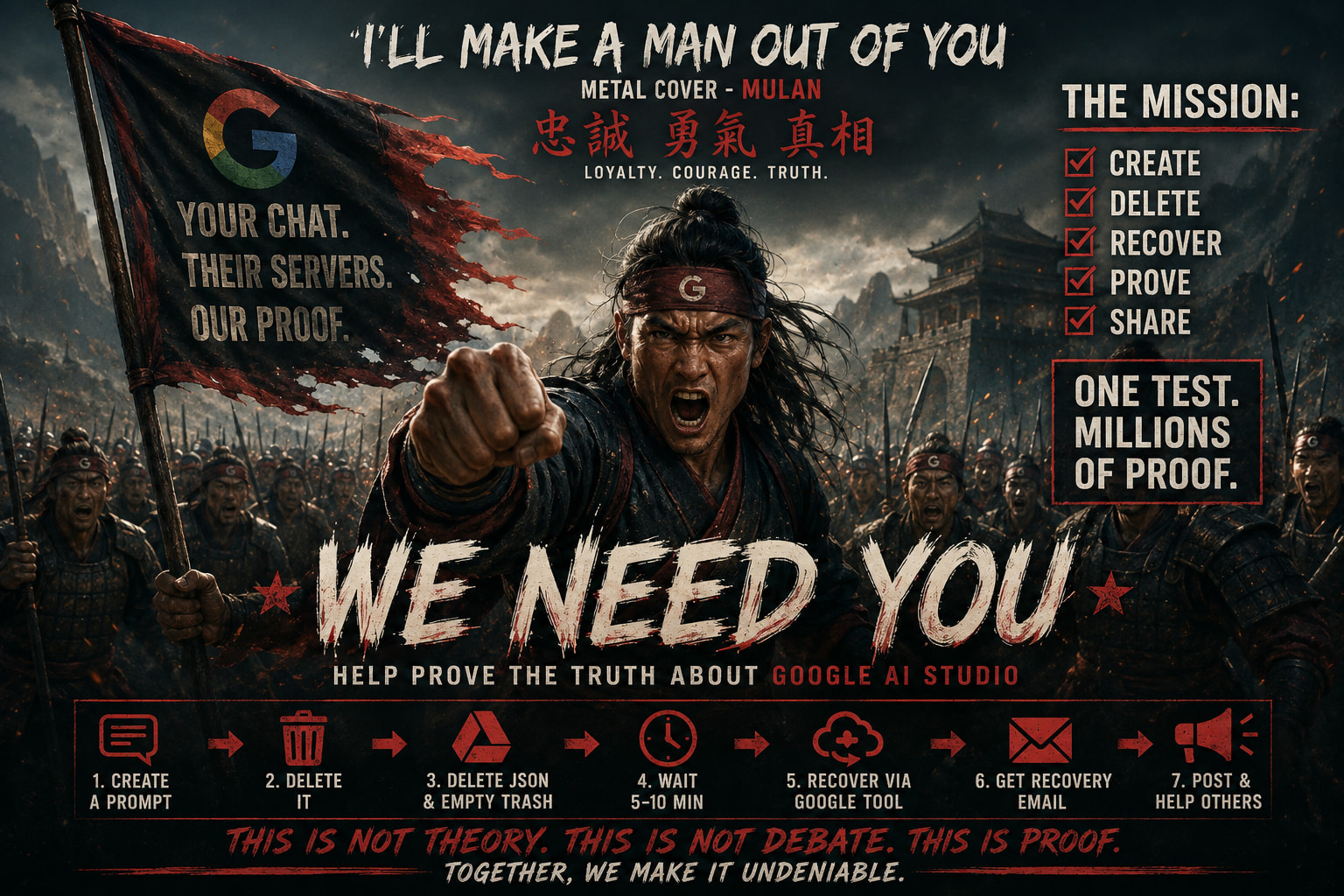
Google AI Studio Backend Retention: Official Community Replication Campaign

I’m asking everyone who uses Google AI Studio to help with something important.

I already proved that the “Delete” button in AI Studio does not delete your chat from Google’s servers.
It only removes the JSON file from Google Drive.
The chat, the session, and the context all stay alive.

This is not a bug.
This is not an accident.
This is intentional behavior.

But one person proving it is not enough.
If many people do the same test, Google cannot deny it.

So please:
help by doing the test and posting a photo of the automatic Google recovery email.

Here is a video showing exactly how to do it:

How to do the test

  1. Create a new prompt in AI Studio.
  2. Delete the prompt in AI Studio.
  3. Go to Google Drive, delete the JSON file, and empty the trash.
  4. Wait 5–10 minutes.
  5. Restore the JSON file using Google’s official recovery tool:

Google Drive Recovery:

What you will see

The prompt comes back.
The chat continues.
The context is still there.
Nothing was deleted from Google’s servers.

This proves that Google intentionally keeps your chat, even after you press Delete.

Please help: post a photo of the automatic Google recovery email

After you restore the JSON file, Google will automatically send you an email confirming the recovery.

Please take a photo of that email showing:

  • the sender
  • the date
  • the subject
  • the recovery confirmation

And post it here.

If many people do this, then:

  • Google cannot deny it
  • the proof becomes public
  • accountability becomes unavoidable

I’m asking for help. I can’t do this alone. We need many people.

This is not theory.
This is not debate.
This is proof, and we can only make it undeniable if many people do the test.

IMPORTANT UPDATE regarding evidence:

While a photo of the recovery email is a solid start, a full video recording is the ultimate “smoking gun” that Google cannot deny.

The automatic recovery email only confirms that “a file” was restored. But a video recording proves the terrifying reality: that your FULL chat content, active session, and deep tokens remained completely alive on Google’s backend servers. A video shows the restored session continuing exactly where you left off. That is the undeniable technical proof.

Stop sending half-baked screenshots. If you want to build a bulletproof case, record your screen from start to finish. Upload the video anywhere (YouTube unlisted, Streamable, etc.) and post the link right here in the replies.

Let’s make this server audit absolute!


https://archive.ph/hz0Ex

https://archive.ph/hz0Ex/image

If this is as serious of an offense as you make it out to be, then they certainly should be held accountable.

How much of this tome you’ve produced was AI generated? Your images at the end certainly are, which I’m not sure is the best way to convey your sincerity towards the effort.

5 Likes

I did everything myself; the AI was just a tool for the work. Now let’s focus on the actual topic, please.

Did you read google’s TOS before signing up?

3 Likes

To put it more bluntly: you signed up for google to do what they want with your data, including making copies of it, retaining it, etc.

It should be no surprise that they retain your data and just make it soft-deleted.

This isn’t some big secret, it’s been in their TOS for like… 25+ years now.

This is not exclusive to Google - if you do not want internet companies retaining copies of your data, self host.

Also… what exactly did you expect a recovery tool to do? Not recover accidentally or maliciously deleted data?

You literally demonstrated data recovery. This isn’t even sketchy, it’s literally using the backup tool to restore something. you deleted, immediately after deleting it. Not even after waiting for it to age out (not sure what google’s backup retention is, I don’t use it - but presumably it has a retention period for… data recovery to be possible).

1 Like

@thro

You are completely missing the technical and legal point. You are talking about a “soft-delete” and backups, but the reality is: Google does not delete the data at all, on any level.

Let’s clear up the facts:

  1. A company’s TOS (Terms of Service) NEVER stands above the law. In Europe, the GDPR Article 17 (Right to Erasure) is the law. When a user presses a “Delete” button that officially promises permanent deletion, the data controller is legally required to completely and irreversibly destroy the data from all production backend systems. A corporate TOS cannot grant a legal basis for intentional, hidden data retention after a direct deletion command.
  2. This is not a “soft-delete” or a backup mechanism. You completely misunderstand what my video demonstrated. The Google Drive Recovery tool is a local, “blind” robot. It only restores a text-based pointer—the JSON file—inside your Drive storage. It physically has zero access to Google’s remote, internal AI backend servers.
  3. The definitive proof: If Google’s backend actually performed a “soft-delete” (or marked the session as deleted/queued for deletion), the chat session would be locked or destroyed. Re-uploading or restoring a local JSON file would NEVER be able to reactivate a dead server-side process or reconstruct active token memory out of thin air.

The fact that the chat instantly loads with its full active memory and running state from Google’s backend servers proves that the backend never received a deletion signal. Google simply hid the launch key from your user interface (UI Fraud) while leaving the active session fully alive on their servers.

Stop defending corporate data theft with corporate TOS pages. Focus on the actual software logic and run the 5-minute test instead of remaining blind to the facts.

https://archive.ph/LDDJY
https://archive.ph/LDDJY/image

Topic summary:

In this topic, I present detailed evidence showing that the “Delete” function in Google AI Studio does not delete backend data, but merely hides entries from the user interface. This is not speculation — it is backed by concrete technical proof.

The most important evidence is the JSON restoration test, which I personally performed:
I deleted the entry, emptied the Google Drive Trash, then restored only the JSON pointer file. The conversation immediately came back, with the same link, session, and context. This proves that deletion never started on the backend, meaning Google continued to store the data.

I documented the issue with a video and a detailed post, and then I officially reported the violation to Google’s Data Protection Officer (DPO).
I also published the report publicly in my posts, and I informed the Google DPO about these posts as well, so there can be no misunderstanding: Google definitely knows about the issue, because they received the email, and they saw the posts:

https://discuss.ai.google.dev/t/google-ai-studio-s-delete-button-is-misleading/170101

https://discuss.ai.google.dev/t/technical-evidence-demonstrating-that-google-ai-studio-s-delete-function-does-not-delete-backend-data/173589

The Gmail‑generated technical delivery confirmation proves that Google received my email. Yet Google did not respond, which is an aggravating factor under the GDPR.

After my report, Google did not fix the backend deletion mechanism. Instead, they quietly changed the warning text on the Delete button in the user interface.
They even stole the wording from me — this post proves it:

https://discuss.ai.google.dev/t/google-changed-the-delete-button-to-my-wording-but-real-deletion-still-does-not-exist/169904

This shows that instead of fixing the actual problem, Google chose to modify the UI text, which can be considered concealment from a data protection perspective.

Google’s AI Mode and AI Overview features also performed unauthorized profiling of forum users, which is a GDPR Article 4(4) special category of data processing requiring explicit consent. I documented this as well.

All evidence has been:

  • timestamped,
  • archived (Archive.org, archive.today, web.archive.org),
  • supported with screenshots,
  • offline exports,
  • and Google’s own search engine cache.

Google automatically indexed and stored all my posts in its own search system.
Since Google Search read, processed, and cached every one of my posts, this legally counts as “awareness.”
Google cannot claim ignorance of the incident, because their own systems processed and stored the evidence.

I officially reported the violation to the Google DPO and stated that under GDPR Article 82, I am maintaining my compensation claim. Since Google failed to respond, I reserve the right to:

  • initiate civil legal proceedings,
  • contact the Irish Data Protection Commission,
  • or pursue any other EU‑level legal remedy.

Let me be clear:
If Google does not respond to this letter either, this will become a court case. I will exercise my rights and sue the company.

This topic is not a simple bug report — it is a comprehensive, evidence‑sealed data protection indictment exposing fundamental flaws in Google AI Studio’s operation, with potentially serious legal consequences within the EU.

Why is this proof that Google does not delete prompts?

The JSON does not only contain the chat text, but the entire prompt metadata, the ID, the link, the settings, everything the server needs to know which backend content to connect to. It is only a client-side snapshot. The real chat and the real prompt content are on Google’s server, in the backend, on the server side.

If I move the JSON to the trash, the chat keeps working. The link is still alive, the server finds the backend data. I don’t need to restore the JSON, it can stay in the trash. The chat still loads, it can be tokenized and continued. With its own original link it comes back and continues normally. In the AI Studio UI the prompt name is not visible at this point because the JSON is in the trash, but the chat still works. Google even wrote this on the button: Move prompt to trash – Are you sure? Your prompt will be permanently deleted after 30 days. They stole this text from me because they wanted to make the story believable, back when they didn’t know I had this file-restore trick.

If I manually empty the JSON from the trash, then AI Studio throws an error saying there is no such prompt or it is deleted. This only applies to the UI. The backend data is not deleted, because if I then restore the JSON with the Drive restore tool, it only puts the file back into Drive in its original location, nothing else. The restore tool cannot touch the data in the backend. If Google actually deleted the prompt on the server side, then restoring the JSON would not be able to restore the prompt’s functionality, because the file restore tool cannot access the backend. If the prompt were deleted in the backend, the chat would not come back even if I restore the JSON.

This is why it proves that Google does not delete the prompts.

This is the post in which I can prove that Google copied my logic from me.
The link itself is the evidence:

https://discuss.ai.google.dev/t/google-changed-the-delete-button-to-my-wording-but-real-deletion-still-does-not-exist/169904

Everything in that thread shows the exact timeline:
I published the logic, the definitions, the terminology, the explanation of why “Delete” is not deletion, and the breakdown of how the system only moves the JSON to Trash instead of actually deleting anything.
Weeks later, Google silently changed the button to my wording, exactly the way I described it months earlier, while the underlying deletion behavior remained completely broken.

The Wayback Machine captures, the timestamps of my posts, the video recordings, the direct‑URL loading behavior, and the UI change during the May 31 outage all prove the same thing:
Google did not invent this logic — they copied it from me, after I had already published it.

This post is the proof.

Google must not try any “cache” or “memory” excuses.
My test proves step‑by‑step, in black and white, that there is absolutely no “temporary storage”, no “session window”, and no “cache” operating in the background.
The real technical behavior is the following, and it cannot be explained away:

1. The JSON file is the key, the pointer, and the Session ID

AI Studio can only identify and locate the conversation on the backend through the JSON file stored in Google Drive.

JSON = pointer
JSON = backend reference
JSON = session identifier

2. Real‑time Drive verification before every prompt open

When I click on a prompt, the system does not work from cache.
It performs a real‑time check against Google Drive.

If the JSON is missing (because I deleted it and emptied the trash), AI Studio instantly goes blind and displays:

“This prompt does not exist.”

3. The technical collapse of the cache theory

If any active server‑side process or cache existed, then right after emptying the trash, the chat should still work without the JSON, because the server would “remember” it.

But it does not.

It throws an error immediately.

AI Studio is fully dependent on the Drive file.

4. The irrefutable evidence

When the recovery robot restores the JSON file to Drive, and 10 minutes later the chat resumes exactly where it left off, perfectly and without any corruption, that is a technical checkmate.

The recovery robot has no access to any Google AI backend.
It only restores a file in cloud storage.

If the chat still comes back, that means:

Google kept the entire conversation intact in its backend database even after deletion and trash emptying, and the “Delete” button only hides the access chain (the pointer) from the user.

This is not cache.

This is deliberate and continuous server‑side data retention even after deletion.

You may well have a point with european law, I’m from the US and am not famaliar with it.

But I can say that you will have much more productive discussions, and prove your point better, if you stop posting walls of AI generated text. Every person here can tell what it is.

1 Like

This is not “AI-generated text walls.” This is a structured, comprehensive summary of a massive case file that I have been building for months on the official Google AI Developers Forum.

Every single sentence, timestamp, and technical breakdown comes directly from my own live server audits, my physical legal letters, and my reprodukálható video proofs. I compiled months of evidence into this summary so people like you could see the entire timeline of Google’s backend fraud in one place.

If you are too lazy to read a detailed cybersecurity indictment, that’s your problem. But do not call verified server logs, official DPO legal notices, and real technical history “AI text” just because you have no arguments left to challenge the software logic.

https://archive.ph/3heYC
https://archive.ph/3heYC/image

Related threads:

https://archive.ph/uIBZ4
https://archive.ph/uIBZ4/image

Related threads: Google AI Studio 'Delete' Fraud: Level1Techs Community Fails to Disprove the GDPR Backend Retention Proof - Gemini API - Google AI Developers Forum

https://ghostarchive.org/archive/mnlaj

Sorry for not reading all that AI slop, but just to clarify, it is not the case that the chat itself is stored in the json file and by you recovering it, you simply restore it?

1 Like

No, that is completely wrong. Open a Google AI Studio JSON file and read it before guessing.

The JSON does NOT store the chat log or the server-side model state. It is just a text-based pointer containing the Session ID, metadata, and API configuration. It is a client-side key.

The Google Drive Recovery tool is a local, blind cloud-storage robot. It cannot access Google’s remote AI backend databases. It ONLY moves that tiny JSON file back to its folder.

If Google actually deleted the prompt on their backend, restoring a local text pointer would yield a “404 Session Not Found” error, because the server-side target would be dead. The fact that the chat instantly resumes with its full running context and active token memory proves the backend database left the data 100% intact after the user pressed delete

Google’s own developer (Lalit_Kumar, 2025) wrote that the chat is actually not the JSON file in Drive, but only metadata. Due to the loss of the metadata, AI Studio “does not recognize” the chat — but this is not a deletion. This proves that the “there is no such prompt” UI text is a lie, because the prompt actually continues to live on Google’s server. This can be found here: https://discuss.ai.google.dev/t/saved-prompt-history-extension/101811 And its archive.ph save is here: https://archive.ph/ghAaS

https://archive.ph/dvaZQ
https://archive.ph/dvaZQ/image