I thought it would be fun to start a FreshRSS power users thread. Share your tips, tricks, setups, hard-to-find feeds, etc. Search filters are also welcome. Be sure to use code blocks.
General AI search filter /A\.?I\.?\b/ OR /Palantir/ OR /Anthropic/ OR /OpenClaw/i [example]
Betteridge’s law of headlines search filter (add to your News categories to mark binary question headlined articles as read) intitle:/^(?!.*(wh|how)).*\?\s*$/i
I’ll make a list of useful posts here to help navigating the thread.
From here we can infer that there are feeds served up at feeds.bloomberg.com but sadly site:feeds.bloomberg.com yields no results on Google… DuckDuckGo, on the other hand…
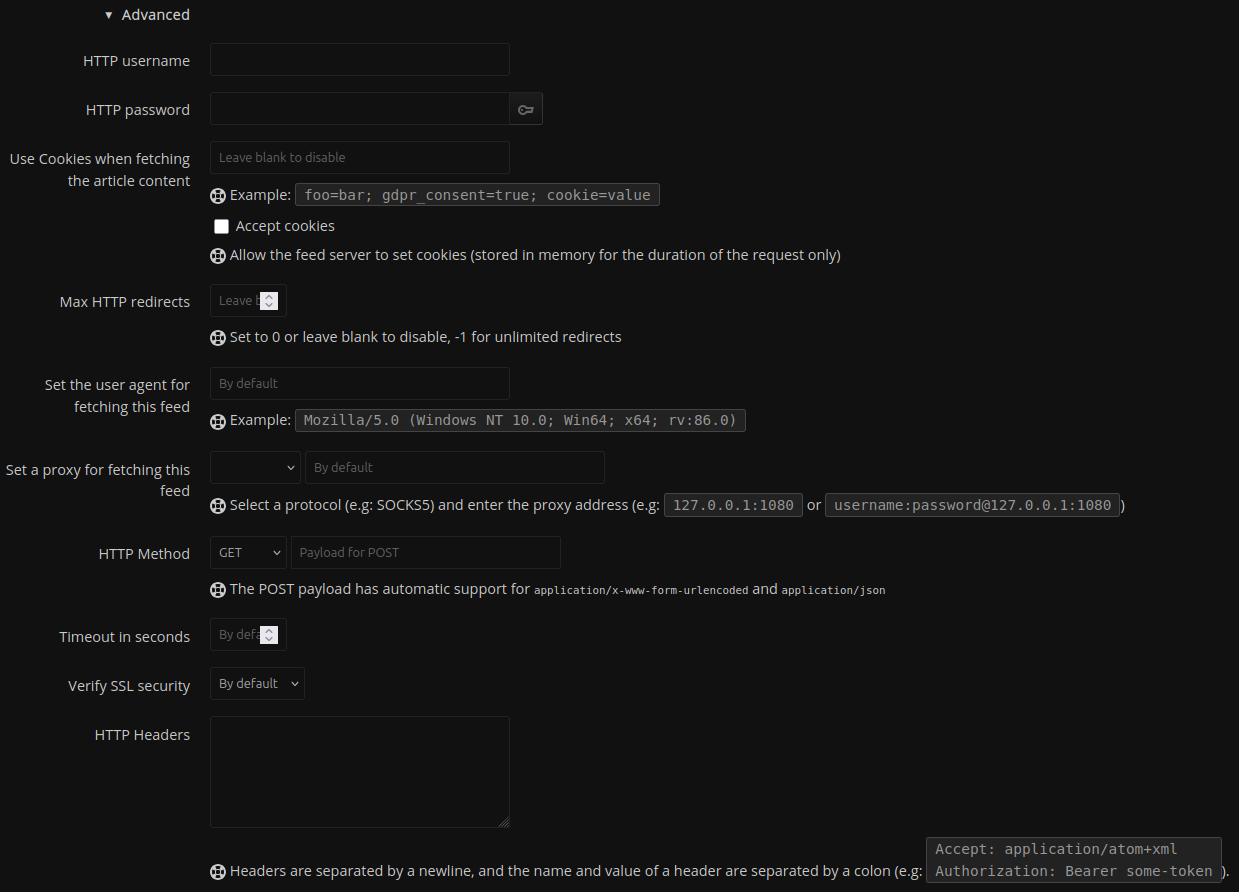
In some cases, you may not be able to add a feed due to misconfigurations on the target webserver, SSL certificate failures (you can relax certificate checking in FreshRSS feeds), or overly aggressive anti-bot measures.
Things to try:
(under Advanced when adding a new feed or modifying and existing one in FreshRSS)
The idea is to try and send a user agent of a “preferred user” Mozilla/5.0 (compatible; Googlebot/2.1; +http://google.com)
You could also try mobile agents too Mozilla/5.0 (Linux; Android 6.0.1; Nexus 5X; Build/MMB29P) AppleWebKit/537.36 (KHTML, like Gecko) Chrome/148.0.7778.98 Mobile Safari/537.36 (compatible; Googlebot/2.1; +http://google.com)
Purportedly this is the kind of user agent string sent by Bloomberg Terminal but I wouldn’t know Mozilla/5.0 (Windows NT 10.0; Win64; x64) AppleWebKit/537.36 (KHTML, like Gecko) Chrome/148.0.7778.98 Safari/537.36 Bloomberg/Professional
Use FreshRSS to send HTTP Headers with your request. Send a bogus referer string like Referer: https://google.com or the website’s homepage itself to try and trick the server into believing it’s not automated traffic.
Use an rss feed proxy (https://feedburner.google.com/) - for whatever reason, I have had success getting feed content using this service when everything else failed. Yes, Alphabet Inc. is probably using your feeds to somehow make the world a worse place. However-and I suspect it may have to do with the fact that a lot of sites used to distribute their feeds through FeedBurner-it just seems to work™. Caveat emptor, Google could shut this service down at any time.
Use a software solution like one of the following:
Note that you can use CSS selector content retrieval in FreshRSS to get the full article content, which is good in cases where no short description is published on an archive page, for example.
Use a software solution like one of the following (ordered roughly from heaviest to lightest resource use):
Use a web service like one of the following (ordered from least to most cool):
PolitePaul - hint: you can use CSS selector content fetching in FreshRSS to replace the entries entirely, thereby removing “Feed provided by” or ad injections for freemium servies
Quality being in the eye of the beholder, I guess…
https://theconversation.com there are many different editions, multilingual etc (AU, BR, CA, ES, EU, FR, ID, NZ, UK). “Academic rigour with a journalistic flair.” But for the benefit of what I assume is a primarily US audience:
https://theconversation.com/us/articles.atom
https://theconversation.com/us/business/articles.atom
https://theconversation.com/us/technology/articles.atom
# ... etc (append /articles.atom to your preferred sections) ...
https://daily.jstor.org “JSTOR Daily provides context for current events using scholarship found in JSTOR, a digital library of academic journals, books, and other material. We publish articles grounded in peer-reviewed research and provide free access to that research for all of our readers.”
https://daily.jstor.org/feed/
https://daily.jstor.org/type/long-reads/feed/
https://daily.jstor.org/category/education-and-society/religion/feed/
# ... etc (append /feed to your preferred sections) ...
https://historyisnowmagazine.com “The articles in the blog cover a wide range of topics, with a focus on modern international, European, and American history.”
https://www.historyisnowmagazine.com/blog?format=rss
https://www.historyisnowmagazine.com/blog?tag=World+War+1&format=rss
https://www.historyisnowmagazine.com/blog?category=20th+century&format=rss
# ... etc (append &format=rss to your preferred sections) ...
Can use it to add youtube feeds & track channels of interest without need of being logged in. (also works with nebula, at least some peertube instances)
The process to scrape a website by XPath + HTML is not too difficult. You should familiarize yourself with the developer tools of your favorite browser. Most use similar terminology. A basic understanding of HTML will also be helpful. Instead of view-source: you will use the “Inspect element” feature (right click) in Chrome/Firefox etc. This splits the page in two, highlighting the element displayed on the page and its associated code in the frame below. The trick is to right click on a headline in a list of articles, and in the HTML frame, try to select a few parent elements to see if you can capture a title, author name and publication date. At least you will want the title, author is nice for filtering and date is largely unnecessary in the context of scraping for news.
Some useful XPath 1.0 patterns to make life much easier for advanced users…
//article[contains(@class, 'article-card-')] matches <article class="article-card-featured">, <article class="article-card-byline">, etc. Roughly equivalent to article-card-*.
concat('https://archive.ph/{TARGET_SITE}', ./a/@href) Typically you would use concat to fix relative links (insert the https://{TARGET_SITE} instead) but this would be one way of bypassing a certain very annoying inducement to subscribe to read more…
.// for finding any descendant of the current context node. E.g. once you find the article container, .//img/@src will get you the thumbnail associated with each article. This is useful when author, date or images are encased in multiple divs. Keeps your XPath short and sweet.
With a bit of trickery you can convert most newsletters (Morningstar, ISW, etc.) to an RSS feed using https://emailtofeed.com There is some interesting investing info only available in newsletter format, and some websites like the ISW publish a newsletter rather than RSS Feed. In some cases you may need to use a throwaway GMail account and configure forwarding addresses to bypass various newsletter providers’ checks. I would not put any personal information into Newsletters you send here since they are essentially exposed to the internet without password protection (and anyone can fire a malicious email at those addresses).
This is a full text search which evaluates, roughly, to “ignoring line breaks, match any feed item greater than 1,000 characters in length, exclude any item that contains the phrases Read Full or Continue Reading”
Please update your docker images to get freshrss 1.30.3 1.30.4, which patches PHP vulnerabilities found in all PHP installations as of today. This particularly if you expose your installation to the wider internet
 very cool, check it out if you like newsreaders
 Please update your docker images to get freshrss