What to do when a feed won’t work?
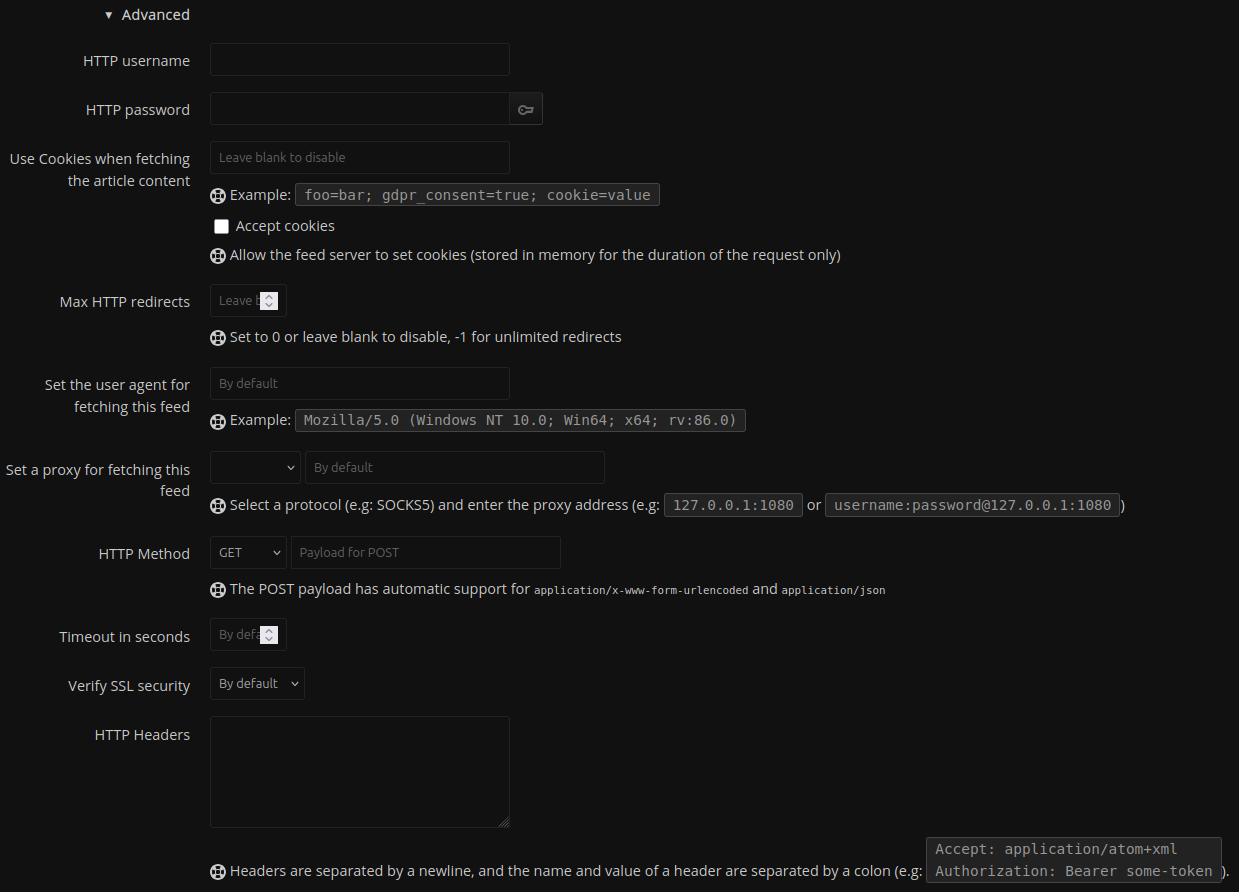
In some cases, you may not be able to add a feed due to misconfigurations on the target webserver, SSL certificate failures (you can relax certificate checking in FreshRSS feeds), or overly aggressive anti-bot measures.
Things to try:
- (under Advanced when adding a new feed or modifying and existing one in FreshRSS)
- Change the user agent when adding a feed
- Some interesting user agents to try:
- The idea is to try and send a user agent of a “preferred user”
Mozilla/5.0 (compatible; Googlebot/2.1; +http://google.com) - You could also try mobile agents too
Mozilla/5.0 (Linux; Android 6.0.1; Nexus 5X; Build/MMB29P) AppleWebKit/537.36 (KHTML, like Gecko) Chrome/148.0.7778.98 Mobile Safari/537.36 (compatible; Googlebot/2.1; +http://google.com) - Purportedly this is the kind of user agent string sent by Bloomberg Terminal but I wouldn’t know
Mozilla/5.0 (Windows NT 10.0; Win64; x64) AppleWebKit/537.36 (KHTML, like Gecko) Chrome/148.0.7778.98 Safari/537.36 Bloomberg/Professional
- The idea is to try and send a user agent of a “preferred user”
- Some interesting user agents to try:
- Use FreshRSS to send HTTP Headers with your request. Send a bogus referer string like
Referer: https://google.comor the website’s homepage itself to try and trick the server into believing it’s not automated traffic.
- Change the user agent when adding a feed
- Use an rss feed proxy (https://feedburner.google.com/) - for whatever reason, I have had success getting feed content using this service when everything else failed. Yes, Alphabet Inc. is probably using your feeds to somehow make the world a worse place. However-and I suspect it may have to do with the fact that a lot of sites used to distribute their feeds through FeedBurner-it just seems to work™. Caveat emptor, Google could shut this service down at any time.
- Use a software solution like one of the following:
What if a website doesn’t publish an RSS feed?
DIY! Try to find a page (archives, latest, featured, etc.) that just lists articles. Then:
- Use FreshRSS feed type “HTML + XPath” to try and scrape the page. The article linked in the FreshRSS docs provides a nice 'n easy tutorial to follow.
- Note that you can use CSS selector content retrieval in FreshRSS to get the full article content, which is good in cases where no short description is published on an archive page, for example.
- Use a software solution like one of the following (ordered roughly from heaviest to lightest resource use):
- Use a web service like one of the following (ordered from least to most cool):
- PolitePaul - hint: you can use CSS selector content fetching in FreshRSS to replace the entries entirely, thereby removing “Feed provided by” or ad injections for freemium servies
- AnyRSS
- RSS-Bridge public instance warning: often rate-limited
- RSS-Proxy can be self hosted
- OpenRSS
 very cool, check it out if you like newsreaders