Frequent freezes necessitating reboot

My system:

win10pro v10.0.19045 build 19045
amd ryzen 9 5950x
x570 aorus elite
64gb ddr4
nvidia geforce rtx 2070 super
. driver: v566.14
. just ran ddu and reinstalled latest in safe mode
drives:
. hgst hdn726040ale614
. samsung ssd 860 eo m.2 2tb (my boot)
. t-force tm8fpq04t

Formerly had intel cpu & mobo. More than a year ago, replaced w/my son’s hand me down mobo/chip/gpu, listed above.

My issue:

repeated freezes. reboot. move mouse to verify functioning. sit for 5 or so minutes, longer if I’m lucky. No mouse, no keyboard, no screen update.

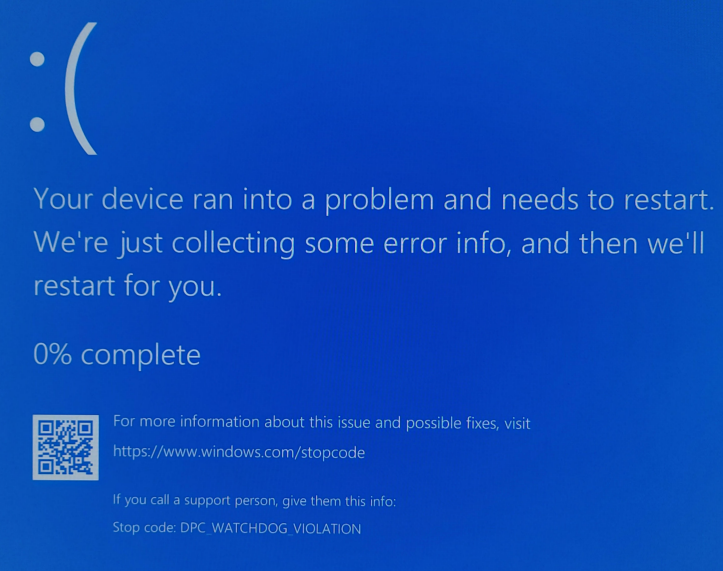
Received BSOD:
DPC_WATCHDOG VIOLATION

Googling suggested newly attached devices/drivers. No new equipment. The ony drivers I suspected were GPU related. Ran DDU then safe-mode re-installed latest NVIDIA for my card, initially gamer, then studio. Later also installed nvidia exoerience or the latest equivalent.

Started having freezes. Typically held down power/reset until shutdown. Rebooted. Usually ok for as much as a half hour. Crashes became more frequent. Went thru DDU → GPU drivers again (my son’s insistance). Crashes intermittent but more frequent.

Event log reports these errors:

. The Intel(R) Rapid Storage Technology service terminated unexpectedly. It has done this 1 time(s).
. The RstMwService service terminated with the following error:
%%2684420176
. A timeout was reached (120000 milliseconds) while waiting for the Intel(R) TPM Provisioning Service service to connect.
. The IntelHaxm service failed to start due to the following error:
A device attached to the system is not functioning.
. HAXM Failed to init VMX
. HAXM can’t work on system without VT support
. The McAfee WebAdvisor service failed to start due to the following error:
The system cannot find the file specified.

I formerly had intel but, more than a year ago, replaced cpu/mobo w/AMD related. Also got my son’s old 2070. I’m guessing the HAXM stuff is leftover, but I don’t know how to uninstall.

I don’t have McAfee anything and don’t know how to be rid of it. I think the haxm & rst mw service stuff is somehow leftover from intel build.

BTW, due to crashes, this note took me more than an hour to write.

Recently uninstalled WAMP. Previously installed wsl & ubuntu – trying unsuccessfully to run local ollama (my problems seemed related to running PIA vpn). uninstalled ubuntu. Wasn’t sure if it was an issue.

Also, it once froze mid-reboot still displaying the AORUS logo making me suspect non-windows. Don’t know if this is correct or not.

hmm. after saying that this was happening as frequently as every 5 minutes. I just had a whole hour of non-freeze in which I played youtube vids in brave and concurrently played backpack battles.

This looks to belong to intel’s virtualization service and probably serves to help aid in the Intel(R) Rapid Storage Technology service.

Intel(R) Rapid Storage Technology service is part of the intel storage controller.

Do you have any intel ssd or optain drives installed in the system? If not uninstall Intel rst!

May also want to update mobo drivers and associated mobo components and bios from here:

When you switch from an intel board and chip to ryzen did you do a clean install of windows like your suppose to?

Edit also delete mcaffee if not used or at the lease reinstall it.

If there’s no device using Intel RapidStore Technology in Device Manager (where you could right-click → uninstall), is it listed in Add/Remove Programs and available to uninstall?

(Side question: Is AMD IOMMU virtualisation acceleration turned on in the BIOS?)

K3n.

Thank you for your feedback. I found multiple intel related programs installed and have now removed them, including:
. rapid storage technology
. ethernet connection manager
. chipset
. hardware accelerated execution manager
. management engine components

The DPC_WATCHDOG_VIOLATION blue screens still occur. Or at least did once last night, and once this morning.

I don’t recall ever installing McAfee WebAdvisor and don’t find any McAffee mention in the installed Apps & Features.

I will attempt to udpate the x570 drivers, but there are many of them and I am a little concerned with potential freezes during an install. don’t want to brick motherboard. This will take me a bit longer.

From your original post is where I’m getting mcafee. Might be a when the pc starts up run this file.

You may find that some of the intel stuff will need to be reinstalled due to the gbe nic that the mobo has built into it.

This procedure will not brick the mobo. Two worst case scenario is that certain devices will not work until the driver is reinstalled again or you’ll have to do a clean install of windows.

Couple of side notes:

  1. Have you looked thru your event logs to see if there are any red stop signs indicating what other issues, if any, your pc may have?

  2. Have you tried a linux live cd and run your pc for more than an hour to see if the machine acts up.

  3. Run a memtest / checked your ssd if they are failing?

1 Like

If you get another BlueScreenView, you can use BlueScreenView from NirSoft to check what exact driver/file is actually causing the error (as long as you let the Minidump process complete. You can pinpoint what exactly is breaking down for you to troubleshoot

1 Like

That error indicates a possible driver problem, however this is very generic and could be an indication of some hardware instability.

If possible I would upload the dump files somewhere to share with us. Alternatively use whocrashed or bluescreenview as suggested to identify if a single driver is at fault. If there are different drivers showing up then the problem would likely be related to some other hardware/firmware issue.

I’d always recommend a sanity check using memtest86+.

You can use safe mode with networking to prevent drivers from loading for the sake of testing as well.

Hold shift while choosing restart and you should be prompted at next boot for recovery options.

1 Like

Downloaded all win10 drivers/utils from auorus related to my mobo. Didn’t realize that when I ran “app-center” that it would download them all again before installing. All are now installed. Rebooted.

Downloaded BlueScreenView (BSV) per suggestion. When run, was examining logs when it froze again. Not blue screen, but required a reboot.

Started up again and here is what BSV tells me:
On Restart, BSV reports crashes on
2024/06/02 ntoskrnl.exe
2023/06/16 ntoskrnl
2024/08/23 dxgmm2.sys & ntoskrnl.exe
2022/04/26 iaStorAC.sys & ntoskrnl.exe
2022/04/26 ntoskrnl.exe

Don’t think any of these are valid as per their dates.

You’re right, dates are not relevant if the clock is set up with the current time. Make sure that you have mini dumps enabled with this guide: Read small memory dump files - Windows Client | Microsoft Learn

Afterwards, when it crashes again, you should be able to see what it’s actually killing your Windows install.

Edit: if it is enabled you need to let Windows complete its log collection process when it crashes (if it can)

1 Like

Are we 100% sure that this is a software issue and not a hardware issue? Does the same thing happen on another OS like Linux or another clean W10/11 install?

Not yet, but kernel error panics will point out to the “what” is failing, from there you can check on the “which part is failing” portion of the troubleshooting

I recently had an abstract problem with a disk, specifically pci-e, at least that’s what I think. :slight_smile:
I’m not saying that OP might have something similar because OP probably don’t, but…

https://forum.level1techs.com/t/lenovo-ideapad-3-15ada05-and-disappearing-nvme/

My gut is telling me hardware problem. My wife has the same motherboard and it had issues like this until I pulled about 200mhz out of the XMP settings.

Not enough information to diagnose though. Need OP to try safe mode since its obviously locking up trying to dump.

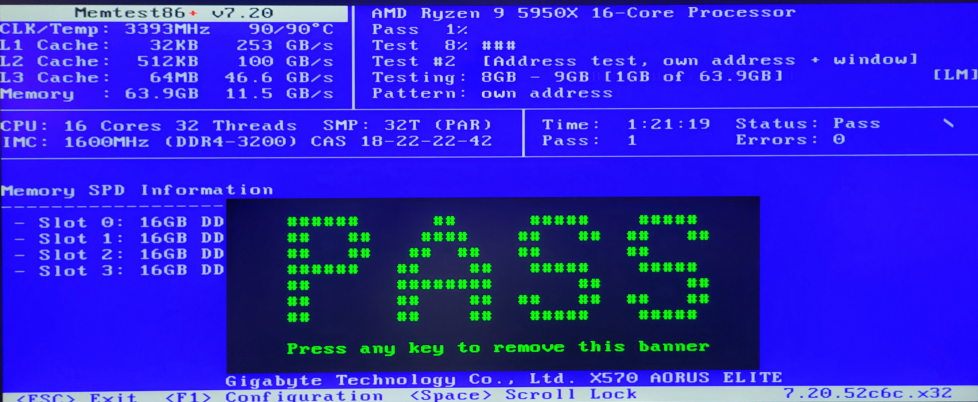
Downloaded mt86plus_7.20_USB_Installer.exe. Took a while to run. Passed. 2 crashes and 1 BSOD while attempting to report back.


2 Likes

After what I went through with Lenovo, I’ll say that no software indications are fully reliable at the end of the day. My W11 was crashing with several different BSODs, after which it would be hard to guess that the hardware was to blame. Only methodical verification step by step sometimes indicates the cause of the problem. :slight_smile:

OpenHardwareMonitor.Report.txt (102.3 KB)

Well thats good news at least.

Apparently I can’t find the right dates on BSV, but event log viewer reports:

Event log System
Event source TPM-WMI
Event ID 1796
When the updated DBX revocation list is applied to a device, and an error occurs that is not covered by the events above, an event is logged, and Windows will try to apply the DBX list to the firmware on the next system restart.
Event log information
Event ID 1796 occurs when an unexpected error is encountered. The event log entry will include the error code for the unexpected error.

And earlier,
. The DNS Client service terminated unexpectedly. It has done this 1 time(s). The following corrective action will be taken in 1000 milliseconds: Restart the service.

. The RstMwService service terminated with the following error:
%%2684420176

. The McAfee WebAdvisor service failed to start due to the following error:
The system cannot find the file specified.

Keep crashing during this report. Didn’t happen when I was in memtest for more than an hour.

I can’t find evidence of any mcafee product. don’t recall ever having such. I thought I would have removed rstmwservice issues when I uninstalled all intel related apps from app list. any idea how to remove that one?

I have “intel(R) Network Connections 26.2.0.1” in app list but it is dated today and I think was installed by mobo’s appctr application when re-installing all drivers/utilities.
Importantly, it does not list “Intel Rapid Storage Technologies” as being installed in app list.

I found this page that purports to tell how to uninstall it. Does this look like it is giving good advice?

https://answers.microsoft.com/en-us/windows/forum/all/uninstalling-the-intelr-rapid-storage-technology/e3c4b6d6-56ba-4ac5-be50-89843c9d9b22

Tim

I had ubuntu installed using wsl, upgraded to wsl 2. Intended to use for personal ollama. However, my PIA VPN gave me so many problems I eventually just gave up. In attempting to diagnose this problem, I have removed WAMP and ubuntu but have yet to remember how to undo the wsl business.

I began to suspect a hardware problem, but when I was in the mem test for more than an hour, I had not crashes. Other than the passed mem test, I am unsure how to rule out the hw.

2 Likes