Engineering Sample CPU Soldered to Motherboard Megathread?

Hi Everyone, I see Wendell’s videos on the engineering sample CPU + motherboard combos, but I don’t see any threads on the forum about these products. Finding English-language computer enthusiast content for these products is a bit difficult, so I thought I’d share my experience.

https://www.level1techs.com/node/3003 - btw the discord link is invalid.

I have now purchased four of these motherboards that have the engineering sample mobile CPUs soldered to the motherboard. Two from Taobao and two from Ali Express. Here are the titles:

  • Erying 11th Core ES 2.6 GHz (Tiger Lake-H) / HM570 (8 Cores / 16 Threads)
  • Erying 11th Core ES 1.8 GHz (Tiger Lake-H) / HM570 (6 Cores / 12 Threads)
  • ATX DIY Desktops Motherboard Set with Onboard 12th Kit Interposer Core CPU QXZR ES 0000(Refer to i5-12***)8C12T Computer Office - Erying Official Store
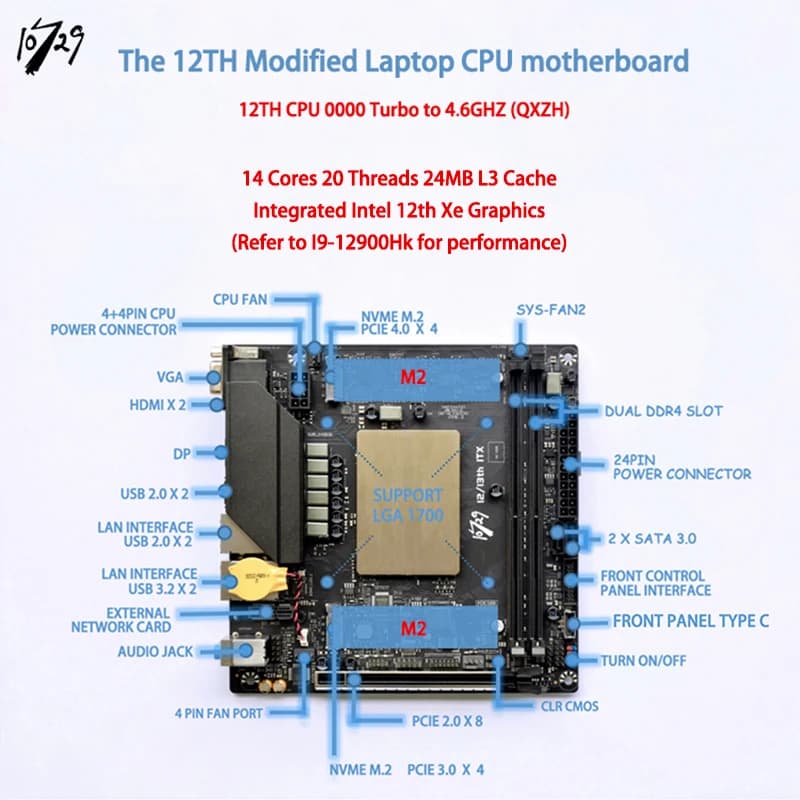
  • 10729 13420H Modified Laptop CPU motherboard 10729 ITX (ES) Q1J1 0000 8C12T

I became interested in these CPU + motherboard combos because I have been running Unraid on an Intel 10980XE for several years, but it was an eggs all-in-one basket situation, which had to be on 24x7 and consumed ~250 watts at idle. I once overloaded a power strip during a gaming session because I didn’t see a power strip I was using was only rated for 1100 watts, but luckily my 1200VA UPS saved me. In that system I had an LSI SAS card, multiple m.2 USB controllers passed through to VMs, several NVMe drives, and a 3080 plus two 1030 GPUs for dedicated hardware pass through. I wanted to try something more power efficient, and I wanted to migrate to Proxmox because it has a better approach to sharing USB peripherals.
Now that I’ve started this engineering sample adventure, my 10980xe box is my gaming machine. I set up wake on lan and only power it on when I want to play games and then power it off. Wendell does know his audience because I have cannibalized the 128 GB of DDR4 ram, taking 6 of the 8 dimms for these engineering sample boards.

Originally, I had the intention of using the 1.8 GHz ES model as a forbidden router/home assistant box, but for unknown reasons, the motherboard stopped booting when I installed an Intel 2-port 1000BASE-T card in the 1x PCIe slot. I suspect a fixed motherboard standoff on the 2U case I was using shorted a capacitor, or I put too much stress on the PCB trying to screw down the PCIe bracket. Oh well, but it was only a 120 USD mistake - cheap compared to some of my early overclocking adventures mistakes I made in the late 90s.

Initially, I got the 2.6 GHz 11th gen board to be my gaming rig. I’d seen the numbers that the performance would be about equivalent to the 10980xe and frankly, my video gaming sessions were becoming more and more infrequent as my interests turned toward other hobbies. After I purchased my 3080, it increased the idle power draw on my 10980 box by about 50 watts in Unraid.

I installed Proxmox on 2.6 GHz 11th gen board and passed through my 3080 to the board, but I found out that I could not pass through both the GPU and the GPU audio device, so I passed through the onboard 3.5 mm analog audio. Ultimately, the Windows VM was unstable, choosing either to crash at the logon screen or crash during a gaming session. I wrote up my instructions on how to set up the system, but I never had this pass through problem or instability issues when the 3080 was installed on in the 10980XE Unraid system. Beware!

I ended up putting the 2.6 GHz 11th gen board into a 4U case to use as my primary PC running Proxmox with two VMs with Nvidia 1030 GPUs passed-through to each. I used a jerry-rig-everything knife to carefully cut out the end of the 1x PCIe slot to accept the 1030 GPU. I later moved this system to the same 2U case which caused me the same trouble as before, and I ended up have to cut the legs of an electrolytic capacitor which was shorting on the same standoff. So far, the only problem I have with this system is that VM the GPU in the primary 16x PCIe slot sometimes doesn’t like to be re-started or doesn’t start, throwing a PCI reset issue. This system also doesn’t want to pass through the secondary PCIe device, but that’s fine because I use a usb microphone with 3.5mm audio jack for headphones. Two GPUs with the same behavior in the same slot. Beware!

To replace the 1.8 GHz 11th gen board that was no longer working, I bought the QXZR ES 0000 12th gen Alder Lake board with the PCIe slot that only works at PCIe 2.0 speeds. I intended to set up a Proxmox and have it serve as a router, home assistant, and NAS box. This did not go well because my SAS drives started reporting CRC errors, so either a) the 16x PCIe slot running at PCIe 2.0 has more problems than just not being able to run at 4.0, b) the card is overheating, or c) the new SAS card I bought is counterfeit or a cheap clone. I was getting far too many “Internal Errors” on the passed-through TrueNas VM, which required rebooting the board and took my internet down for about 2 minutes each time, which I couldn’t have. I haven’t removed the LSI card yet, but I did stop using the TrueNas VM. I had 5 days of uptime before a mysterious crash - with nothing in journalctl, but now I’m at 14 days of uptime. So, another PCIe error: Beware!

And today, I’m waiting for delivery on the 10729 13420H ITX board which I intend to install the LSI SAS card into - I have two of these now - to dedicate to TrueNas. I am eager to see if the 13th gen mobile CPU on this board will have even less power consumption. Hopefully, for my application, I won’t impacted by vcore degradation issues, but as I review this post I will not be surprised if there will be PCIe issues with the LSI 8x PCIe card on this board too. Beware!

Basically, I’ve turned one expensive all-in-one system into four systems for a few hundred dollars plus the cost of a few power supplies, and my 1200 VA UPS went from bouncing between 14-22% at idle to now reading 0%. There have been a few gremlins, but feeding my computer habit at such a cheap price - even if some of it breaks - makes it all worth it.
5 Likes

As I had been looking for something to upgrade from my old i5-4690K system, the moment I saw Wendell’s video on the 10729 QXZS ES mATX mobo, i went and purchased that exact mobo. I just have it in a test bench setup, but I plan to do a simple mobo swap, and just use it for gaming (primarily Warhammer 40K Darktide, where i’m currently getting atrocious framerate drops), but who knows what else I’ll do with it. I’m not much of a home lab person, but i’m sure i can put it to some good use.

i dunno which one would be the main thread for these but ill necro both to keep things going?
there’s not much talk about the later 13th/14th gen presumably from the overvolting tomfoolery
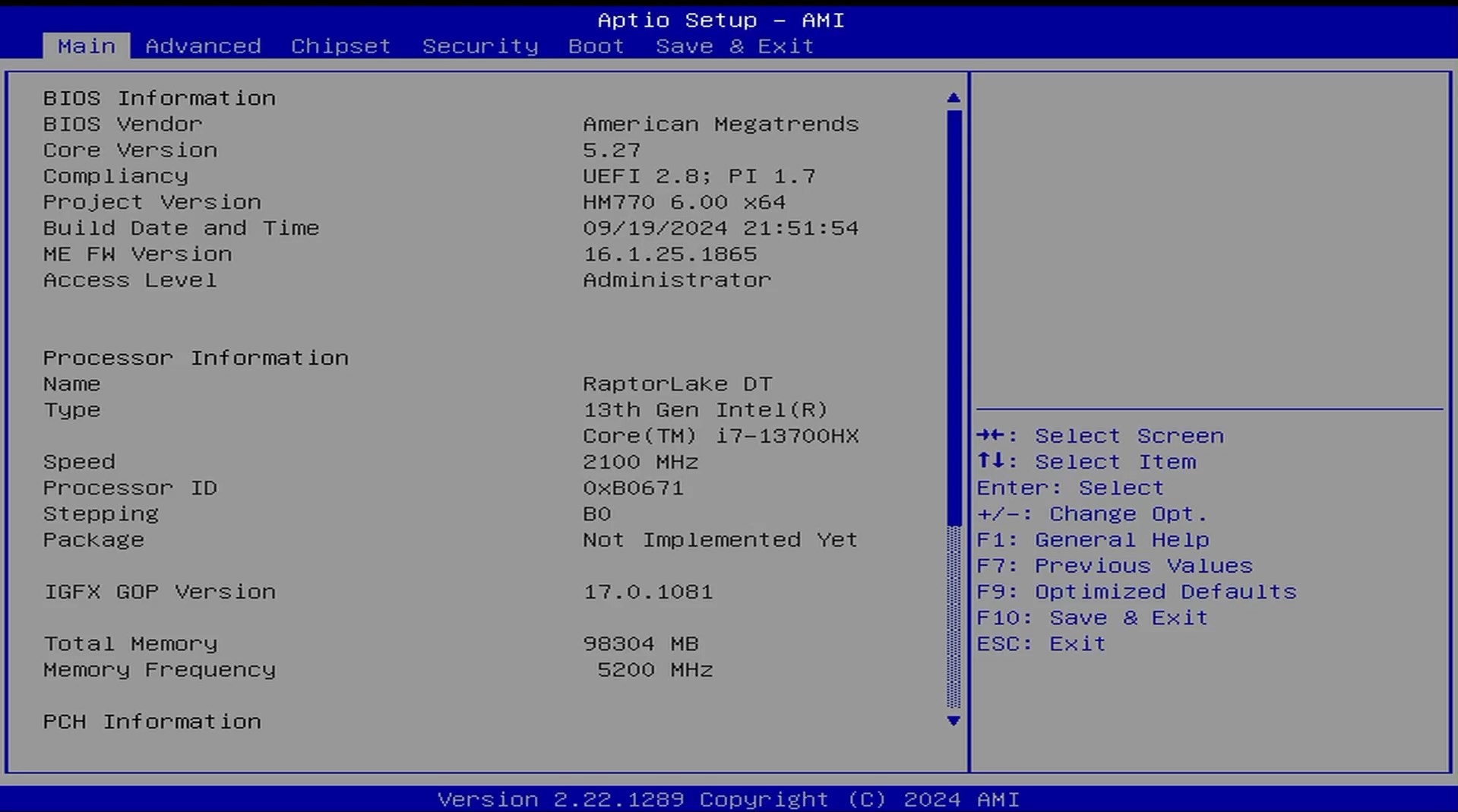
but I’m currently setting up a 13th gen i7-13700hx cost me CN ¥1999 so $304ish USD or $460 AUD +extra for shipping from taobao via superbuy, of course it arrived and sat unused for a couple weeks before the whole flood of 13th/14th gen voltage instability

then reading further some folks with the 11th gen said eryings website drivers had trojans packaged in?

so now I’m a bit spooked, has anyone heard of their bios updates being compromised?

been about 7years since I’ve built a pc so I’m a bit out of the loop and stupidly went after this board because I’m a cheapass, but hopefully it doesn’t turn into another case of “buy cheap buy twice” as the saying goes.

I’m hoping to learn linux and move away from windows via a dual boot setup, keeping a second m.2 drive as win11 ltsc for outlier software.
rest of the parts:
RAM: G.SKILL Ripjaws S5 96GB (2x48GB) 5200MT/s CL40-40-40-83 1.10V
ram compatibility seems really hit or miss so fingers crossed.
GPU: RX 7900GRE XFX Quicksilver magnetic air white edition
Lexar NM790 4TB for linux, old Crucial P1 1tb for windows.
housed in a Core V21 stuffed behind monitors.

ill report back how it goes, in hindsight if going down this route again id probably look at the AMD lappy cpu varients of these, hopefully i can undervolt to stave off its death?

1 Like

Don’t know anything about these drivers but it can be a few things.

  • Erying links/copied the drivers from another site and the drivers had malicious software in it.
  • The software overwrites system files and is flagged flagged as a trojan/virus. It’s not the first time a virus program do that.
  • Intel hates that people buy desktop motherboard with laptop cpus so they spread rumours about the drivers containing trojans and keyloggers. (Are you employed by Intel?)
  • Erying needs a side hustle to selling hardware that is widely popular among geeks and have been mentioned at a couple of the bigger hardware geek channels on youtube.

Since Intel’s drivers also get falsely flagged as trojans sometimes I think it’s more likely that the drivers were falsely flagged (and the one about Intel hating people buying Erying motherboards.)

But I’m just some dude on the web, test the files yourself, I think https://www.virustotal.com is pretty popular for things like that.

3 Likes

i wish my minimum wage ass was employed by intel lol
but yeah gamers nexus also had concerns about the same thing, so i just wanted to double check since there’s very little discussion or info around these boards
as you said its looking like either stupidity on their part or false positives

2 Likes

I don’t know how they handle the false positives but I would assume Intel and others have a department who handle things like that. A small-ish corporation out of China handle that when there’s time. But with that said, one/some of the China noname motherboards linked drivers uploaded to a Russian forum and those did contain a trojan. But again, virus testers are prone to false positives when it comes to drivers and system files and both Intel and AMD has hade some of their drivers flagged. But again again, I promise this will be the last one, Microsoft and others have malware analysis service where you can upload the files.

2 Likes

I trouble finding bios files for this board and had a lot of issues with the bios before flashing this file in the repo.


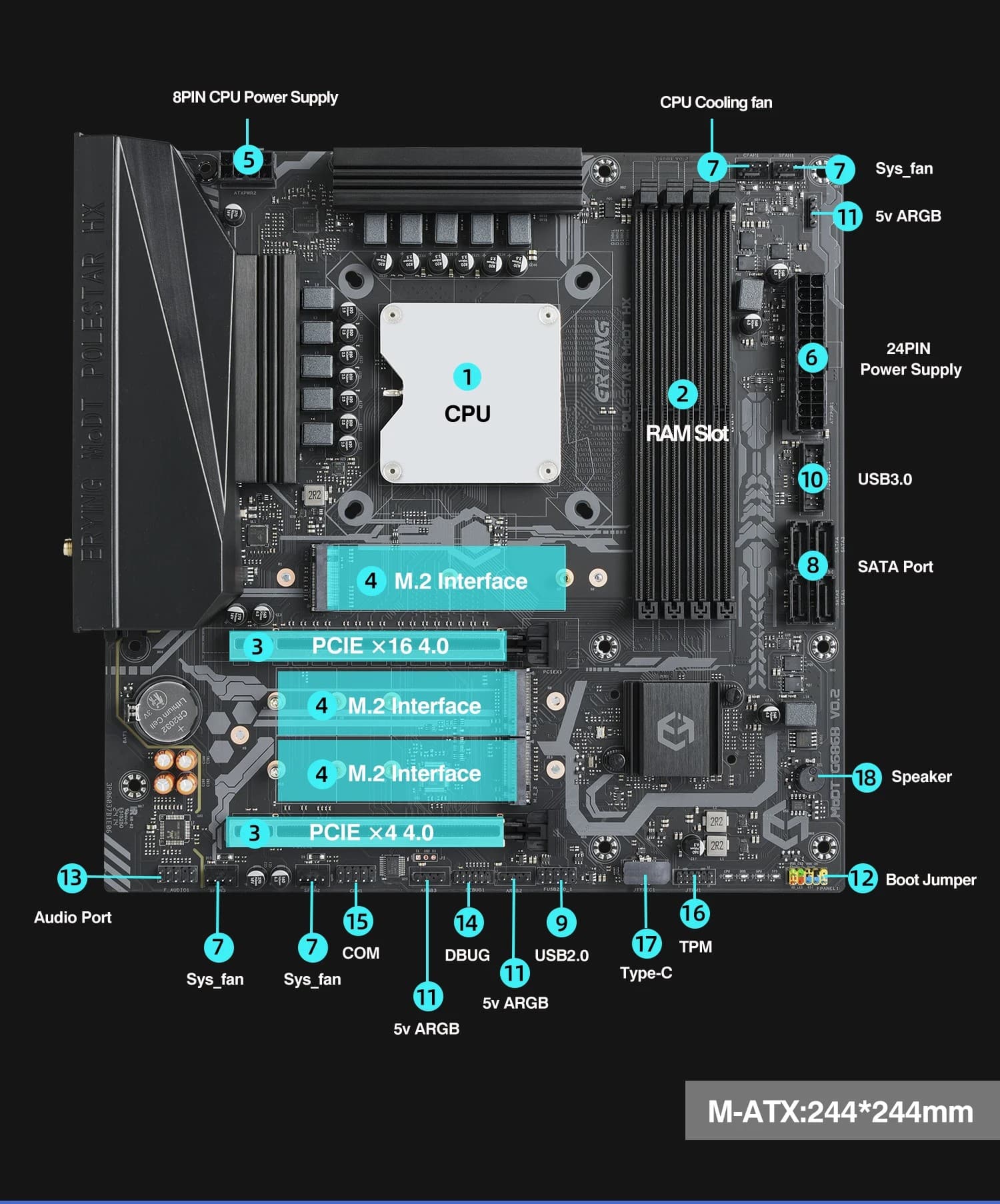
this is the exact board I have as far as I can tell. (10729 brand)

Prior to this certain bios settings wouldn’t save (most notably ram timing/ xmp profile switching) and XTU had most options disabled. Afterwards XTU has more options (allowing me to undervolt) and so far my frequent bsods experienced prior are no longer a problem.

1 Like

How was your experience ordering the board, and how close to reality is that “Refer to 12900Hk for performance” ? Also, are the 2 SATA 3.0 ports working on yours?
I am considering taking the plunge myself, and would appreciate hearing more about your experience - Thanks!

I haven’t benchmarked it yet and I am dealing with some overheating issues (I think due to a problem with the way I mounted the cooler) which are bringing the core clock down pretty far, but I hope to have those sorted in two days or so. I’ll be sure to post some benchmarks then. As for the sata ports, they are both working fine for me.

1 Like

Thanks! I look forward to your next BMs! Which cooler did you end up using? Also, while your getting ready to reseat the cooler, check if the heatspreader (lid) they put on the CPU is firmly connected to the die (soldered down). If it’s not, you won’t get good heat transfer.
What comesmight be redundant/boring to you (sorry if that’s the case) If that’s okay, clean both heatspreader and the cooler’s contact plate gently with isopropanol and no-lint paper towels)) and give it a fresh thin layer of thermal compound (paste). If, after all that, it’s still overheating, it might be necessary to very carefully remove the heatspreader, clean the die and reseat the heatspreader with applied new thermal compound. However, I hope it won’t come to that :crossed_fingers:

I’ve got an aio on right now, its EVGA, but I’m am unsure of the model.

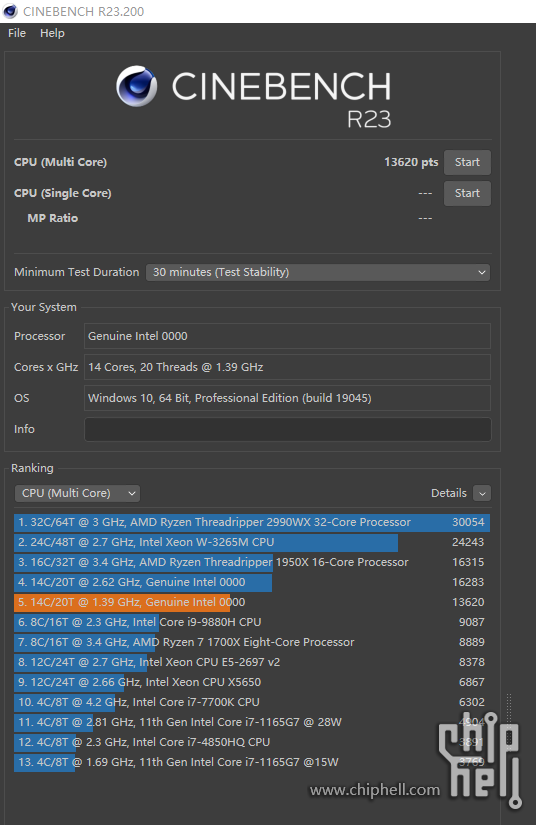
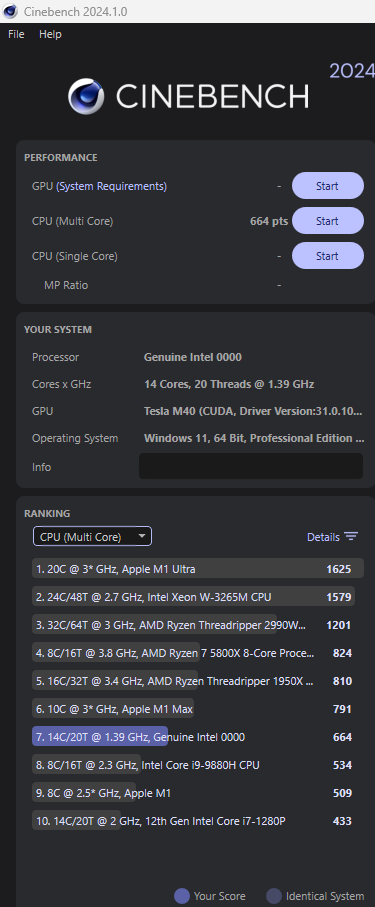
There have been delays in the shipping of some parts I’m waiting so I haven’t touched the board for a while. However, I did find some synthetic benchmark results online.

1 Like

Thanks for the reply and the update! While the Cinebench numbers aren’t horribly off from what could be expected for a 14C20T Intel mobile processor, the processor speed shown is really low. I wonder if Cinebench isn’t reading that out correctly, maybe because Cinebench doesn’t recognize the CPU. But, as long as it’s quick enough for your intended uses and runs stable and no longer too warm, benchmark values are (IMHO) more of academic interest.


P-cores maxed out at 4.1Ghz.

2 Likes

jeeze 29days! well my followup: finally setting things up on my matx 13700hx I’m still sorting out dual drive dual boot linux/win11 and had to buy a ch341a to backup and update flash the bios,
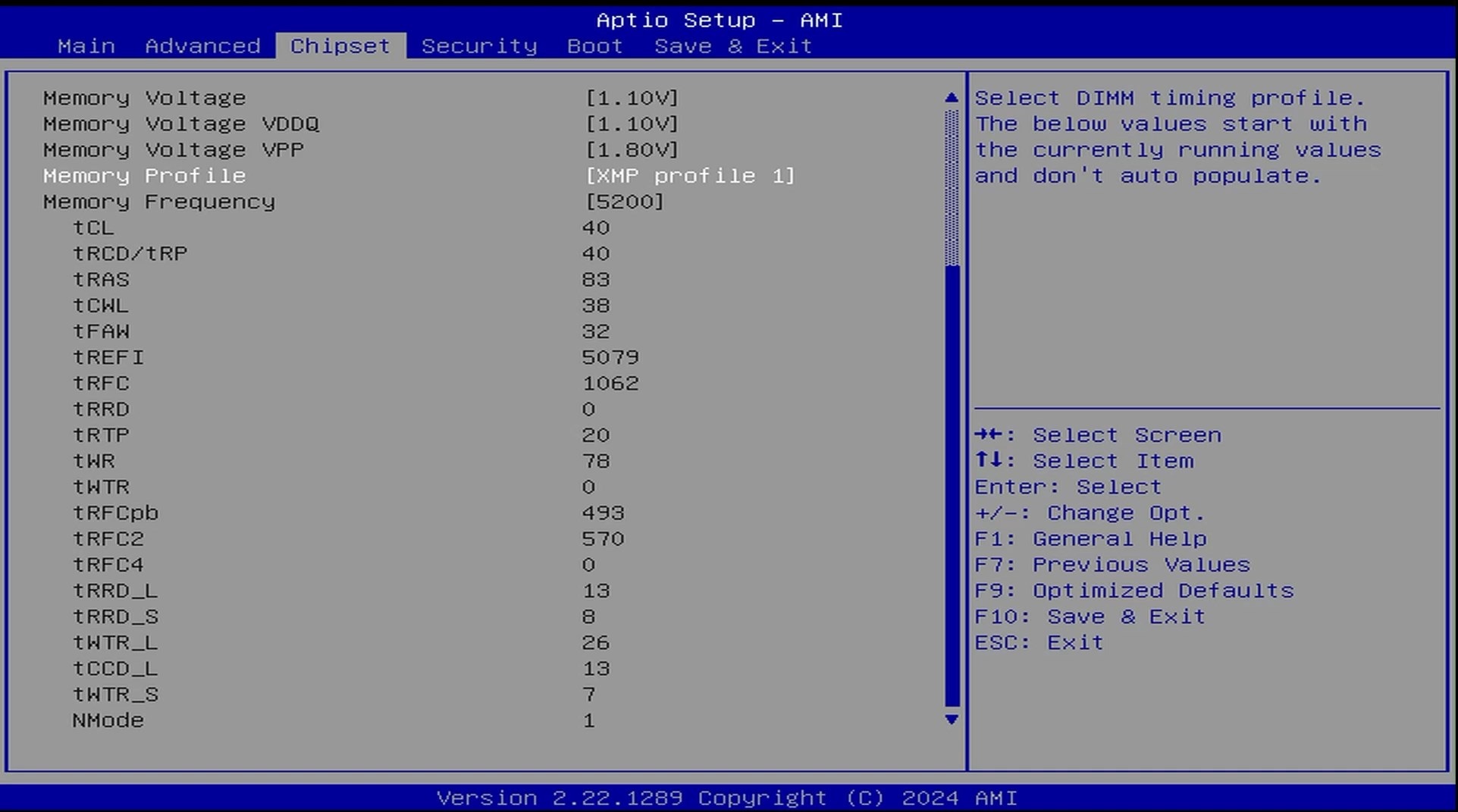
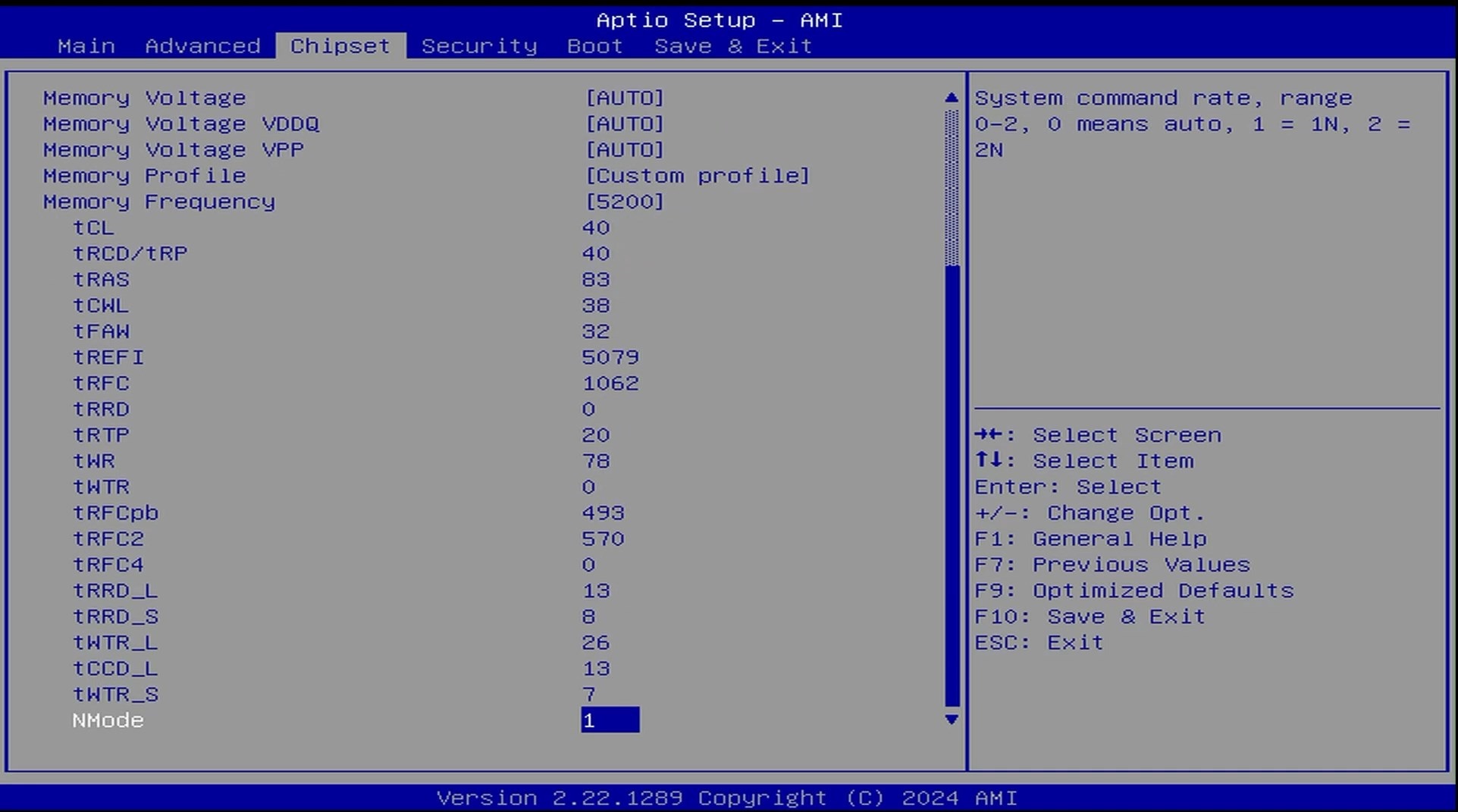
I tried to set the XMP profile for the RAM kit: G.SKILL Ripjaws S5 96GB (2x48GB) 5200MT/s CL40-40-40-83 1.10V
when i save n exit ended up with a boot loop
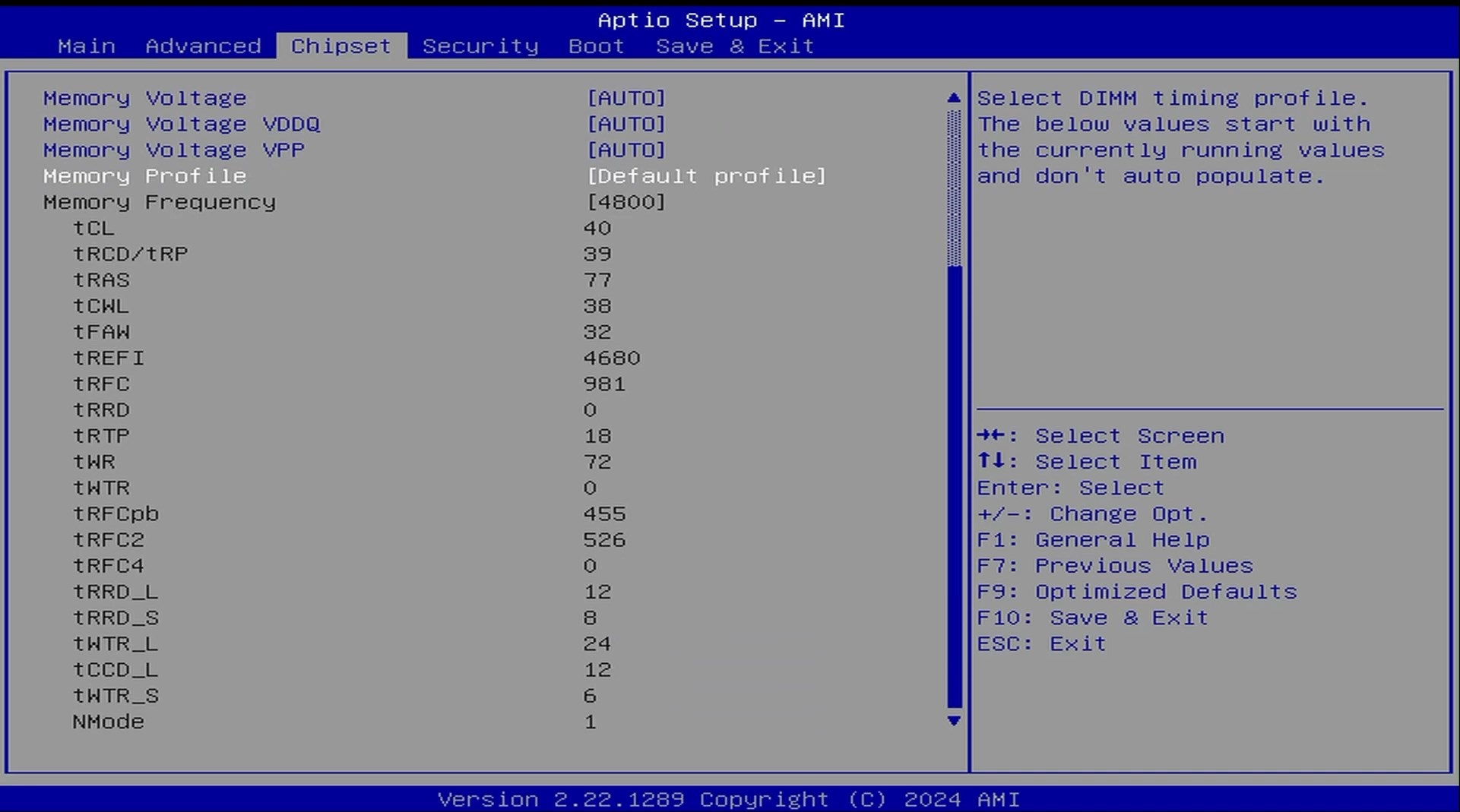
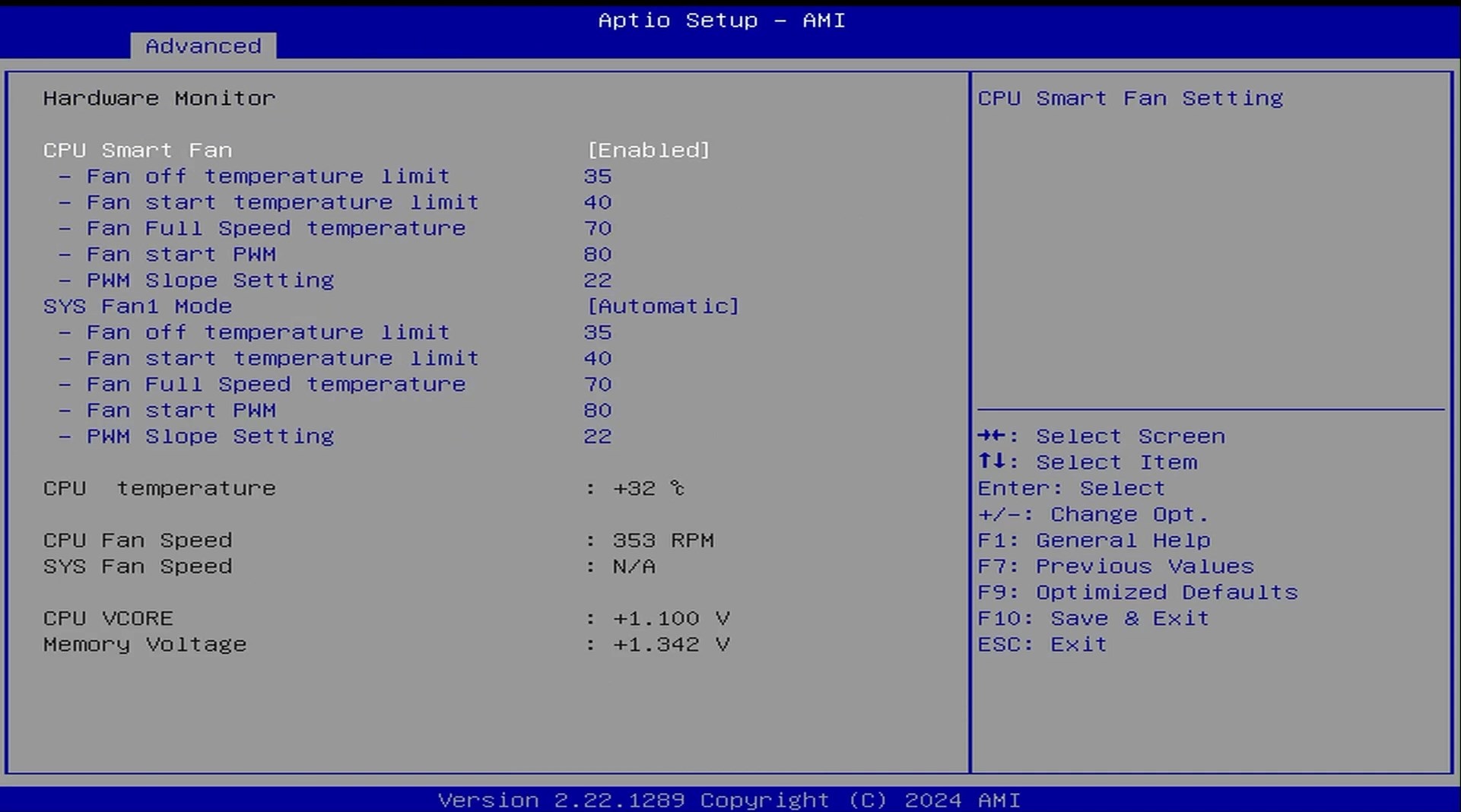
however if i keep the same XMP timings but set Voltage to Auto it boots, however in Hardware Monitor it claims the rams at 1.34v? would this damage my ram kit overtime? is it techincally overclocking it or?

I’m not super familiar with RAM specific timings/voltages outside of the basics, i usually just slap it’s XMP profile on and leave it.

is there recommended tools or software to fine tune/test ram stability while in OS linux/win? or should it all be done in the bios?
or more recommended timings/voltages for that kit?

mainly want to know if leaving voltages as auto with everything else at its XMP timings if ital be fine long term? or should i stick to the default 4800mhz profile? do i need to mess with CPU VDD2 Voltage setting?


it’s a neat bit of kit but not for the average joe user like me lol

I don’t quite understand the need to go above the default and recommended memory speed. Is this mainly for exploring what is possible? And, is your RAM’s voltage at the recommended frequency of 4800 MHz “in spec” for that RAM? These MoDT setups are a bit notorious for being, let’s say, temperamental, and if the CPU is an engineering sample (ES), even more so. I believe one recommendation with MoDT boards is to only populate one RAM slot, start at the known/recommended frequency by the board’s manufacturer, and then slowly go up in speed until it shows signs of being unstable. And then back down by 50 or 100 MHz, and insert the other RAM module. Lastly, while staying at or better below 1.4 V is (apparently) considered safe for JEDEC compliant DDR5 RAM, memory overclockers stress the need for good cooling when operating RAM above spec. So, a Heatspreader, thin thermal pads and good air flow (from the CPU or case fan) will help.
Lastly, I don’t overclock - RAM or otherwise. Too much of a headache for me; I need all my wits for the ongoing battle with Windows 11.

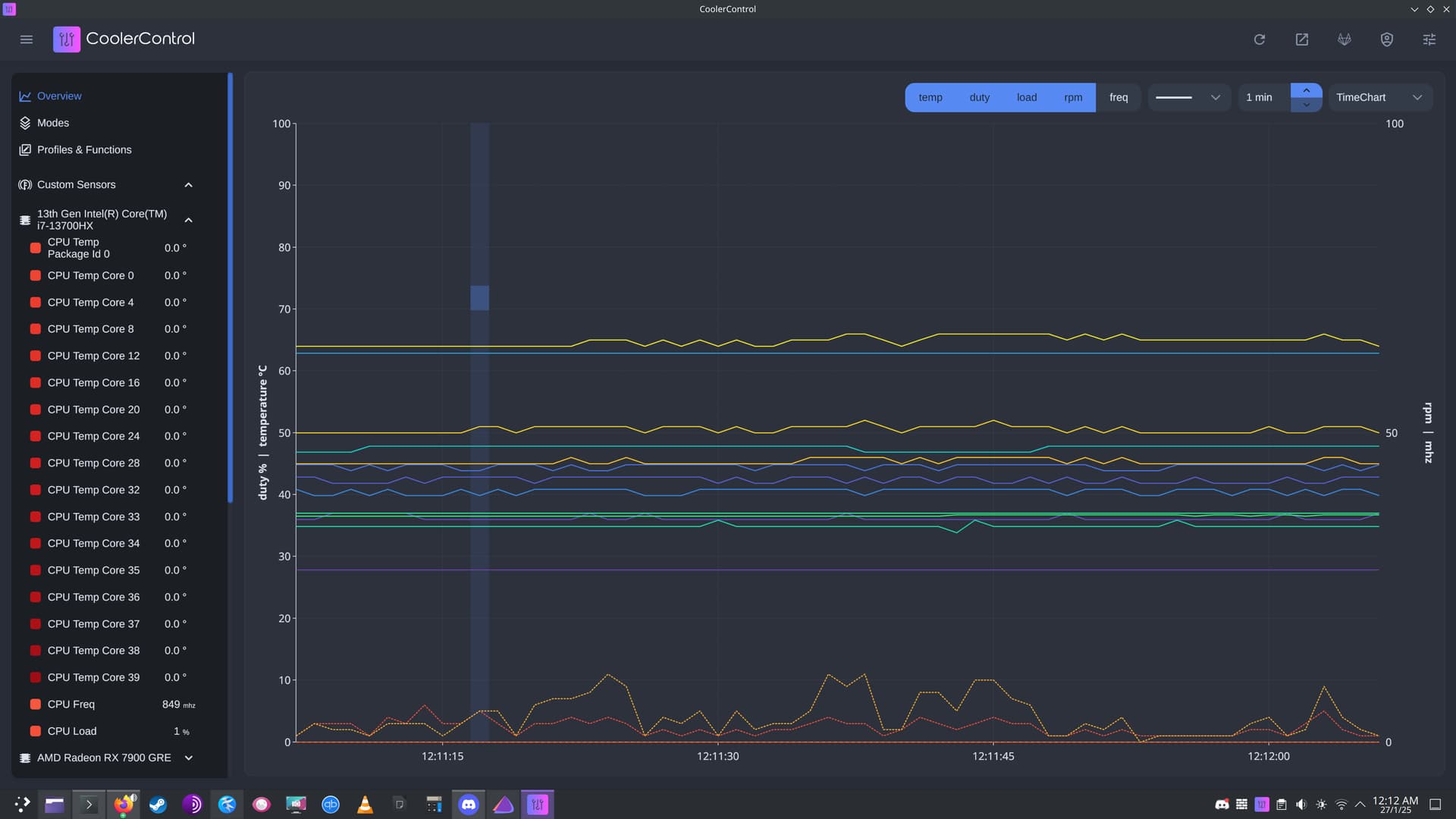
had to put the ram testing on pause just left it default because I’ve been trying linux out with the intention to get away from windows however after distro hopping from mint to fedora i settled on endeavourOS, unfortunately it doesn’t detect any CPU temps and it ignored my bios sysfan1 auto mode instead anything plugged into that pwm header ramps to 100%

i installed coolercontrol and nope no fans listed there. (except my 7900gre gpu which seems fine)

sudo sensors-detect finds:

Driver `coretemp':
  * Chip `Intel digital thermal sensor' (confidence: 9)
Driver `to-be-written':
  * ISA bus, address 0xa30
    Chip `ITE IT8613E Super IO Sensors' (confidence: 9)

Note: there is no driver for ITE IT8613E Super IO Sensors yet.

some googling pointed people to a community made driver: AUR (en) - it87-dkms-git
which should cover IT8613E but I’m struggling to figure out how to install it, i managed to cd into the it87 directory but it wont install without dkms, of which i can’t figure out how to install dkms?
I’m still new to linux I’ve spent the last 5hours trying to figure this out lol
i might post this over on the linux side of the fourm but yeah i guess these boards are as you said temperamental and linux probably doesn’t help.

I’ll see if i get the same issues over on win11, i installed a LTSC IOT version and that has cut down *most issues I’ve had with windows so i might have to begrudgingly stay on windows.

2 Likes

I’ve used an Erying G660 board with an i7-12700H for what feels at least a year now.

I might have downloaded the BIOS from their site, but I’m not even sure I ever flashed it, there never was a newer version, but I’ve also never had BIOS issues.

As to BIOS/µ-code vulnerabilities: they are not my greatest worry, since my attack surface in the home-lab is rather small.

As for the drivers: there is no reason to use the ones from the Erying site: I just used either generic ones, or those from Intel NUCs, or perhaps Microsoft downloaded them, or I was using Linux: this is plain Intel/Realtek hardware, nothing that requires Erying specific drivers.

Cooling has been the bigger challenge with this board.

Since these boards use soldered and naked dies without an IHS, Erying provides a “cabrio-IHS” shim to compensate the height difference. That component requires interface material at top and bottom and is rather critical for the cooling performance of the system.

And unfortunately it’s not the best money can buy, but it comes included and pre-applied so that you just need to add a desktop cooler and paste or similar on top.

I chose my favorite Noctua NH-L9i low-profile cooler for this type of application.

At first, performance on the board was underwhelming. According to HWinfo it would never really get hot, just around 60°C, yet clearly throttle or rather reduce clocks due to temperature reasons, when any such limit should be around 90°C, not 60°C. It never used more than 35 Watts of power even with PL2/PL1 at their default 120/90 Watt settings and a long TAU. But it also delivered rather sluggish compute.

I suspected that the heat transfer between the naked CPU die and the Erying provided “cabrio IHS” wasn’t good enough, due to some mediocre paste and the CPU heated (and throttled) so quickly, that heat never quite spread to the sensors. While I didn’t think that hypothesis very likely, I did prove it true.

Instead of using my typical Noctua paste, I decided to try my luck with liquid metal and loo! things changed dramatically.

Not only would it now easily reach 90°C, but also sustain 90 Watts on Prime95 max-heat and Cinebench performance on par or better than e.g. my Ryzen 7 5800X3D. Not bad considering how Alder Lake desktop parts got trashed for needing 250 Watts to break even with Ryzen.

It’s actually not a system I use a lot, but I recently switched all my Windows installations to a slimmed down Windows 11 24H2 Enterprise IoT LTSC and during validation I noticed that performance had gone down again to those terrible 35 Watt/60°C levels far below the potential of that SoC.

When I took it apart I noticed that the liquid metal had decided to escape and puddle onto the die carrier and there was actually even pitting on the surface of the silicon die itself, which had me rather afraid I ruined it all.

Now there is no obvious signs of copper in this “cabrio-IHS” from Erying, being all silverish (they have others that look far more copper in color), but it obviously wasn’t all Nickel plated, either. Whatever it is, while this board clearly benefits from liquid metal for cooling, that “cabrio-IHS” just as clearly isn’t compatible with it, both the chip and the IHS lower surface had be roughed up.

Cleaning the liquid metal was a bit of a mess, since I’ve never done it before, but a 40 year old solder pump allowed me to suck up all the spills from the mainboard, I had swept there with my wipes (those rely on capillary adhesion of fluids, but metal is only liquid).

At that point I mentally banned liquid metal from any future work, just as I had previously banned liquid/fluid cooling even without any practical experience: my main interest is long term stability, not overclocking.

I tried Noctua paste on both sides next, but the cooling results were not impressive.

I then went with Thermal Grizzly Carbonaut, mostly to ensure that I wouldn’t have to clean the somewhat pitted die again, potentially ruining it.

But that material didn’t really do better than the Noctua Paste, I’m nowhere near the 90 Watt (and 90°C) performance that I enjoyed (briefly) with the liquid metal. It’s now rather strictly around 45 Watts sustained (and 60°C), which is the actual official spec of the i7-12700H anyway and quite satisfactory for what I want to do with the system: mostly a Wattage µ-server running VMs. No, it will no longer put desktops to shame, but yes it will perform at 45 Watt TDP levels, which is very near the optimum of the CMOS knee of these parts.

And while Carbonaut advertises its long term reusability, I noticed small tearing holes is the tissue after only removing it once or twice to check for its application after the burn-in results were somewhat lower than expected. It’s clearly not as durable as I would have liked, but it didn’t directly turn into dust, either; I’ll have to keep monitoring temperatures, physical inspection seems to do damage, contrary to what they advertise.

(BTW. those tearing holes were few, but similarly on both sides of the IHS, even if the contact surfaces are vastly different in size: the die is much smaller and rectangular, while the top of the IHS and the contact to the Noctua cooler is much bigger and square, yet both sides showed similar wear. To me that proves it’s not a heat related issue, but purely mechanical.)

I also got it finally to run with a Chinese 120Watt pico-PSU knock-off by limiting PL1 and PL2 to 45 Watts; it’s stable with 5 NVMe drives (4 in the PCIe x8 slot used at x4 with a PCIe switch), a 10 Gbit Aquantia AQC107 in a M.2 form factor and a 18TB Helium HDD as well as 64GB of RAM. All that fits into a squarish Mini-ITX chassis that operates “unnoticeable” at 30 Watt idle power on the wall plug, staying below 110 Watts with a mix of GPU/CPU and I/O power viruses.

I’d even recommend it, if the Minisforum BD790i wasn’t the far better product and deal today. That one sports a Ryzen 9 7945HX with 16 big Zen 4 cores and 24 lanes of PCIe v5 at €500, which is just insanely superior and just as small.

And it doesn’t have any cooling issues, coming with a pre-installed proprietary cooler straight from the factory: just mounted an ancient 90mm fan and I was done with it. I’m also exploiting bifurcation and riser boards that offer extra M.2 slots to fit 6 SATA ports, a 10GBit NIC and an extra NVMe slot. It’s an incredible amount of compute power that never gets noisy and uses rather modest amounts of electricity.

That form factor is simply awsome and mobile-on-desktop now one of my standard staples, especially since they are much more affordable than any similar power using desktop parts.

1 Like

Most dkms installs fail, because I guess the dependencies aren’t as inclusive as they need to be. E.g. I find that very often the linux-headers or the compile tools aren’t pulled when you have done a minimal install (as you should) of the OS.

Search for “dkms” and whatever base OS is at endeavour’s roots and you’ll likely find all the packages that are needed for a successful dkms build.

Generally dkms is quite a bit of overhead on kernel updates and far more prone to break than I like, so I’d tend to forego sensor support in thise case and rely on BIOS settings for fan control and power limits.

Yes, LTSC IoT is a godsent, especially since it runs so wonderfully on everything Nehalem or newer. I’ve also cut Co-Pilot, OneDrive, Edge, Xbox, HVCI and plenty of other nasties from my standard Windows IoT to Go image, which I just boot from USB and clone on everything I want. Windows server 2025 works just as well, except on AMD desktop hardware where AMD didn’t want to pay Microsoft extra for server signatures on their drivers :frowning:

Thanks for the posts! I have stayed away from liquid metal-based thermal interface compounds, mainly because I don’t trust my luck (and skills) applying it in a way that avoids spillage or it leaking out. Yes, one can cover the area around the socket, but if it leaks out after the cooler is mounted, it’s still a bit of a gamble IMHO. As we know, even a small droplet of liquid metal can cause a short, and if that happens and one doesn’t notice it before turning the power on, it’s game over.
Regarding heat transfer solutions (pastes, sheets etc), Igorslab has created a database of pastes, pads and putties that I found helpful. Igor Wallossek uses industry standard-type testing to evaluate whatever ends up in the database.

If you can get your hands on it, Dowsil 5888 seems to be the best electrically non-conductive paste out there. The main problem with that is sourcing it. Unfortunately, Dow doesn’t sell it to retail customers like you and me, so one depends on resellers and how honest they are. Basically, it’s🤞🏻 they sell the real thing.
That list at Igorslab also has possible alternatives to the Dowsil paste that are almost as good, and definitely better than the paste Noctua supplies with their coolers.
Another alternative that supposedly comes close to the heat conductance of liquid metal are graphen sheets. They’re also electrically conductive, but at least a sheet won’t spill or have droplets. Haven’t tried those myself.
And, yes, that Minisforum BD-790 board with the 7945 HX in it is a real beast (16 Zen 4 cores!), and will even give the majority of desktop setups out there a run for the money.