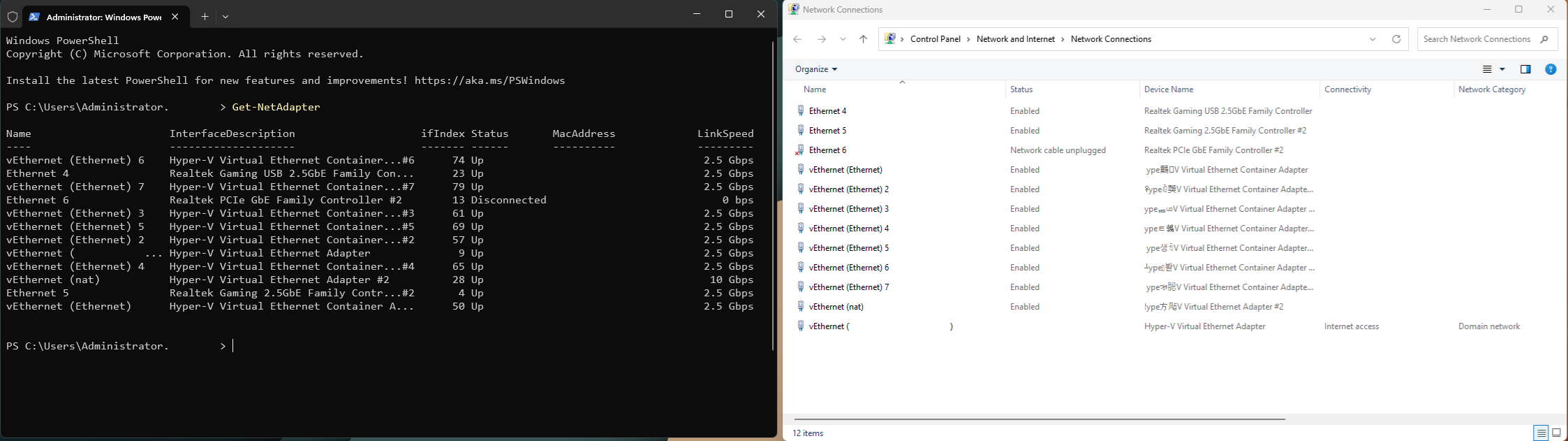
I’ve been encountering into weird bugs on Windows Server 2025 (as if they weren’t shoving AI code nowadays into everything). One of these is that I can see all the Ethernet Adapters created by Docker Engine with a big case of an extremely garbled text, and I’m not sure why this happens. If you use Powershell to see these adapters, they all seem fine:
I think it could be just a visual bug in Windows. I remember seeing somewhere a Windows 10 update (not the same I know, but close enough) that had troubles representing “TB” as in “terabytes of storage” in the Windows Settings app showing garbled text. All that to say that Windows is not new to issues in proper text display.
I know it’s not the best course of action but until you see anything weird happening I’d just ignore that and hope for an update that will fix the issue.
P.S. what you could do to check if it’s just a visual bug is changing the adapter name and copy the string of text related to the adapter in Notepad++ or a similar tool. That should tell you if there are weird characters mixed in there or not.
P.P.S. a Superuser post referring to it as a visual bug, as I suspected.
Interesting - been searching this for a while and it’s the first time I’ve seen that one post lol. I can guarantee that it happens on Windows Server 2025 latest updates at of today too…
In that case, my crashes have nothing to do with this lol.
Can you copy the literal names in a comment here? Since only part of the name is corrupted, I wonder if the corrupted part corresponds to something meaningful in different Unicode encodings. Since it is so consistantly corrupted in the same part of the name, it could code that is using the string as a pointer to a structure member to write a value into the string.
And I assume you did a memtest or are using ECC etc etc…?
Blue screens with win32k.sys and the processor being on an idle state - and I can’t find any reason through WinDbg. Happen daily with all Core Isolation enabled, but infrequent without it. First time diving that far into the kernel, but that warrants its own separate thread.
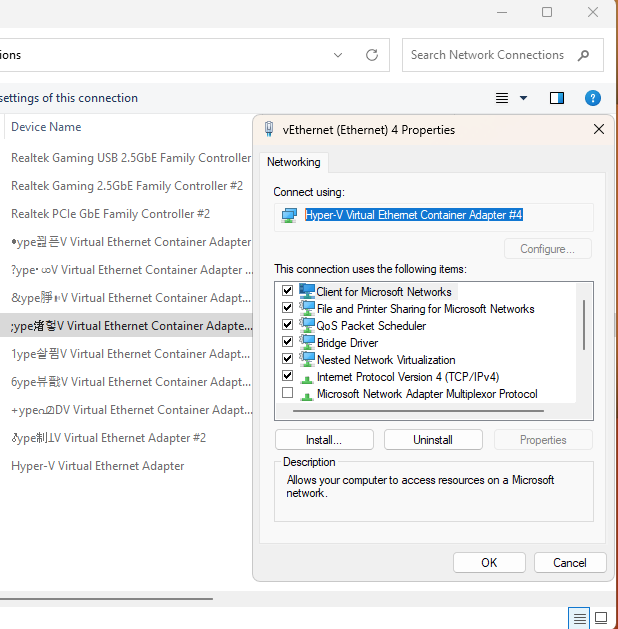
Yeah it’s truly a visualization issue here: this is the literal text that is presented on the Properties dialog for example: Hyper-V Virtual Ethernet Container Adapter #4. But the overall view is bugged up:
As for a memtest - I did run the Windows built in memory tester, which is usually fine. Don’t have ECC, but given everything around this, this is not the bug that’s burning my setup right now.
Edit: If you want to see what I am actually struggling with, you can take a peek here!