TL;DR
FCC router ban got you down? Want to audit what’s running on your LAN? I found that DIY routers/firewall appliances are the best cost/performance in this market, and you don’t need an N100 fanless to do it. I used an HP Mini PC with new NICs in the M.2 slots, a 2.5G PoE Switch, and two Zyxel Wifi 7 Access Points to build a budget-friendly, open-source firewall/router that’s more reliable than my old Asus AXE router. Total cost: $440
Background
I have been using an Asus RT-AXE7800 WiFi Router for years now. It’s worked well enough, but was missing just a few features (VLAN, complex firewall rules, etc) to make it truly reliable. When the FCC banned router imports in March, the writing was on the wall for me that it was time to upgrade. My goals with the upgrade:
- “Enterprise” features like VLAN and complex firewall support
- Reasonable performance
- Open-source firmware as much as possible
Unfortunately, consumer WiFi routers are terrible. Even the OpenWRT One was underwhelming, and a downgrade from WiFi 6E (great for streaming gameplay to my Steam Deck from my HTPC). A former roommate also previously flashed OpenWRT onto an Asus router, and it was a reliability nightmare (constant resetting), so OpenWRT was not something I was excited for. After hitting a few walls finding an OpenWRT-compatible replacement (including a strange 6GHz-band compliance issue in the US), I decided that building my own router was the best path forward.
Used Mini PCs are great, #tinyminimicro
I had previously purchase a lot of five HP Elitedesk 800 G2 Mini PCs for $150 total (old proxmox cluster, now replaced). Specs:
| Part | Model |
|---|---|
| CPU | Intel Core i5-6500T |
| RAM | 2x4GB DDR4 2133 Sodimm (I think from Mac Minis) |
| SSD | 128GB Sata SSD |
This isn’t a high-performance mini PC by any stretch of the imagination, but at $30 per unit, it’s a steal. My guess was that despite being 10 years old, the CPU was more than capable of handling OPNSense routing, firewall rules, gigabit+ traffic, etc. It’s missing modern instructions and consumes more power than an N100 appliance, but I can’t find an N100 mini PC under $100. The Elitedesk also has two m.2 slots, which is perfect for my build. I’ll use these for adding new NICs, and boot from SATA (or even USB).
I’ll use OPNsense on the mini PC, and have separate WiFi APs for WLAN. This was a paradigm shift for me, since I’m used to consumer WiFi routers up until this point. But using the mini PC, which has limited PCIe bandwidth available, I was more or less priced into exploring what AP options I had available. Thankfully, just a few weeks prior to my search, Zyxel announced that some of its WiFi 7 APs now support OpenWRT.
This was great for, since I can now upgrade my WiFi from 6E to 7, use the proprietary AP firmware for now, and flash OpenWRT when it gets 6Ghz figured out. I live in an apartment, so despite the small coverage area, the sheer number of competing signals and old radio-blocking construction materials means 6GHz signals taper out rapidly. I got two Zyxel NWA130BE APs for maximum coverage (and I can always get more). I think Zyxel also has some load-balancing/neighbor functionality, but I’m still learning what this does for me.
Adding new network interfaces
My building just got a new ISP connected, so 1G/2G WAN is now available to me. I already has an arris modem with 2.5g WAN, so to keep this new service an option for me, I needed my router to have 2.5G for WAN. Since I also have a server rack for self-hosting, and I have a NAS, and because of my partner’s work, and because of the Zyxel APs, I wanted maximum bandwidth on my LAN. Since I only have two m.2 slots, and because I could use traditional PCIe cards in ATX mounting, that meant 10G, which I break out to multiple 2.5G ports. Some research showed that OPNsense works well with intel chipsets, so I went with i226V for 2.5G and 82599EN for 10G.
I couldn’t find any multi-port 2230 2.5G NIC, so I have a single 2.5G RJ45 port for WAN. I was able to find Intel X540-T2 dual 10G cards readily available. I also found reports that this chipset is well supported by OPNsense. However, they were triple the price of the single 82599EN card, and I don’t have any way to take advantage of the extra bandwidth at the moment. Long-term, I can always upgrade and move the single 10G card to workstation or something, but for now, this is good enough.
I used the 2230 slot on the mini PC for the 2.5G NIC. This slot is normally populated with WiFi radios on these mini PCs, but mine was empty. Simple enough to install an A+E key 2230 card. I couldn’t find a 2280 form-factor 10G module (no surprise), so I went with a 2280 to PCIe riser, then installed the NIC to that. I powered the riser with an exteral AC to DC power supply I had lying around.
HP mini PCs have an internal header called a “flex port”. This lets users customize the rear IO. My mini PC came with an extra video output. I removed this flex port module, which creates a hole in the rear chassis. This hole was large enough to route both the riser ribbon and the 2.5G NIC out the back of the mini PC, allowing me to close it up. I do have a loose RJ45 and 10G NIC card just lying on the floor under my media cabinet, but oh well.
I still needed a switch to split the 10G port to multiple 2.5G ports, and I wanted PoE+ to power my APs. After some searching, I found the Grandstream GWN7700MP. It’s unmannaged, but has enough power for both access points, 10G SFP uplink, and five 2.5G RJ45 ports.
It looks stupid, but it works, so it’s not stupid
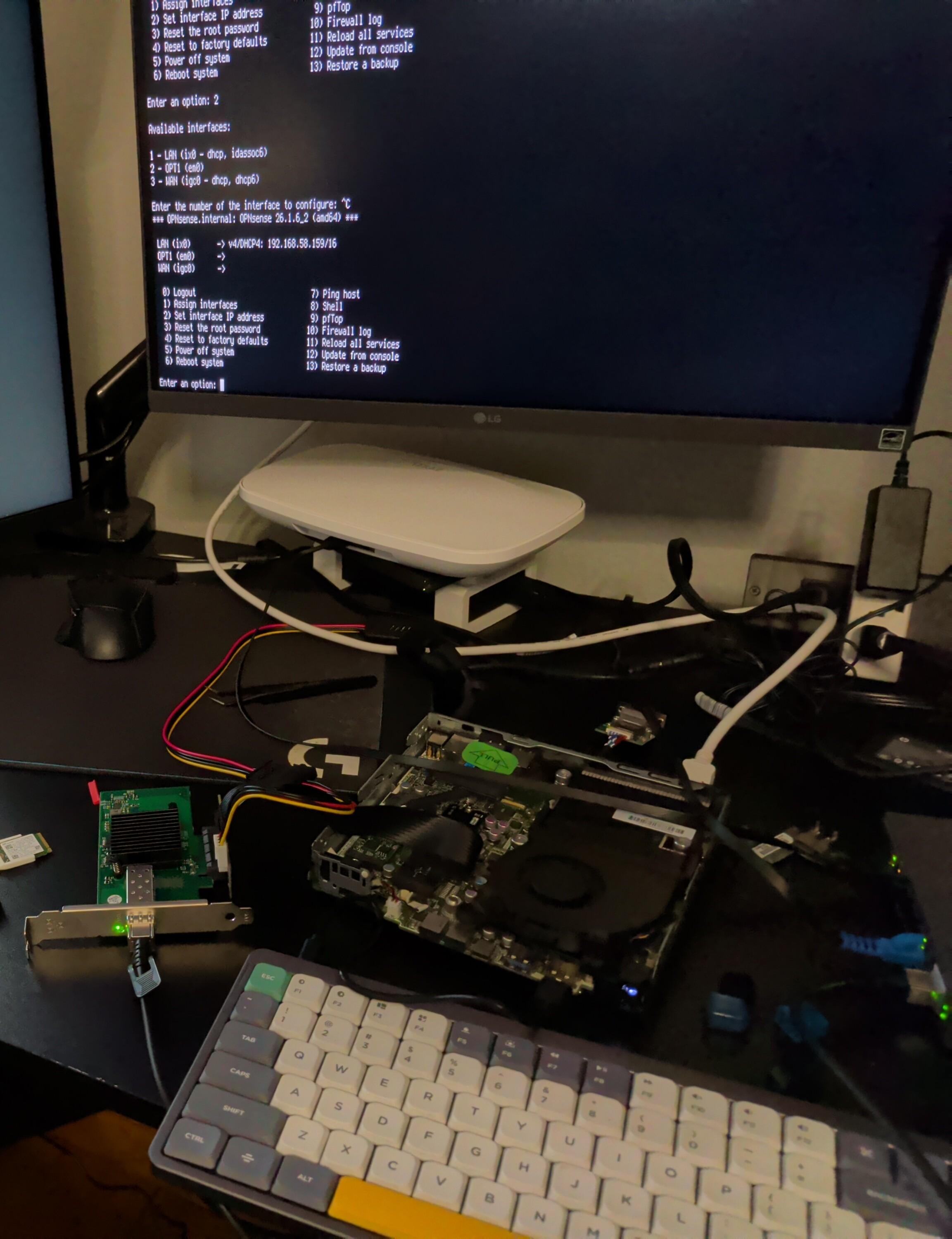
After receiving my part orders, I tested first on my existing Asus LAN. Amazingly, all parts just worked out of the box! Both NICs were detected and even assigned WAN/LAN appropriately as a default. I was also able to power access the Zyxel AP over the Grandstream switch. With this proof of concept working, it was time to shift my LAN over to OPNsense. Also, it was time to learn how to use OPNsense.
Setup
I had an existing server setup, but it was just static IPs on the flat VLAN my Asus router created. Nothing fancy. With OPNsense, I have already setup a couple of VLANs with firewall rules:
| VLAN | Description |
|---|---|
| 1 | Management |
| 2 | STORAGE (NAS) |
| 10 | STABLE (k3s pi cluster for traefik, pihole, and oauth) |
| 150 | WIFIGUEST (specific SSID, no LAN access, probably some filtering/bandwidth limiting) |
| 200 | WIFIPRIMARY (household wifi network, limited LAN access) |
| 201 | WIFIWORK (for work laptops, keep private as much as possible) |
I am able to tag wired clients for VLANs using my Cisco SGE2000P, which is ancient, but cheap and good enough. This post isn’t a dive into my entire server setup, but I’ll definitely have more VLANs set up for my proxmox cluster, GPU/AI Server, IOT, and specific services.
Speed tests over WiFi max out my ISP service bandwidth. I haven’t done much LAN performance testing, but clients are connecting, so I’m happy with that. If I do more in-depth testing, I’ll update this post.
Results
I love this outcome. I’m sure I could have done better, but for a quick build with spare parts and having access to community-driven software, I’m satisfied. I can always upgrade in the future, just migrate over my configs (now in git), so I’m not locked into anything.
I think the real lesson here is, like I showed with my tablet post, modular, repairable hardware is the best hardware. A ten year old office PC is now outperforming my consumer wifi router for a similar price, and there is room for growth. And given recent videos, I’m happier than ever that I did this upgrade.
What do you think? Good “baby’s first firewall appliance?” Or did I make a glaring mistake? Also, any guidance is appreciated as I become comfortable with OPNsense and networking. I’ll probably repurpose the Asus router (and my stack of other wifi routers) as APs for IOT and other LAN-only uses, take advantage of the hardware while minimizing impact.
BOM
Here is my BOM. Links are to the Amazon listing I purchased (zero affiliate links). Prices are what I paid (pre-tax), all USD. The Mini PC was bought on Ebay in Feb 2024, all other parts in May 2026. Took me a few weeks to set aside time to disrupt internet service in my household, but got there in the end.
| part | cost | notes |
|---|---|---|
| hp elitedesk 800 g2 mini | $30 | Core i5-6500T, 8GB RAM, 128GB SSD |
| a+e 2.5G | $26 | Intel I226V |
| m.2 riser | $26 | Sinloon |
| AC adapter | $16 | had lying around, estimated price |
| DC to SATA | $10 | for m.2 riser power |
| 10G SFP | $33 | Intel 82599EN |
| SFP Cable | $17 | Cable Matters, 2M |
| PoE Switch | $65 | Grandstream GWN7700MP |
| Zyxel AP x2 | $216 | NWA130BE, openwrt compatible |
| Total: | $439 | - |
I am certain there is room for improvement. Total cost for the mini PC + NICs + power is $141, and no 2.5G switch. I think a PDU or DC power supply with multiple outputs could have helped. A cheaper 2280 to PCIe riser might also have helped. And buying everything from Amazon probably isn’t ideal. That said, the Zyxel APs being $108 each was a great price. But overall, compared to what companies like Netgear, TP-Link, and Asus will sell you, and given the fact that I didn’t want to spend too much time shopping, I think I did okay.
If you have a better build, definitely share it! The FCC gave US consumers a very good reason to build their own routers, and I think this shows it’s possible to do it affordably without much effort. Having a library of community builds with opinionated configs can help new users dip their toes into networking, and possibly move the needle on consumer routers.
