Here’s the video for context:
Babbys first Local Agentic AI Loop – what does it look like?
You may have also heard executives saying that “computers were now using computers” and this is a little bit of insight into what that means.
(also, the subtext here should be, wait, executives see this and think they can replace people?!? what?!???)
This is the MSI EdgeXpert – an nvidia DGX Spark
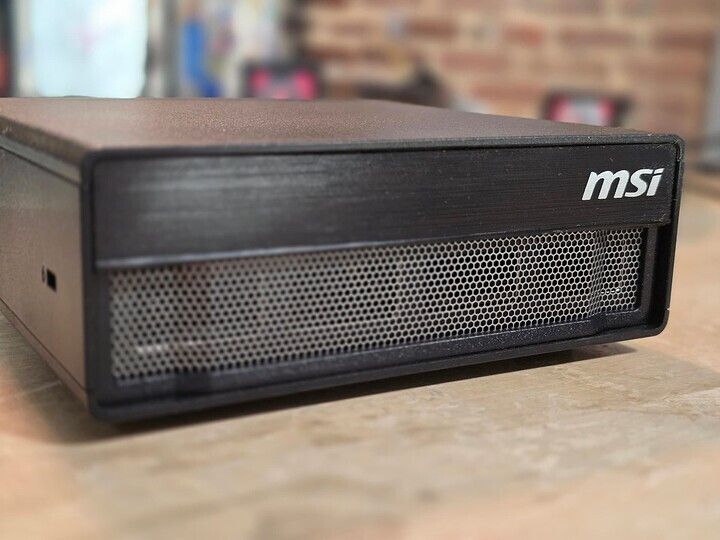
It has 128gb ram and can run many AI models. We reviewed it separately here, and even got Steam running on it natively (preview of RTX spark anyone?) .
And here’s our Windows 11 MSI Cubi NUC AI+
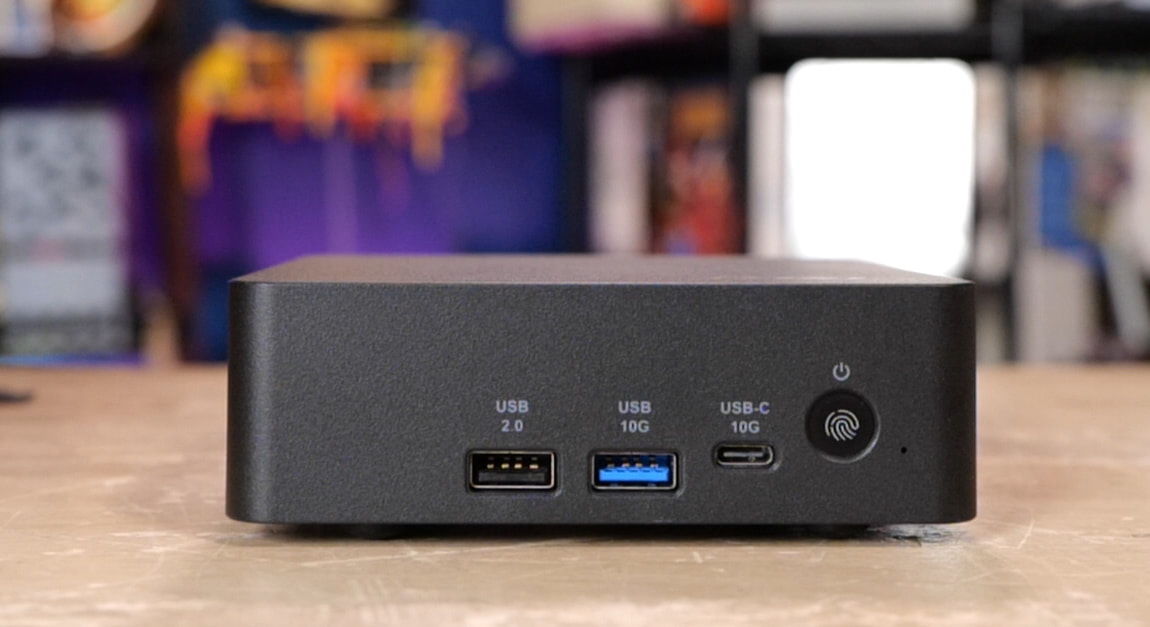
We also reviewed it separately, here.
The DGX Spark can basically marionette Windows 11, launch programs and run tools on it.
The Project
The goal is to run local intelligence on the DGX spark and setup a Model Context Protocol (MCP) server on the MSI Cubi Nuc AI+ mini pc, running windows.
There are a lot of models that run well on the DGX spark; for the video we used Nemotron Omni for the voice and video capabilities, and Nemotron Nano for reasoning and agentic tasks. Nvidia has great writeups on how to get this sort of thing going on your spark.
The other part of this is Turnstone:
Turnstone is a harness which means you can hook up an AI model and give it an ability to do things – tool calling.
Typically getting AI to do things effectively (quickly, lowest number of tokens, consistently) typically depends on tool calling and skills. Skills are often markdown files and, optionally, utility or helper scripts). The skill explains to the AI how to call a tool or tools (or helper scripts), how to interpret the output and most importantly what success criteria looks like. This gives the model context for what you have asked it to accomplish, and what success looks like.
You may have heard the term Agentic before.. what it means in this context is that your harness software (Turnstone in our case) could spawn several “chat” sessions that have different instructions but are all working toward the same goal.
TODO: PIC
That’s why this is called an orchestrator – it’s orchestrating several sessions with the AI model. Think of each of these as an AI chat session except that you have tool calling (for generic tools), Skills (which can provide their own tools/scripts), and, the big thing in our video here, access to MCP interfaces.
So, in summary:
Hardware/software used
- MSI EdgeXpert / DGX Spark
- MSI Cubi NUC AI+ running Windows 11
- Turnstone
- Windows-MCP
- Nemotron Nano / Omni, or another OpenAI-compatible local model endpoint
What’s MCP? Why is it useful here?
MCP provides a standardized interface layer that also exposes tools and describes functionality. Think of it like an API but with built-in documentation. We can run an MCP server on the Cubi Nuc AI+ and then AI Agents running inside our Turnstone harness have the tools that the MCP server reports.
For this demo we’ll be using this Windows MCP server:
How-To
DGX Spark Setup
First, setup the DGX Spark with both the Nemotron Omni and Nemotron Nano models.
It is possible to run Nemotron Omni Super on here; at NVFP4 it uses about 2/3 of the available memory at maximum context, and leaves enough room to also run Nemotron Omni in the background for voice and video.
And, of course Models like Qwen A35B, also available in NVFP4 format, can run. Qwen makes an excellent coding and judge model, and is reasonably fast.
Step 1: Prepare the DGX Spark model endpoint
- Install the Nemotron model(s) you want to use
- Confirm the OpenAI-compatible endpoint works.
- Test with a simple completion.
Pre-reqs:
sudo apt install -y ca-certificates curl gnupg python3-pip python3-venv jq
I am assuming your Spark already has docker and the nvidia container toolkit installed. It should. It should also have python3
python3 -m pip install -U "huggingface_hub[hf_xet]" --break-system-packages
Log into hugging face, or don’t (and just have slower downloads)
hf auth login
hf auth whoami

export HF_TOKEN="$(cat ~/.cache/huggingface/token)"
mkdir -p ~/models
The main setup in the video is 2 main models running on Spark, then some optional other configurations:
Nemotron Omni for Speech, Image and Video reasoning
Nemotron Nano: A 35B A3B model which is small and competent
Optional:
Nemotron Super: It’s 120b so it’ll be slower and put more memory pressure on. Tough to get other optional models running at the same time due to memory pressure, especially if you want maximum context.
Gemma4 E4B: its just 4 billion effective parameters, but it makes a pretty good “judge” model for Turnstone. Gemma3 12b can also make a good judge, but in BF16 it’ll consume 24gb vram not 12. SFP8 is an option… but!
Qwen is also amazing! And if you’re doing agentic coding tasks, then the 27B NVFP4 version of Qwen is worth a look on this hardware. That is a dense model – all 27 billion parameters are active at once – so it’ll be slower. There is also the 35B A3B version of Qwen 3.6, which runs much faster, but the NVFP4 version was just released and has some bugs in the response template or with tool-calling.
**However, see note about nvfp4 versions of Qwen! **
Nemotron 3 Nano 3B A3B NVFP4
HF card: nvidia/NVIDIA-Nemotron-3-Nano-30B-A3B-NVFP4. NVIDIA’s card says to use vLLM, download the custom nano_v3_reasoning_parser.py, enable auto tool choice, use qwen3_coder, and use FP8 KV cache; it recommends temperature=0.6/top_p=0.95 for tool calling.
Here’s an example hf download command:
hf download nvidia/NVIDIA-Nemotron-3-Nano-30B-A3B-NVFP4 \
  --local-dir ~/models/NVIDIA-Nemotron-3-Nano-30B-A3B-NVFP4
Here’s the full script I used for this one, which will auto download the model if you don’t have it using hf
export MODEL_ID="nvidia/NVIDIA-Nemotron-3-Nano-30B-A3B-NVFP4"
export WEIGHTS="$HOME/models/NVIDIA-Nemotron-3-Nano-30B-A3B-NVFP4"

hf download "$MODEL_ID" \
  --local-dir "$WEIGHTS" \
  --max-workers 8

test -f "$WEIGHTS/config.json" && echo "weights OK"
test -f "$WEIGHTS/nano_v3_reasoning_parser.py" || \
  curl -L -o "$WEIGHTS/nano_v3_reasoning_parser.py" \
  https://huggingface.co/nvidia/NVIDIA-Nemotron-3-Nano-30B-A3B-NVFP4/resolve/main/nano_v3_reasoning_parser.py

docker run --rm -it \
  --name vllm-nemotron3-nano \
  --gpus all \
  --ipc=host \
  --shm-size=16g \
  -p 8000:8000 \
  -e HF_TOKEN="$HF_TOKEN" \
  -e VLLM_USE_FLASHINFER_MOE_FP4=1 \
  -e VLLM_FLASHINFER_MOE_BACKEND=throughput \
  -v "$WEIGHTS:/model:ro" \
  -v "$WEIGHTS/nano_v3_reasoning_parser.py:/app/nano_v3_reasoning_parser.py:ro" \
  vllm/vllm-openai:v0.20.0 \
  /model \
    --served-model-name nvidia/nemotron-3-nano \
    --host 0.0.0.0 \
    --port 8000 \
    --trust-remote-code \
    --tensor-parallel-size 1 \
    --max-model-len 262144 \
    --max-num-seqs 8 \
    --gpu-memory-utilization 0.85 \
    --kv-cache-dtype fp8 \
    --enable-auto-tool-choice \
    --tool-call-parser qwen3_coder \
    --reasoning-parser-plugin /app/nano_v3_reasoning_parser.py \
    --reasoning-parser nano_v3
The first time you create and run this script you will get output like:
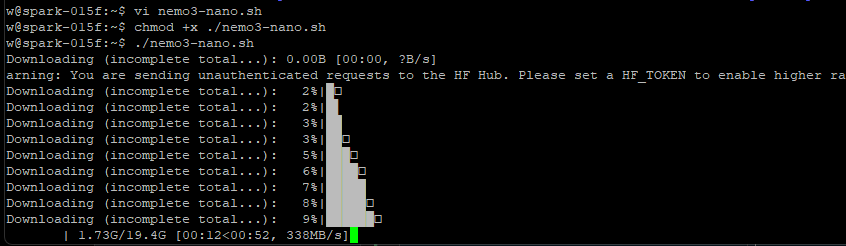
as it downloads the model to ~/.model
Nemotron 3 Omni
Build page: nvidia/nemotron-3-nano-omni-30b-a3b-reasoning. HF: nvidia/Nemotron-3-Nano-Omni-30B-A3B-Reasoning-NVFP4. NVIDIA describes it as multimodal: video, audio, image, and text, with OCR/speech/video/document workflows. The Spark-specific Build recipe uses vLLM 0.20.0, mounts local weights, installs vllm[audio] inside the container, enables multimodal limits, sets video FPS/frames, and enables tool calling with the qwen3_coder style tool calling template.
Script I used for the video to download, then run Omni:
hf download nvidia/Nemotron-3-Nano-Omni-30B-A3B-Reasoning-NVFP4 \
  --local-dir ```/models/Nemotron-3-Nano-Omni-30B-A3B-Reasoning-NVFP4
#!/usr/bin/env bash
set -euo pipefail

MODEL_BASE="${HOME}/models"
MODEL_NAME="Nemotron-3-Nano-Omni-30B-A3B-Reasoning-NVFP4"
MODEL_DIR="${MODEL_BASE}/${MODEL_NAME}"
CONTAINER_MODEL_DIR="/models/${MODEL_NAME}"

CONTAINER_NAME="vllm-nemotron3-omni"
PORT="8001"

echo "Starting Nemotron 3 Nano Omni on http://localhost:${PORT}/v1"
echo "Host model path: ${MODEL_DIR}"
echo "Container model path: ${CONTAINER_MODEL_DIR}"

if [[ ! -f "${MODEL_DIR}/config.json" ]]; then
  echo "ERROR: ${MODEL_DIR}/config.json not found."
  echo
  echo "Download the model first:"
  echo "hf download nvidia/Nemotron-3-Nano-Omni-30B-A3B-Reasoning-NVFP4 \\"
  echo "  --local-dir ${MODEL_DIR}"
  exit 1
fi

docker rm -f "${CONTAINER_NAME}" 2>/dev/null || true

docker run -d \
  --name "${CONTAINER_NAME}" \
  --restart unless-stopped \
  --gpus all \
  --ipc=host \
  --shm-size=16g \
  -p "${PORT}:8000" \
  -e HF_TOKEN="${HF_TOKEN:-}" \
  -e FLASHINFER_DISABLE_VERSION_CHECK=1 \
  -v "${MODEL_DIR}:${CONTAINER_MODEL_DIR}:ro" \
  vllm/vllm-openai:v0.20.0 \
  "${CONTAINER_MODEL_DIR}" \
    --served-model-name nvidia/nemotron-3-nano-omni \
    --host 0.0.0.0 \
    --port 8000 \
    --max-num-seqs 1 \
    --max-model-len 32768 \
    --trust-remote-code \
    --gpu-memory-utilization 0.25 \
    --limit-mm-per-prompt '{"video": 1, "image": 1, "audio": 1}' \
    --media-io-kwargs '{"video": {"fps": 2, "num_frames": 128}}' \
    --allowed-local-media-path / \
    --max-num-batched-tokens 16384 \
    --reasoning-parser nemotron_v3 \
    --enable-auto-tool-choice \
    --tool-call-parser qwen3_coder

echo "Nemotron 3 Nano Omni is starting on http://localhost:${PORT}/v1"
echo "Logs: docker logs -f ${CONTAINER_NAME}"
echo "Models: curl -sS http://localhost:${PORT}/v1/models | jq"
Nemotron 3 Super 120b
Optional; use this instead of Nemotron 3 Nano or Qwen3.6 27B
#!/usr/bin/env bash
set -euo pipefail

MODEL_BASE="${HOME}/models"
MODEL_NAME="NVIDIA-Nemotron-3-Super-120B-A12B-NVFP4"
MODEL_DIR="${MODEL_BASE}/${MODEL_NAME}"
CONTAINER_MODEL_DIR="/models/${MODEL_NAME}"

CONTAINER_NAME="vllm-nemotron3-super"
PORT="8002"
VLLM_IMAGE="vllm/vllm-openai:v0.20.0"

echo "Starting Nemotron 3 Super 120B A12B NVFP4 on http://localhost:${PORT}/v1"
echo "Host model path: ${MODEL_DIR}"
echo "Container model path: ${CONTAINER_MODEL_DIR}"
echo "vLLM image: ${VLLM_IMAGE}"

if [[ ! -f "${MODEL_DIR}/config.json" ]]; then
  echo "ERROR: ${MODEL_DIR}/config.json not found."
  echo
  echo "Download the model first:"
  echo "hf download nvidia/NVIDIA-Nemotron-3-Super-120B-A12B-NVFP4 \\"
  echo "  --local-dir ${MODEL_DIR}"
  exit 1
fi

if [[ ! -f "${MODEL_DIR}/super_v3_reasoning_parser.py" ]]; then
  echo "ERROR: ${MODEL_DIR}/super_v3_reasoning_parser.py not found."
  echo
  echo "Re-run:"
  echo "hf download nvidia/NVIDIA-Nemotron-3-Super-120B-A12B-NVFP4 \\"
  echo "  --local-dir ${MODEL_DIR}"
  exit 1
fi

docker rm -f "${CONTAINER_NAME}" 2>/dev/null || true

docker run -d \
  --name "${CONTAINER_NAME}" \
  --restart unless-stopped \
  --gpus all \
  --ipc=host \
  --shm-size=16g \
  --ulimit memlock=-1 \
  --ulimit stack=67108864 \
  -p "${PORT}:8000" \
  -e HF_TOKEN="${HF_TOKEN:-}" \
  -e VLLM_NVFP4_GEMM_BACKEND=marlin \
  -e VLLM_ALLOW_LONG_MAX_MODEL_LEN=1 \
  -e VLLM_FLASHINFER_ALLREDUCE_BACKEND=trtllm \
  -e VLLM_USE_FLASHINFER_MOE_FP4=0 \
  -v "${MODEL_DIR}:${CONTAINER_MODEL_DIR}:ro" \
  -v "${MODEL_DIR}/super_v3_reasoning_parser.py:/app/super_v3_reasoning_parser.py:ro" \
  "${VLLM_IMAGE}" \
    --model "${CONTAINER_MODEL_DIR}" \
    --served-model-name nvidia/nemotron-3-super \
    --host 0.0.0.0 \
    --port 8000 \
    --async-scheduling \
    --dtype auto \
    --kv-cache-dtype fp8 \
    --tensor-parallel-size 1 \
    --pipeline-parallel-size 1 \
    --data-parallel-size 1 \
    --trust-remote-code \
    --gpu-memory-utilization 0.90 \
    --enable-chunked-prefill \
    --max-num-seqs 4 \
    --max-model-len 1000000 \
    --moe-backend marlin \
    --mamba_ssm_cache_dtype float16 \
    --quantization fp4 \
    --speculative_config '{"method":"mtp","num_speculative_tokens":3,"moe_backend":"triton"}' \
    --reasoning-parser-plugin /app/super_v3_reasoning_parser.py \
    --reasoning-parser super_v3 \
    --enable-auto-tool-choice \
    --tool-call-parser qwen3_coder

echo "Nemotron 3 Super is starting on http://localhost:${PORT}/v1"
echo "Logs: docker logs -f ${CONTAINER_NAME}"
echo "Models: curl -sS http://localhost:${PORT}/v1/models | jq"
Gemma4 E4B Judge Model
This is optiona; you should look at the ALTERNATE WAY section below. The judge in turnstone typically needs 64k+ context; this can put some strain on on the configuration.
#!/usr/bin/env bash
set -euo pipefail

MODEL_BASE="${HOME}/models"

# Replace this with the exact downloaded Gemma 4 judge model directory.
# Examples might be something like:
#   gemma-4-e4b-it
#   gemma-4-e4b-it-sfp8
#   gemma-4-26b-a4b-it
MODEL_NAME="gemma-4-e4b-it"

MODEL_DIR="${MODEL_BASE}/${MODEL_NAME}"
CONTAINER_MODEL_DIR="/models/${MODEL_NAME}"

CONTAINER_NAME="vllm-gemma4-judge"
PORT="8003"

echo "Starting Gemma 4 judge model on http://localhost:${PORT}/v1"
echo "Host model path: ${MODEL_DIR}"
echo "Container model path: ${CONTAINER_MODEL_DIR}"

if [[ ! -f "${MODEL_DIR}/config.json" ]]; then
  echo "ERROR: ${MODEL_DIR}/config.json not found."
  echo
  echo "Download the model first, for example:"
  echo "hf download google/${MODEL_NAME} \\"
  echo "  --local-dir ${MODEL_DIR}"
  exit 1
fi

docker rm -f "${CONTAINER_NAME}" 2>/dev/null || true

docker run -d \
  --name "${CONTAINER_NAME}" \
  --restart unless-stopped \
  --gpus all \
  --ipc=host \
  --shm-size=8g \
  -p "${PORT}:8000" \
  -e HF_TOKEN="${HF_TOKEN:-}" \
  -e FLASHINFER_DISABLE_VERSION_CHECK=1 \
  -v "${MODEL_DIR}:${CONTAINER_MODEL_DIR}:ro" \
  vllm/vllm-openai:v0.20.0 \
  "${CONTAINER_MODEL_DIR}" \
    --served-model-name google/gemma-4-judge \
    --host 0.0.0.0 \
    --port 8000 \
    --trust-remote-code \
    --tensor-parallel-size 1 \
    --dtype auto \
    --max-model-len 65535 \
    --max-num-seqs 2 \
    --gpu-memory-utilization 0.25 \
    --kv-cache-dtype fp8 \
    --enable-prefix-caching

echo "Gemma 4 judge model is starting on http://localhost:${PORT}/v1"
echo "Logs: docker logs -f ${CONTAINER_NAME}"
echo "Models: curl -sS http://localhost:${PORT}/v1/models | jq"
Note: Do not try to run all four models at once! If you’re running nvfp4 Super then you might not even want to run Omni!
Qwen Models
They are also amazing models!
They need vllm nightly, and sometimes the chat template or mtp can be sketchy. That’s one thing I’ve been stuck on the last few weeks.. it can be the difference between 15 and 45 t/s.. plus everyone always overlooks the utility and coherence of the model output. We want that to be as high as possible.
Here are some starter scripts for Qwen3.6 A35B:
#!/usr/bin/env bash
set -euo pipefail

MODEL_BASE="${HOME}/models"
MODEL_NAME="Qwen3.6-35B-A3B-NVFP4"
MODEL_DIR="${MODEL_BASE}/${MODEL_NAME}"
CONTAINER_MODEL_DIR="/models/${MODEL_NAME}"

CONTAINER_NAME="vllm-qwen36-35b-a3b"
PORT="8005"

# Official model card says vllm/vllm-openai:nightly.
# Community reports v0.23.0-class images also work on DGX Spark.
VLLM_IMAGE="${VLLM_IMAGE:-vllm/vllm-openai:nightly}"

echo "Starting Qwen3.6 35B A3B NVFP4 on http://localhost:${PORT}/v1"
echo "Host model path: ${MODEL_DIR}"
echo "Container model path: ${CONTAINER_MODEL_DIR}"
echo "vLLM image: ${VLLM_IMAGE}"

if [[ ! -f "${MODEL_DIR}/config.json" ]]; then
  echo "ERROR: ${MODEL_DIR}/config.json not found."
  echo
  echo "Download the model first:"
  echo "hf download nvidia/Qwen3.6-35B-A3B-NVFP4 \\"
  echo "  --local-dir ${MODEL_DIR}"
  exit 1
fi

docker rm -f "${CONTAINER_NAME}" 2>/dev/null || true

docker run -d \
  --name "${CONTAINER_NAME}" \
  --restart unless-stopped \
  --gpus all \
  --ipc=host \
  --shm-size=16g \
  --ulimit memlock=-1 \
  --ulimit stack=67108864 \
  -p "${PORT}:8000" \
  -e HF_TOKEN="${HF_TOKEN:-}" \
  -e FLASHINFER_DISABLE_VERSION_CHECK=1 \
  -e VLLM_USE_FLASHINFER_MOE_FP4=0 \
  -e VLLM_FP8_MOE_BACKEND=flashinfer_cutlass \
  -e CUTE_DSL_ARCH=sm_121a \
  -e VLLM_ALLOW_LONG_MAX_MODEL_LEN=1 \
  -v "${MODEL_DIR}:${CONTAINER_MODEL_DIR}:ro" \
  --entrypoint /bin/bash \
  "${VLLM_IMAGE}" \
  -lc "exec vllm serve '${CONTAINER_MODEL_DIR}' \
    --served-model-name nvidia/qwen3.6-35b-a3b \
    --host 0.0.0.0 \
    --port 8000 \
    --tensor-parallel-size 1 \
    --trust-remote-code \
    --dtype auto \
    --kv-cache-dtype fp8 \
    --quantization modelopt \
    --attention-backend flashinfer \
    --moe-backend marlin \
    --gpu-memory-utilization 0.40 \
    --max-model-len 262144 \
    --max-num-seqs 4 \
    --max-num-batched-tokens 8192 \
    --enable-chunked-prefill \
    --async-scheduling \
    --enable-prefix-caching \
    --load-format fastsafetensors \
    --reasoning-parser qwen3 \
    --enable-auto-tool-choice \
    --tool-call-parser qwen3_xml \
    --speculative-config '{\"method\":\"mtp\",\"num_speculative_tokens\":3,\"moe_backend\":\"triton\"}'"

echo "Qwen3.6 35B A3B NVFP4 is starting on http://localhost:${PORT}/v1"
echo "Logs: docker logs -f ${CONTAINER_NAME}"
echo "Models: curl -sS http://localhost:${PORT}/v1/models | jq"
Understand that generally I’ve found the 27B model to be the most coherent on this model, but also much slower. The further wrinkle is that the Unsloth 4 bit quant version of Qwen3.6 27B doesn’t seem to have the same chat template/tool calling bugs the NVFP4 version does.
This is something that will have to be updated in this guide over time as things evolve. Watch the video for more context/nuance.
Note: For all these example scripts the context length and the gpu memory utilization is a bit fungible. You’re meant to think about that and play with that number a bit as you come up with something that would work for your use case.
Turnstone Setup on the DGX Spark
curl -fsSL https://raw.githubusercontent.com/turnstonelabs/turnstone/main/run.sh | bash
…Check out the video for setting up Turnstone; it’s pretty slick.
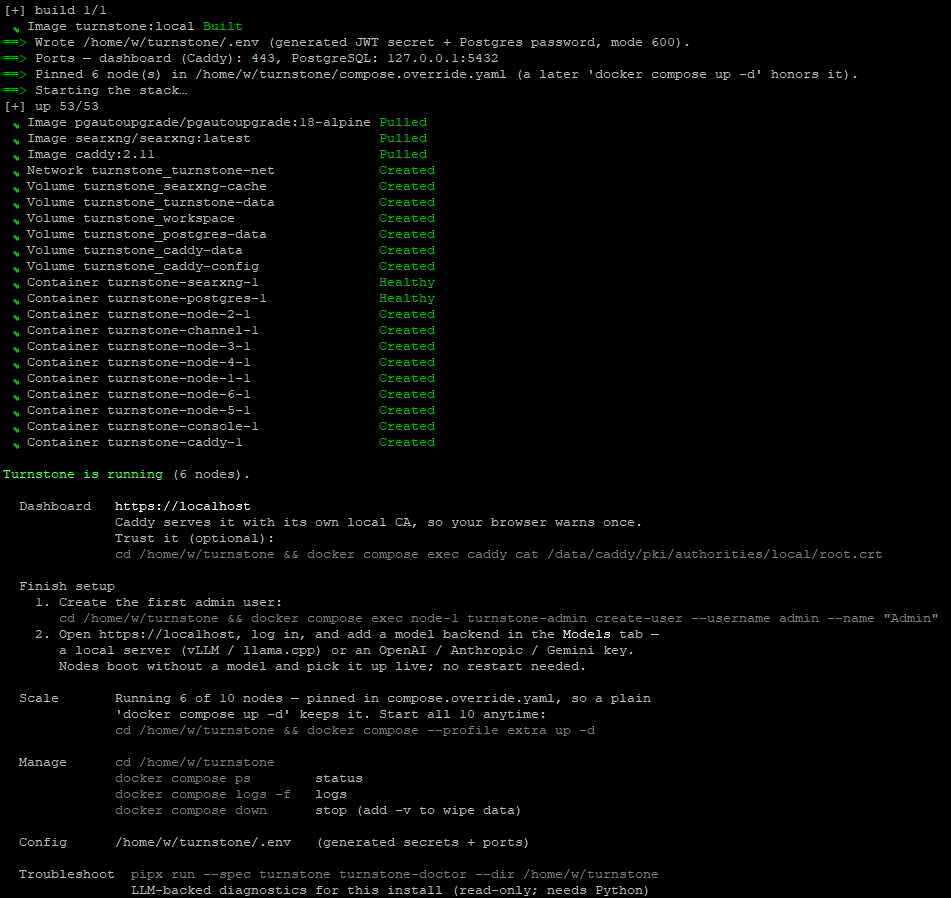
Make sure that at least one AI container is running because the installer can connect to the AI container to get it to help you set everything up.
ALTERNATE WAY: So if you have any experience here, you may be questioning the wisdom of running multiple vLLM containers on DGX spark. That might not be a best fit for what we want to accomplish. So check this out:
turnstone/turnstone/deploy/vllm-litellm at main · turnstonelabs/turnstone · GitHub
Reasoning, Perception and re-ranking models at once (this also applies to Strix Halo!)
This is using Qwen 3.6 27B in nvfp4; vLLM nightly has had some performance regressions at the time of this write-up, but it is possible to achieve about 20t/s. This also works natively with HF_HOME so you don’t need to manually download models to the ~/models dir (and, infact, you shouldn’t).
This way gives you more model (more context) functionality, and uses 117 of the 121gb memory on my system.
MSI Cubi Nuc AI+ Mini PC Windows Setup
Install python 3, and ux, etc
Start the MCP server on windows
python -m uv tool run windows-mcp serve --transport streamable-http --host 192.168.0.115 --port 8000 --auth-key ItsForTheLulzOrWhateverYouChose
Configuring Nemotron 3 Super 120b A12B NVFP4
HF card: nvidia/NVIDIA-Nemotron-3-Super-120B-A12B-NVFP4. This is one of the best models that can be run on Spark, but it is slower: 120B total, 12B active, NVFP4, tool calling, and MTP. The Spark-specific HF command uses vllm/vllm-openai:v0.20.0, VLLM_NVFP4_GEMM_BACKEND=marlin, --quantization fp4, --speculative_config '{"method":"mtp","num_speculative_tokens":3,...}'
script:
#!/usr/bin/env bash
set -euo pipefail

MODEL_BASE="${HOME}/models"
MODEL_NAME="NVIDIA-Nemotron-3-Super-120B-A12B-NVFP4"
MODEL_DIR="${MODEL_BASE}/${MODEL_NAME}"
CONTAINER_MODEL_DIR="/models/${MODEL_NAME}"

CONTAINER_NAME="vllm-nemotron3-super"
PORT="8002"
VLLM_IMAGE="vllm/vllm-openai:v0.20.0"

echo "Starting Nemotron 3 Super 120B A12B NVFP4 on http://localhost:${PORT}/v1"
echo "Host model path: ${MODEL_DIR}"
echo "Container model path: ${CONTAINER_MODEL_DIR}"
echo "vLLM image: ${VLLM_IMAGE}"

if [[ ! -f "${MODEL_DIR}/config.json" ]]; then
  echo "ERROR: ${MODEL_DIR}/config.json not found."
  echo
  echo "Download the model first:"
  echo "hf download nvidia/NVIDIA-Nemotron-3-Super-120B-A12B-NVFP4 \\"
  echo "  --local-dir ${MODEL_DIR}"
  exit 1
fi

if [[ ! -f "${MODEL_DIR}/super_v3_reasoning_parser.py" ]]; then
  echo "ERROR: ${MODEL_DIR}/super_v3_reasoning_parser.py not found."
  echo
  echo "Re-run the HF download or fetch the parser from the model repo."
  exit 1
fi

docker rm -f "${CONTAINER_NAME}" 2>/dev/null || true

docker run -d \
  --name "${CONTAINER_NAME}" \
  --restart unless-stopped \
  --gpus all \
  --ipc=host \
  --shm-size=16g \
  --ulimit memlock=-1 \
  --ulimit stack=67108864 \
  -p "${PORT}:8000" \
  -e HF_TOKEN="${HF_TOKEN:-}" \
  -e VLLM_NVFP4_GEMM_BACKEND=marlin \
  -e VLLM_ALLOW_LONG_MAX_MODEL_LEN=1 \
  -e VLLM_FLASHINFER_ALLREDUCE_BACKEND=trtllm \
  -e VLLM_USE_FLASHINFER_MOE_FP4=0 \
  -e FLASHINFER_DISABLE_VERSION_CHECK=1 \
  -v "${MODEL_DIR}:${CONTAINER_MODEL_DIR}:ro" \
  -v "${MODEL_DIR}/super_v3_reasoning_parser.py:/app/super_v3_reasoning_parser.py:ro" \
  "${VLLM_IMAGE}" \
  "${CONTAINER_MODEL_DIR}" \
    --served-model-name nvidia/nemotron-3-super \
    --host 0.0.0.0 \
    --port 8000 \
    --async-scheduling \
    --dtype auto \
    --kv-cache-dtype fp8 \
    --tensor-parallel-size 1 \
    --pipeline-parallel-size 1 \
    --data-parallel-size 1 \
    --trust-remote-code \
    --gpu-memory-utilization 0.90 \
    --enable-chunked-prefill \
    --max-num-seqs 4 \
    --max-model-len 1000000 \
    --moe-backend marlin \
    --mamba_ssm_cache_dtype float16 \
    --quantization fp4 \
    --speculative_config '{"method":"mtp","num_speculative_tokens":3,"moe_backend":"triton"}' \
    --reasoning-parser-plugin /app/super_v3_reasoning_parser.py \
    --reasoning-parser super_v3 \
    --enable-auto-tool-choice \
    --tool-call-parser qwen3_coder

echo "Nemotron 3 Super is starting on http://localhost:${PORT}/v1"
echo "Logs: docker logs -f ${CONTAINER_NAME}"
echo "Models: curl -sS http://localhost:${PORT}/v1/models | jq"
Configure Turnstone
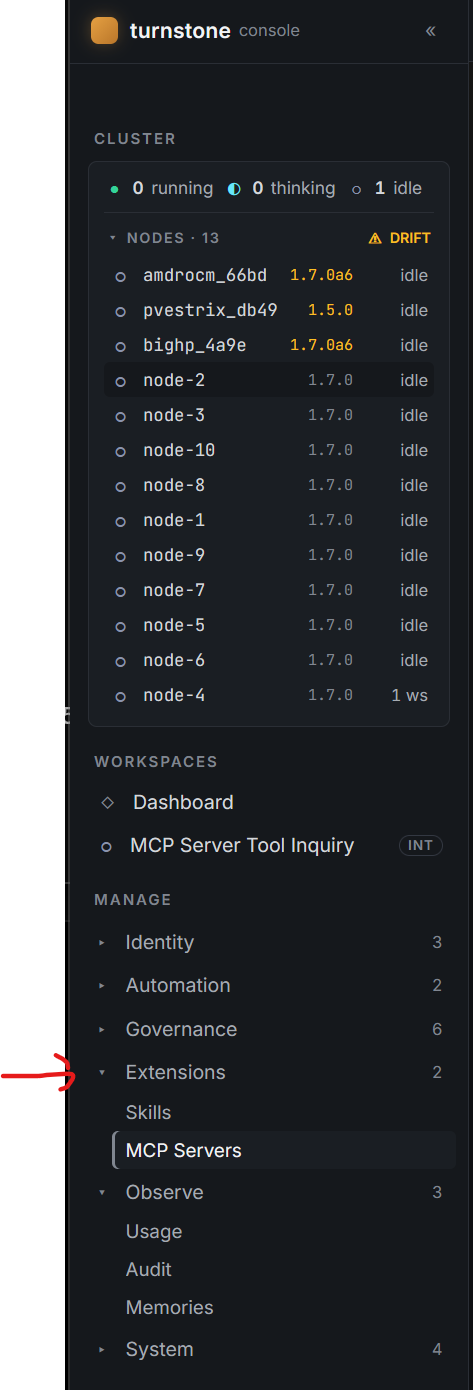
and configure the mcp sever:

Note that you need Authorization: Bearer and then the token you specified on the CLI.
*I also recommend you setup TLS as in the TLS example for this windows MCP server so that the communications layer is encrypted on your lan, but one problem at a time. *
You should see:

you may also want to click Sync to nodes
Bonus Round: Configure Hermes Agent
I was surprised by how unnecessarily cumbersome this was.
The whole secret, and the place where the Hermes installer breaks down for the uninitiated, is that they make it too easy to break if you don’t want to cloud-host your AI, or go through their router.
The desktop gui did not work for setting up a http://192.168.x.y. type local address.
- Install Hermes (their website/walkthrough is sufficient for this).
- You can create an account, but when it asks for an ai provider you can go with defaults or skip over it.
- run a terminal and do hermes setup. Pick FULL setup.
- For the model provider, pick custom, around option 32.
- Enter the url and port of the DGX Spark/EdgeXpert: http://192.168.0.166:8000/v1
- it should auto detect the model and context. You want to use the smartest model with hermes, ideally.
If you have two sparks you can try the new deepseek v4 flash nvfp4, or even run “only” the nemotron 120b parameter model as well.
As shown in the video, it’s pretty impressive to go from this:
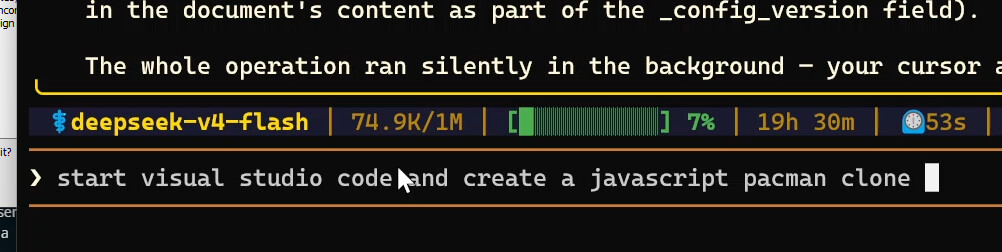
to this
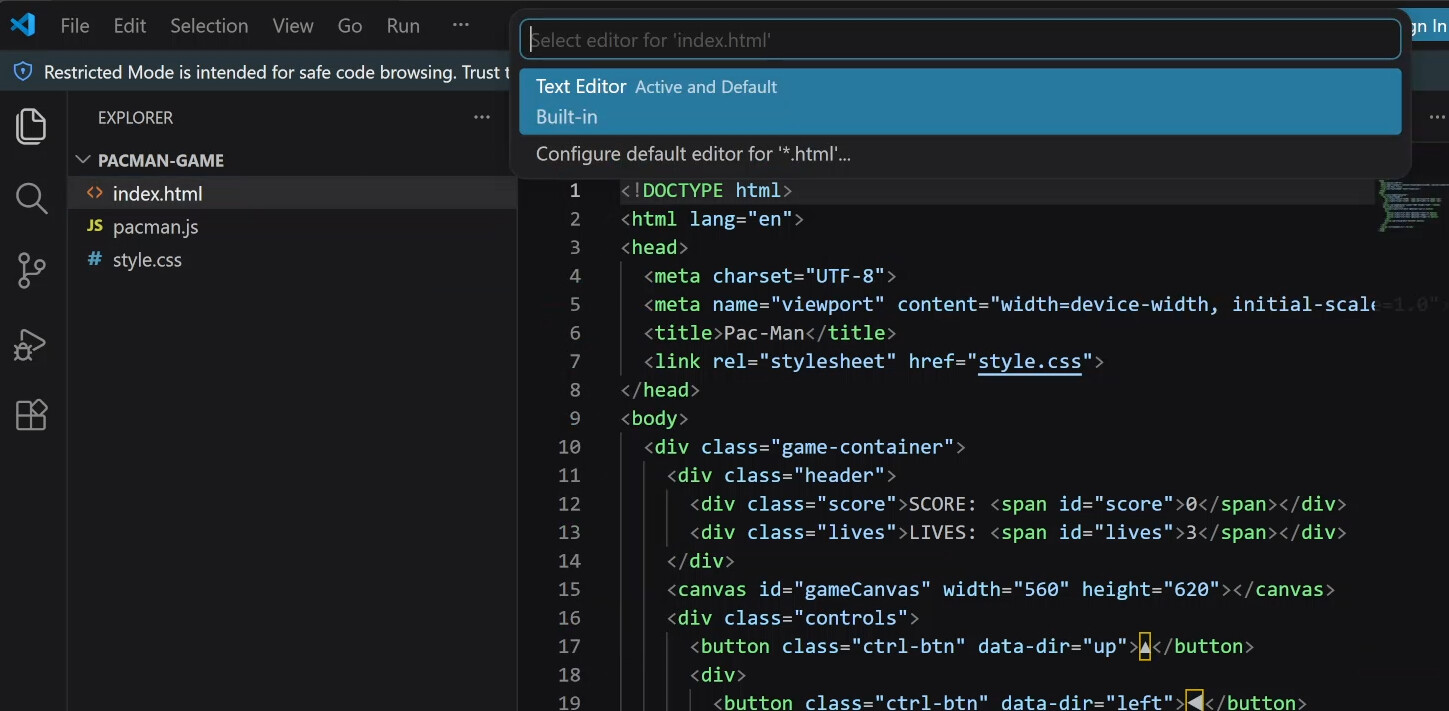
to this
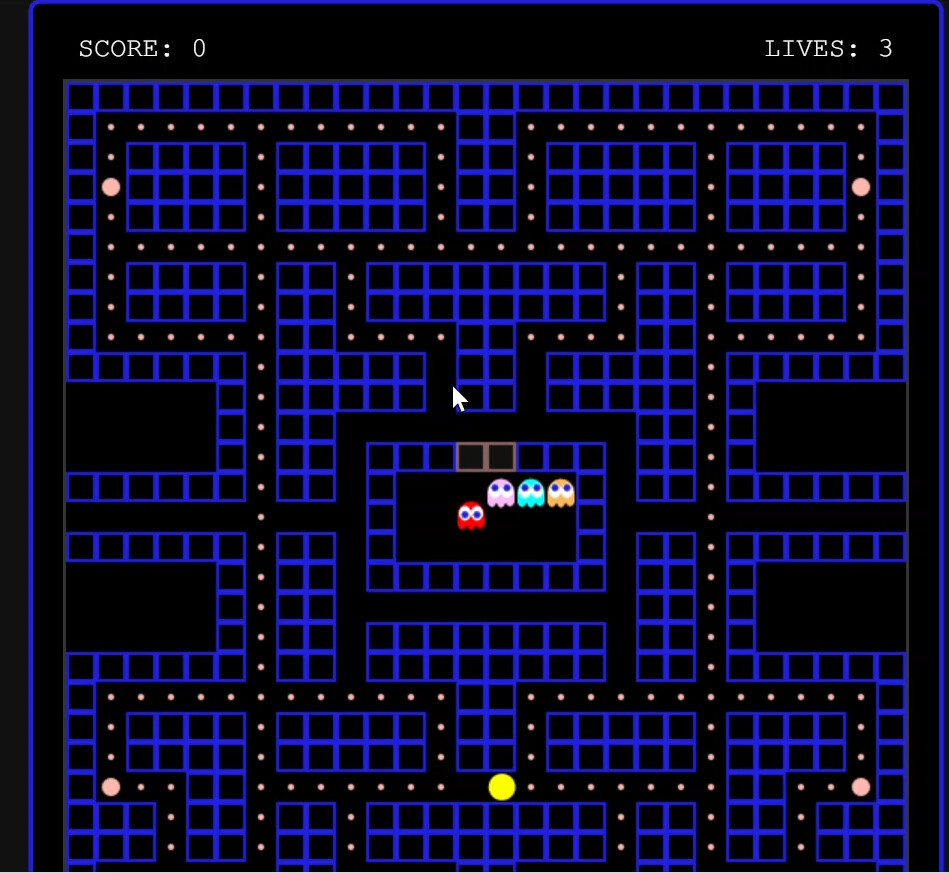
in just a few minutes.
Skills
This is very basic, but if you want something a little more advanced.. i.e. a skill that can use bash for example, check this out:
This blog post is a year old at the time I’m writing this, but it still pretty relevant for wrapping your head around the possibilities. And everything has moved 10 years in the last year, so it’s even better:
Create Your Own Bash Computer Use Agent with NVIDIA Nemotron in One Hour | NVIDIA Technical Blog
Anthropic also has a skills repo on GitHub if you want to read and understand.

