You are essentially benchmarking your RAM here, not the drive. Those figures are mostly cache.
And the Chinese ownership of PrimoCache is a huge red flag for me. I wouldn’t touch it with a 39.5ft pole.
See above. He has PrimoCache set up, and is essentially benchmarking his RAM.
The dead giveaway is that great as the Optanes are, the P5800x is a 4x Gen4 device and can never exceed 4x Gen 4 sequential speeds no matter what you do. Those would cap it at ~7.8GB/s
Besides, the reason to get an Optane is not for it’s sequential speeds. Those are pretty average for a drive of its generation. It is the extremely fast random speeds.
You sequential speeds are pretty much par for the course for a 400GB p5800x. They are rated at 7200 MB/s reads, but it is not uncommon to read slightly slower. Your writes are actually above Intel’s spec of 4800MB/s.
Your low queue depth random reads are a little on the low side, but that is also not uncommon.
Low queue depth single threaded reads are so fast on Optane drives compared to other SSD’s that you are usually CPU limited rather than drive limited. I suspect that is what is holding you back there (though I don’t know exactly which CPU you are using, and what else is loading up the system during your test)
If you monitor your CPU utilization you will find that on an Optane drive the Q1T1 RNBD4k Read test will almost always pin one CPU thread and be limited by it.
Here are mine, but they are from Windows, and windows performance will differ slightly.
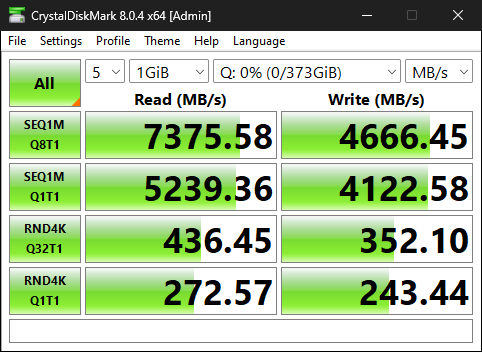
I had never heard of Kdisk. I’m going to have to install it and give it a try.
In general - however - while most SSD’s are drive limited in this test, if you want to get the most out of Q1T1 Random reads on an Optane drive - particularly a p5800x - you are going to need a CPU with pretty high single threaded performance.
I just installed kdiskmark and attempted to replicate your test. Not sure why you cranked the test size up to 64GB. That is much larger than typical, and means it will not be directly comparable to others tests. I believe the default is always 1GB.
Here is mine at 1GB. I don’t feel like writing a 64GB test to my drive right now.
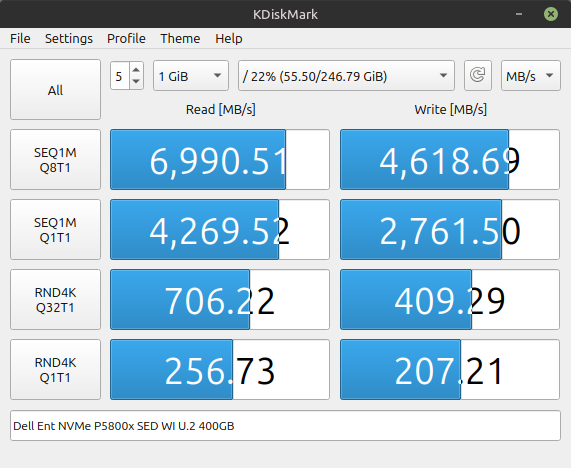
Keep in mind, mine is on my active root drive, so this test is going to be held back by other processes accessing the disk during the test.
I think your test is fine. The RND4K Q1T1 is a little slow, but that is likely just the CPU holding you back. But also, try it again at 1GB and see if it looks any different.