I have installed Ubuntu 22.04 (normal install, with updates).
I have the firmware update file on a USB flash drive (E:).
Ubuntu sees the file on the flash drive, but it won’t run if I double click on it, saying that it can’t open executables.
I have tried those commands, exactly as you’ve typed them in, but they are not working.
Please explain to me, as for a 5 year old, how exactly should I type in those commands, specificly for my system.
Thank you!
PS:
I am a Windows user.
That’s the 1st time I’ve ever installed a Linux distro.
I’ve taken out my Nvidia GPU, because I had artifacts in “Try mode”, so now I am using the CPUs iGPU.
Also, my mouse is lagging badly.
Any recommendations for these? I have a pair of U.2 P905s on the way, and I haven’t pulled the trigger yet on a carrier card. I was eyeing the 10GTek 2-port PCIe x8 card, since it fits perfectly in my spare x8 slot… it’s cheap, likely because it doesn’t have active redrivers. Would gladly change to something else if you have options to consider…
Hi,
I have a 053M3R Intel Optane 400G connected with the DiLinker M.2 to U.2 50cm cable that can be found on Amazon, in the PCIe 4.0 slot on my Asus B650 Creator motherboard that is connected to the CPU (AMD 9900x). This cable appears to work very well.
As far as I know these numbers are in line what I can expect from my setup.
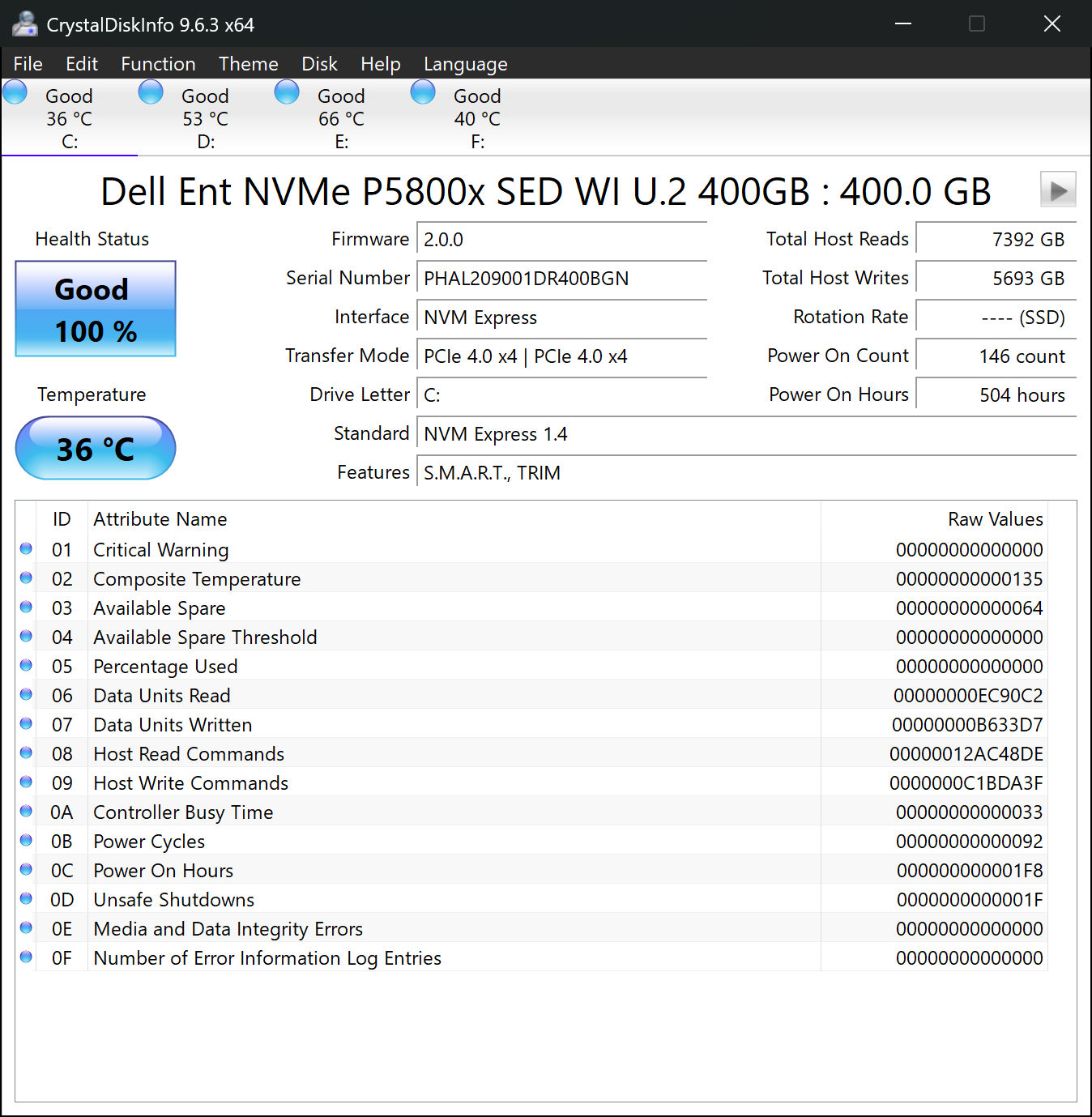
My disk is revision A00 and I flashed it with the 2.0.0 A01 firmware, changed LBAformat to 4k, but neither change gave me any meaningful performance upgrade. I would just advise not to bother with it.
This setup got a rather disappointing result in 3Dmark storage benchmark at about 4100, not close to the new shiny PCIe 5 SSDs hitting the market. I assume the Optane drive just doesn’t provide the sequential read speeds needed to score higher in that benchmark. The difference as an OS drive however is rather noticeable, never seen apt eat through packages at that speed before. Also try running SQLite benchmarks on the Optane vs NAND drives, it’s amazing.
it’s still the case that most benchmarks don’t really quantify fast optablne as an os drive. i disable aspm and put optane on CPU pcie lanes to help minimize latency fwiw. still good boot/os drive. less relevant for data drive. I’m on the fence about /home since I can symlink some dirs to open but still have /home be on a big drive for capacity
First, there’s no need to install the OS. You can boot a Live CD.
Once booted, you need to copy the file from the drive to your system. You can do that with the GUI file manager if you like. Copy it to your home directory
You have to run it in a terminal as the root user, you can’t just double click it:
$ cd ~
$ chmod 755 thefile
$ sudo ./thefile
If it says sudo isn’t installed, then do:
$ cd ~
$ chmod 755 thefile
$ su -c ./thefile
Nothing special here, if you have problems, you can search “how to run a program as root on Linux”
At the very least, do ~/.cache (unless you’re already using a RAM disk for this)
All of the modern browsers do a silly amount of small i/o to their respective directories in ~/.config as well. It’s a good candidate for Optane as well, though I ended up using profile sync daemon (psd) for this when I found it a couple of years ago. The constant i/o was driving me batty
I highly recommend psd. It beats the hacks I spent quite a bit of time on. It’s reliable, easy to configure and very flexible
(Assuming you’re talking about a workstation- otherwise not too helpful)
First of all, thanks for detailing here the steps that you’ve taken to install this firmware update.
Yesterday, with the help of a friend, who’s a Linux user, we’ve been able to update the firmware to v2.0.0.
(We’ve done it in Ubuntu 22).
However, the numbers in benchmarks didn’t improve, compared to v1.0.0, but somehow, the SSD became more responsive.
Every file & program opens up instantaneously now!
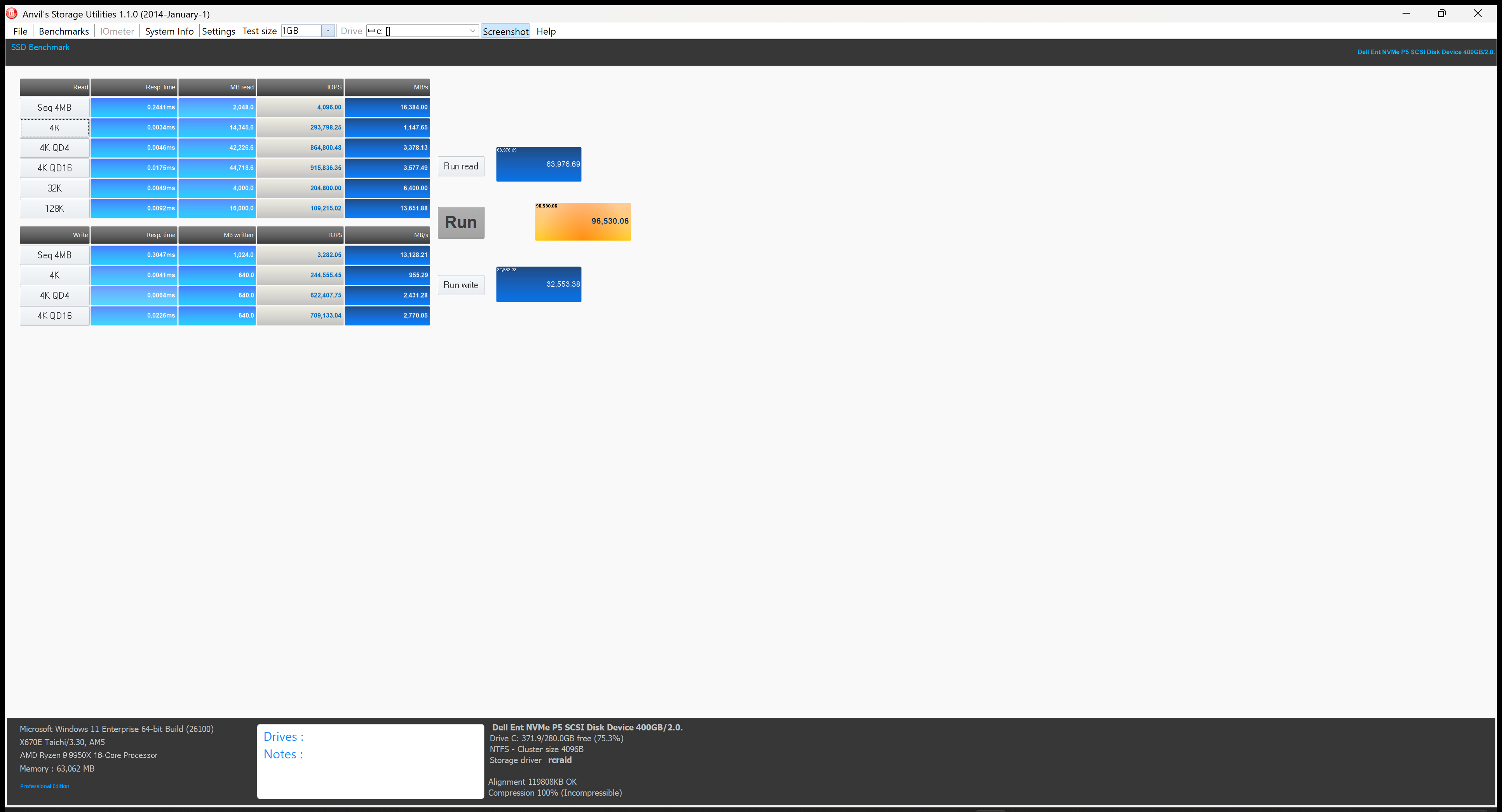
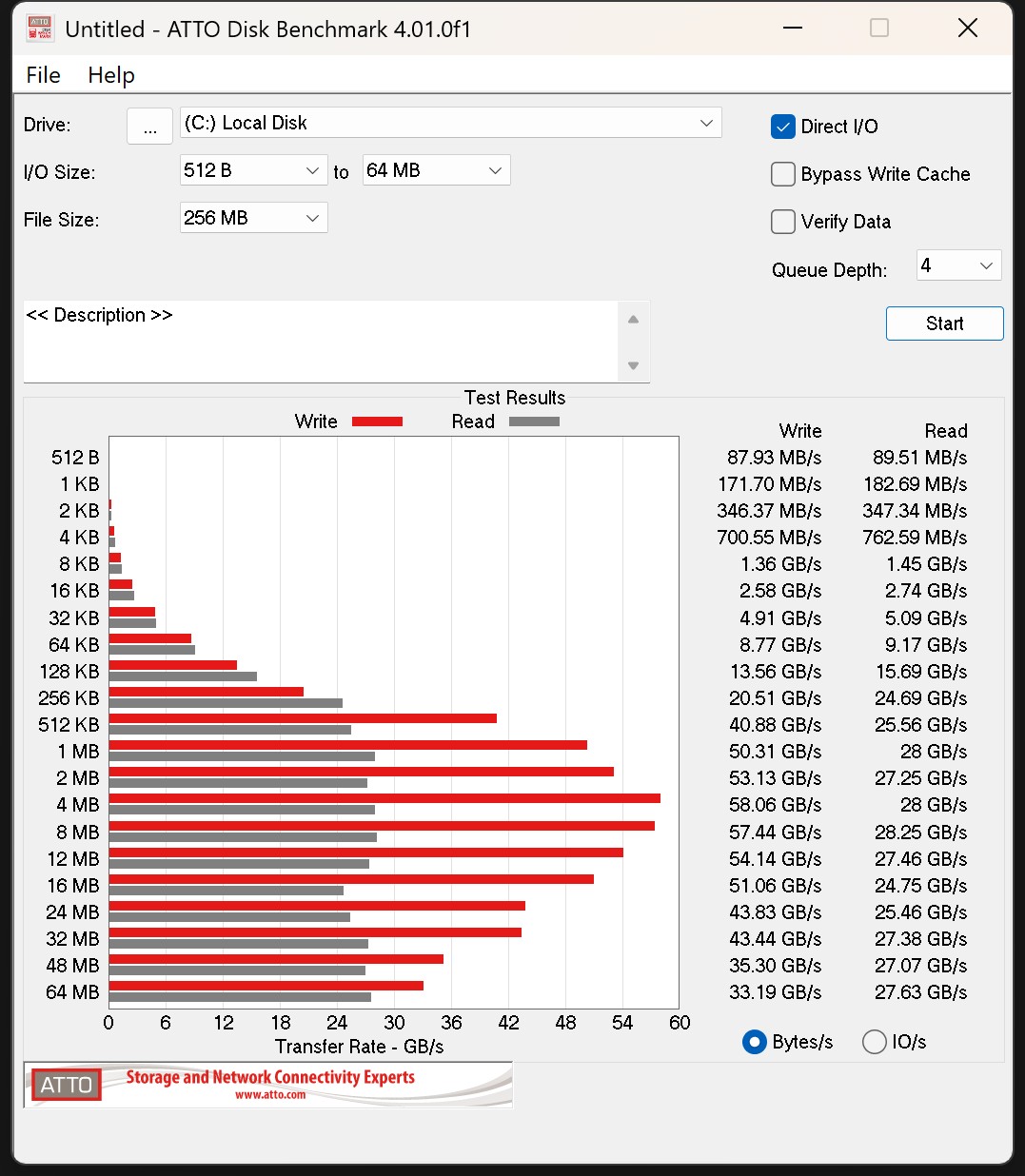
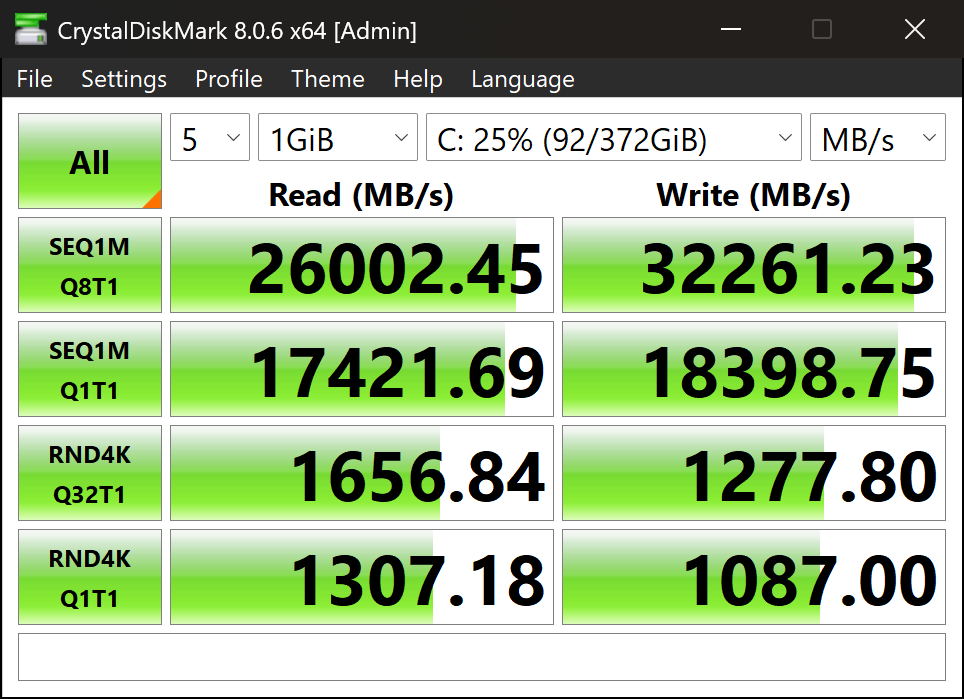
You are essentially benchmarking your RAM here, not the drive. Those figures are mostly cache.
And the Chinese ownership of PrimoCache is a huge red flag for me. I wouldn’t touch it with a 39.5ft pole.
See above. He has PrimoCache set up, and is essentially benchmarking his RAM.
The dead giveaway is that great as the Optanes are, the P5800x is a 4x Gen4 device and can never exceed 4x Gen 4 sequential speeds no matter what you do. Those would cap it at ~7.8GB/s
Besides, the reason to get an Optane is not for it’s sequential speeds. Those are pretty average for a drive of its generation. It is the extremely fast random speeds.
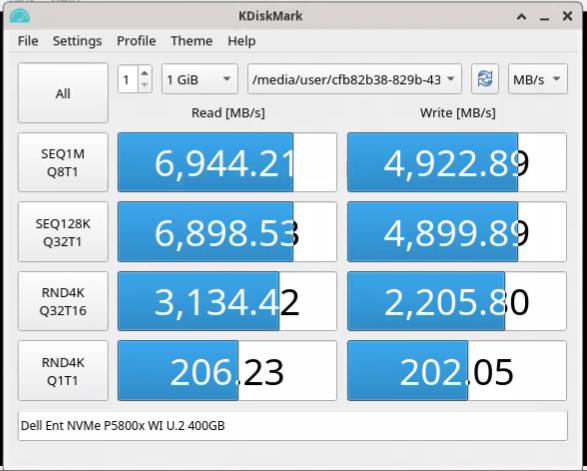
You sequential speeds are pretty much par for the course for a 400GB p5800x. They are rated at 7200 MB/s reads, but it is not uncommon to read slightly slower. Your writes are actually above Intel’s spec of 4800MB/s.
Your low queue depth random reads are a little on the low side, but that is also not uncommon.
Low queue depth single threaded reads are so fast on Optane drives compared to other SSD’s that you are usually CPU limited rather than drive limited. I suspect that is what is holding you back there (though I don’t know exactly which CPU you are using, and what else is loading up the system during your test)
If you monitor your CPU utilization you will find that on an Optane drive the Q1T1 RNBD4k Read test will almost always pin one CPU thread and be limited by it.
Here are mine, but they are from Windows, and windows performance will differ slightly.
I had never heard of Kdisk. I’m going to have to install it and give it a try.
In general - however - while most SSD’s are drive limited in this test, if you want to get the most out of Q1T1 Random reads on an Optane drive - particularly a p5800x - you are going to need a CPU with pretty high single threaded performance.
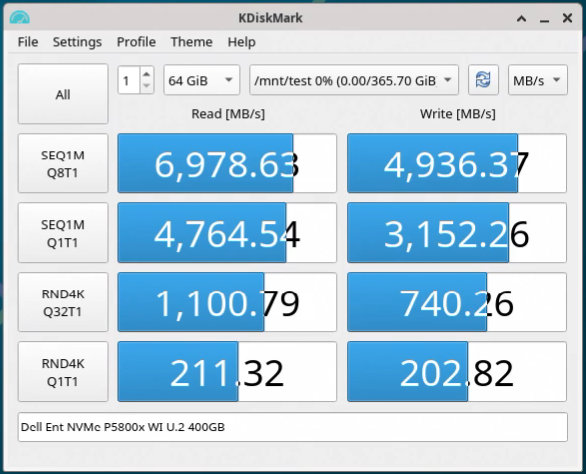
I just installed kdiskmark and attempted to replicate your test. Not sure why you cranked the test size up to 64GB. That is much larger than typical, and means it will not be directly comparable to others tests. I believe the default is always 1GB.
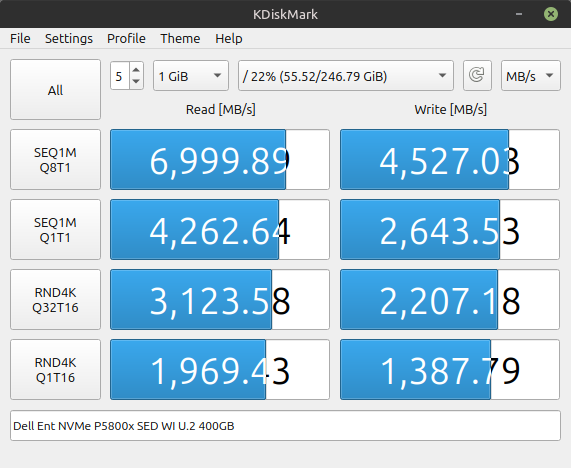
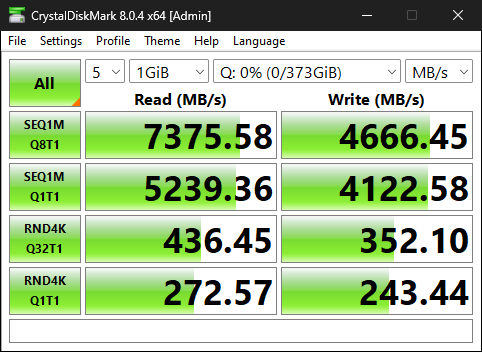
Here is mine at 1GB. I don’t feel like writing a 64GB test to my drive right now.
Keep in mind, mine is on my active root drive, so this test is going to be held back by other processes accessing the disk during the test.
I think your test is fine. The RND4K Q1T1 is a little slow, but that is likely just the CPU holding you back. But also, try it again at 1GB and see if it looks any different.
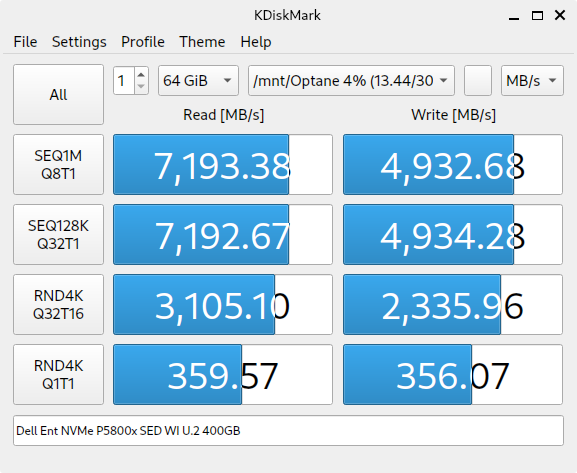
I was actually comparing to @ekkert’s post further up While trying to use the same settings. Buuut, I just realized they had set it to the “NVMe” preset, which uses different tests!
Note that what the NVMe settings usually change is simply allowing for more CPU threads. The top of the two RND4K tests - for instance - went from Q32T1 to Q32T16. So now that test is likely no longer held back by the CPU and is instead drive limited.
This further confirms to me that your Q1T1 results are probably a CPU limit.
I happen to have a 24C/48T Threadripper 3960x. I have a VM running right now I don’t want to shut down (or conflict with for CPU power) which is using 8 cores, but if I run custom settings with 16T on all of the RND4K tests (it shouldn’t matter for the sequentials), guaranteeing that each one gets a (mostly) dedicated core my results are less CPU dependent, and look very different:
That last number (the low queue depth RND4k reads) is really the most astonishing one compared to non-Optane drives, as they tend to peak just north of 100MB/s even when the CPU is not a limiting factor.
It is my belief that this is what accounts for the ridiculous real world responsiveness of these drives.
I don’t know what the significance of the Q1T1 test is. Maybe it is tested that way in this benchmark because most disk access code is single threaded and doesn’t benefit from multi-threaded CPU performance? I don’t know. But it sounds likely to me.
Just as @mattlach said, I am using PrimoCache Pro.
So, the drive benchmarks turn into RAM benchmarks, according to the size of the RAM cache assigned to the drive.
Since I have 64GB DDR5, I’ve assigned 10GB RAM cache to the OS drive.
Previously, I was saying that I get low numbers in benchmarks, especially in random transfers, with my Dell Optane P5800X 400GB.
Disappointed, I’ve even tried caching tools like PrimoCache Pro to boost its speed.
Today I’ve discovered the issue!
The issue was that, besides the Optane drive, I had a RAID-0 array (3x Samsung 970 Pro 1TB) done in the BIOS menu.
The Boot-Start Drivers, which had to be installed at the Windows setup, in order for the OS to see those 3 SSDs as one big drive, were controlling the Optane drive too!
So, though the OS was installed on the Optane drive, if I’d disable RAID in the BIOS menu, the PC wouldn’t boot into Windows, but it would give me a BSOD, saying that it could not find the bootloader.
Today, I have deleted the RAID array.
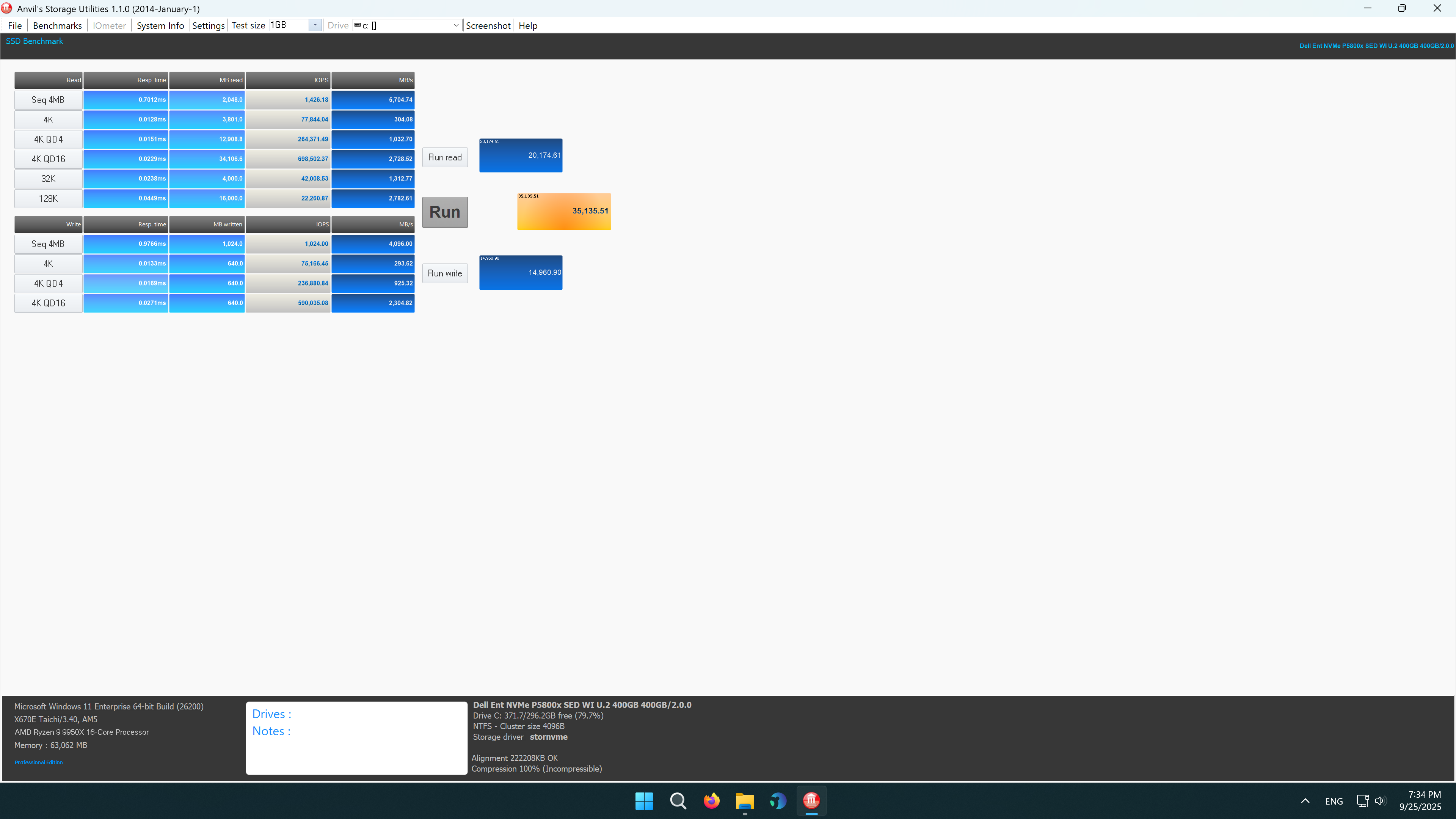
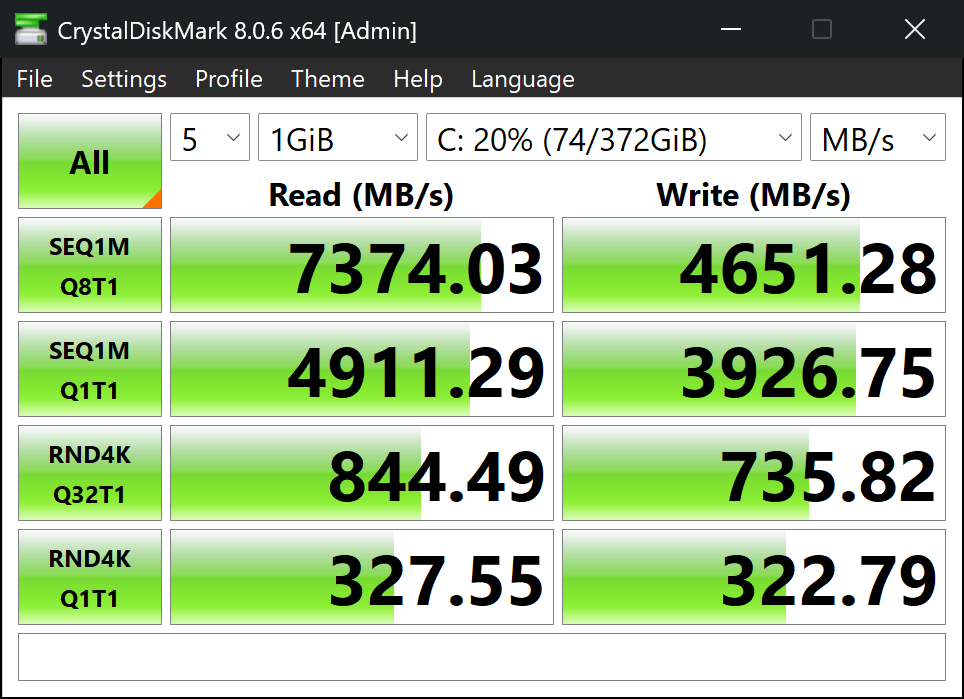
I’ve re-installed Windows 11 clean, and my OS drive numbers in benchmarks ar much better!!!
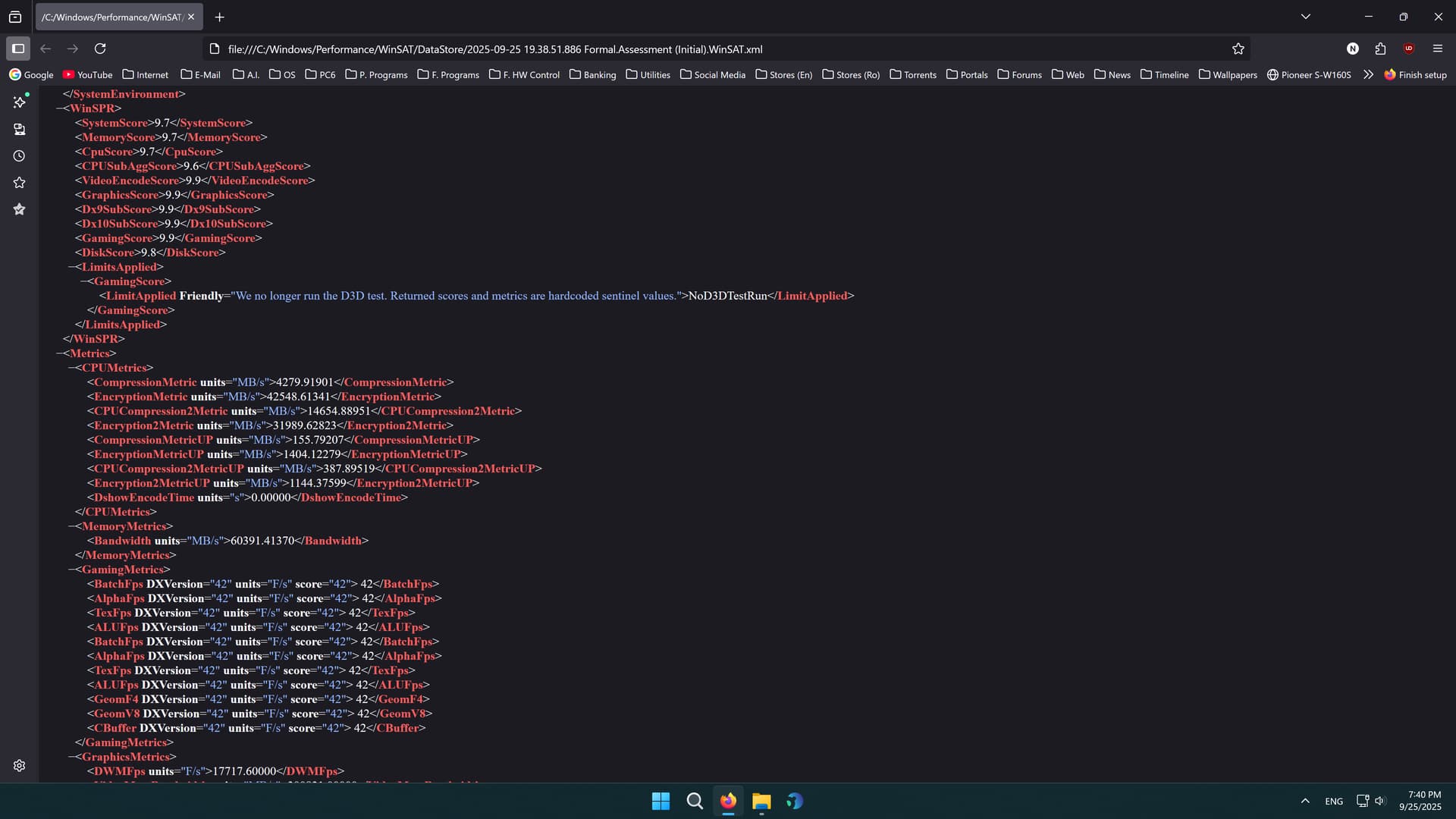
Even the disk numbers, in Windows 11 WinSAT Formal test grew from 9.6, to 9.8!


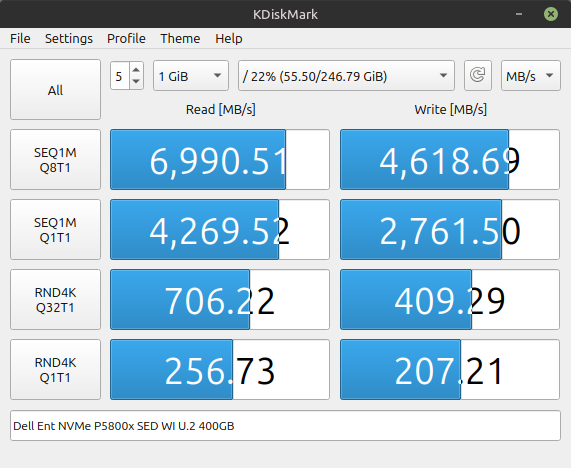
 While trying to use the same settings. Buuut, I just realized they had set it to the “NVMe” preset, which uses different tests!