I have a similar system with 64 Zen3 cores and I am currently using DeepSeek-v3:671b-q8_0 to generate answers for me. Takes a while but apart from the costs of the hardware the usage is free.
If someone can give me hints how to best get a comparable benchmark I could do this for you with you desired model to give you some orientation what you could expect from hardware like this.
Also question to anyone on here, especially @ubergarm, do you people have an idea how best to setup a usable RAG system. Open-WebUI has a bit of features in this direction included but it’s not a great solution and depends on Open-WebUI. I tried to search how to setup something like this but people only mention very vague ideas about it and it appears like anyone has a different idea about it too.
Yeah for the real R1 67B models and quants you want enough RAM ideally in a single NUMA node. Faster RAM bandwidth will help for sure. If you want to run the full q8_0, it will take up around 700GiB RAM.
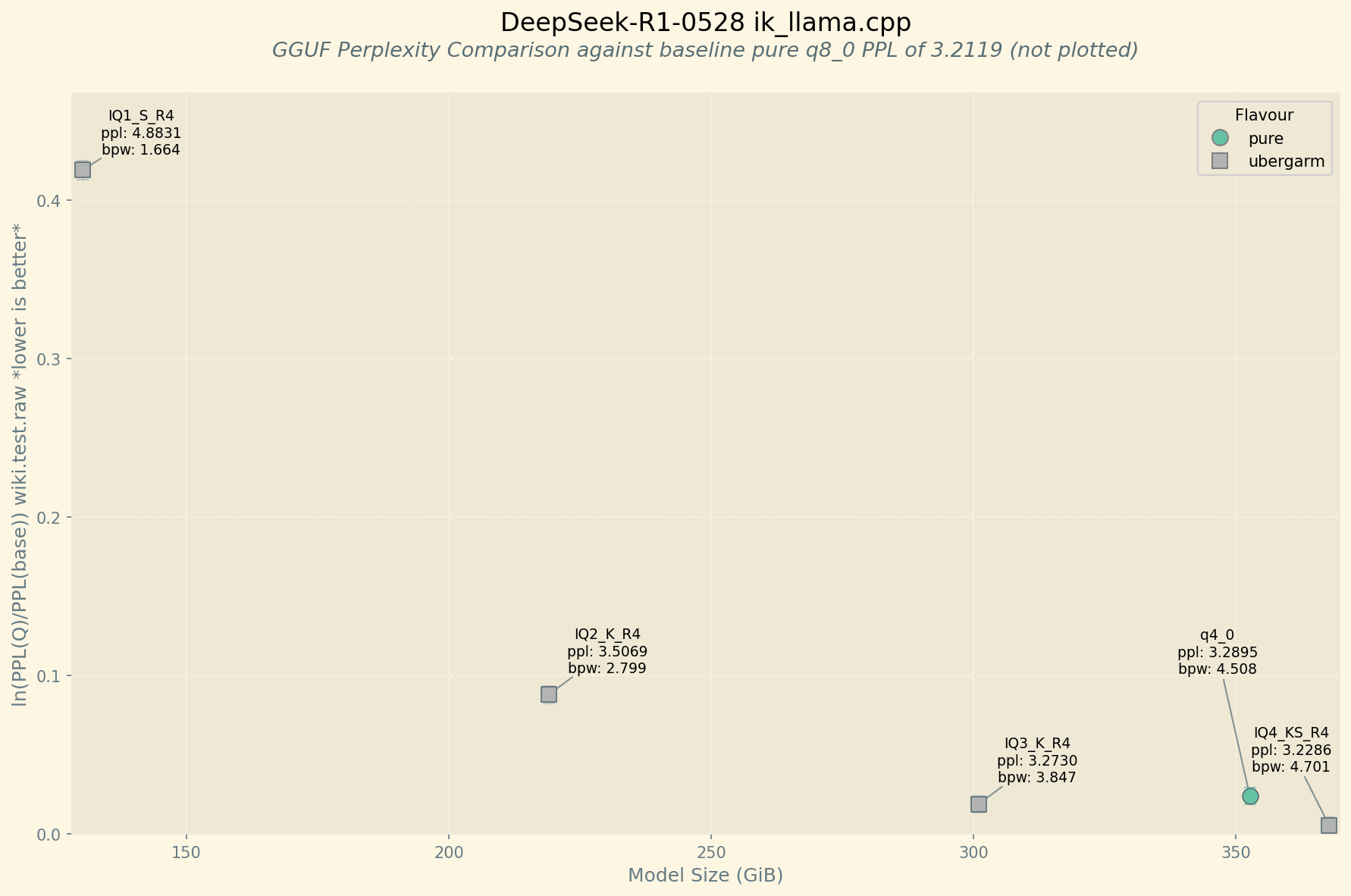
That said, I just used one of Wendell’s big rigs to cook up the latest DeepSeek-R1-0528 in a IQ4_KS_R4 quant that is 368GiB. It is very close to full quality in terms of perplexity comparison, and will likely run faster than the full q8_0 assuming your bottle-neck is RAM i/o.
A single 24GB VRAM GPU is probably a good place to start, and likely a CUDA unfortunately just for compatibility. A used 3090TI 24GB is still a good value. Though DeepSeek uses MLA (Multi-head Latent Attention) which scales linearly so with some of my quants you can fit almost 90k context on a single 24GB VRAM GPU. Also running the kv-cache and attention stuff on a GPU generally gets you a good speed boost while letting the CPU/RAM handle the routed expert layers.
So at first glance your rig looks reasonable and having plenty of RAM will let you run almost any model even if the speed on big dense models won’t be very good.
I forget exactly what GPUs or not you’re using on your rig? I like llama-sweep-bench which works on ik_llama.cpp and I have a custom fork for mainline llama.cpp as well if you wanted to try it. I just learned about -ub 4096 -b 4096 to increase batch size which uses a little more VRAM but can speeds up prompt processing a lot.
Yeah I tried Open-WebUI a little bit and while it is interesting and I see the use cases it was not something I enjoyed using as a daily driver.
Honestly I just have a little text ui OpenAI API compatible client that I connect via ssh tunnels to various ik/llama.cpp/exllamav3 servers and copy paste my prompts and code hah…
I haven’t tried it myself, but a friend of mine recommended to me DocsGPT which can do the RAG chunking of your documents connecting to a local API endpoint e.g. ollama or ik/llama.cpp and gives a user interface to interact with it.
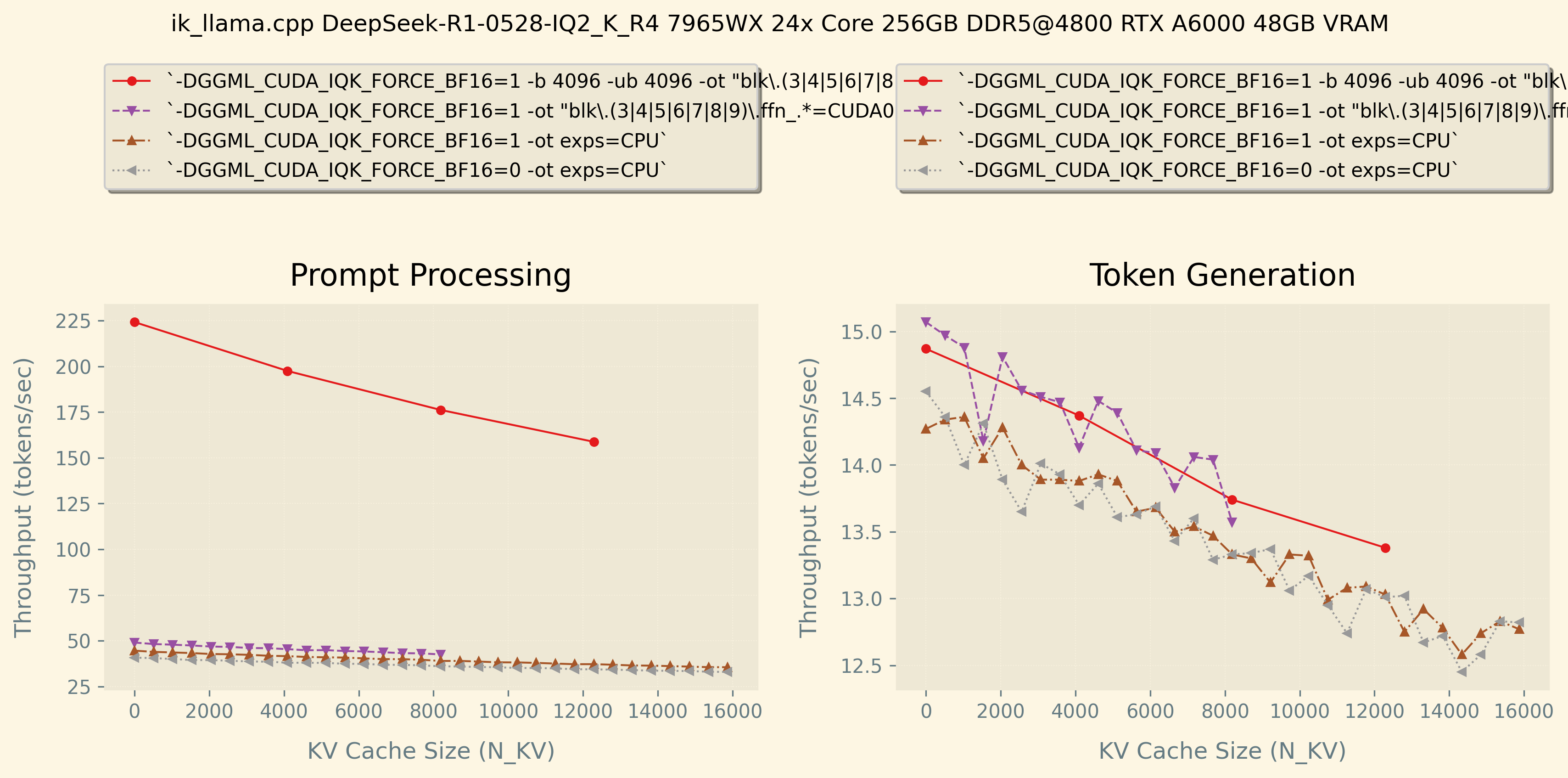
Holy cow fully GPU offloading R1 amazing. You can probably get it going faster playing around with the -ub -b options I mention above as my graph shows over 200tok/s prompt processing on a single RTX A6000 48GB VRAM @ 300W which is faster than your 106 tok/sec haha… Sorry I just had to tease u a little cuz I’m jealous too xD
Also IQ1_S is not very optimized CUDA kernel from what I can tell, but it is very small at least. You might want to look in to the new exl3 quants with exllamav3 or also ik_llama.cpp has the same new experimental “QTIP / trellis quants” called iqN_kt which I want to try soon. They are slow on CPU but pretty fast on CUDA with the best quality available today.
Its amazing how a few tweaks and small optimizations to your server command can really add up to meaningful improvements.
First of all, I’d be extremely grateful if you’d be able to give me even the most basic stuff like token/s with zero/low amount of context and then something with more context filled, and I’d be indescribably beyond extremally grateful if you’d feel like doing the llama-sweep-bench ubergarm mentioned. (Just getting a baseline to compare against to make sure I haven’t messed up something in a config somewhere would be priceless on its own.)
However, after reading a bit more, ever since I wrote my post, I have a few more questions for you/ubergarm, sorry if my lack of knowledge shows. Have you tried using different quants, like Q6 for example? And was there any real difference when it comes to interference speed vs Q8?
Back when I was used to doing this stuff, generally, higher quant = better, and the only issue was VRAM, but with so much RAM, is there any real difference between speeds on Q8 and Q6? And that’s not even to mention that IQ4_KS_R4 that ubergarm pointed me to.
As soon as I get the rig working (supposedly 2~ ish weeks is when all parts should be delivered.), would you be interested in a comparison from my setup running IQ4_KS_R4 and something like Q_8? I don’t benchmark much, but I think I probably could run something like the bench you mentioned earlier, the downside is that I’m going to start with no GPU, so that will show up.
Speaking of, since you’re the one making these things, I hope you don’t mind me asking, but would you recommend any resource for me to learn about the new ‘weird’ quants? It just seems insane to me that you can run something like R1 with low loss in terms of perplexity with 300 GB of RAM less, no shade, but I remember back in the day when even a few steps below with quants could sometimes really hurt and make the model feel like it’s from a different weight class.
And I’m going to leave the most wishful for the last, but is there any, even slightly approximate way, to calculate the differences between performance you’d get with faster RAM and/or CUDA GPU? I know that in the case of GPU that might be asking for fairy dust, but I swear I heard about a thumbs rule with calculating RAM speed differences in LLMs performance somewhere, can’t find it though.
You can run all the different combinations in a single llama-bench psure, but I personally prefer llama-sweep-bench as the graphs are easier for me to understand and reflect actual speed drop curves over long chats.
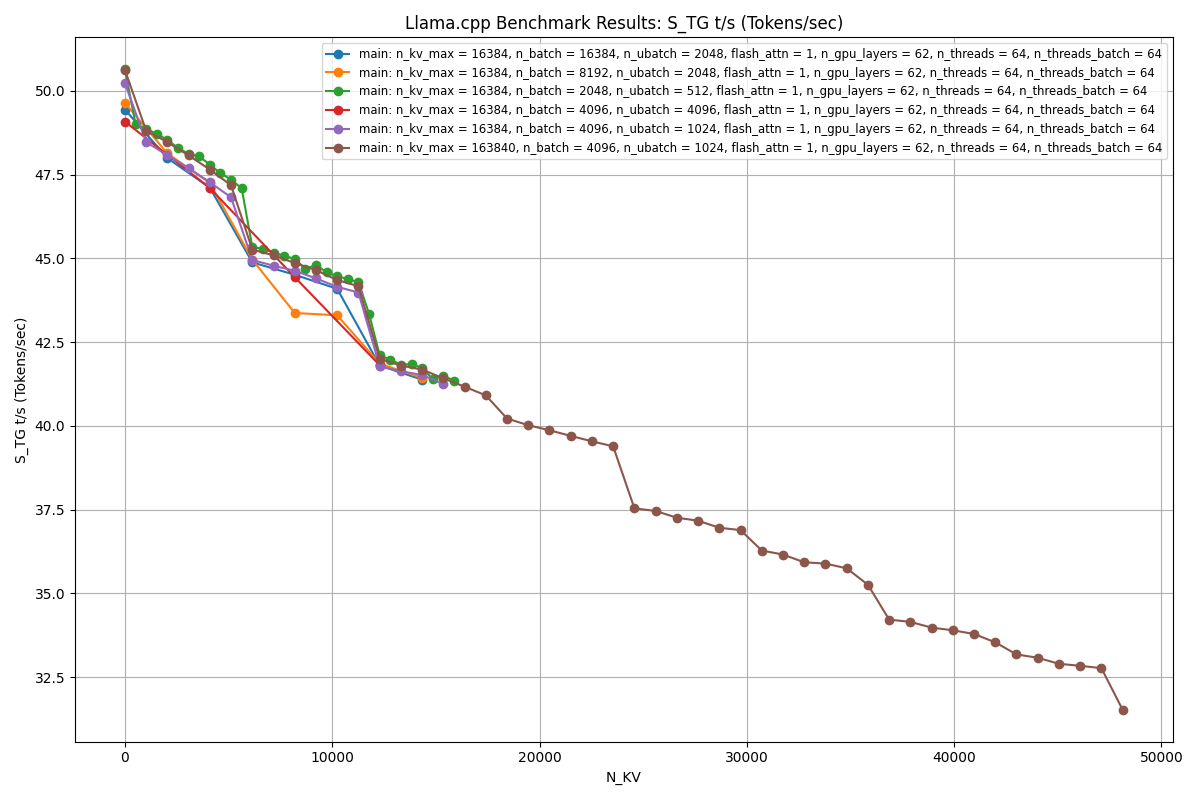
Seems like increasing -ub and -b isn’t doing much at this small size test so hard to say if it would help in actual usage or over longer contexts.
Its wild but you could probably crank up context beyond 160k (the model max) then use like --parallel 4 and hit it with async requests and get some serious throughput!
You have lots of options to play around and tweak, so cool, thanks for sharing the baseline numbers!
My take away from this is if you are wanting to process a lot of prompt tokens increase batch, if you want to process alot of model tokens increase ubatch.
Wow you figured that out quick, thanks for sharing some results! So cool to see fully GPU offloaded R1 this is pretty wild haha!
Yeah those arguments and some others are specific to ik_llama.cpp and not available in mainline llama.cpp.
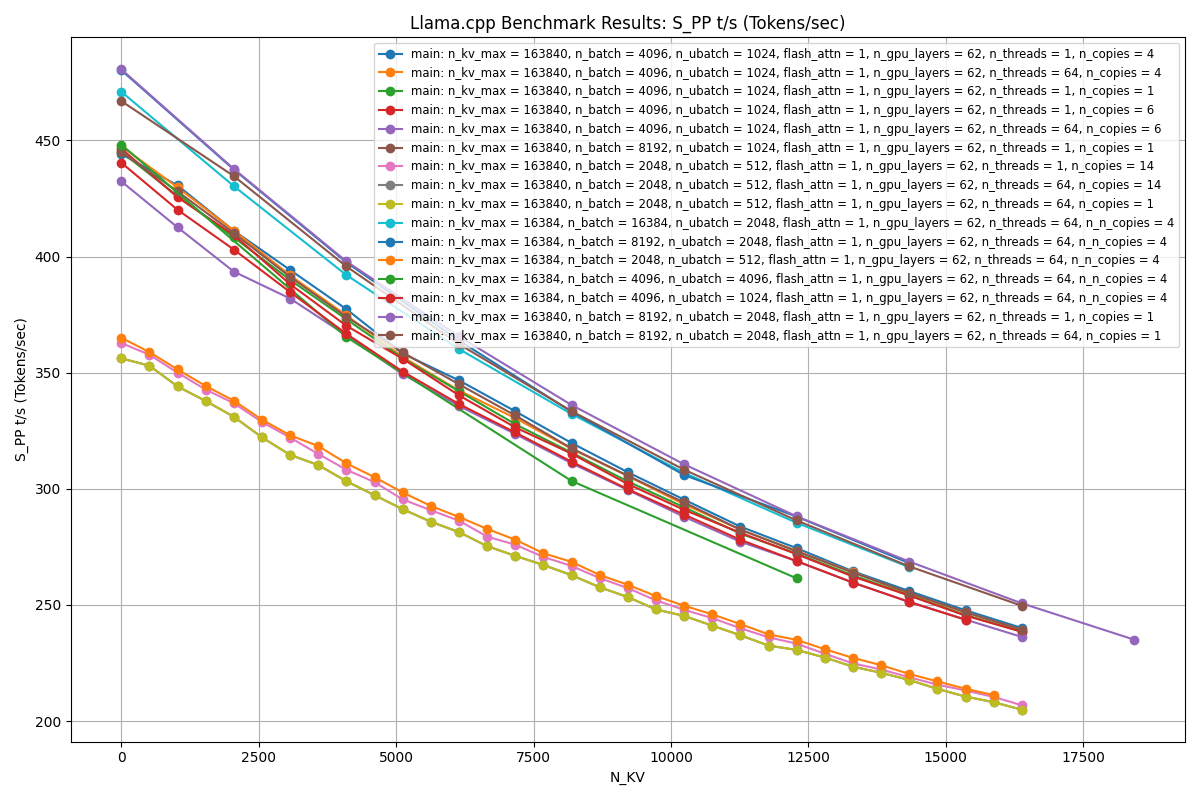
Hrmm, one other thing you can play with is compiling to change the default parallelism from 4 down to 1. This results usually in extra free VRAM to fit more bigger models, or you can use the extra VRAM for bigger batches until you figure out what works best for your system. e.g.
Also when you’re running fully offloaded onto GPU turn down the CPU threads to just 1 with --threads 1 or -t 1 which can give a small boost sometimes.
Impressive you were able to visualize the results and figure out the best combinations of -ub and -b for your rig! Nice job and thanks again for sharing!
Llama.cpp isn’t the best at multi-gpu, have you tried using vllm or exllamav2 or exllamav3?
Every model I run on exllamav2 vs llama.cpp it’s not even close, exllamav2 is significantly faster out of the box with no tuning.
I haven’t gone down the rabbit hole of tuning yet but will get around to it eventually. Will be following your work to see what you come up with. If you want to run similar tests on my 7 card setup, happy to collab and get some results for people.
Heya @Rakeznik no need to figure it all out before your rig even arrives haha… ;p But I can tell you are excited and I’ll do my best here. It takes time to learn all this stuff, and I’m still learning because it changes faster than I can start to figure it out even lol. Enjoy the journey is all one can do!
Yup, I personally don’t like ~6bpw quants as I’m just superstitious that they’re blursed due to old perplexity graphs showing a slight dip around there.
For smaller models especially like under 70B dense models you probably don’t want to go below ~4bpw quant sizes unless you have some reason or the very new bleeding edge QTIP/trellis/exl3/iqN_k quants.
For very large MoE’s like DeepSeek you can quantize harder and it still remains pretty useful. My best vibe coding quant currently is my new IQ2_K_R4 2.799 BPW (220GiB).
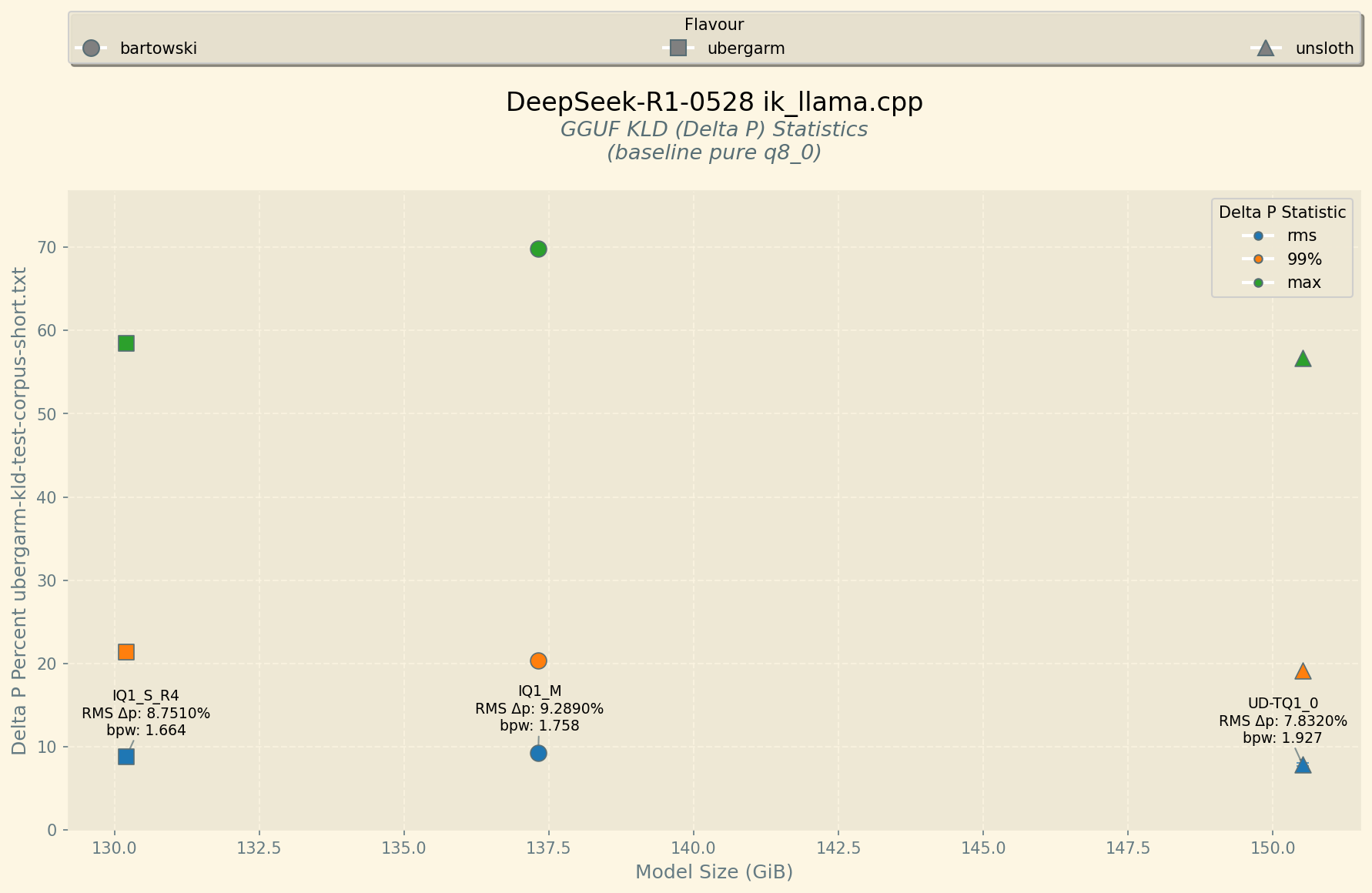
I ran perplexity estimates of all the new quants I released vs the original full quality Q8_0 (actual original model is fp8 but close enough) so you can see how quality remains pretty good until you get way down to under 2bpw and surprisingly the smol boi IQ_S_R4 is still actually usable haha…
There are so many these days… You almost have to read papers on arxiv if you want to really understand them and the differences. It is confusing too because QTIP paper was implemented by turboderp as exl3 and ik’s implementaiton is called iqN_kt haha… Then all the big GPU folks using sglang/vllm use AWQs and other types of quants more related to the exact GPU datatype supported for their hardware etc. Its all a game of how to do matrix math the fastest on the exact hardware capabilities.
Sort of… In general Prompt Processing (PP) aka Prefill is more CPU intensive and less memory i/o intensive. Then Token Generation (TG) is more memorio i/o bound. So already there is no single configuration way to optimize both. In fact you can specify different number of threads for each with --threads N --threads-batch Y to try to help out.
You can think of it in terms of memory bandwidth though either RAM on CPU maybe hitting 60-90 GB/s on gaming rigs, to 256-1000 GB/s on workstations and servers. Then on GPUs gddr6 and bus width etc so like my 3090TI FE 24GB VRAM can hit almost 1TB/s memory bandwidth.
To make it more confusing there are NUMA node issues, so your calculations will likely assume all the RAM is in the same numa node as your CPU core which is not the case as this software is not optimized for big CPU servers at all haha…
Then you look at the size of the model weights and begin to find out if your bottle neck is CPU, RAM/VRAM bandwidth, possibly PCIe bandwidth if you’re doing multi-GPU stuff, and while yes you can come up with a theoretical upper limit for a given model architecture of a given quantization on a given hardware configuration for a given algorithm implementation… I haven’t bothered thinking about it too much and just run benchmarks and a/b tests and see what other people are reporting.
Okay, excited for you to build your rig and start playing around! Run whatever model seems most interesting to you and happy if you shared some llama-sweep-bench graphs like recently posted above! Cheers!
Haven’t ran benchmarks yet but I was reading through the code on what GGML_CUDA_PEER_MAX_BATCH_SIZE=128 does in the abstract. Something about enabling peer mode if batch size is less than max size. So rebuilt with cmake -B build -DGGML_CUDA=ON -DLLAMA_CURL=ON -DGGML_CUDA_PEER_MAX_BATCH_SIZE=8192 and it seems to fix the batching issues I was having above 2048. Utilization still seems a little subpar but I can now comfortably run 4096 ub
Oh interesting find. I have not played with that at all, but interesting it seems to fix your batching issue.
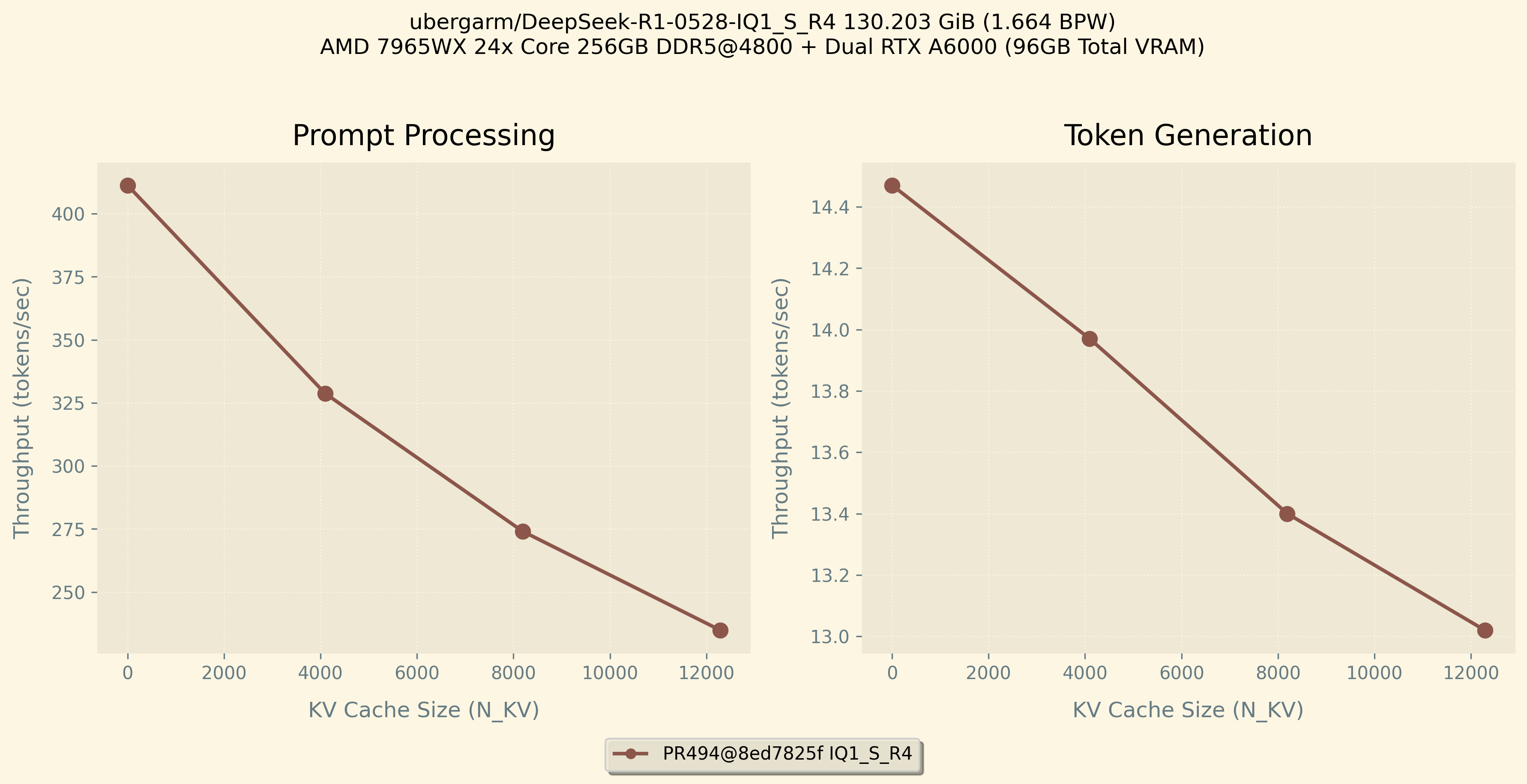
fwiw ik_llama.cpp just added support in PR494 for running iq1_s_r4 and iq1_m_r4 quants on CUDA to speed up infrencing on the worlds smallest working R1-0528 quant!
ubergarm/DeepSeek-R1-0528-GGUF/IQ1_S_R4 weighs in at 130.203 GiB (1.664 BPW) putting it within reach of AM5 class gaming rigs with the new 2x64GB DDR5 kits and a single GPU!
It is still competitive in terms of quality with other smaller quants (though of course it is recommended to use the bigger quants as they will have better quality if you can fit them!).
Speed Benchmark
You can now offload the repacked _r4 quants onto CUDA which gives flexibility to offload as much or as little as you need while keeping max TG performance either way. This functionality is only on ik_llama.cpp and just a few hours old so bleeding edge it isn’t merged into main yet haha…
I have given up on the unsloth 1 bit quant atm. While the performance is good when it works it tends to get into local mins and just start spamming the same token repeatedly.
Unfortunately I don’t have a repeatable prompt but --prompt '<|User|>What is the value of pi accurate to the 1,000th decimal? You must show all 1,000 values. Feel free to use tools, scripts, calculators, or other resources to accurately calculate the number. Show your work and verify the number for accuracy.\n<|Assistant|>' -sys 'This assistant is DeepSeek-R1, created by DeepSeek.\nToday is Sunday, June 1st, 2025.' probably has, as a wag, a 5% failure. Temp 0.6 of course
Tried llama-server with your quants (and also some non ik and non-deepseek), and chat responses end too early, sometimes partially midway though a word. Tried many of your posts and guides. Did I miss something with ik_llama.cpp?
Also, is there a way with ik_llama, to see Deepseek’s thinking/reasoning like llama.cpp shows?
@ubergarm, I wanna try one of your prepared quants these days. I got it that you predefine how much of it should go on the GPU and the rest on the CPU. Can you tell me is there a requirement how much VRAM the GPU needs. Is 16GB enough or would I need 24GB?
Huh, I’ve used that same hash successfully before and just tested it again right now with my DeepSeek-R1-0528-IQ2_K_R4 offloading extra layers to RTX A6000. I get over 15 tok/sec generation speeds in very basic setup and short prompts.
It does show the <think>blahblah</think> for me with default setup nothing special to do. So might be something up with your setup.
What is your CPU, RAM, GPU, and operating system?
What client are you using to connect?
What is the exact command you’re using to start the server?
Assuming you have like 256GB RAM and 16GB VRAM, try the ubergarm/DeepSeek-R1-0528-IQ2_K_R4 which I just checked can run 32k context with -ctk q8_0 using 15328MiB according to nvidia-smi using the following command:
I’m getting prompt processing about 40 tok/sec and token generation about 14 tok/sec using less than 16GB VRAM of a single RTX A6000 on a 24x core thread ripper pro with 256 GB DDR5@4800.
You might be able to play around and free up enough VRAM to still use like -b 2048 -ub 2048 and possibly get good prompt processing speed-ups.
Details
For running R1-0528 the attention and shared expert layers are much much smaller than all the routed experts. So yes I design my quants to run those smaller layers on CUDA for speed-ups while letting the CPU/RAM handle the big chonky routed experts.
My bigger quants use full sized Q8_0 tensors for those destined for GPU so requires 24GB VRAM. However, my smaller quants from IQ2_K_R4 and down use smaller (yet still very good quality like iq5_ks) for those layers and will fit 32k context in 16GB VRAM.
My smallest the IQ1_S_R4 can run on 128GB RAM + 16GB VRAM and is still usable but not recommended if you can fit a larger one.