DeepSeek Deep Dive R1 at Home!

Just released some “SOTA” quants of DeepSeek-V3-0324 up on huggingface (link to r/LocalLLaMA post about it).

I have a quant comparison of showing the exact quants used for which layers and it is interesting to see the differences across the top quant cookers offerings.

Also have some perplexity benchmarks showing how these quants offer performance similar to the full Q8_0 model in a much smaller memory footprint without sacrificing on prompt processing or token generation speed.

These quants do require ikawrakow/ik_llama.cpp fork, which builds and runs about the same as vanilla mainline llama.cpp and offers the OpenAI API compatible llama-server endpoint that works with all your favorite clients. Just note these GGUFs will not work with regular llama.cpp, ollama, lm studio, koboldcpp etc… (It’s because they have additional MLA tensors [which saves a ton of space on kv-cache]).

Thanks a ton to @wendell for all the hardware support and bandwidth going into doing doing research and cooking big quants! Also thanks to y’all sharing your results and findings in this fast moving special interest haha… :rocket:

5 Likes

Do you know whether ik_llama.cpp can compile with support for ROCm? Just curious if I can try your quants with my “budget” MI50/EPYC Milan server.

2 Likes

I’ve been trying to get the most out of my system for Deepseek R1 and Deepseek V3. I presume the same principles that you are applying also holds for R1?

My system is an odd one - a gaming rig with a bunch of GPUs: AMD 7900 w/ 96 GB RAM + 144 GB (48x2 + 24x2) + 4TB Samsung 990 pro.

I can get the Unsloth Deepseek V3-0324 IQ1_M working with a cache-type-k of q8_0, 36 layers offloaded to GPU with a ctx-size of 7,000.

I realize these low bit quants have a fairly high perplexity though they are definitely lightyears better than smaller models that are less quantized.

If your 9950X3D system had a few new GPUs, which is sort of what I have, what might be the approach you take to get the most out of it? Something like a cobbled together quant using a similar technique to what Unsloth does for their low bit quants?

I was thinking of upgrading the system memory to 192 GB (48x4) but I’m not sure how much benefit that would yield as the chipset only supports dual channel memory.

Thanks!

1 Like

Unsurprisingly, the perplexity for the Unsloth 1Q1_M quant isn’t great. fwiw, I tried to keep the same parameters when running llama-perplexity as Ubergarm’s runs for his quants.

$ ~/llama.cpp/build/bin/llama-perplexity \
>   --model /home/ai/models/DeepSeek-V3-0324-GGUF/DeepSeek-V3-0324-UD-IQ1_M.gguf \
>   --flash-attn \
>   --cache-type-k q8_0 \
>   --threads 16 \
>   --n-gpu-layers 38 \
>   --ctx-size 512 \
>   --ubatch-size 512 \
>   -f /home/ai/models/wikitext-2-raw/wiki.test.raw \
>   --seed 1337

[...]

Final estimate: PPL = 4.1655 +/- 0.02431

llama_perf_context_print:        load time =  284351.34 ms
llama_perf_context_print: prompt eval time = 4997985.03 ms / 287232 tokens (   17.40 ms per token,    57.47 tokens per second)
llama_perf_context_print:        eval time =       0.00 ms /     1 runs   (    0.00 ms per token,      inf tokens per second)
llama_perf_context_print:       total time = 5010021.10 ms / 287233 tokens
2 Likes

I am still fighting with ollama unloading the models from main memory all the time.

I instruct it load into memory with …

curl http://localhost:11434/api/generate -d '{"model": "deepseek-r1:671b", "keep_alive": -1}'

But when I send queries from open-webui it always unloads the model again after a while. I am not sure if open-webui sends keep_alive commands itself as well that override my command.

1 Like

It might? I believe the fork split from mainline llama.cpp late last year or so, so it may still have ROCm support, but not sure if matrix multiplication kernels for latest quants are implemented for it or not.

The quants I uploaded have about 18GB of weights in q8_0 which are designed to go onto GPU. The remaining routed expert weights are in a CPU optimized iqx_k_r4format (the _r4 means how the tensor data is repacked for memory access).

So you can fit 32k context in under 24GB VRAM and entire 160k context in under 40GB VRAM.

If you want to put some of those routed expert weights onto a GPU, you don’t want that _r4 quant though as it is made for CPU inferencing.

I’m curious the state of ik_llama.cpp for ROCm too, feel free to try it and report back or ask in a discussion on their github repo. If you find it does work, I’m happy to provide guidance in how to quantize a model designing which quants will offload onto which GPUs VRAM or RAM. Everything is managed with that -ot combining regex to map individual tensors whereever you want them to run!

3 Likes

Its possible I replied to you u reddit or github already, but yeah, welcome to l1t! Yes, if you have a variety of GPUs with various VRAM, the strategy would be to selectively quantize various tensors with quants good for that specific hardware and place them using regex and -ot (-ot just got merged into llama.cpp mainline a few hours ago too, so that is exciting.

Basically use qX_0 or iqX_xs type quants for any tensors that will be computed on the GPU and use the repacked iqN_K_r4 type quants for the routed experts remaining for use in RAM.

In the quants I provided above I use q8_0 for all the non-routed expert layers which uses about 18GB VRAM which leaves enough for 32k MLA context on a 24GB VRAM card.

You probably don’t want to use my two quants on hugging face if you want to offload more than 24-38 GB VRAM.

Right, the “verboten” 4x dimms configuratino on AM5 haha… I’m using 2x 48GB DDR5-6400, and not gonna trade down in speed for extra space. There are some other threads on here about tuning RAM for speed, and also some folks have won the silicon lottery enough to get DDR5-6000 stable with 4x DIMMs, but I’m not feeling lucky enough myself haha…

You can mmap() off of disk, but it bottlenecks around 5GB/s.

Yeah, their mix of quants is better than vanilla llama.cpp’s, but there is a whole story behind it. Also I believe bartowski is in the process of updating his quant offing to include his new V2 recipes now which is great!

1 Like

Hrmm, I’ve not used ollama in a while, but does it have some logs it is outputting somewhere you can check?

I think open-webui might load up some of its own models, perhaps there is memory pressure going on triggering something to unload?

1 Like

It looks like last night when QWEN3 came out, KTransformers released their AMX kernel. ktransformers/doc/en/AMX.md at main · kvcache-ai/ktransformers · GitHub

2 Likes

Yeah, I saw some early benchmarks on r/LocalLLaMA

I’m curious how much the AMX support helps given usually the bottleneck is often RAM bandwidth.

I’m outon my laptop still and haven’t been home since Qwen3 dropped but am already working on cooking up an ik_llama..cpp fork quant that will hopefully fit on 24GB VRAM + 96GB system RAM which is about as good as you can do on an AM5 or comparable intel gaming rig. :crossed_fingers:

Exciting times! And if R2 drops in the next couple days things are gonna go even more nuts haha…

Fun times!

2 Likes

I was up all night burning some GPU oil and cranked out a new Qwen3-235B-A22B 106.830 GiB (3.903 BPW) GGUF with exclusive ik_llama.cpp fork quants and announced the release of ubergarm/Qwen3-235B-A22B-mix-IQ3_K on r/LocalLLaMA.

This model is the perfect size to max out what is possible on a high end AM5 / LG 1700 gaming rig with 24GB VRAM and 2x48GB DDR5 DIMMs.

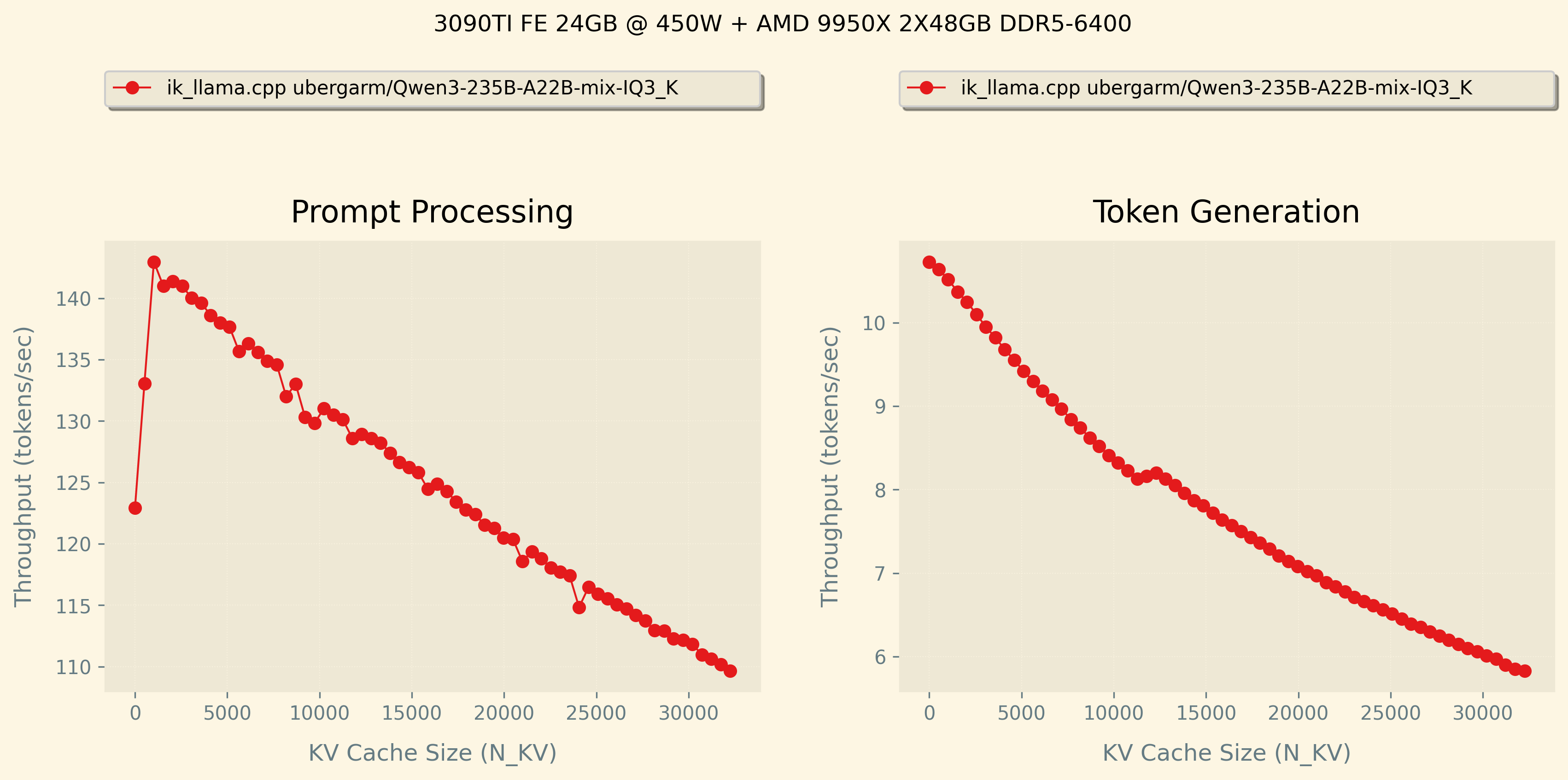
I benchmarked it on my 3090TI FE 24GB VRAM + AMD 9950X 96GB RAM home rig and was very happy with the speed across the entire 32k context length. The developer, ik, may be making improvements to how the ik_llama.cpp fork’s GQA (grouped query attention) FA (flash attention) implementation and speed up token generation even more.

Note that this quant only works on ik_llama.cpp fork. If you want to run on mainline llama.cpp, ollama, lm studio, or koboldcpp etc then check out bartowski’s quants or unsloth or mradermacher. I’ve been working with bartowski to compare quantization quality across some of these models and still learning how best to do comparisons e.g. perplexity, kl-divergence, benchmarking, etc.

I’m amazed how fast this stuff is still moving and very excited to see what DeepSeek-R2 will bring!

4 Likes

While not specific to DeepSeek, I just finished a big round of benchmarking with bartowski’s help for Qwen3-30B-A3B (and some data points on the larger 235B) here:

https://www.reddit.com/r/LocalLLaMA/comments/1khwxal/the_great_quant_wars_of_2025/

3 Likes

Hi there, first comment here! I wonder how to test PPL/KLD on the DeepSeek V3 quants. I want to check the PPL/KLD of Q2_K_XL, IQ3_XXS and Q3_K_XL, but basically I just get nans. I am missing something with my command?

I’m running with

./llama-server -m '/GGUFs/DeepSeek-V3-0324-UD-Q2_K_XL-merged.gguf' -c 512 --no-mmap -v -ngl 999 -ot "blk.(0|1|2|3|4|5|6|7).ffn.=CUDA0" -ot "blk.(8|9|10|11).ffn.=CUDA1" -ot "blk.(12|13|14|15|16).ffn.=CUDA2" -ot "blk.(17|18|19|20|21|22|23|24|25|26).ffn.=CUDA3" -ot "ffn.*=CPU" -fa -mg 0 -ub 1024 -f /wiki.test.raw

But basically getting just

perplexity: tokenizing the input ..
perplexity: tokenization took 447.431 ms
perplexity: calculating perplexity over 561 chunks, n_ctx=512, batch_size=2048, n_seq=4
perplexity: 18.81 seconds per pass - ETA 43.97 minutes
[1]nan,[2]nan,[3]nan,[4]nan,[5]nan,[6]nan,[7]nan,[8]nan,[9]nan,[10]nan,[11]nan,[12]nan,[13]nan,[14]nan,[15]nan,[16]nan,[17]nan,[18]nan,[19]nan,[20]nan,[21]nan,[22]nan,[23]nan,[24]nan,[25]nan,[26]nan,[27]nan,[28]nan,[29]nan,[30]nan,[31]nan,[32]nan,[33]nan,[34]nan,[35]nan,[36]nan,[37]nan,[38]nan,[39]nan,[40]nan,[41]nan,[42]nan,[43]nan,[44]nan,

EDIT: It seems I get nan on llamacpp everytime, and on ik llamacpp starts fine but then it get nans

2 Likes

I want to check the PPL/KLD of Q2_K_XL, IQ3_XXS and Q3_K_XL, but basically I just get nans.

Heya @Panchovix and welcome! You find me everywhere haha, its nice seeing you here too.

tl;dr;

If you’re getting nans, that means there is numerical instability somewhere, like the MLA calculations need some accumulator increases or possibly something is wrong with the quant. If you see DDDDD or gibberish output when inferencing normally, that is basically the same idea.

Perplexity

So you should be able to check perplexity (PPL) of those quants assuming you can run them for normal inferencing. You have such an assortment of hardware your commands are not simple haha…

The command you list must be for mainline llama.cpp, so check on the very recent PRs as MLA was only implemented correctly recently pretty sure, and even then the CUDA implementation is pretty fresh. I think know this as you were commenting on some recent llama.cpp PRs

Make sure the quant you are running was made for MLA on mainline, as I don’t think they can calculate attention on the fly like ik’s fork to add it on at runtime.

If the quant is a mainline MLA quant, I believe ik only recently decided to add backwards compatibility for that given ik’s implementation was already available but mainline didn’t use it due to various “beef” possibly, I don’t understand it I just see discussions on github haha… Anyway, since that looks like a mainline quant then on ik’s for I believe you have to use -mla 1 for the backwards compatible (slower) MLA implementation, check his recent closed PRs for details.

You might be able to get it going by turning off -fa, though it might be slower and I’m not sure how it effects the numbers.

KL-Divergence

Getting KLD will be challenging because you need to run the Q8_0 (given the original is fp8) to get the KLD base which will be a big file probably like 80GB.

Assuming you can get a baseline from the Q8_0 then you run a pass on each other smaller quant to see how much it diverges from the Q8_0’s baseline.

I have some example commands i was using for Qwen3 over in my methodology section of this gist. Might be useful as you delve into this wacky hobby deeper and deeper, haha…

Cheers!

2 Likes

Many thanks! Just found a bug on llamacpp GGML_ASSERT(cur_p->size > 0) failed, or gibberish on DeepSeek V3 0324 (Q2_K_XL), CUDA + CPU · Issue #13461 · ggml-org/llama.cpp · GitHub, so it could be related. Not sure about ik llamacpp for now. And you nailed, it is for llamacpp. For ikllamacpp I add -mla 1 -fmoe.

And ah I didn’t know about KLD needing Q8_0!

I appreciate that methodology, will help a lot!

I’m gonna try after reverting the commit with issues on llamacpp to see if it works.

EDIT: After reverting the commit with issues no luck either. I will try without fa soon.

1 Like

Here we are around 3 months later and deepseek-ai just released updated improved model weights: DeepSeek-R1-0528!

With Wendell and the l1t crews’ help with hardware I managed to cook up some ik_llama.cpp exclusive quants and release them on huggingface at ubergarm/DeepSeek-R1-0528-GGUF if anyone is interested.

They are a bit large for gaming rigs but more targeted for homelab folks. The bigger one is good for 368GiB RAM rigs and the smaller one for 256GB RAM systems. I am gonna download the smaller one and try to run it at home anyway using mmap() off of my NVMe drive as much discussed above already. Hopefully I can hit ~5 tok/sec.

Quality benchmarks (lower perplexity is “beter”):

  • DeepSeek-R1-0528-Q8_0 666GiB
    • Final estimate: PPL = 3.2130 +/- 0.01698
    • I didn’t upload this, it is for baseline reference only.
  • DeepSeek-R1-0528-IQ3_K_R4 301GiB
    • Final estimate: PPL = 3.2730 +/- 0.01738
    • Fits 32k context in under 24GiB VRAM
  • DeepSeek-R1-0528-IQ2_K_R4 220GiB
    • Final estimate: PPL = 3.5069 +/- 0.01893
    • Fits 32k context in under 16GiB VRAM

Cheers and happy weekend!

3 Likes

I am looking forward for the Intel B60 and Intel B60 Dual to hit the markets. 48GB for an estimates MSRP of $1000 would be magnificent. That would mean I can afford two or even more of them. Also Battlematrix support means I can use them all as one hopefully. That would mean 96GB with 4 GPUs at around $2000 instead of $10000 for an RTX Pro 6000!

2 Likes

Yeah those new intel GPUs with a decent VRAM per $ price definitely caught my eye too. Fingers crossed on software support, I know much of the ik_llama.cpp code is mostly optimized for CPU and CUDA only at the moment. So will likely take at least a few months for optimized GEMM kernels etc to land after the hardware becomes available.

But yeah happy to have any options other than $10k+ RTX Pro 6000 Blackwells haha…

1 Like

Hi there, everyone.

I’ve plugged out of LLM space after LLAMA2 release, recently I’ve gotten to play with Deepseek R1 a bit, and that’s it, I’m sold. (And that was before 0528 released!) I want to run it locally, because it’s useful enough for myself that I can justify investing that money into getting a private, configurable, and always available RAG’ed R1 running.

So, here’s my question, if anyone could help me out.
I have experience with running LLM’s and GenAI stuff on GPU’s, but I haven’t really done much on CPU side, I sort of managed to read enough about other people setups to try and create my own, but, for people with more knowledge about this, how does following build looks like?

TL:DR Would this work well as a setup to run R1 on CPU?

CPU - EPYC 7C13 - $718

RAM - 64GB Samsung/HP ECC 2400T x 16 - $704

Mobo - GIGABYTE MZ32-AR1 - $623

PSU - CORSAIR HX1500i - $299

CPU Cooler - Noctua NH-U14S -$110

SSD - Samsung 990 PRO 2TB - $170

Case - 12GPU Mining Rig Frame - $54

All in all, comes slightly cheaper then one new 5090, so that’s how I can cheer myself up. But, does it function like a setup that would work well for R1?

In case of my use, I always run with context more or less full, and I want to be able to do things like use RAG, I know I won’t be running at some amazing speed, but will this setup be at least usable?

(Also, going to be honest, after I recover from getting this, I wonder if adding a GPU or two, with something between 16GB to 32GB of VRAM to help with prompt processing speed would be a decent upgrade path.)

I know that technically, the amount of RAM here is seriously big compared to R1 itself, but since I’m already spending this much money, few hundred dollars one way or the other doesn’t seem like that big of an ask, and if it allows me to use higher fidelity quants, then why the heck not, plus, as I’ve said, I tend to fill context lots.

Thank you for your attention and help!

3 Likes
llama_perf_sampler_print:    sampling time =     214.13 ms /  6351 runs   (    0.03 ms per token, 29659.55 tokens per second)
llama_perf_context_print:        load time =   19414.90 ms
llama_perf_context_print: prompt eval time =     516.14 ms /    55 tokens (    9.38 ms per token,   106.56 tokens per second)
llama_perf_context_print:        eval time =  138112.28 ms /  6295 runs   (   21.94 ms per token,    45.58 tokens per second)
llama_perf_context_print:       total time =  139185.50 ms /  6350 tokens

Zoom zoom, being able to run a 680 billion model fast enough to use it for real time code completion and agentic tasks is wild. This is from the unsloth UD-IQ1_S release with 163840 ctx window fully loaded on two blackwell gpu’s with f16 ctx k/v

5 Likes