Yeah, I figure if ASRock’s training supported the extended DDR configuration settings MSI does then manual control of those same options would be offered in ASRock’s BIOS menus.
Out of curiosity, how do the termination values you get compare between the boards? So far I’ve only had a chance to look at ASRock versus MSI in 1DPC and the two boards go pretty different places, though that’s confounded by board differences as well as only moving the DIMMs back and forth rather than CPU+DIMMs.
I am terribly sorry, even as a computer hobbyist I feel like I have no idea what I’m talking about compared to the members here, I literally just enable expo and if it doesn’t boot, I reset to stock settings and then re-enable expo again to set the timings, then I lower the memory clock speed until it boots, and then I test for stability lol, idk where to even find termination values.
Would I be able to find the values you’re interested in by just screenshotting zentimings across both mobos? Because I could try to find some time to swap the RAM back and forth for a test, no problem.
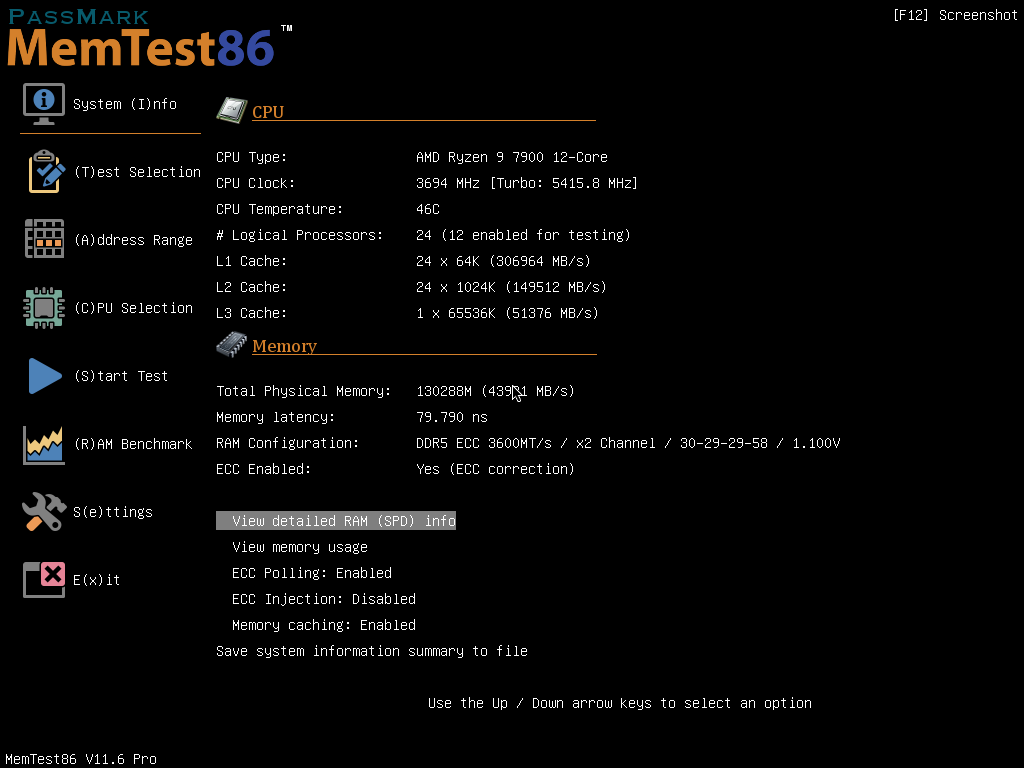
Made an account to post some very preliminary results but with the MSI XB870E Tomahawk with the September 10 2025 bios I managed to get 2 kits of dual rank G.Skill 64GB working (2 kits of F5-6000J3040G32GX2-TZ5NR) at 6000MT 32-39-39-96. I want to grab better pictures later but I’m running a second run of memtest86.
Not the advertised 6000MT 30-40-40-96 but close enough for me to be happy.
Nicely done! I assume these are cold-boot stable, too?
Maybe try the more memory-heavy torture tests of y-cruncher next. I’ve known these to fail or crash configurations otherwise stable in memtest86 for hours in minutes.
How are your RAM cooled? Mine get hot without a fan even at 4800.
Indeed. Cold boot works too. I need to do tougher tests so ycruncher might be a good idea. I’m in the process of setting up boot drives for windows and Linux to test things. We’ll see how it goes.
Initial 3 hour run of absolut. Had some issues before which I’m assuming was because I didn’t have the GPU fans running to move air over he ram dims as they were getting close to 60 degrees.
To note, PBO appeared to make things worse as I failed on test 2-3 of absolut. Without the gpu fans running and UCLK forced I failed on test 5. Quick aside, no clue why the AMD overclocking warning is gone because I’ve declined it every time I was asked by pressing escape but I guess that means if there was an internal fuse, it’s tripped.
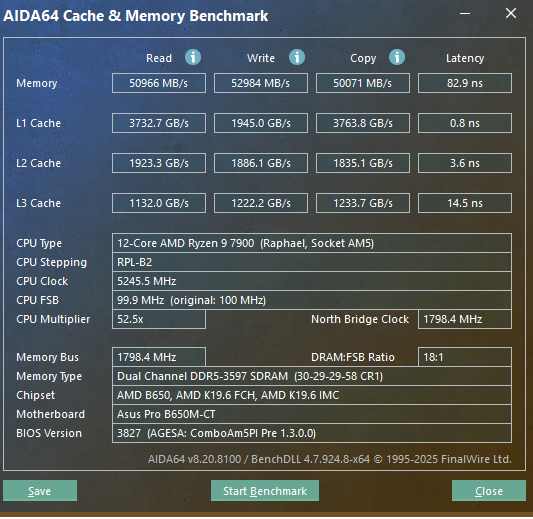
Version 3827
13.91 MB
2026/02/13
SHA-256 :F50F7EF34C7185945F2872F0D06B76CC7044CDC1EA413A263A8D8E48E2C0E28C

"1. AGESA updated to ComboAM5 PI_Pre1.3.0.0 for better security.
2. Enhanced system performance and stability.
3. Improved memory compatibility for JEDEC-compliant modules."
Running 4 DDR5 dimms on AM5 works best with 4x16 GB at ~3600 MHz. For bigger kits, set voltages on 2 dimms first, add the rest, and let auto-training finish. Good cooling, proper seating, and board quality matter. Mixed dimms are possible but less stable, and disabling memory context restore helps.
I was running 4x32GB (2x64GB Kit) on my Gigabyte AORUS x870 ELITE WIFI-7 ICE with a 9900X CPU until this weekend when I tried swapping to a ProArt before abandoning that and bent a couple of pins while trying to go back to my Gigabyte
For the past six months I’ve had 128GB working; now I have nothing working.
Can’t speak for AM5, but in a pinch you could look for a used arrow lake cpu+mobo combo to use temporarily since people will be selling them off cheaply now that the refresh is coming. ARL can run 4 sticks pretty reliably at 4800 afaik.
Well, apparently I won the AM5 IMC lottery… or the latest AGESA is just really really good. I spent considerable time reading through this thread (big thanks to everybody who has contributed) and went ahead to purchase memory to my personal PC. Unfortunately with the DDR5 pricing and availability crisis, the only thing I could get my hands on was not the most optimal thing ever.
Two different Corsair Vengeance RGB 2x16 GB DDR5-6000 CL36 kits, 64GB total
The exact discount-bin kits are CMH32GX5M2E6000Z36 and CMH32GX5M2E6000Z36W.
All are labelled DDR5-6000 36-44-44-96 1.35V ver 4.43.16
The kits were bought separately, from different retailers, and to be clear - were not sold as a matched 4-DIMM kit. Now, I know this is unwise, but we’re having severe DDR5 availability and pricing issues where I live.
Here’s where I got absurdly lucky: checking SPD, the dimms all report the same 2026 week 03 manufacturing period. HWiNFO identifies the DIMMs as Samsung P-die stepping 5.0 which matches the version stickers.
I specifically followed the “keep like/matched DIMMs together on the same channel” advice from earlier in this thread rather than alternating the kits between channels. So A1 + A2 for the black dimms, B1+B2 for the white ones.
Now, I expected them to work at 5600 at best or after some lengthy manual tuning. The only thing I enabled in the BIOS was just EXPO 1, rebooted with the additional sticks and waited… and on the first boot it already trained to DDR5-6000 after just a minute.
No manual timings.
No manual VSOC.
No manual VDDIO/MC.
No termination tuning.
No drive-strength tuning.
No frequency stepping to get it to train.
It passed MemTest86+ without issues and I’m currently running extensive testing with OCCT and the AM5 Probe profile, but at least after the initial two hours of testing, no issues whatsoever.
The only issue… now I’m terrified of ever updating the BIOS (the AGESA) again..
The summary is that I have 192GB (4x48GB) 5200MT/s working (I didn’t properly stress it, more details next) in an ASUS B650 Creator.
Hardware:
9950X3D
ASUS ProArt B650-Creator
2 kits of Corsair 2x48GB 6000C36 (CMH96GX5M2E6000Z36, the kits were manufactured 1 week appart from the other)
Bios 4003
This is on my home server, it’s running proxmox with more than 30 containers. I was using it with 98GB of RAM but I wanted to try Qwen Flash so I added 2 more sticks (I already had the ram in another pc). I updated the bios, added the 2 sticks (the pairs mixed in the channels now that I think it in more detail), enabled XMP and reduced the frequency to 5200 since I wanted less chance of instability and corrupting my partitions (sounds quite kamikazey, I know). It booted right up, I have been running it for more than a week now and it has not shown signs of instability. I was able to run Qwen Flash, overall ram use was around 150GB alongside the VMs and things. (In case anyone wonders its throughput was ~60tok/s with 2xRTX3090 and 262k context). Since it was quite loaded I’m assuming it is working, I didn’t want to have the server offline for a day to run memtest since it is also my router. Feel free to ask questions or correct me in something.
I wanted to report that my 4x64gb Gskill 6000J3444F64GX4-FX5 kit works plug and play in my MSI X870E Carbon Max Wifi at expo 6000 settings with my 9950x3d2. No configuration, no tweaks, just boots the first time stably and reliably like any normal kit.
Also with x8 x8 pcie gen5 plus a separate chip-controlled x4 gen4 connector, I’m able to run 3 GPUs and 256gb of ram with a consumer platform. It’s actually pretty sick. 10/10 motherboard.