I can’t confirm this combination is the best any more, sadly. With updates the performance I can reach has been reduced to 4800MT/s for two DIMMs per channel in ECC mode. The ECC still works just fine, and I do have 128GBs of it, but the performance is likely lower than what you’d be able to get with more modern 48GB DIMMs. If you care about performance and don’t strictly speaking need 128GB, consider doing one DIMM per channel 96GB total instead. It’ll work way better.
Thanks diizzy, I did read you had mentioned another brand though I thought you were using an MSI board (though I cannot find that post now searching) rather than the ProArt which seems to be often recommended for VFIO, though in my PC Build thread another recommendation has been made. (Black Friday 9950X3D ML, LLM, & gaming build). Perhaps it is the case that we can generally expect the same experience with ECC or DDR5 across x670e or AM5 generally?
I do not see that specific Micron model on the ProArt x670e, though the Kingstons are and rated at 4800, albeit only for 1,2 socket support.
Great share. My use case here fits into Machine Learning / AI, Software Development, 1440p gaming, and I guess Science and Research.
Sorry to hear that but glad to receive the update.
I do care about performance, and I would like to play games sometimes, and I see from the article diizzy linked is does impact some of my other use cases, but I am trying to balance that with my plans to backtest financial market trading algorithms, and economic modelling, which if my understanding is correct I should only use EEC for which will also have the bonus of a more stable system.
I am also considering the rule of thumb I have read for machine learning that the system RAM should be twice VRAM, and since the build will be with dual 3090s, primarily so I have the option to run LLMs >24GB, 96GB is exactly that. As I also want to be able to run 2 VMs at all times, and sometimes a third VM simultaneously Windows gaming I have been aiming for 128GB. I have queried if 96GB is adequate for my needs in the ML/LLM section: < 96GB RAM on 48GB VRAM?
1 Like
This thread has been an amazing resource for 4x32G, and one of the only written ones I’ve found.
I want to report a working configuration I’ve settled into in case anyone else wants to try, and to see if folks here can spot any obvious areas for improvement:
CPU: Ryzen 9 7900X
MB: MSI MAG B650 Tomahawk Wifi (MS-7D75)
Memory: Two 2x32G sets of GSkill F5-6000J3040G32G (rated at 6000MT, CL-30-40-40-96 at 1.40V)
These should be decent but not top-of-the-line parts, originally purchased only targeting 64GB (2x32) in mind. I decided to stick another 2x32 set in, and with some tweaking got it stable at a modest performance level.
Overall result:
- 4x32GB Stable at 4800MT, CL34-40-40-96
- Memory bandwidth 63GB/s and 86ns latency isn’t great, but substantially better than stock 3600MT
- This is comparable to running a single 2x32 set without EXPO.
- For reference, a single 2x32 set with the 6000MT EXPO profile reaches 77GB/s and 74ns latency - so there’s definitely a performance penalty.
Tweaks:
- Timings set to 34-40-40-96.
- Pretty sure I can squeeze down to tCL=32 with a bit more tuning, but I didn’t want to spend that effort.
- Given the sticks themselves are rated at 30-40-40-96, how much room is there to squeeze? Why is the tRAS=96 so high?
- VDD/VDDQ/VDDIO set to 1.3V
- Sticks are themselves rated at 1.4V and this config works at 1.4V as well. I figured I’d undervolt a bit as I wasn’t too comfortable with 1.4V (for no particular reason).
- VSOC set to 1.15V
- Set the following. I think they were what ultimately pushed me over the edge to stability:
- RttNomWr=40
- RttNomRd=40
- RttWr=129
- RttPark=40
- RttParkDqs=40
Questions:
- Any thoughts/comments on this setup?
- Anything obvious I should try to tighten up the timings or boost performance? Given the diminishing returns with memory scaling I don’t want to spend too much more time on this, but I’m happy to try any low-hanging-fruit.
- My gut sense is that this probably won’t push to 5200MT - do folks here agree?
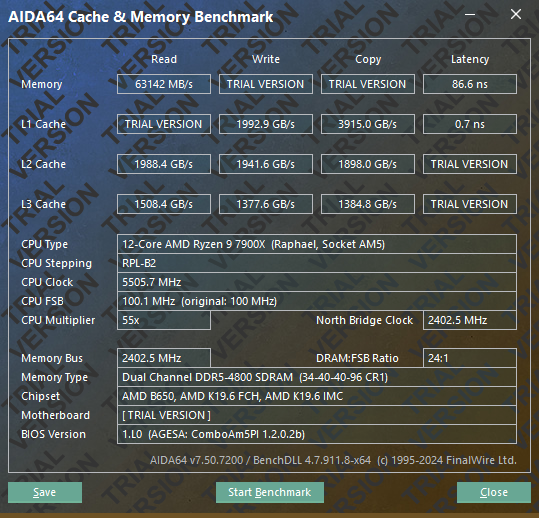

3 Likes
Yeah. that’s interesting. I haven’t looked at Hynix A-die closely as the DIMMs I have to work with are all M-die. With M-die I’ve put tRAS into the 40s, though the BIOS is probably overriding to what would be tCL + tRCDRD = 74 in this case.
With M-die I was able to drop tRFC to ~400 and tRFCsb to ~280, (extrapolated from 5600 1.25 V to 4800 1.3 V with first order voltage and speed adjustments). It’s my impression A-die wants a bit looser timings but, if you haven’t already checked, there might be some room for improvement.
Also, if SPD temperatures aren’t over 70-75 °C putting tREFI up to 5-6 μs should be no problem. DDR tuning guides usually indicate considerably higher (20+ μs) but, in my AM5 benching, I’ve seen some perf gain and power reduction in the 3.9 → 5.5 μs range but no change past that.
Worth at least trying, IMO, though with the VSOC and termination changes for stability at 4800 I agree the odds are against 5200. However, some 4x32s are hitting 6000, 1.3V should be overkill for 5200, and since 7900X supports 5200 at 1DPC the IMC’s guaranteed to handle the clocks. So it’s just a question about pushing 2DPC loads a bit farther.
That said, when I benched 7950X I found some workloads ran slower at 5200 than 4800. So if 5200’s stable it may not be worth it.
The issue is the bios controlling the OC.
You also need to have matching RAM in the same channel with all 4 DIMMS. So channel AA needs to match rather than say A2 B2 as it would put mixed timings in the same channel causing instability. It states this in the AM5 motherboard manuals.
Also, most Ryzen CPU state the memory limitations as:
2 DIMMS @ 5200MT/s 4 DIMMS @ 3800MT/s
You can find this on all the specifications under “connectivity, Memory” sections on AMD website.
When the motherboard keeps retraining on boot, it’s because the default ram timings are not saved and ech time it goes through the same process at it attempts to load the RAM at its default timings.
To overcome this issue, install Ryzen Master and follow this guide where I walk through all the mistakes I made, and how I discovered each issue.
Basically, you can not mess with the voltage at all with all 4 DIMMS, it just won’t boot. You have to adjust the memory in AMD Ryzen Master, leaving all other settings on Auto.
I managed to scale mine from 1800 (3600) to 2600 (5200) before it automatically adjusted the voltage up, preventing it from booting, or it became unstable.
I’ve tried everything, nothing else will work. I think it’s more of a mixed RAM issue with all 4 DIMMS rather than a limitation of the actual CPU or motherboard.
I documented everything here: Lewis-Anderson dot com/resolving-mixed-ddr5-ram-compatibility-issues-with-ryzen-7-8700g-a-comprehensive-walkthrough/
I used AI to write up all my notes and I corrected any mistakes I made.
I am Joe running 64GB = 4x16GB mixed moduels due to limitations in availability and mismatched product listings online. Some listed Expo profile speeds as default while others listed the correct speeds so I ended up having to get mixed moduels.
I hope this helps someone.
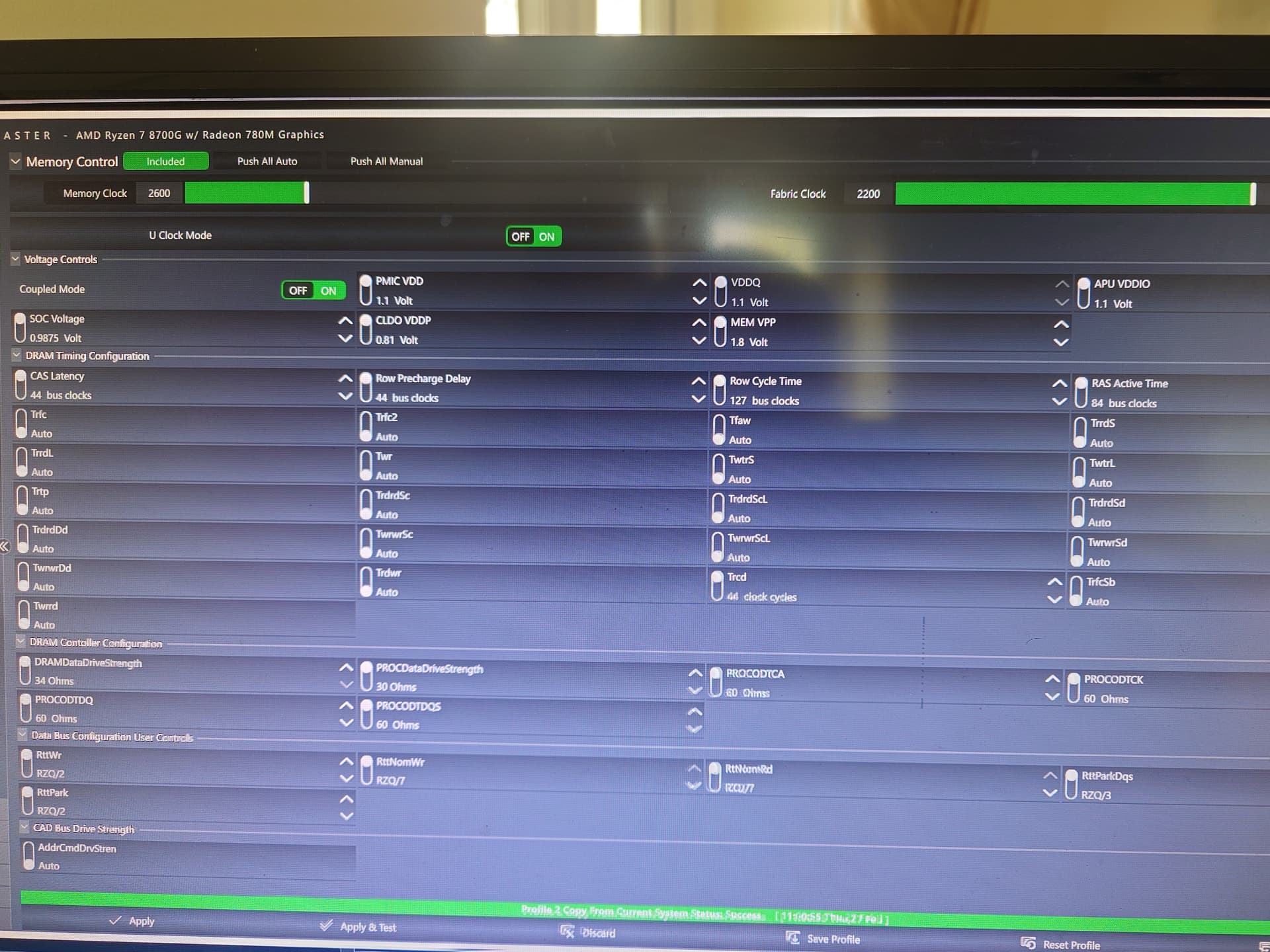
Try overclocking memory with Ryzen Master  remove all BIOS overclocking.
Bios settings can’t set stable timings and voltage for the Ryzen.
Load up Ryzen Master and use tagt instead. You will get a nice stable 5200 at least.
I’ve heard some horror stories about using four DIMMs with AM5, so I’m pleasantly surprised that my new build seems to stress testing absolutely fine with 4x48GB at 6000MT/s so far…
It’s a 9950x, MSI MPG X670e Carbon (BIOS 7D70v1M), and two Corsair 96GB kits (CMK96GX5M2B6000Z30) - literally just finished building it, enabled XMP, left EXPO disabled, installed an OS, and have been running stressapptest for the last hour with no errors yet.
Happy to run other (linux based) tests if anyone’s curious about any details.
4 Likes
Admittedly I need to re-read through much of this thread, I hadn’t originally planned to delve into the deepest patch of weeds that RAM settings has to offer… But does anyone know of any good resources to educate myself on DDR5’s impedance & drive strengths? All those oft-ignored settings in the lower-right side of ZenTimings from ProcOdt on down…
I have come to realize EXPO modifies impedance & drive strength values, not just voltages, subtimings, and primary timings. For my 32GB kit it was perfect. For my new 96GB kit it only has an XMP profile, so the board just defaults to entirely different drive/impedance values which are making the kit so unstable it wasn’t usable at rated settings, and tuning it proved impossible.
For fun I tried the impedance and drive strength values on a recent Buildzoid video featuring a nearly identical 96GB 6400 kit. But that wouldn’t even post at 6000 so I have no idea how his kit even runs those values. Finally straight copied the 32GB Hynix-A die values from my old RAM and that made a world of difference despite this being a very different dual-rank Hynix M-die kit. I can actually tighten timings and reduced lots of voltages that the missing EXPO profile would’ve modified. Lesson learned, don’t ever save a few bucks buying a kit without EXPO I guess…
1 Like
I’ve come to believe that getting all of your impedances right is critical to having any sort of reasonable shot at success. It’s not as bad as voltage or timings, as most values won’t even post so you get “fast” feedback.
Rtt, ProcOdt (along with pull up and down), and all the drive strengths are the ones you want. Leave anything that says Group A or B or P1 to P3 on auto, and find the rest out using a testing profile that has y-cruncher vt3 produce a mtbf between 2 to 15 mins. Test each value one at a time and pick the ones with the best mtbf (only when done - reset back to the testing profile each value change).
Here is a very homebrew C# file for a console project that will run y-cruncher a bunch of times and give you and average when done. Windows or Wine unfortunately. Takes the number of runs to perform as a parameter; defaults to 10
using System.Diagnostics;
using System.Runtime.InteropServices;

namespace Stabilitea;

internal class Program
{
    public const string YCruncher = "C:\\y-cruncher v0.8.5.9543\\y-cruncher.exe";

    static void Main(string[] args)
    {
        int runs = 10;

        if (args.Length is not 0)
        {
            if (int.TryParse(args[0], out runs) is false)
            {
                Console.WriteLine(args[0] + " is not a number");
                return;
            }
        }

        results = new double[runs];

        process.OutputDataReceived += Process_OutputDataReceived;

        SetConsoleCtrlHandler(handler, true);
        Console.CancelKeyPress += delegate { KillProcess(); };

        Console.WriteLine($"Starting stability check using { runs } runs");

        for (int run = 0; run != runs; ++run)
        {
            Console.Write("run " + (run + 1) + " = ");

            process.Start();
            process.BeginOutputReadLine();
            process.WaitForExit();
            process.CancelOutputRead();

            results[run] = timer.Elapsed.TotalMinutes;

            Console.WriteLine($"{results[run]:0.###} min");
        }

        Console.WriteLine("");
        Console.WriteLine("average = " + results.Average());

        Console.ReadKey();
    }

    private static void Process_OutputDataReceived(object sender, DataReceivedEventArgs e)
    {
        using var stream = File.AppendText("log.txt");
        stream.WriteLine(e.Data);

        if (e.Data is null) return;

        if (e.Data.Contains("Iteration: 0"))
        {
            timer.Restart();
        }
        else if (e.Data.Contains("Exception"))
        {
            KillProcess();
        }
    }

    internal static bool ConsoleEventCallback(int eventType)
    {
        if (eventType is 2)
        {
            KillProcess();
        }
        return false;
    }

    internal static void KillProcess()
    {
        Process[] processes = Process.GetProcessesByName("24-ZN5 ~ Komari");
        foreach (var process in processes)
        {
            process.Kill();
            process.WaitForExit();
        }
    }

    readonly static ConsoleEventDelegate handler = new(ConsoleEventCallback);

    private delegate bool ConsoleEventDelegate(int eventType);

    [DllImport("kernel32.dll", SetLastError = true)]
    private static extern bool SetConsoleCtrlHandler(ConsoleEventDelegate callback, bool add);

    private static readonly Process process = new()
    {
        StartInfo = new()
        {
            CreateNoWindow = true,
            RedirectStandardOutput = true,
            FileName = YCruncher,
            Arguments = "stress -TL:3600 VT3",
            UseShellExecute = false,
        }
    };

    private static readonly Stopwatch timer = new();

    private static double[]? results;
}
I lost my 5600MT settings for Bios 2204 and initially had problems with Bios 2806, but it turned out that less is more with the new Bios versions.
I just set VSOC to 1.18, MC and MEM VDD,VDDIO 13.8 and the system boots reliably with 5600MT
The timings are not really optimized yet, I have to find out first which settings are different with 4 DIMMs
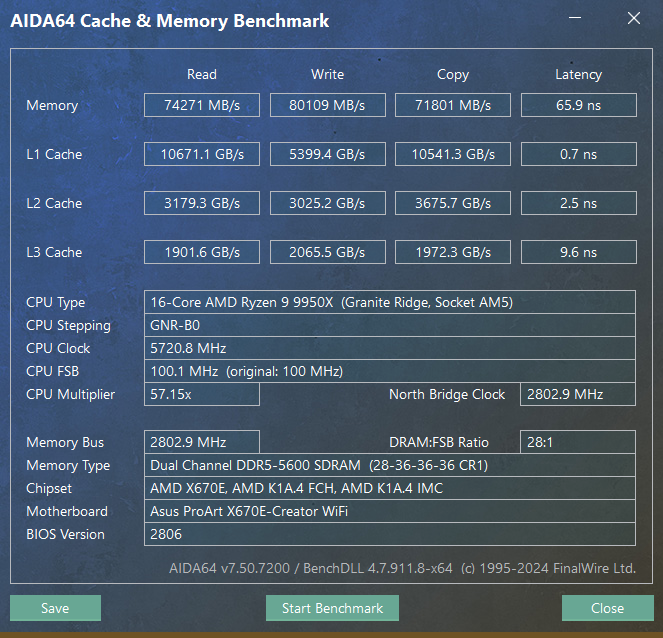
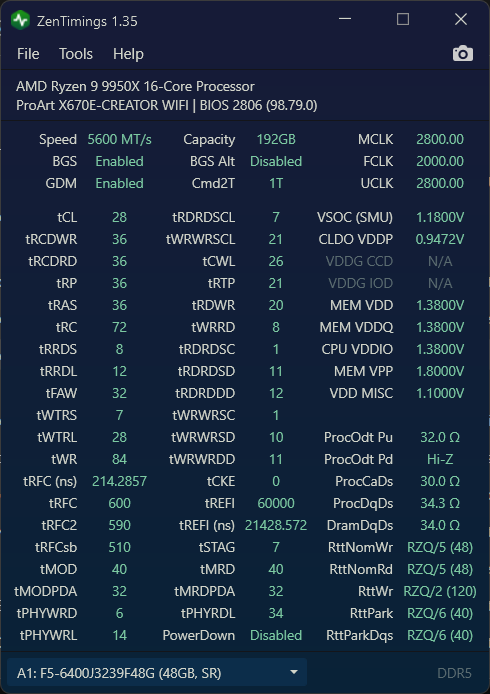
But 6000MT with 192GB is the hill I will die on…
Intel Memory Latency Checker v.3.11b results please.
1 Like
Big homie you found a unicorn
Output from sudo mlc:
Intel(R) Memory Latency Checker - v3.11b
Measuring idle latencies for random access (in ns)...
		Numa node
Numa node	     0
       0	  87.6

Measuring Peak Injection Memory Bandwidths for the system
Bandwidths are in MB/sec (1 MB/sec = 1,000,000 Bytes/sec)
Using all the threads from each core if Hyper-threading is enabled
Using traffic with the following read-write ratios
ALL Reads        :	61768.3
3:1 Reads-Writes :	60396.0
2:1 Reads-Writes :	61054.9
1:1 Reads-Writes :	61918.8
Stream-triad like:	60888.0

Measuring Memory Bandwidths between nodes within system
Bandwidths are in MB/sec (1 MB/sec = 1,000,000 Bytes/sec)
Using all the threads from each core if Hyper-threading is enabled
Using Read-only traffic type
		Numa node
Numa node	     0
       0	61738.8

Measuring Loaded Latencies for the system
Using all the threads from each core if Hyper-threading is enabled
Using Read-only traffic type
Inject	Latency	Bandwidth
Delay	(ns)	MB/sec
==========================
 00000	202.02	  61598.7
 00002	203.46	  61583.1
 00008	194.91	  61316.1
 00015	180.74	  61288.2
 00050	203.87	  61543.2
 00100	202.09	  61601.4
 00200	201.47	  61510.5
 00300	203.72	  61510.8
 00400	207.61	  61525.0
 00500	209.43	  61608.4
 00700	123.56	  53533.7
 01000	109.78	  38921.4
 01300	105.82	  30672.1
 01700	103.44	  23939.9
 02500	 97.62	  16751.1
 03500	 96.47	  12274.6
 05000	 95.86	   8848.0
 09000	 95.36	   5249.9
 20000	 95.12	   2743.7

Measuring cache-to-cache transfer latency (in ns)...
Local Socket L2->L2 HIT  latency	15.1
Local Socket L2->L2 HITM latency	15.1
1 Like
This are the 5600MT results.
I’m banging my head against the wall at 5800MT, Y-Cruncher had an error at the SNT test, I think I’ll leave it at 5600, need a break from memory testing
Microsoft Windows [Version 10.0.26100.2894]
(c) Microsoft Corporation. Alle Rechte vorbehalten.

C:\Users\user>"C:\Users\user\Downloads\Windows\mlc.exe"
Intel(R) Memory Latency Checker - v3.11b
Measuring idle latencies for random access (in ns)...
                Numa node
Numa node            0
       0          73.5

Measuring Peak Injection Memory Bandwidths for the system
Bandwidths are in MB/sec (1 MB/sec = 1,000,000 Bytes/sec)
Using all the threads from each core if Hyper-threading is enabled
Using traffic with the following read-write ratios
ALL Reads        :      65947.6
3:1 Reads-Writes :      61810.7
2:1 Reads-Writes :      62854.3
1:1 Reads-Writes :      65449.8
Stream-triad like:      61769.7

Measuring Memory Bandwidths between nodes within system
Bandwidths are in MB/sec (1 MB/sec = 1,000,000 Bytes/sec)
Using all the threads from each core if Hyper-threading is enabled
Using Read-only traffic type
                Numa node
Numa node            0
       0        66364.6

Measuring Loaded Latencies for the system
Using all the threads from each core if Hyper-threading is enabled
Using Read-only traffic type
Inject  Latency Bandwidth
Delay   (ns)    MB/sec
==========================
 00000  172.12    66247.7
 00002  167.81    66439.3
 00008  163.72    65970.1
 00015  162.23    65934.4
 00050  181.20    66295.1
 00100  177.62    66208.7
 00200  177.68    66263.3
 00300  180.44    66244.9
 00400  183.78    66547.0
 00500  116.21    64832.3
 00700   92.72    48013.2
 01000   87.46    35844.5
 01300   84.95    27698.1
 01700   82.07    21905.4
 02500   77.89    15440.4
 03500   77.27    11335.5
 05000   76.59     8205.4
 09000   76.19     5003.2
 20000   75.73     2736.1

Measuring cache-to-cache transfer latency (in ns)...
Unable to enable large page allocation
Using small pages for allocating buffers
Local Socket L2->L2 HIT  latency        16.8
Local Socket L2->L2 HITM latency        16.8
1 Like
G.Skill just showed the new DDR5-6000 CL28-36-36 192GB (48GBx4) kit
1 Like
Biwin’s announced CL30 6400 as well as a matching 4x48 CL28 6000.
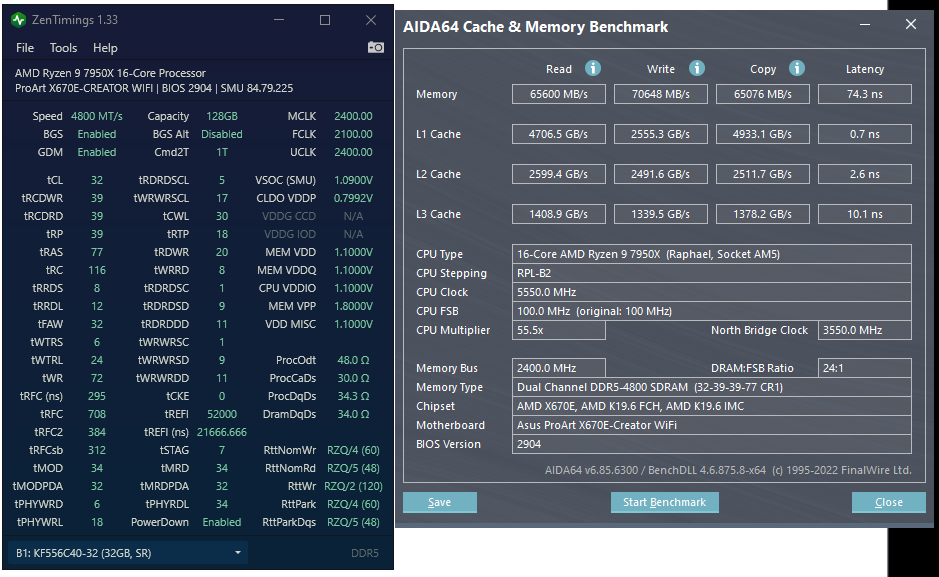
Hi I’ve finally upgraded my x670e Proart from 0805, no other BIOS seemed stable until the current 2904 which was recently released.
It quickly booted with 4x32GB dimms, a quick change to 4800 and 1.4v, and my usual termination settings booted quickly. Need my pc to be functional until I’ve got some spare time but I’ve a feeling this will make it really easy to end up getting >5000 which for me was a brick wall in my original thread 7950x: I want 4x32GB unless it sucks, does it suck?
I’ve tried to order some of the above mentioned g.skill 6000 cl28 4x48. My usual supplier has said they don’t have dates yet. I’m also finding it hard to source 48G dimms in general so I may just wait for those to come out.
I would strongly recommend people try the new BIOS who had previously thought they hit their limit with 4x32
edit:
seriously try out 2904! Haven’t stress tested anything but look at the voltages it trained at and seems usable in terms of stability so far
3 Likes
I updated to a 9950X3D and therefore had to also update my BIOS to 2904. I noticed faster training times and attributed it to better memory controller in the 9950X3D. Maybe it was just BIOS.
4 sticks of Crucial 5600MHz 48GB running at 5000MHz.
I have ordered 2 of these kits: CP2K64G56C46U5
so that I can try with 256GB.
Edit: ProArt B650 motherboard, recommended, great IOMMU groups. Bought a separate AX210 card for Wifi that works perfectly with Linux.
Edit: Memory training takes a few minutes, certainly not 10-20.
2 Likes