DDN Dual-SAS2308 Combo Card: Host Booting the SAS Side
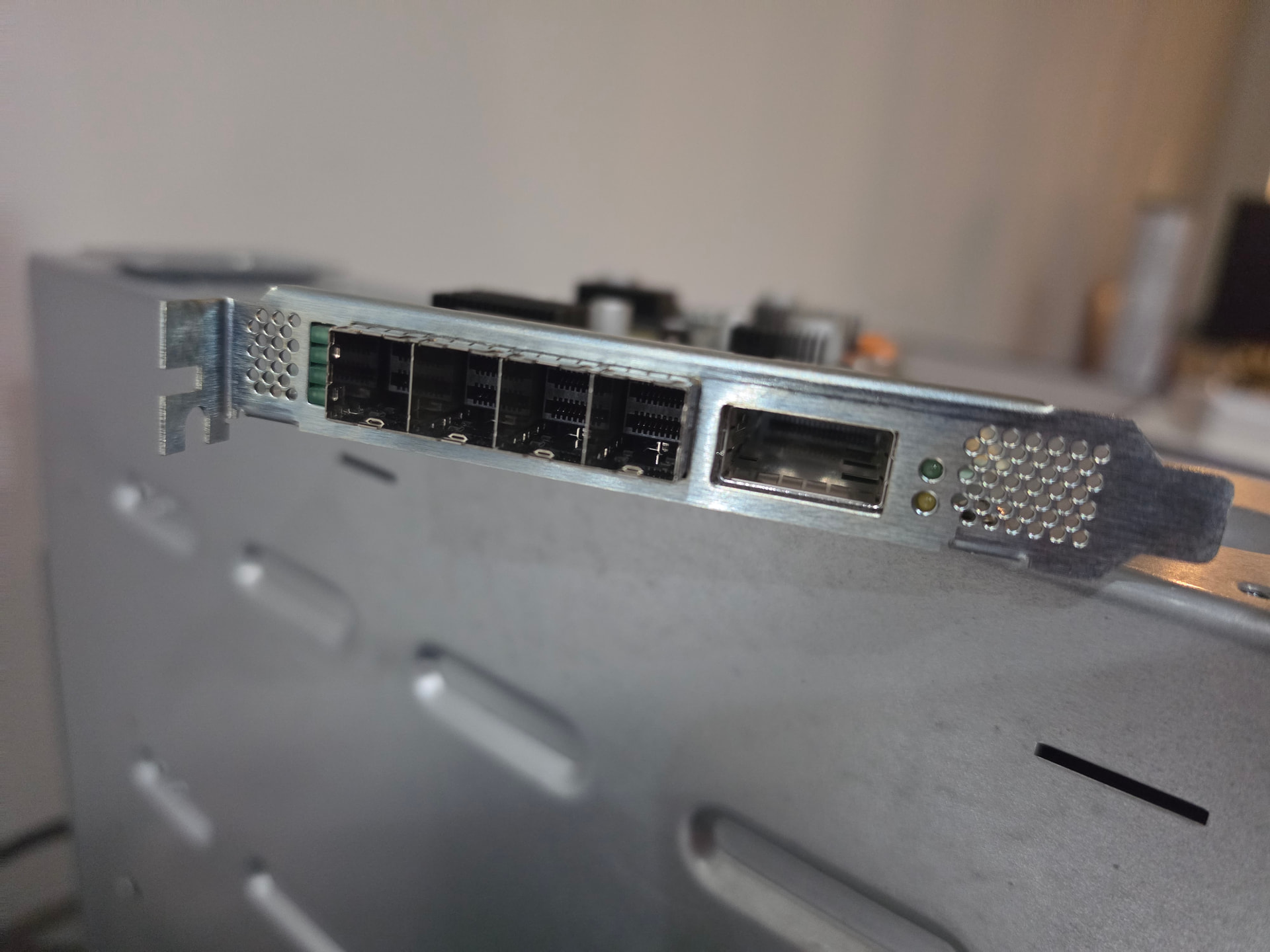
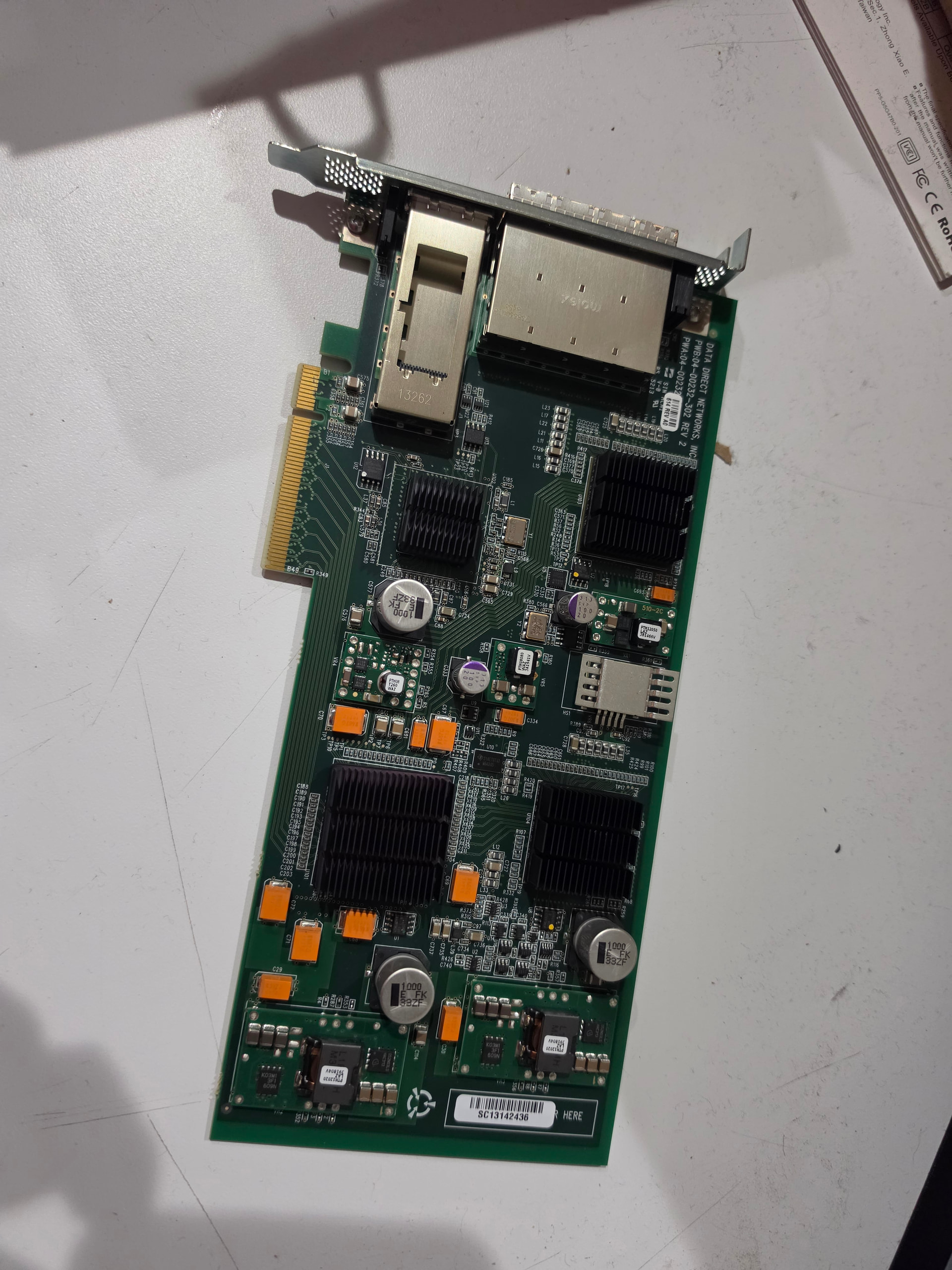
Card: DDN 04-00232-614 REV 2 (PLX PEX 8732 + 2x LSI SAS2308 + Mellanox ConnectX-3 VPI)
Status: WORKING, Both controllers host boot at system startup, disks enumerate, and the shelf is visible. See Section 8. They are not usable for OS volume/boot drives, however.
Table of Contents
- What This Card Actually Is
- Why the SAS Side Does Not Come Up
- Read the Card Before You Touch It
- Build lsirec
- The IOMMU Problem, and the Fix That Works
- Host Booting the Controllers
- Making It Survive a Reboot
- Verified Results
- SAS Addresses
- Troubleshooting
- Appendix: Raw Evidence From This Box
1. What This Card Actually Is
These came out of Data Direct Networks (DDN) storage appliances. They show up cheap on the secondary market and look like a bargain: two SAS HBAs and a 40Gb NIC on one slot.
“Yes, its a PCIe video card” ulgh but cheap??
Underneath, it is a single PCB with four functions:
| Function | Chip | PCI address on this box | Notes |
|---|---|---|---|
| PCIe switch | PLX PEX 8732 | 01:00.0 |
32-lane Gen3 switch, feeds everything below |
| NIC | Mellanox ConnectX-3 VPI (MT27500) | 03:00.0 |
40Gb IB / 10GbE, single QSFP |
| SAS HBA 0 | LSI SAS2308 | 04:00.0 |
2x SFF-8614 external |
| SAS HBA 1 | LSI SAS2308 | 05:00.0 |
2x SFF-8614 external |
[root complex]
      |
   01:00.0  PLX PEX 8732 switch
      |
      +-- 02:00.0 --> 03:00.0  ConnectX-3 VPI        (works out of the box)
      +-- 02:08.0 --> 04:00.0  SAS2308 #0            (needs host boot)
      +-- 02:09.0 --> 05:00.0  SAS2308 #1            (needs host boot)
The NIC half is essentially self-sufficient and works with the in-tree mlx4 driver. This guide is about the SAS half.
The catch: there is no firmware flash
A normal SAS2308 HBA carries a flash chip holding three things: the firmware image, the BIOS/option ROM, and the SBR (Serial Boot Record, the small config block with the PCI IDs). At power on, the chip’s boot ROM reads that flash and starts the firmware, and then the chip appears on the bus as a working controller.
On this card the SAS chips have no usable firmware flash. Only the SBR exists, and it lives on a small serial EEPROM. So:
- The option ROM never runs.
- No firmware ever starts.
- The chip sits in
RESETstate forever. mpt3sasbinds, tries to talk to it, and times out.
That last part is what you see in dmesg:
mpt3sas version 54.100.00.00 loaded
Warning: Unmaintained Hardware is detected: mpt3sas:0087:1000 @ 0000:04:00.0
mpt3sas 0000:04:00.0: enabling device (0000 -> 0002)
mpt2sas_cm0: 64 BIT PCI BUS DMA ADDRESSING SUPPORTED, total mem (31682220 kB)
mpt2sas_cm0: _base_spin_on_doorbell_int: failed due to timeout count(10000), int_status(c0000000)!
mpt2sas_cm0: doorbell handshake int failed (line=7079)
mpt2sas_cm0: _base_get_ioc_facts: handshake failed (r=-14)
mpt2sas_cm0: failure at drivers/scsi/mpt3sas/mpt3sas_scsih.c:12337/_scsih_probe()!
Two things worth noticing, because they save time later:
Warning: Unmaintained Hardwareis cosmetic. It does not mean the driver refuses to work. It means Broadcom has stopped testing this chip. The driver is fine.handshake failed (r=-14)is-EFAULT, not “device not found”. The PCI device is present and enabled. The driver simply cannot get an answer out of the IOC. That is the signature of a chip with no running firmware.
Because the firmware is not in flash, it has to be pushed into the chip’s memory at boot time, from the host. That is what “host boot” means.
2. Why the SAS Side Does Not Come Up
Once the card is in a machine, the failure has a very specific shape. Reading the chip’s own registers tells you exactly where you are:
./lsirec 0000:04:00.0 info
Device in MPT mode
Registers:
 DOORBELL:       0x00000000
 DIAG:           0x000001f2
 DCR_I2C_SELECT: 0xc003ff08
 DCR_SBR_SELECT: 0x05000059
 CHIP_I2C_PINS:  0x00000003
IOC is RESET
Decode the two registers that matter.
DOORBELL: 0x00000000 means state field (bits 31:28) is 0, which is RESET. No firmware is running.
DIAG: 0x000001f2 is a bitfield. The interesting bits:
| Bit | Name | Meaning here |
|---|---|---|
0x002 |
HOLD_IOC_RESET |
set, IOC held in reset |
0x010 |
RW_ENABLE |
set, diagnostics unlocked |
0x020 |
RESET_HISTORY |
set, latched reset condition |
0x040 |
FLASH_BAD_SIG |
set, no valid firmware signature found in flash |
0x080 |
WRITE_ENABLE |
set, write access unlocked |
0x100 |
HCB_MODE |
set |
FLASH_BAD_SIG is the important one. The chip checked its flash, found nothing bootable, and latched a flag saying so. That single bit confirms the whole story: there is no firmware to run, so the host has to supply one.
Also note Device in MPT mode on the first line. This is good news. It means the SBR is present and already configured for IT/IR mode, not MegaRAID. You do not need to rewrite the SBR. A lot of the crossflash guides you will find online start by rewriting the SBR; skip that step on this card unless you have a specific reason.
3. Read the Card
Do this first, every time, before any operation that touches flash or resets the chip.
Check the topology
lspci -tv
+-01.1-[01-05]----00.0-[02-05]--+-00.0-[03]----00.0  Mellanox MT27500 [ConnectX-3]
 |                               +-08.0-[04]----00.0  Broadcom / LSI SAS2308
 |                               \-09.0-[05]----00.0  Broadcom / LSI SAS2308
Confirm you have two SAS2308 functions. If you only see one, the card or slot has a problem and nothing below will help.
Note the exact part numbers
lspci -nn -s 04:00.0
04:00.0 Serial Attached SCSI controller [0107]: Broadcom / LSI SAS2308
        PCI-Express Fusion-MPT SAS-2 [1000:0087] (rev 03)
1000:0087 is the SAS2308 in MPT (IT/IR) mode. If you see 1000:0079 instead, that is a MegaRAID personality, which is a different problem.
Confirm the chip responds at all
sudo ./lsirec 0000:04:00.0 info
If this hangs or errors, stop. Everything downstream assumes the chip answers diagnostic reads. I had to hard reset the computer a few times because the PLX/bridge ports hung and the SAS controller(s) became completely unreachable.
Back up the SBR
The SBR is the only persistent configuration on the card. Back it up before doing anything just because I’m paranoid:
sudo ./lsirec 0000:04:00.0 readsbr sbr_04_backup.bin
sudo ./lsirec 0000:05:00.0 readsbr sbr_05_backup.bin
Verify the reads are stable by doing it three times and comparing hashes. A stable SBR read looks like this:
$ md5sum s1.bin s2.bin s3.bin
0734179724190c4902475ae90ab54411  s1.bin
0734179724190c4902475ae90ab54411  s2.bin
0734179724190c4902475ae90ab54411  s3.bin
I recommend this because I was using it through a pcie riser cable and it wasn’t consistent until I ditched the riser cable? These cards are not.. what you’d call stable.
[!WARNING]
Do not trustsbrtool.py parseoutput on this card blindly. It reportsMfg data checksum errorand nonsense PCI IDs (PCIVID = 0x5ae0). That is expected on these cards, because the SBR format here is not the standard LSI layout the tool was written against. Do not “fix” it by rebuilding the SBR from a sample. I noticed several people bricked their cards by writing an SBR taken from a different board, and had to restore the original to recover their cards. The SBR is already in MPT mode and already works. Leave it alone. I don’t think these cards even have “normal” rom chips, so remember that as you work on it.
4. Build lsirec
lsirec by Marcan is the tool that performs the host boot. It is small and has no dependencies.
sudo dnf install -y gcc make git
git clone https://github.com/marcan/lsirec
cd lsirec
make
It builds with no warnings:
cc -Wall -O2 -std=gnu99 lsirec.c -o lsirec
Install it somewhere on root’s path:
sudo install -m 755 lsirec /usr/sbin/lsirec
[!NOTE]
lsirecdeliberately does not check PCI vendor/device IDs, so that it can work on cards with unusual SBRs. The flip side is that it will happily operate on any PCI device you point it at. Always pass an explicit BDF (0000:04:00.0), and double/triple check it withlspcifirst.
Supported operations:
info                print device state and registers
readsbr <file>      read the SBR
writesbr <file>     write the SBR
reset               normal adapter reset, reloads SBR
halt                HCB reset, IOC not allowed to boot
hostboot <fw.bin>   reset and boot firmware from host memory
unbind              unbind the kernel driver
rescan              remove and rescan the PCI device
Only hostboot matters for this card. writesbr is the dangerous one and you do not need it.
5. The IOMMU Problem
lsirec hostboot works like this:
- Allocate a 2 MB hugepage-backed buffer in userspace.
- Read its physical address out of
/proc/self/pagemap. - Write that physical address into the controller’s
HCBAddressregister. - Tell the IOC “boot from that address”.
- The IOC DMAs the firmware image straight out of that memory into its own RAM.
Step 5 is where it breaks w/IOMMU on modern machines. The IOC is handed a raw physical address and told to read it. When an IOMMU is translating for that device, the address the IOC puts on the bus is not the physical address lsirec gave it, so the translation either misses or reads somewhere wrong, and the transfer fails.
This is a genuine incompatibility, not a misconfiguration. It is why the lsirec README says host boot “is not compatible with IOMMUs”.
What it looks like when it fails
With IOMMU translation active, the log reports a page fault at the HCDW buffer:
pci 0000:04:00.0: AMD-Vi: Event logged [IO_PAGE_FAULT domain=0x0013 address=0x1b27fffe0 flags=0x0000]
That address is important: 0x1b2600000 is the HCDW base lsirec printed, and 0x1b27fffe0 is base + 0x1FFFE0, the last page of the 2 MB window. So the IOC was reading the firmware image from the top of the buffer and the IOMMU refused the access.
The usual advice, and why it is unsatisfying
There is other advice out there to disable VT-d/IOMMU in the BIOS. That works, but it turns off DMA remapping for the whole machine, which is a real security and stability loss on a box you are using for anything else.
The fix: per-group identity mapping
Modern kernels let you change the DMA translation mode of a single IOMMU group at runtime, without touching the BIOS and without a reboot:
# find the group for the controller
grp=$(basename "$(readlink -f /sys/bus/pci/devices/0000:04:00.0/iommu_group)")

# show current mode
cat /sys/kernel/iommu_groups/$grp/type
# DMA-FQ

# switch that group to identity (untranslated) mapping
echo identity | sudo tee /sys/kernel/iommu_groups/$grp/type
On this box (the one I used for the ZFS ha stuff) the SAS controllers land in groups 17 and 18, separate from the CX3 NIC (group 16), so switching them to identity affects only the SAS chips. Everything else on the machine keeps full IOMMU protection.
Valid values are DMA, DMA-FQ and identity. You can set it back with echo DMA-FQ > .../type.
[!IMPORTANT]
The write returns success even if the mode does not actually take effect on an already-running device. Verify by reading the file back. On this box the readback confirmedidentity, and the page fault above stopped appearing entirely once it was set. That is the proof-of-life you should be looking for.
Way better result than disabling IOMMU in firmware, imho, and it is worth doing first whether or not you end up needing the reboot route.
identity is the reliable setting, but it is not always strictly required. During testing, a host boot also succeeded with the group still on DMA-FQ, when the controller was already live and the buffer happened to land somewhere the translation did not interfere with. The page fault is intermittent in that sense: it seems it can depend on the physical address the allocator hands you, or I might not have a full understanding of what’s happening here.
Treat it as “set identity if host boot fails, and keep it set for the boot automation so it never depends on luck.”
The script in section 7 sets it every time, which is why the automated path should be dependable.
6. Host Booting the Controllers
The sequence is important:
# 0. no disks may be in use on these controllers
#    (host boot resets the IOC, so anything mounted dies)
# relevant for ZFS ha guide if you got some of these for that...

# 1. hugepages: lsirec maps the HCDW buffer with MAP_HUGETLB

echo 16 | sudo tee /proc/sys/vm/nr_hugepages
grep HugePages_Total /proc/meminfo      # want 16

# 2. put the controller's IOMMU group into identity mode (section 5)
grp=$(basename "$(readlink -f /sys/bus/pci/devices/0000:04:00.0/iommu_group)")
echo identity | sudo tee /sys/kernel/iommu_groups/$grp/type

# 3. unload the driver so it stops probing mid-operation
sudo modprobe -r mpt3sas

# 4. unbind and host boot
sudo lsirec 0000:04:00.0 unbind
sudo lsirec 0000:04:00.0 hostboot 9205-8e.bin

# 5. check the result
sudo lsirec 0000:04:00.0 info
A successful run looks like this:
Device in MPT mode
Resetting adapter in HCB mode...
Trying unlock in MPT mode...
Device in MPT mode
IOC is RESET
Setting up HCB...
HCDW virtual: 0x7fd030600000
HCDW physical: 0x1b2600000
Loading firmware...
Loaded 809436 bytes
Booting IOC...
IOC is READY
IOC Host Boot successful.
The line to watch is IOC is READY. Everything up to Loaded 809436 bytes only proves the host managed to hand the IOC a buffer. IOC is READY is the IOC saying it accepted and started the image.
Then bring the driver back and check for disks:
sudo modprobe mpt3sas
dmesg | tail -30
lsblk -S
ls /sys/class/sas_device/
On success dmesg shows the probe completing and the PHYs coming up, and lsblk -S lists the controller with disks under it.
Repeat for the second controller at 0000:05:00.0.
Firmware image format
hostboot takes a raw firmware image, the same file you would flash with sas2flash -f. It is not an .rom option ROM and not a zip. Check the image before you use it:
strings -n 6 9205-8e.bin | head -3
@(#)MPTFW-13.00.01.00-IT
@(#)LSI Logic
MPTFW-<version>-IT confirms it is an IT-mode firmware image for an MPT controller, and the size should be around 800 KB to 1 MB.
[!WARNING]
Do not use2118it.binor any other 2108/2118 image here. Those are for the SAS2108 chip family and are the example used in thelsirecREADME. Wrong chip family. This was what broadcom’s “legacy support” page sent me to, which seems to be wrong.
Use the 9205-8e image.
| Image | Banner | Result on this card |
|---|---|---|
9205-8e.bin |
MPTFW-13.00.01.00-IT |
WORKS, IOC is READY |
2308T207.ROM |
MPTFW-20.00.07.00-IT |
fails, FAULT 0x4000130a |
9207-8.bin |
MPTFW-20.00.06.00-IT |
fails, FAULT 0x4000130a |
Note what is not the deciding factor here: the 9205-8e image that works is the oldest of the three, P13 versus P20.
7. Making It Survive a Reboot
Host boot isn’t persistent because there’s literally no ram or flash chip. Every cold boot starts with the IOC in RESET and you have to host boot it again.
I think the cleanest way to automate it is a udev rule or a small systemd unit that runs after the PCI devices appear. The script attached here scripts/ddn-hostboot.sh does the whole sequence: raises hugepages, switches the IOMMU group to identity, unbinds, host boots each controller, then reloads mpt3sas.
sudo install -m 755 ddn-hostboot.sh /usr/sbin/ddn-hostboot.sh
sudo install -m 644 9205-8e.bin /usr/lib/firmware/9205-8e-P20.bin
Then a systemd unit:
# /etc/systemd/system/ddn-hostboot.service
[Unit]
Description=Host boot DDN dual-SAS2308 card
After=local-fs.target
Before=mpt3sas-probe.service

[Service]
Type=oneshot
RemainAfterExit=yes
ExecStart=/usr/sbin/ddn-hostboot.sh /usr/lib/firmware/9205-8e-P20.bin

[Install]
WantedBy=multi-user.target
sudo systemctl enable --now ddn-hostboot.service
[!NOTE]
If the SAS controllers are your boot device, this will not work, because the firmware has to be running before the root filesystem is mounted. That case needs the host boot pulled into the initramfs instead. On this card the controllers are pure data HBAs, so a normal systemd unit afterlocal-fs.targetis sufficient.
8. Reboot Results
After a clean system start, both controllers host boot automatically and the kernel drives them:
mpt2sas_cm0: LSISAS2308: FWVersion(13.00.01.00), ChipRevision(0x03)
mpt2sas_cm1: LSISAS2308: FWVersion(13.00.01.00), ChipRevision(0x03)
mpt2sas_cm1: host_add: handle(0x0001), sas_addr(0x5000000080000000), phys(8)
mpt2sas_cm0: host_add: handle(0x0001), sas_addr(0x5000000080000000), phys(8)
mpt2sas_cm1: port enable: SUCCESS
mpt2sas_cm0: port enable: SUCCESS
Both port enable: SUCCESS, 8 PHYs each, both controllers OPERATIONAL.
Disks enumerate
A NetApp DS460 shelf on one controller (the one from the ZFA ha video) fully discovered: 6 expanders, 14 end devices, PHYs negotiated at 6.0 and 12.0 Gbit.
7:0:0:0:  NETAPP  DS46012IOM12A  rev=0311   (enclosure services)
7:0:5:0:  WDC     WD30EFRX-68EUZSA          (2.7T)
7:0:6:0:  ATA     TOSHIBA-TR200             (447G)
7:0:7:0:  ATA     ST31000340AS              (931G)
NAME   SIZE  TRAN  MODEL                SERIAL
sda    2.7T  sas   WD30EFRX-68EUZSA     WD-WCC4NHSL2LUL
sdf  447.1G  sas   TOSHIBA-TR200        676B600YK3GS
sdg  931.5G  sas   ST31000340AS         5QJ0YRVF
Expander links came up at 12.0 Gbit, drive links at 6.0 Gbit, which is what you expect for a SAS2 card in front of a SAS3 shelf.
It is unfortunate these are SAS2 cards, but for a homelab it is fine.
Boot automation works
The systemd unit did the whole job with no manual intervention:
ddn-hostboot: raising hugepages 0 -> 16
ddn-hostboot: === 0000:04:00.0 ===
ddn-hostboot: 0000:04:00.0: iommu group 17 DMA-FQ -> identity
ddn-hostboot: 0000:04:00.0: IOC is RESET
ddn-hostboot:     IOC is READY
ddn-hostboot:     IOC Host Boot successful.
ddn-hostboot: 0000:04:00.0: hostboot OK
ddn-hostboot: === 0000:05:00.0 ===
ddn-hostboot: 0000:05:00.0: iommu group 18 DMA-FQ -> identity
ddn-hostboot: 0000:05:00.0: IOC is RESET
ddn-hostboot:     IOC is READY
ddn-hostboot:     IOC Host Boot successful.
ddn-hostboot: 0000:05:00.0: hostboot OK
ddn-hostboot: reloading mpt3sas
ddn-hostboot: 0000:04:00.0: final state: IOC is OPERATIONAL
ddn-hostboot: 0000:05:00.0: final state: IOC is OPERATIONAL
Summary table
| Result | Status |
|---|---|
| Card identified | PLX PEX 8732 + 2x SAS2308 + CX3 VPI |
| Both SAS chips answer diagnostics | yes |
| Correct firmware identified | 9205-8e.bin (P13) |
| Host boot at every cold start | yes, automated |
| Both controllers operational | yes, port enable: SUCCESS |
| Disks enumerate | yes, SAS shelf + 3 drives |
| Unique SAS address per controller | no, see section 9 |
If host boot fails, host boot several different images and compare the fault code each one produces. This tells you whether the problem is the plumbing or the firmware. And remember sometimes you have to hard-reset the host to really clear the hardware state.
| Image | Result |
|---|---|
| random garbage | FAULT 0x4000265e |
| all zeros | FAULT 0x40002656 |
| wrong-variant real firmware | FAULT 0x4000130a |
| correct firmware | READY |
Garbage and zeros produce different, higher codes than real firmware. Real firmware produces a deterministic, lower code. That pattern means the IOC is genuinely reading and executing your buffer, so the hugepages, physical address, HCB registers, bus mastering and IOMMU are all correct, and you should be looking at firmware selection rather than at the setup.
Conversely, if all images including garbage give you RESET and never a fault code, the IOC never started at all, and that points back at the plumbing, most often the IOMMU.
9. SAS Addresses
Both controllers report the same default SAS address:
mpt2sas_cm0: host_add: handle(0x0001), sas_addr(0x5000000080000000), phys(8)
mpt2sas_cm1: host_add: handle(0x0001), sas_addr(0x5000000080000000), phys(8)
This matters if you ever put the two controllers behind multipath, because duplicate SAS addresses confuse path selection.
Can We Fix the Dupe Sas Addresses?
The card has no firmware flash, but it does have an SBR EEPROM, and that EEPROM has a SAS address field. On this card the field is all zeros, which is why the firmware falls back to its built-in default.
The SBR is 256 bytes: two 128-byte copies, each with a trailing checksum byte computed as (0x5b - sum(block)) & 0xff. The address sits at offset 0xd8 to 0xdf, with its own checksum at 0xef. Both checksums validated on this card (0x96), so the SBR is intact; the address field is simply unset.
You can safely write a real address. Program 0xd8..0xdf, recompute 0xef and the second-copy block checksum at 0xff, and write it back:
sudo lsirec 0000:04:00.0 readsbr sbr_backup.bin
# program the 8 address bytes at 0xd8, fix checksums at 0xef and 0xff
sudo lsirec 0000:04:00.0 writesbr sbr_with_addr.bin
sudo lsirec 0000:04:00.0 reset
Do that on a working controller, not a wedged one, and keep the backup.
[!IMPORTANT]
On this card the firmware does not honor the SBR SAS address field. I wrote a distinct, checksum-valid address to controller 0, verified it read back correctly from the EEPROM, confirmed it survived a reset and a cold start, and the kernel still reported0x5000000080000000. So setting an address from the sticker is the correct and reasonable thing to do, and it persists, but firmware P13 seems to ignore it.If unique addresses become a hard requirement, the paths are: a firmware version that reads the field, or handling it above the controller (for example by not presenting both HBAs to the same multipath layer). Do not assume writing the SBR is enough, and do not spend time re-verifying it the way I did; verify once with
host_addindmesgand move on. I’ll keep working on this…
Do not “repair” the SBR
The SBR on this card is valid. Note that sbrtool.py parse from the lsirec repo reports a checksum error and nonsense PCI IDs here as I mentioned above. This is because it expects a 0x4c-byte mfg block and this card uses two 0x80-byte copies. The tool is wrong about the card, not the other way around.
10. Troubleshooting
| Symptom | Cause | Fix |
|---|---|---|
handshake failed (r=-14) in dmesg |
No firmware in the IOC | Host boot it. This is the normal state before section 6. |
IOC failed to become ready and IOC still shows RESET |
IOMMU is translating for the device | Set the controller’s IOMMU group to identity (section 5). |
IO_PAGE_FAULT ... address=<hcdw+0x1fffe0> |
Same as above, and this is the confirmation | Same fix. The address is the top of the 2 MB HCDW window. |
mmap hcdw: Cannot allocate memory |
No hugepages | echo 16 > /proc/sys/vm/nr_hugepages |
IOC is FAULT with a code, immediately |
Firmware started but init failed | Wrong firmware variant. See section 8. Codes differ by image, so compare them. Wrong variant is the most common cause. |
IOC is FAULT and code keeps changing |
Firmware is not executing properly | Same as above. |
open bar1: No such file or directory |
Wrong BDF, or the device has no BAR resources assigned | Recheck with lspci -tv. If the device is present but resource1 is missing, the subtree was re-enumerated badly; remove the PLX switch and rescan (see below). |
Failed to unlock device |
Chip in an unexpected mode | Check lspci -nn; if 1000:0079 it is MegaRAID personality. |
sas2flash reports No LSI SAS adapters found |
Expected, the IOC is not running | Host boot first. sas2flash cannot drive an IOC that is in RESET. |
sbrtool.py parse reports checksum error |
Expected on this card’s SBR layout | Nothing. Do not “repair” it. See section 9. |
| Card works, disks do not appear | PHYs down or cabling | Check /sys/class/sas_phy/, and see below. |
Controller disappears from lspci entirely |
Wedged by a failed function-level reset | Cold start. See warning below. |
[!WARNING]
If a controller stops appearing inlspci, do not escalate through in-place resets. On the target hardware a failed FLR wedged one controller (not ready 65535ms after FLR; giving up) and it stopped answering config cycles. Secondary bus reset, slot power cycle, and full PLX subtree re-enumeration all failed to bring it back. A normal system restart restored it immediately, with the SBR and EEPROM untouched and nothing lost.Practical recovery order: try a subtree re-enumeration once, then stop and do a clean restart. It is faster and far less likely to make things worse.
Verifying the SAS side actually came up
When host boot succeeds, these should stop being empty:
ls /sys/class/sas_host/
ls /sys/class/sas_phy/
ls /sys/class/sas_port/
ls /sys/class/sas_device/
And the probe in dmesg should complete:
mpt2sas_cm0: port enable: SUCCESS
lsblk -S lists the controller, and disks appear under it.
[!TIP]
Do not judge success bylsblkalone. A controller can be up with all PHYs down if nothing is plugged in, and a disk can be present but not scanned. Check/sys/class/sas_phy/for PHY state separately fromlsblkjust to make sure.
Cabling
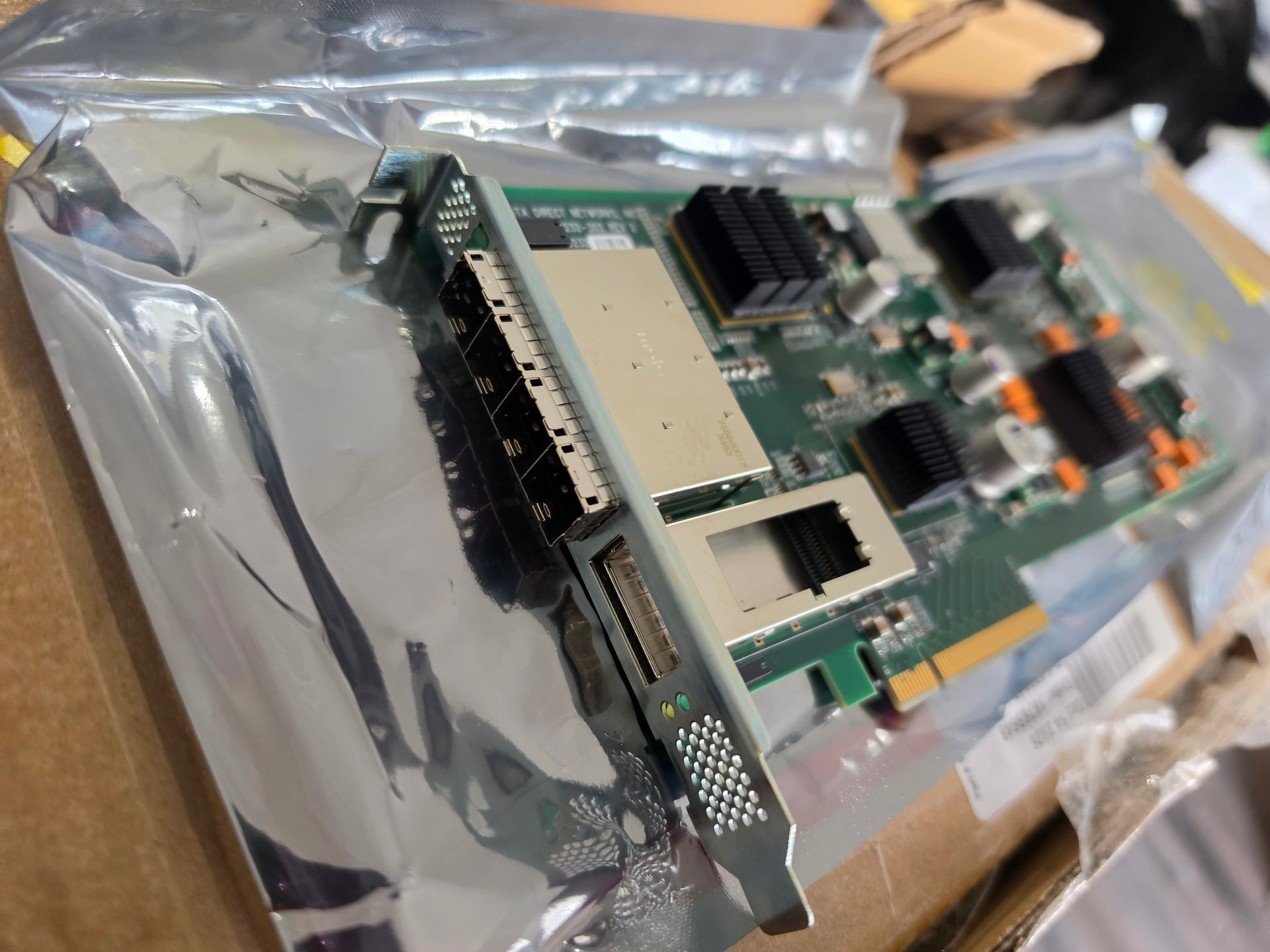
Each SAS2308 has 2x SFF-8614 external ports, so 4 ports total across the card. You need SFF-8614 to SFF-8482 breakout cables for individual drives, or SFF-8614 to SFF-8088/8644 for a shelf. In the original thread the external ports worked fine with a 1 m SFF-8614-to-4x-SFF-8482 cable across both SATA and SAS drives, but the rear activity LEDs on the card did not light.
Thermals
Worth knowing before you build this into anything. The original thread measured 37 W idle for the whole card, and reported the SAS2308s running hot. The heatsinks on these cards are designed for appliance airflow. In a desktop or a quiet case, plan on directed airflow across both LSI heatsinks.
Remember the ghetto EVGA fan that was repurposed from the video? You need at least that much airflow!
Other Notes
Card at the start of investigation:
04:00.0 Serial Attached SCSI controller [0107]: Broadcom / LSI SAS2308 [1000:0087] (rev 03)
05:00.0 Serial Attached SCSI controller [0107]: Broadcom / LSI SAS2308 [1000:0087] (rev 03)
03:00.0 Network controller [0280]: Mellanox MT27500 Family [ConnectX-3] [15b3:1003]
01:00.0 PCI bridge [0604]: PLX Technology PEX 8732 [10b5:8732] (rev ca)
Both SAS controllers: enable=0, no driver bound, IOC in RESET.
SBR, both chips byte-identical:
61 ef 3a 05 60 e5 5a 5f 0b 01 2d 71 e0 5a 02 f8
df 91 00 10 87 00 00 07 01 00 10 00 30 00 00 00
Interface = 0x00 (IT/IR mode), SubsysVID = 0x0087, 52 non-zero bytes, stable across repeated reads. SAS address field at 0xd8..0xdf is all zeros, which is why both controllers fall back to the firmware default.
End state after following this guide
04:00.0  IOC OPERATIONAL   FWVersion 13.00.01.00   8 phys   -> scsi host0
05:00.0  IOC OPERATIONAL   FWVersion 13.00.01.00   8 phys   -> scsi host7
Controller 0 carries the NetApp DS460 shelf: 6 expanders, 14 end devices, PHY links at 6.0 Gbit (drives) and 12.0 Gbit (expander uplinks), drives sda / sdf / sdg.
Files in this guide
DDN-card-level1techs-howto.zip (380.9 KB)
ddn-sas2308/
  DDN_SAS2308_HOSTBOOT_HOWTO.md     this document
  scripts/ddn-hostboot.sh           full boot-time sequence, both controllers
  scripts/hostboot-test.sh          single-controller test with verbose output
  firmware/9205-8e.bin              MPTFW-13.00.01.00-IT   THE ONE THAT WORKS
  firmware/2308T207.ROM             MPTFW-20.00.07.00-IT   (tested, faults)
  firmware/9207-8.bin               MPTFW-20.00.06.00-IT   (tested, faults)
  firmware/sbr_04_BACKUP.bin        SBR backup, controller 0 (original, before addr write)
  firmware/sbr_05_BACKUP.bin        SBR backup, controller 1
  firmware/sbr_04_sasaddr.bin       controller 0 SBR with an address programmed
References
lsirec, the host boot tool: GitHub - marcan/lsirec: LSI SAS2008/SAS2108 low-level recovery tool for Linux · GitHub- Linux
mpt3sasdriver,mpi2.hfor the register and state definitions:drivers/scsi/mpt3sas/mpi/mpi2.h - Broadcom legacy HBA downloads (9205-8e P20 package, manual download): https://docs.broadcom.com/
BONUS ROUND: Can it do 40gbe? 40 gigabit ethernet?? Nope
It’s kind of interesting. I wasted way too much time on this. Probably because these cards cost about $8. While I got them to be reliable at 40gb IB I couldn’t get them up reliably at 40gbe, and I also couldn’t get them reliable at pcie gen3 even though the PLX chip supports it.
TL;DR: the stock DDN firmware is probably fine and you should leave it alone. We spent a long
time hacking on these cards, got 10GbE working reliably, got 40GbE to advertise but never to
link, and didn’t get PCIe Gen3 out of it either. If you have one of these cards and you want
networking, flash the DDN firmware, add the Ethernet capability flags, and stop there.
Pulled from DDN storage appliances. One PCB, four functions:
| Function | Chip | Notes |
|---|---|---|
| PCIe switch | PLX PEX 8732 | 32 lane, 8 port, Gen3 capable |
| NIC | Mellanox ConnectX-3 VPI (MT27500) | single QSFP, Brocade SR4 optic |
| SAS HBA x2 | LSI SAS2308 | separate problem, see above |
The SAS side has no firmware flash at all, which is a well-known story. The NIC side is more
interesting: the card has no bootrom chip either (cost-down), and the firmware declares
vpd\_enable = false.
Why it does not work out of the box
The card ships as an InfiniBand HBA. The stock DDN firmware’s INI has eth\_xfi\_en = true but
none of the 802.3ap Ethernet capability flags:
port1\_802\_3ap\_cr4\_enable    <- absent
port1\_802\_3ap\_cr4\_ability   <- absent
port1\_802\_3ap\_kr4\_enable    <- absent
port1\_802\_3ap\_kr4\_ability   <- absent
port1\_802\_3ap\_56kr4\_ability <- absent
Without those, mlx4\_core never creates the .eth auxiliary device, so mlx4\_en never binds
and you get no netdev. The card looks dead but is actually just in IB mode.
Getting 10GbE working
Graft those five flags into the \[IB] section of the DDN INI, splice it back into the image,
flash it, and force the port type:
# after building the modified image
mstflint -d <bdf> -i image.bin burn
echo 1 > /sys/bus/pci/devices/<bdf>/reset

# port\_type\_array is per-card, per-port: 2 = Ethernet
modprobe mlx4\_core port\_type\_array=2,2
modprobe mlx4\_en
Result, verified on three cards carrying live traffic:
enp35s0   UP   10000Mb/s  full duplex  carrier=1
ens32     UP   10000Mb/s  full duplex  carrier=1
enp137s0  UP   10000Mb/s  full duplex  carrier=1
port\_type\_array is not persistent. Put it in /etc/modprobe.d/ and rebuild the
initramfs, because mlx4\_core loads from the initramfs at about 1 second, before
/etc/modprobe.d is mounted. If you skip the initramfs rebuild the parameter is silently
ignored and you are back in IB mode with no netdev and no error message.
Unload order matters. mlx4\_ib holds a reference on mlx4\_core, so modprobe -r mlx4\_core
silently fails and your parameter never applies. Unload mlx4\_en, then mlx4\_ib, then
mlx4\_core.
We went a long way down this road. Summary of what was tried:
| Firmware | 10G | 40G advertises | 40G links |
|---|---|---|---|
| DDN 2.32.5110 stock | IB only | no | no |
| DDN + Ethernet flags | yes | no | no |
| DDN + 2-byte CNF patch | yes | yes | no |
| Stock Mellanox FCBT 2.42.5000 | no | yes | no |
| Q-bin 2.40.7000 + CNF patch | no | yes | no |
| Dell 2.36.5000 (from a working 40G card) | no | yes | no |
| Dell + DDN lane mapping | no | yes | no |
| Dell + DDN lanes + GPIO + ref clock | no | yes | no |
The key result: every firmware (dell, hp, stock mellanox, old, new ) that supports 40GbE cannot train this board at all, not even at 10G. Only DDN’s own firmware trains at 10gbe. That strongly suggests DDN’s firmware contains board-specific PHY initialisation that the stock Mellanox-derived builds do not have, and it lives in compiled code we could not read.
The one interesting hybrid
Applying the 2-byte CNF patch to DDN firmware gives a card that:
- links reliably at 10GbE, and
- advertises 40GBASE_CR4/SR4 when you ask for it
$ ethtool -s enp35s0 speed 40000 duplex full autoneg off
$ ethtool enp35s0 | grep -A2 "Advertised link modes"
    Advertised link modes:  40000baseCR4/Full
                            40000baseSR4/Full
It still does not link at 40G. phys\_state stays Disabled with zero error counters, which
means the PHY never even attempts training. That is not a negotiation mismatch, it is the port
not being driven.
Comparing Q-bin and F-bin firmware at the same version (2.40.7000) showed the 12 DDR code
sections are byte-identical. The entire 10GbE to 40GbE difference is 14 bytes of CNF
configuration plus the INI.
Bisecting those 14 bytes found two independent 2-byte switches that each unlock 40G
advertisement:
CNF#1 body offset 0x03b8, 0x03ba   1c 03 89  ->  1f 03 f9
CNF#1 body offset 0x154f, 0x155a   03 .. 02  ->  0f .. 00
Those sit inside 00 01 f9 xx config tokens, which is where the protocol settings live. The
patch also applies cleanly to DDN firmware at the same offset.
PCIe Gen3 maybe?
So discovering that, I noticed the DDN INI has pcie\_gen3\_speed\_supported = false. Setting it to true does work at the firmware level: the card starts reporting Gen3 capability and requesting it.
Card:       LnkCap: 8GT/s   LnkCtl2: Target 8GT/s   LnkSta: 5GT/s (downgraded)
PLX up:     LnkSta: 8GT/s
PLX down:   LnkSta: 5GT/s
The PLX switch’s downstream port caps at Gen2. The upstream port negotiates Gen3 fine, the card asks for Gen3, but the switch port feeding it reports a Gen2 maximum:
upstream   LnkCap = 0x01416883   max speed bits = 3 (8GT/s)
downstream LnkCap = 0x00415c82   max speed bits = 2 (5GT/s)
So after all that firmware work: no reliable Gen3, and even if we got 40GbE working in this config,it would have been somewhat bandwidth-starved even if it had trained.
If you want networking out of one of these cards, the recipe is:
- Flash DDN firmware (or keep what is on it)
- Add the five
port1\_802\_3ap\_\*flags to the INI port\_type\_array=2,2in/etc/modprobe.d/plus an initramfs rebuild- Done. You have a 10GbE card.
Bonus: an mstflint bug worth fixing
Separately, mstflint segfaults on any ConnectX-3 with a BAR0 smaller than 64MB, which includes
these cards. Two causes:
MTCR_MAP_SIZEis hardcoded to0x4000000(64MB).mmap()of 64MB over a 1MB BAR fails,
bar_virtual_addrstays NULL, and the next CR-space read dereferences it.mtcr_check_signature()reads0x30F0014, which is outside a 1MB BAR.
A patch that derives the mapping size from the device’s actual resource0 fixes it… If you are hitting segfaults on CX3 hardware, that’s why.
Here’s the patch: 0001-mtcr_ul-derive-BAR-size-from-sysfs.patch (6.6 KB)


