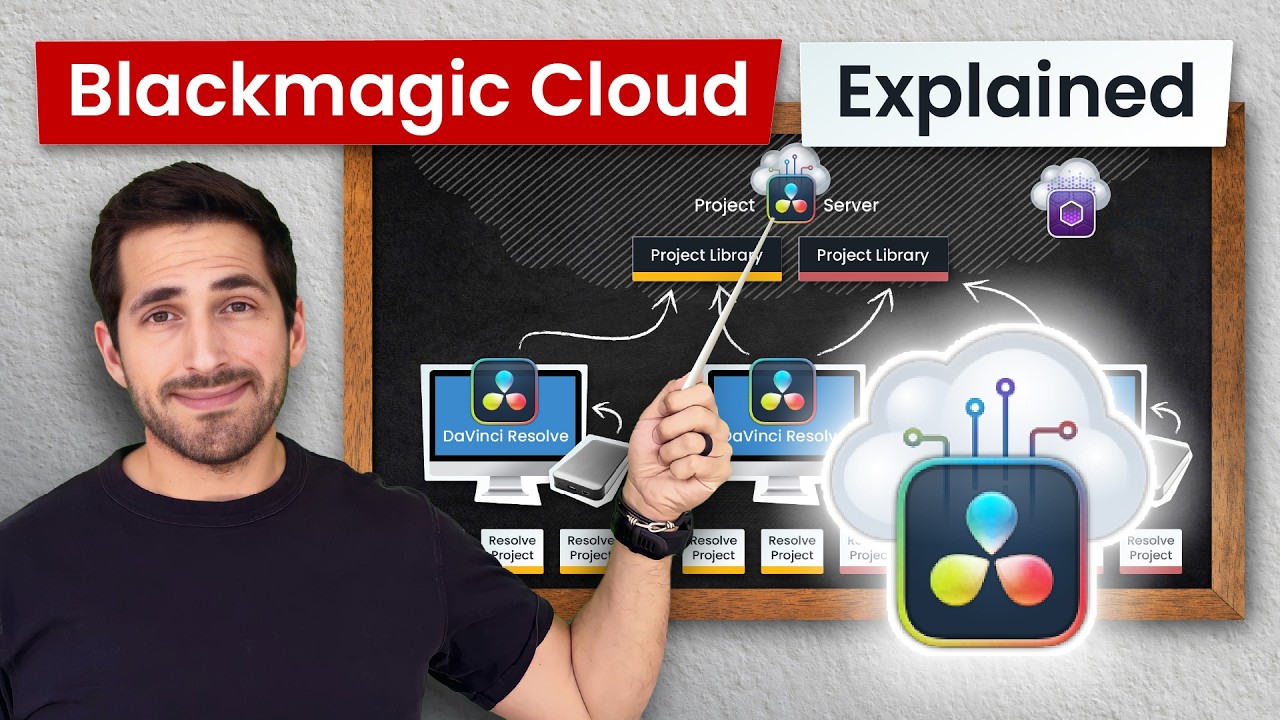
Davinci Resolve Project/Database Server | Recommendations?

Hello there,


**Background Info:**
We are a primarily Adobe CC video production house but use Davinci Resolve for color grading and denoising

Using 4k10bit 30fps footage (sometimes 60-120fps). Filmed on GH5 and BMPCC 6k Pro usually. Selling our Reds as we do not need them anymore.

1-2 people need to connect to Resolve at a time.

Usually a 10-18 node tree, no fusion or audio workflow. Again, only Color Grading, Denoising, Power Windows, blurs and sharpens, etc. Anything and everything in the color tab and nothing anywhere else.

Seeking a smooth enough experience for playback. Local workstations are TR 2000 with 1080ti’s about to be upgraded to TR 7000 with 4070 Super’s. Remote editors… specs vary.

Gigabit up and down. Live in an area still using Cable Modems, fiber is not an option. In fact we only have two ISP companies in our area outwards to about ~30 ish miles.

We have a networked render server that Premiere Pro, Adobe After Effects and Resolve projects render out from.


The Question:


I *just* made a post about our new Premiere server and questions regarding that. However, I've been meaning to create a centralized access for Davinci Resolve Project Files/Database to host those specific files so they are not local to any specific device.

I have yet to build this as I have heard conflicting information and wanted some clarification:

  1. I have heard both opinions that a Davinci server to host the project files needs the hardware to edit off of (meaning the workload is hosted on the server and not the workstation you are working on) and I have heard the opposite. Which is it?

  2. If the latter, I would assume ordering any mini-PC and just using it as a storage box (essentially) would work fine? If the former, I’d rather not build a $3k+ rig for this so whats the best bang for buck I can make given my particular use (refer to background info above)?

  3. I have seen many Mac Minis or Studios recommended for this task. Why and what specs/information should I be looking for? Is there a step by step guide somewhere to show how to make a Mac a remote storage box?

  4. We’d only have 1-2 people connecting at the same time so I’d think with the footage data rates (400mbps - 1Gbps) a 2.5Gbps connection would be enough to the rest of the network?

Thats all the questions I have for now. I essentially am just trying to make sure anyone and everyone who needs access to resolve projects has said access. What hardware I should be looking for, etc. Again, I have heard conflicting information…

Thank you for the help in advance everyone :slight_smile:

Since I am currently doing a similar project, here is what I found out so far.
It seems to be pretty complex and the wording and resources from BlackMagic are a little bit strange for a newcomer like me.

So I try to split things up.

First of all, let’s take a look at project libraries.

A Project Library (formerly project database), is a database file storing one or more DaVinci Resolve projects. When you create or load a project from the Project Manager, or save a current project, you read from or write to a project library. A project library contains multiple projects, and each project contains all the timelines, grades, clip metadata, visual effects, audio mixing, etc. for your film. A project library does not store the original media itself, only the instructions on how to use that media to create a finished film. DaVinci Resolve can access multiple project libraries, but can only connect to one project library at a time.

Now for project libraries there are three options on where to store them.

— Local: Stores your project libraries locally on your workstation. This is the default and is best for individual users or single systems.

— Network: Stores your project libraries on an external computer that is connected to several workstations on the same local network. It also allows you to control user access to the project library. This is best for a facility composed of multiple workstations in the same building working on the same material.

— Cloud: Stores your project libraries in the Blackmagic Cloud. This allows several workstations to connect to the same project library over the internet. It also allows you to control user access to the project library. This is best for multiple people working on the same project from different locations around the world.

Let’s take an even deeper look at each option.

Local is probably out of the Window unless you are a very small team and never work on the same project. You could in theory use local by saving the library in a Dropbox or similar “Cloud” folder. That way another project member could access it. Problem is that there is no file lock system (well there is, but it won’t work on cloud services that do not instantly sync) and if two people open it up at the same time there will be conflicts.

Network: This option has basically two parts, storage and collaboration.

Network storage: could be a Windows 11 PC sharing (watch out for the share limitations of none Server Windows) a Mac sharing or a NAS (Synology, QNAP) or TrueNAS.
There is a lock mechanism, so not multiple people at the same time can open it.

Network for collaboration: there is an option to use a collaborative workflow for Network Libraries. Multiple people can work at the same project. But you need a DaVinci Resolve Project Server for that!

DaVinci Resolve Project Server: It looks like there a basically no real requirements for that machine, other than it is up and running 24/7. That is why you probably see a lot of people recommending getting a mac Mini for that. Uptime is probably better than with a Windows client.

So let’s look at the network options again.
We first need to decide if we need collaboration. If not, we can ditch the second part and the Project Server.

Whatever we choose, we could combine it with a VPN so we can work from outside and basically create our own cloud solution. Setting up a VPN in a secure way is not an easy task and you need to know stuff about networks like CG-NAT. Another problem is that you need very fast access to the project with low latency. Since that is not really possible over the internet, unless both sides use fiber, and even then it is not guaranteed, we need some kind of cache. For media we need a fast enough connection to stream it. Proxies make the bandwidth requirements smaller.

Blackmagic Cloud Hardware:
This is basically just some very simple NAS and cache server hardware that Blackmagic sells you. It seems easy to setup and does a lot of heavy lifting for you. You still need to take care of some network stuff and know how to import and trust certs so your clients can access it over the internet.

The storage of that solution is based on two options. Cloud Dock and Cloud Store.
Dock will only work with Dropbox/GDrive as storage backend and Store will work with Blackmagic Cloud as storage backend.

Dropbox or Gdrive as storage backend:
Pricing depends on region. Roughly 1k € per year for 5TB.

Blackmagic Cloud as storage backend:
Pricing depends on region, roughly 5€ per Project, and 15€ per TB.

Another completely different topic that could become interesting for you is proxies. The software Blackmagic Proxy Generator can automatically overwatch folders to create proxies. This could be a local Windows Workstation or macMini, depending on your needs.

That is probably because it all REALLY depends on your workload.

Biggest issue I see currently with your workload, is that you only have 1GBit upload and it is not even fiber, which means high latency. So a VPN to a network drive is not gonna cut it. These editors either need to somehow have the project local (otherwise performance is too bad) and to somehow access the media (either the original or proxy).

To solve that for your remote workers have multiple options.

  • Download a project to their remote systems and tell everyone else not to work in that project. Probably not a good solutions, unless very small and no collab.

  • Install a Blackmagic Cloud Pod in every remote workers home, basically acts as a local cache server for your Dropbox/GDrive storage. Your remote workers each having their own Cloud Pod that syncs with your company Dropbox/Gdrive.

  • Go with the Blackmagic Cloud as storage backend. Here I hope files are stored locally and maybe even collab is possible.

  • This option I would have to test or read up on it, not sure if this can be done. Connect via VPN, somehow get the Project locally cached, maybe from the Project manager and work with small proxies.

You are not editing on the server, always on the workstation.
Server can need performance for Proxies.

See my other text about networks. For only projects, you probably don’t need a lot of performance and a macmini is more than enough. That changes is you add storage or proxies.

Again depends on your needs.

Davinci Manual does a decent job at explaining the davinci part. Way more complicated is the network part. So if you want a simple remote storage box and not to thinker with VPNs, I would probably go with a Blackmagic Cloud Dock or Store.

[quote=“twursta, post:1, topic:226109”]
We’d only have 1-2 people connecting at the same time so I’d think with the footage data rates (400mbps - 1Gbps) a 2.5Gbps connection would be enough to the rest of the network?
[/quote] Depends on your network hardware, 100Gbit/s QSFP28 is not that expensive anymore 10Gbit/S SFP+ is dirt cheap and does not use a lot of power.
The copper solutions would be 10GBASE-T, which is not that cheap, pretty power hungry, but more common on consumer hardware.

I would recommend that each editing machine has at least 10GBASE-T to your switch and that switch could be connected to your storage over QSFP+ 40Gbit/s.

You can get these kind of switches for 550€ like the Mikrotik CRS354-48G-4S+2Q+RM

Great vid that explains it a lot better than I do :wink:

Thank you @ThisMightBeAFish !

That’s what I thought but again had heard different thoughts voiced. No proxies, just color work/visual editing a shot or two for testimonials, training videos, corporate videos of all sorts, etc.

I did and it sounds like I will be looking at the:

although I did figure I’d learn how to setup a VPN for it so I can self-host everything. But makes sense.

Google Drive is our Cloud backup, dont touch drop box.

What other information do you require my friend?

Currently rocking a 10Gb switch that connects all our local devices/servers to our server box via two 25Gb ports (Ubiquiti enterprise switch). Great advice though and certainly something to think about!!!

I’lll have to take a look, thank you for providing this! :slight_smile:

1 Like

Resolve has the option to render remotely, the network storage can just be a “dumb fileshare”.

At that point, just get one of the “Cloud Store”-devices from Black Magic. These have the advantage of being able to sync to the BM-Cloud.

I wouldn’t use Mac-anything for this, but that is purely based on me knowing jack about them. Any decently quick SMB-share-box will do.

A lot of mainboards have 2.5G ports nowadays. Throwing in 10G or 25G NICs into any box is not a big expense compared to your camera gear. You really want to avoid an editor having a bad time because the network is not keeping up.


There is no single correct answer for storage needs:

  • A few terabytes on the network at Gigabit read speeds is easy and cheap
  • a few terabytes at 10G Read and Write is harder
  • tens of terabytes at 10G R/W for tens of people gets expensive quickly
1 Like

Do more than one person work at the same project?

Do you work in collab?

Mac Minis are dirt cheap, while offering a lot of performance, and are at the same time very, very easy to maintain. Synology and QNAP are probably similar easy, but will never have that kind of horsepower.

Even a cheap mac Mini will offer 10Gbit nowadays. I think that 10GBit/s OR proxies is pretty much needed with such high quality footage.

Everything below 10GBit/s will even be outperformed by a good USB SSD. 10Gbit/s is only 1.25GB/s, which is not that much.