Optane is fast because of latency. It’s halfway between nand latency and main memory latency. That’s prettymuch it.
Galaxy class enterprise vs defiant class defiant type designs
Optane is fast because of latency. It’s halfway between nand latency and main memory latency. That’s prettymuch it.
Galaxy class enterprise vs defiant class defiant type designs
Nice, good to know. Really makes a big difference even from nvme. I was surprised once I started comparing with a stop watch.
I have now almost burnt down the server when attempting to use a Tesla M40 as a Titian Black… I messed up the power connector and didnt use the supplied adapter. UG… I thought about selling the whole server, but I’m going to keep it. I can do so much with it because it has so much ram and number of threads.
I bounced back and forth, but after upgrading it to a dual CPU system, and seeing as its a weird step for Xeon, with DDR3 still, Its something good to play with despite the heat.
I will however let the gaming card mod go for a little bit, possibly come back to it once I identify the chip I need, if I can get it. I’ll need a new solder iron or gun…
Well, I may take a bit of a break… I need to read some more and gain some more knowledge before I continue I think.
That adds a new dimension… and it worked a bit before it went kaput? That sounds pretty impressive tbh
Yeah, bonehead move. I dont know what happened. Soon as I turned it on I smelled it. I had the box closed and had to move the adapter for the PCIE to line up. I had the box closed in my closet… Ug…
I am glad the damage was localised and you & your house is still okay.
I’m sorry you now have a new toy to play with/repair
Me too… It will be something to do…later…
really glad server is ok, put some hard work into that modification.
So, I decided to distract myself with playing with Intel Optane drives on AMD to try out the new StoreMI to see how Optane worked in that role. Sadly, M.2 slots I was working with were on the B550 Mortar by MSI.
I was using a H10 Intel drive with 32GB Optane and 480GB QLC Flash. Here’s the interesting thing. The H10 from what I read actually splits the 4 PCIE lanes into a 2x2 PCIE lanes. Thats done by the chipset that supports optane on intel platforms it seems.
1.) When it is plugged into a PCIE/SATA slot the 32GB of Optane memory populates in BIOs.
2.) When put in the lower slot which is PCIE only it only registers the 480GB of QLC flash in BIOs.
It was a interesting experiment to see how it worked on the AMD platform. I have a smaller dedicated 16GB nvme m.2 I may try, or a larger 118GB model. I have to double check the M.2 layout again.
So it seems that the bifurcation that happens on PCIE 16x slots can happen on a M.2 slot… but only on Intel systems unless someone else has figured out how to get this to work and I have missed it in my google-fu…lol
EDIT: -Heres the specs from MSI
So it appears that the H10 Intel drive reads the Optane memory in SATA slots and reads the QLC in PCIE Slots.
2nd EDIT-
With only a SATA drive and NVME 16GB Optane drive, Store MI wont install without a HDD in the system. I will next attempt to install one HDD to see if I can use Optane memory to accelerate the SATA M.2 drive.
Going to try Primocache as a 30day trial first and see how it goes…
I finally got around to installing a 3TB seagate HDD in my Ryzen 9 3900XT with B550 Mortar. It let me install StoreMI finally but I didn’t get the options I hoped for.
I couldn’t accelerate the boot drive (M.2 SATA) with my Optane 16GB M.2 NVME drive.
Caveats - Drive must be unformatted to use as cache via Disk management.
I may run some Diskmark tests just to see speeds compared to primo cache. So far Primocache is a winner hands down on usability and configuration options.
I just ran the numbers on this vs their Kryonaut on my Ryzen 9 3900XT.
Idle temps- rougly 37-39C Peak Load 78-80C w/ Carbonaut Carbon pad
Idle temps- rougly 34-36C Peak Load 72-74C w/ Kryonaut Paste
Just a un-biased non-paid advertisement. So 3 degrees C at idle but at peak load is the big one with 5-6C difference.
So if paste makes you scared or worried about application and need a pad the Carbonaut does a great job.
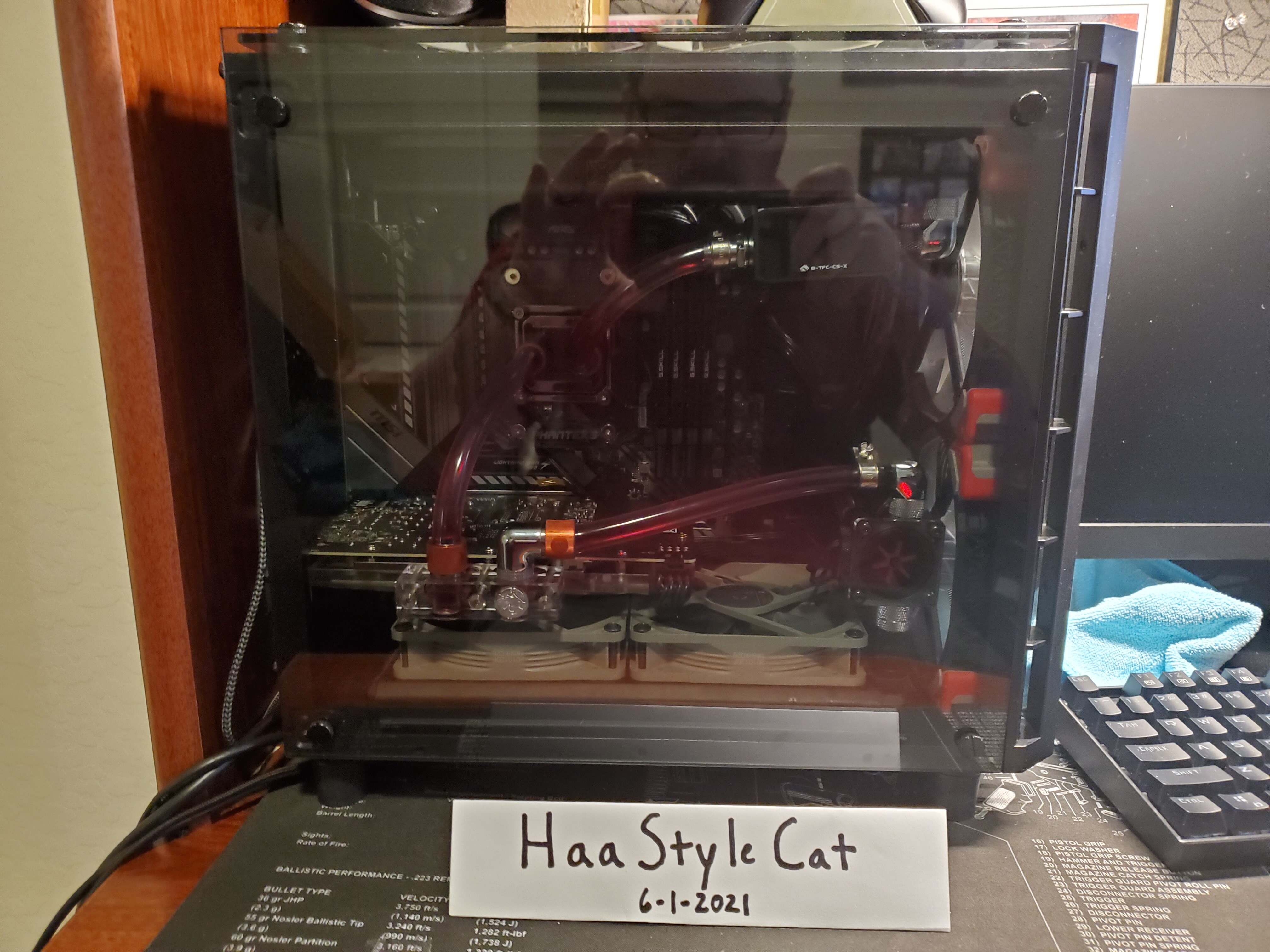
This test was done with a Phanteks Glacier block and dual 240mm rads with a ddc pump at roughly 1 gpm and Noctua NF-P12’s and ML 140’s in a Corsair Crystal 280x case…which I finally got a picture of the insides from the back…
Well I finally got some testing done and some benchmarks to compare the new StoreMI from AMD and Primocache. This was on the system just above with B550 MSI Mortar and 3900XT. Not entirely surprising that Primocache was way faster due to using tier 1 Ram cache (which AMD Store MI 2.0 does not) AND tier 2 Optane drive.
Heres the 7200 RPM 256MB Cache Seagate drive results.
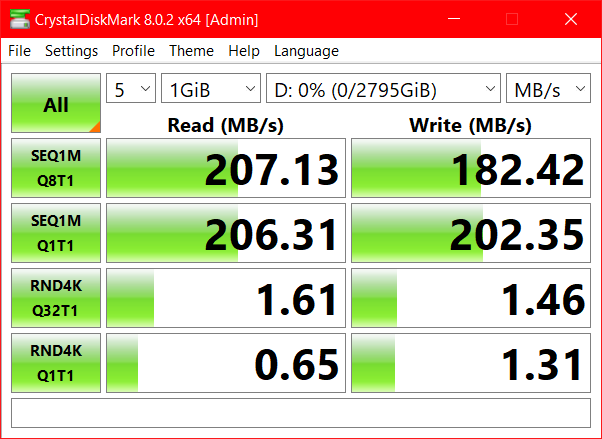
No cache

Store MI on 1st run

StoreMI second run…no more increase with 3rd or 4th runs.

Results with Primocache (tuned only for reads/ can be tuned for writes as well but I didnt have a good setting for that but there are some presets avalible)
Now on to the Samsung M.2 Sata drive, this one I could NOT accelerate with AMD’s Store MI, but I could with Primocache.
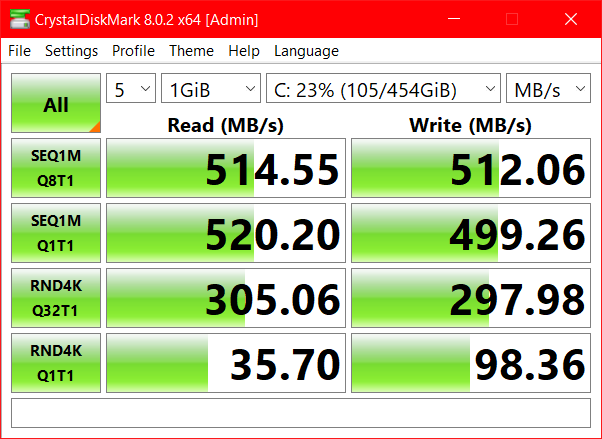
No cache
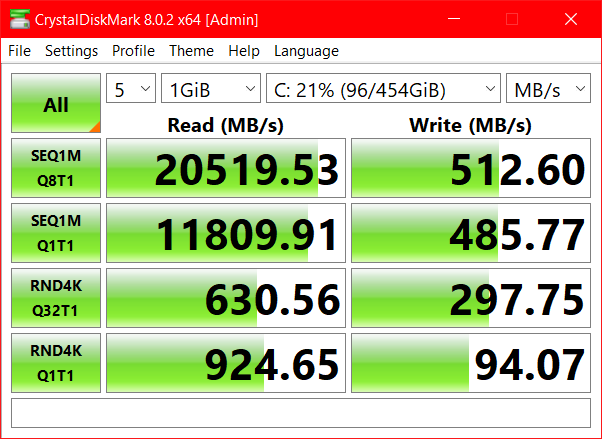
Sata m.2 with Primocache (again not set up for writes in this senario either)
All in all Primocache seems like a solid tool if you have excess RAM and or a NVME/Optane drive you want to use for accelerating spinning rust disks.
The flexability of Primocache is great as well in that you can set up seprate cache “jobs” with devices or partitions for different drives or in my gaming rigs case I created one big pool on the 260GB Optane drive allocated the excess 12-16GB of ram and accelerated all my M.2 NVME storage and my one SATA disk for gaming. Once I have played a few times/or a while load times were next to nill on a number of games I remember watching loading screens for ages.
Ok, now that I’m completely off getting a new GPU or hardware (I went a little overboard), It’s now time for me to get down too it. I’m going to try to organize myself a little here and come up with projects and goals for the home lab. There is so much I want to do and learn.
1.) I want to use the Protectli to run OPNsense as a firewall for the home. Its installed and working…just need to configure.
A.) Get the bare minimum up and working correctly
B.) Integrate it with Pi-hole running on my server (or move to another appliance and find good “White Lists” and Block Lists"
C.) have it work well with my ASUS wifi 6 mesh nodes. (exspected NAT issues)
I want to:
2.) I want to learn how to set up some automated maintenance for the servers some how. I literally don’t know where to start here. Do I need a service running or write a script where to put it or anything. I get the concept, but I have no idea how to start.
3.) Centralize monitoring and reporting of errors. I need to setup postfix? I think. Cockpit should run on my servers, maybe monitor firewall as well.
4.) Set up a steam cache server. I have documentation on this, and after learning some more about networking I think this should make more sense.
5.) TrueNAS migration of entertainment data-
6.) Automated backup between two servers possibly with rsync. One on 24/7 the other I start when needed for work I want as the tertiary local BU. (Too Much?)
7.) Work with another hypervisor (need a free option)
Just as a reminder, here are my machines as of right now. These are brief descriptions…
Other Hardware
Network Hardware-
Notes-
I have no hardwire in the house. I HAVE to rely on the wifi nodes to connect the office (where internet comes in)/ Man cave/Livingroom entertainment center.
Any help, or suggested reading?
@PhaseLockedLoop Has been a HUGE HELP with his series on
https://forum.level1techs.com/t/re-infrastructure-series-recursive-dns-and-adblocking-dns/173612/18
The series on selfhosting and disconnecting from big tech is something I am really into. I also want to see how I can encrypt cloud storage…anyone know a free option.
That’s on my list also. I’m planning to use Anisible for the automation. Jeff Geerling has a book on Ansible plus some videos on his youtube channel about it. He’s been doing a lot of raspberry pi stuff lately also if you’re interested in that.
Sweet, I will check that out for sure. I’ve been spinning my wheels getting nowhere so I thought if I put it down that might help me focus.
Im sorry I havent been attentive in the least. Im glad the reading has helped. Since you are going through it as a beginning. Comment when you read. Reply.. tell me whats not so beginner friendly and Ill added it to notes and references in the reserved post as I can.
Ive just been lol otherwise occupied as of late 
Good for you, no issues there and I get it.
Well, we are buying a new home. Well Having it built actually. I’m now planning the layout for the networking as the wife has given me permission to do so. The “Office” I chose has a small closet in a small hallway to it behind a door. I thinking of making this the “server closet” with possibly a air exhaust and cool air intake and a 10 cable keystone panel if I cant move the entire patch panel from the laundry room. I will attach pictures when I can. However… I am also having the garage insulated and the patch panel is just on the other side of the wall…However, My bet is it’s still going to be hot as hell in the garage with no AC in Arizona summers. For the time being we will be moving to a apartment to take full advantage of the huge house market spike here in Arizona to get top dollar for the home. I’m still alive, I’m still trying to sell equipment and also sadly my tools (Snap-On and MAC) but still married so thats a plus. Anyways, miss ya all. I hope I can be on more in the future. Oh, and wife saw my Patreon Subscription… I have to cancel it for now. It might not have been a ton but I really wanted to support this place.
That’s exciting that you are getting to have a house built. Will give you lots of opportunities to build the home lab you want.
Well, just had a meeting with the electrical team… and wife was there… my dream is coming true.
My office/Man Cave/Home Lab will have the patch panel in the closet with a sliding door and it’s own ac inlet and ventilation fan!.. cat6 through the whole house, fiber up to patch panel for when that comes avalible, ummm yeah there was more too but I’m stoked for it!
Again more pictures will be up maybe tomorrow. Spent most the day in the design center… we will also being doing a pool with the excess we’re making on the sale of the house.
Glad to hear it dude. I keep threatening to start my own homelab thread. I should really do that sometime.