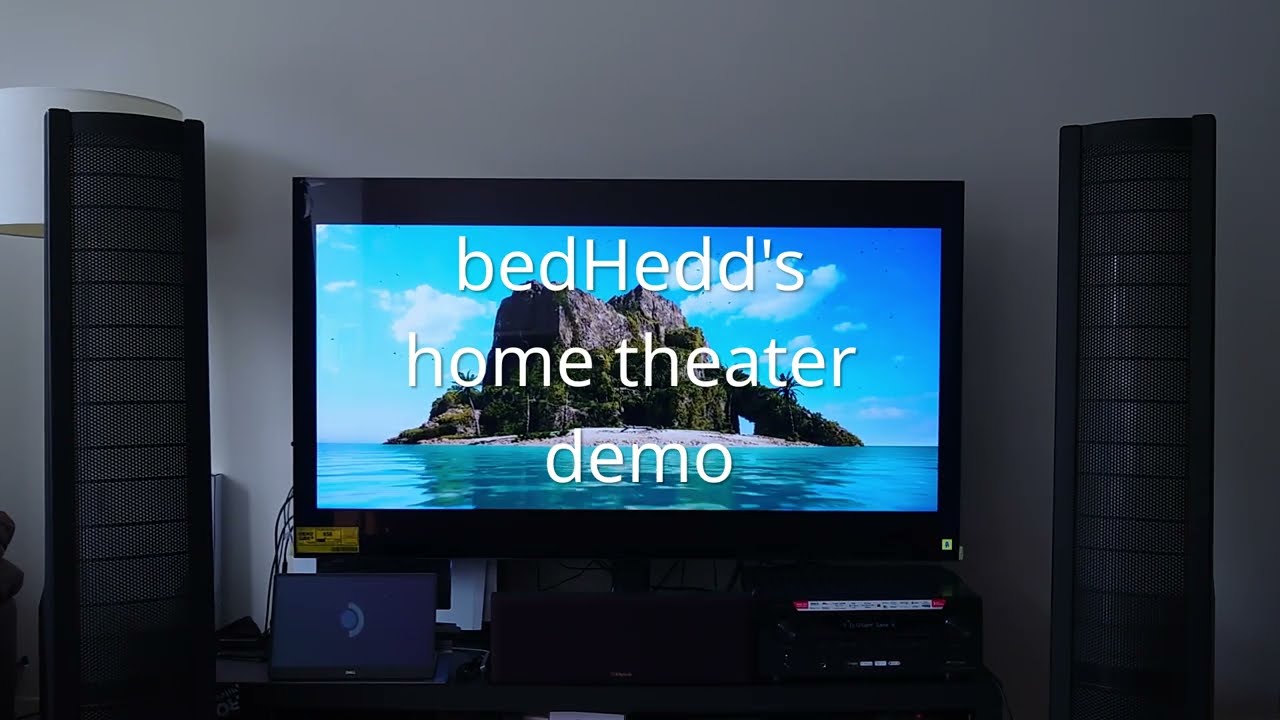
I am in the progress of upgrading my living room audio setup. This was initially going to be a post to the lounge, but after some skim research I figure I’d ask the community.
Feel free to follow as I figure out what I need
initial setup
Right now I have a LG C3 OLED, some cheapo speakers from my brother’s karaoke setup. I use the livingroom setup to play party games, light karaoke, and watch movies when I need to entertain guests.
The karaoke setup uses a optical spdif out to a mic and audio mixer. I have my old PC parts as my home theater PC. I would like to upgrade the speakers to standing as they currently block my TV on the stand
recent setup
PC:
Nobara Linux 42 (Steam-HTPC edition)
Ryzen 3800x
16 GB RAM
Nvidia RTX 2070
Display
LG C3 connected to AVR via EARC (4K 120 Hz HDR)
Club 3D CAC-1088 DisplayPort 1.4 to HDMI 4K120Hz/8K60Hz HDR Active Adapter M/F
PC → Receiver (DP → HDMI) → TV EARC (HDMI → EARC HDMI)
Audio
Denon X3800H (Audyssey Calibrated) volume set to 75
Stereo: Martin Logan Aerius
Center: Klipsch KV1
demo
video
chapters
0:00 Crab Rave - Noisestorm
3:12 Clint Eastwood - Gorillaz
8:49 All Caps - MF DOOM
11:00 –CUPID– - Miki Matsubara
16:21 Chamber of Reflection - Mac DeMarco
20:10 Show Me How - Men I Trust
23:45 Body Paint - Arctic Monkeys
28:31 Telescope - Cage the Elephant
Someone in my local area posted their Martin Logan Aerius electrostatic standing speakers for sale for $425. According to the widow, the owner was into HiFi and got into home theater. They are willing to throw in a klipch center channel speaker as well as the monster cables from the setup.
It has been in storage for 10 years. When I checked them out, their window shades were closed, so I can’t imagine that the have a lot of uv damage
I’m going to use my Dayton audio amp to test it out. The recommended wattage by the aerius recommends a amp with 60-200 watts per channel my amp is 50 watts per channel
This is what is making me hesitate on pulling the trigger. It sounds like a pain in the butt to repair/refurbish
Also how good are they for A home theater? Reddit says it’s good for tall ceilings. The previous owner liked them enough to use it for their home theater
Tested the speakers with 1 speaker at a time with my Dayton Audio DTA 2.1 BT amp that I use for my desk setup, since one of the speaker wires were broken.
There wasn’t any noticeable issues so I pulled the trigger. Now to find a receiver that can power it.
I am still debating if I need a receiver, as I use my HTPC for viewing content and games. The main advantage is being able to pass multiple inputs to my speakers
Electrostatics can be stiff and may need power in the suggested range just to move and make any sound at all. Check with wiser heads than mine on electrostatic speaker, it may be that you’re pushing energy through them and they’re not making sound, they may just be be heating up.
If I opt for this setup, the Denon X3800 seems like the right pairing as it can do multiple HDMI 2.1 inputs (4K 120hz hdr) and can power my speakers.
The X3700 is great, but it seems to only do 1 HDMI 2.1 at a time, but I gotta wonder if I need more than 1 HDMI 2.1 because I’m just going to use my PC.
I also need to be able to have mic inputs for karaoke. A temporary solution might be to get a audio interface and a external amp (that can power the left and right channel speakers in addition to the center channel) similar to my desk setup.
I went to a local home theater shop I mentioned my speakers and wanting to let the reciever manage all input. I asked if they had any used x3800 or x3700. Unfortunately they did not and said they had the Denon AVR-S970H new for $680 would be cheaper than the x3800 and match my needs.
On eBay I see listings for 500-600, so I would probably from online given the differece of ~$170. Now to do some more research on how seemless 120hz HDR is on the S970H.
I have a 3800 and I recommend that because it has a decent amp section which you will need for those electrostats, it has full preouts which will be handy if you get an external amp which may drive them better and it has HDMI 2.1. You can run the source in to the TV and use eARC to get audio on the AVR but it can be a little janky. I have to do this on my setup to get 144hz, it works but sometimes it takes a while for the audio to switch. You’re also limited to the audio formats that the TV supports, even though it’s just passing them through, older LG TVs didn’t support DTS for example but I think the C3 does.
Those speakers should be very good, especially for music. But they’re also very fussy about how they’re set up in a room. They’ll need to be a good distance off the front wall to sound their best and they’ll have a very narrow sweet spot. They also pull a lot of current so you might want to think about getting an external power amp at some point.
Yeah, even supports g-sync though it’s not a stated feature.
I mean more like 3 feet, or more. All speakers sound better away from walls but dipolar/open baffle speakers need a lot of space for the back wave to be delayed and diffused otherwise it will just interfere negatively with the direct wave.
I was thinking of plugging it into the hdmi 2.1 port on the receiver, but letting it be the hub for my tv. I was thinking if I opt for hdmi arc, could I get something cheaper but with a good amp?
The 3800 is hard to beat unless you find something second hand (a third option by the way is to run HDMI to both the TV and AVR and just configure the AVR as a second monitor, thus not requiring eARC). Having preamp outputs to run external amps is a feature that only mid range and up AVRs have. If you’re thinking of doing that now or in the future then make sure whatever you go with has at least left and right channel pre-outs. If you don’t need HDMI 2.1 then you can go back a fair way with older models and still support all modern audio formats.
I invested in a 5.1.4 setup for a 12 x 13 room; Onkyo TX-NR7100 (when receiving an Atmos or DTSX audio signal, you will HAVE to have something playing a constant audio signal in the background if you don’t want a 3 second delay; Moodil (edit, sorry) in a separate browser with the volume set to 1 has been fine), but the speakers are a cheap Klipsch 5.1.4 speaker kit, the only issue is the subwoofer (because Klipsch subwoofers are dogfarts).
You don’t have to spend hundreds of dollars on a single speaker to have a good experience, but most speaker reviewers will tell you differently, because they focus on graphs instead of how it actually sounds in real time.
You don’t need to spend a lot, but it also depends on the size of the room.
You can still have ARC even if you don’t use it for the PC. Unfortunately there isn’t really an ideal way to use a PC in a home theatre. If you run the PC through the AVR you’re limited to what resolutions and HDMI features it supports and you can have irritation loss of signal on resolution changes sometimes. If you go direct to the TV and use eARC (ARC doesn’t support multichannel formats other than DD and DTS) then you’re limited to whatever audio formats the TV supports plus you can run in to issues when switching audio formats. And if you run a second HDMI cable you will have a phantom second monitor which you will occasionally lose windows or your mouse on.
Personally I only go directly to the TV and use eARC because of 144hz support, otherwise I would go though the AVR as it’s the least janky way.
eARC performance on a TV is very TV model specific.
Just anecdotally, when I tried eARC on my TV, it screwed everything up when routing back to my receiver. TV is a Samsung QN90B 55". It has been a better experience to run audio through HDMI directly to the receiver than through eARC. I can’t remember exactly what happened, but once switched to direct to receiver, I had no problems whatsoever.
Edit: For people looking for a (somewhat) hyper-specific use case.
if I opt for this, I want the setup to be seamless (4k, 120 Hz, HDR) since I am spending >$900. If this doesn’t work I can fall back on the earc method
scenario 2: htpc → TV ← Reciever
if I opt for this, I want to get the best bang for my buck new or used. I will expect jank because it is cheaper. If this is still jank, I can get a PC to arc box
ARC is really designed for getting audio from a TVs built in apps, passing the audio through the TV seems to be a bit buggy especially with a PC which can change resolutions and audio formats.
Getting something with HDMI 2.1 and running the PC through the AVR is the simplest solution. I wouldn’t even consider some kind of ARC splitter. If you can’t run the PC through the AVR and you don’t want to use eARC then using a second HDMI cable to the AVR for audio will be the best solution. The only problem that causes is having a phantom second monitor but that’s not too hard to deal with.