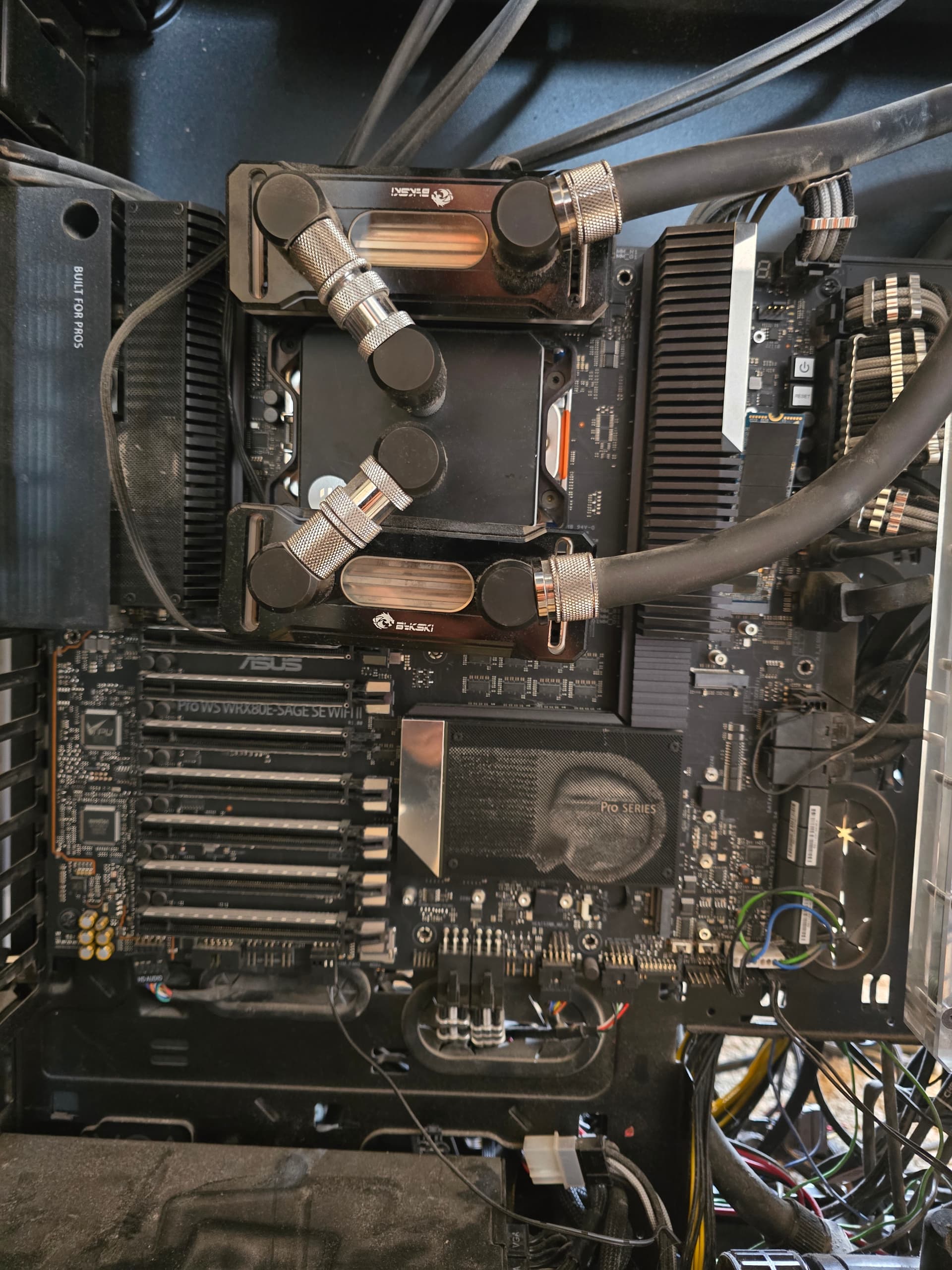
I have been having issues with my motherboard for a while, and I think I have narrowed it down.
Currently I cannot save any settings that are CPU related. For example, I cannot turn off SMT, enable NPS0-4, Turn off Virtualization, etc. The CPU that is in it is a 5995WX.
I can, however, make any other changes in the bios and they persist. I have upgraded the bios 3 times and am currently on 1602.
Otherwise, the motherboard works fine. Even able to enable PBO, overclock the RAM just a tad.
ideas?
Copy down or export your current settings. Reset the BIOS to F5 defaults.
Shut the PSU power off and the PC and pull the battery.
Short the BIOS reset pins or pads or push and hold the BIOS reset button for a minute.
Load a new BIOS on a USB flash drive and flash the BIOS. Boot and put back your settings or make one change to a cpu setting, save it and reboot and see if the cpu setting is reloaded to the state you set it.
Just sounds like your current BIOS is corrupted.
Ok, ill give this a try. This might be a larger endeavor. The battery is covered by 4 watercooled GPUs lol.
Try without removing the battery first for simplicity first. Maybe just reflashing the BIOS will fix the corruption after the BIOS reset.
Removing the battery is always the best choice to make sure all the areas of the BIOS get flashed and updated.
I have done that previously. I have gpus out and cant find the battery lol
Look at your motherboard layout in the manual. The battery is in the upper left corner probably not visible because it’s under either the I/O cover shield or the VRM heatsink. Piggybacks on the M.2 WiFi module under the I/O cover. Page 14.
Certainly didn’t make for easy access.
This thread discusses the procedure.
https://forums.bit-tech.net/index.php?threads/asus-wrx80e-sage-se-wifi-motherboard-cmos-battery-replacement.385826/#:~:text=wolfticket%20Downwind%20from%20the%20bloodhounds&text=It%20looks%20a%20like%20the,from%20below%20to%20change%20it.&text=adidan%20and%20kenco_uk%20like%20this.
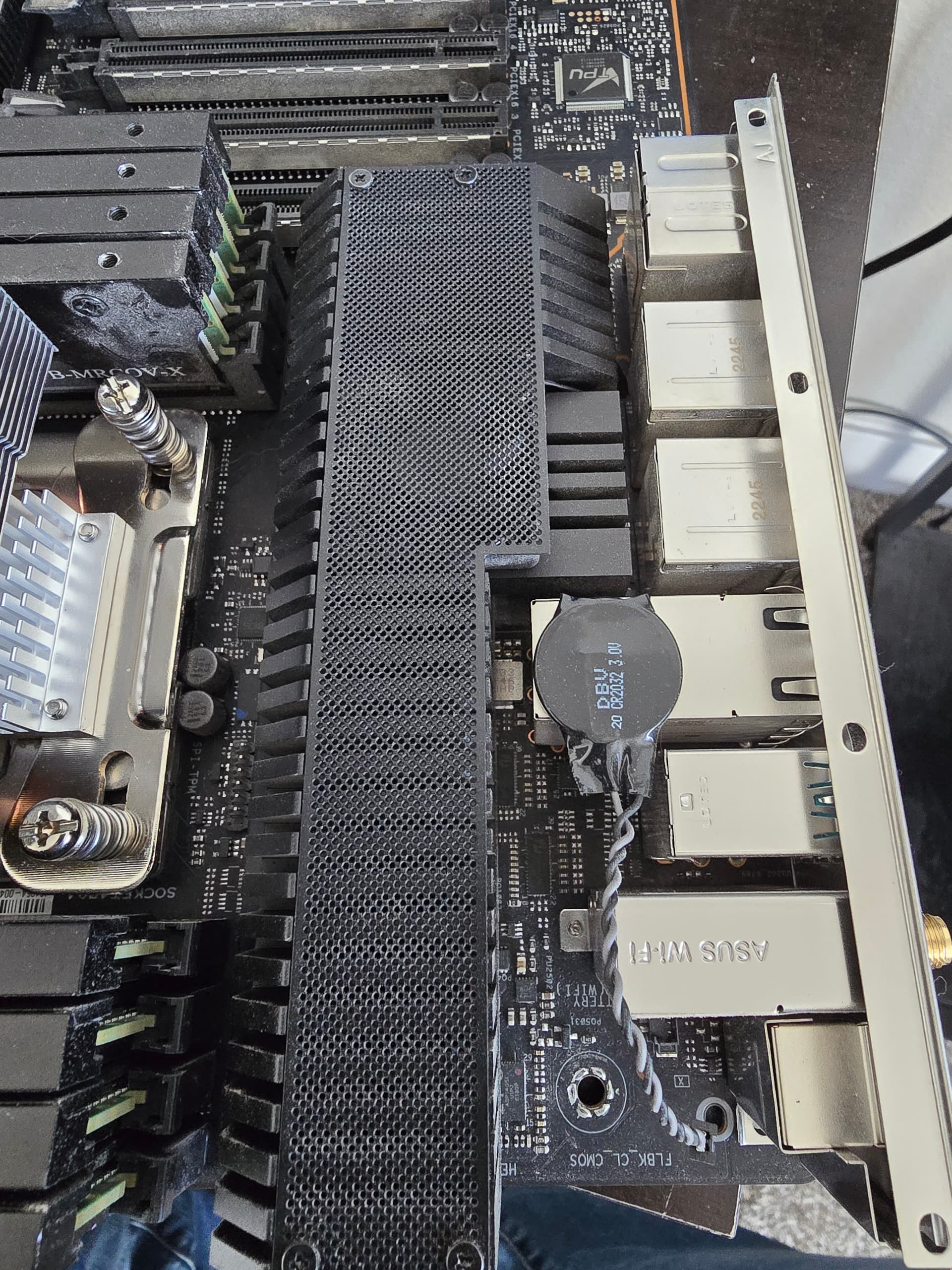
It is under the IO Cover. I can see it at an angle. It has wires running to it instead of being soldered on the board. Ill work on getting the board pulled out and thrown on a test bench. I need to get a heatsink so I can test without all the water and connections.
Just getting to and and wanted to throw up a pic of the cmos battery
1 Like
Is the lead terminated in a plug? Do I see a possible socket right under the WiFi shield?
I have reset the bios, pulled battery fpr a while, reflashed with 1602 bios, set the numa setting to nps4. When saving it reboots sticks at C2 for a while which seems standard, does a hard power off, then reverts back.
https://1drv.ms/v/s!AnGdIsjlgdZco6wjK7r6KStEWJRWgA
This is a link to the video i started recording right after it rebooted when i saved the bios settings.
Before that i went through the instructions verbatim again. The set cf setting on the cpu to nps4.
I’m pretty much out of suggestions. Sounds like the board is defective or something.
This being an Asus board and AFAIK, all of their BIOS’ follow the same look no matter desktop or server, so I would think the BIOS has the same Ctrl-F2 option in the Save Profile menu to save the BIOS settings to a Flash drive.
I would do this and then print out the BIOS settings. The printout shows every setting in the BIOS and much, much more than what is presented in the GUI menus.
I would examine the printout for any values related to the cpu and specifically for the NPS4 setting you set to see if it in fact did set the value or whether it defaulted to NPS1 as default.
The saga continues. I bought a new board and it does the same thing. Came with bios v1106 and i tried with that version and updating to the last one. Same issue
Ok getting somewhere… went dow to 1 stick of 128gb ram and it saved. Going to work up to the 8 sticks and see what happens.
1 Like
If I have 7 sticks or less, I can make any changes in the bios and they stick. If I add an 8th, the bios goes into something like a limp mode. There is a hard power cycle and everything goes back to defaults. I tested with different sticks of RAM to rule out a bad stick. If I remove a stick (regardless of location) I can go back in and save everything and it works fine. I am not sure if it is because all 8 channels are populated, or the fact that it is 1TB of ram.
ended up sticking 8GB sticks in there, and with 7 sticks its fine, 8 causes it to not actually post. might have been incompatible ram. the 128GB sticks are on the QVL.
Very similar to this:
[SOLVED] 5995wx on ASUS WRX80E-SAGE with 1TB memory installed goes into an infinite Q-Code loop - Hardware Hub / Motherboards - Level1Techs Forums
2 Likes
Definitely looks like the launch issue BIOS in the linked thread. Assume you are running the latest BIOS and AGESA?
Yes 1602 bios. Im going to step through each bios revision to see if any works. Also i want to do a test on mempory performance with the bios in its current state, and then with all sticks in to see what im really losing.
MLC tests:
2933 8 sticks:
Measuring idle latencies for random access (in ns)...
		Numa node
Numa node	     0
       0	 101.9

Measuring Peak Injection Memory Bandwidths for the system
Bandwidths are in MB/sec (1 MB/sec = 1,000,000 Bytes/sec)
Using all the threads from each core if Hyper-threading is enabled
Using traffic with the following read-write ratios
ALL Reads        :	145936.7
3:1 Reads-Writes :	143753.0
2:1 Reads-Writes :	144256.3
1:1 Reads-Writes :	144022.6
Stream-triad like:	143363.2

Measuring Memory Bandwidths between nodes within system
Bandwidths are in MB/sec (1 MB/sec = 1,000,000 Bytes/sec)
Using all the threads from each core if Hyper-threading is enabled
Using Read-only traffic type
		Numa node
Numa node	     0
       0	146001.6

Measuring Loaded Latencies for the system
Using all the threads from each core if Hyper-threading is enabled
Using Read-only traffic type
Inject	Latency	Bandwidth
Delay	(ns)	MB/sec
==========================
 00000	1125.23	 145667.8
 00002	1133.95	 145674.0
 00008	1126.70	 145822.6
 00015	1109.68	 146102.7
 00050	1104.11	 145815.5
 00100	1098.64	 145994.3
 00200	1118.87	 146826.9
 00300	791.72	 149798.7
 00400	219.77	 144579.0
 00500	148.44	 117256.5
 00700	132.81	  84896.4
 01000	126.61	  60180.7
 01300	124.19	  46696.6
 01700	122.68	  35995.1
 02500	120.75	  24855.1
 03500	119.94	  17957.7
 05000	119.36	  12756.7
 09000	118.79	   7343.5
 20000	118.64	   3605.1

Measuring cache-to-cache transfer latency (in ns)...
Local Socket L2->L2 HIT  latency	20.9
Local Socket L2->L2 HITM latency	21.5
2933 7 sticks NPS4
Intel(R) Memory Latency Checker - v3.11b
Measuring idle latencies for random access (in ns)...
		Numa node
Numa node	     0	     1	     2	     3
       0	  91.1	  98.4	 106.6	 110.7
       1	 101.5	  91.2	 110.8	 106.7
       2	 110.8	 110.7	  94.3	  98.3
       3	 115.6	 108.1	  98.5	  91.2

Measuring Peak Injection Memory Bandwidths for the system
Bandwidths are in MB/sec (1 MB/sec = 1,000,000 Bytes/sec)
Using all the threads from each core if Hyper-threading is enabled
Using traffic with the following read-write ratios
ALL Reads        :	141651.8
3:1 Reads-Writes :	132322.0
2:1 Reads-Writes :	130754.3
1:1 Reads-Writes :	128917.0
Stream-triad like:	131371.6

Measuring Memory Bandwidths between nodes within system
Bandwidths are in MB/sec (1 MB/sec = 1,000,000 Bytes/sec)
Using all the threads from each core if Hyper-threading is enabled
Using Read-only traffic type
		Numa node
Numa node	     0	     1	     2	     3
       0	40417.5	40029.2	20094.2	39105.9
       1	40038.0	40419.1	20020.2	39455.4
       2	39448.9	39094.3	20504.3	40033.7
       3	39096.1	39409.3	20236.5	40394.7

Measuring Loaded Latencies for the system
Using all the threads from each core if Hyper-threading is enabled
Using Read-only traffic type
Inject	Latency	Bandwidth
Delay	(ns)	MB/sec
==========================
 00000	1014.63	 141689.0
 00002	1024.67	 141725.3
 00008	1006.17	 141886.5
 00015	1007.82	 141886.7
 00050	989.27	 142161.9
 00100	988.84	 142265.0
 00200	974.03	 142357.2
 00300	887.89	 142518.6
 00400	157.64	 132450.9
 00500	134.29	 110038.9
 00700	122.83	  84392.2
 01000	117.62	  59757.6
 01300	117.33	  46344.5
 01700	114.16	  35855.0
 02500	111.61	  24719.8
 03500	110.72	  17893.5
 05000	110.31	  12733.8
 09000	109.59	   7358.1
 20000	109.11	   3637.7

Measuring cache-to-cache transfer latency (in ns)...
Local Socket L2->L2 HIT  latency	21.8
Local Socket L2->L2 HITM latency	22.1
3200MHz 8 sticks:
Intel(R) Memory Latency Checker - v3.11b
Measuring idle latencies for random access (in ns)...
		Numa node
Numa node	     0
       0	  97.3

Measuring Peak Injection Memory Bandwidths for the system
Bandwidths are in MB/sec (1 MB/sec = 1,000,000 Bytes/sec)
Using all the threads from each core if Hyper-threading is enabled
Using traffic with the following read-write ratios
ALL Reads        :	155069.1
3:1 Reads-Writes :	153334.9
2:1 Reads-Writes :	153752.9
1:1 Reads-Writes :	152770.5
Stream-triad like:	153322.5

Measuring Memory Bandwidths between nodes within system
Bandwidths are in MB/sec (1 MB/sec = 1,000,000 Bytes/sec)
Using all the threads from each core if Hyper-threading is enabled
Using Read-only traffic type
		Numa node
Numa node	     0
       0	157662.0

Measuring Loaded Latencies for the system
Using all the threads from each core if Hyper-threading is enabled
Using Read-only traffic type
Inject	Latency	Bandwidth
Delay	(ns)	MB/sec
==========================
 00000	1036.00	 157030.8
 00002	1026.92	 157675.6
 00008	1021.09	 157817.5
 00015	1007.19	 158093.6
 00050	996.49	 157796.5
 00100	1001.65	 157992.3
 00200	1017.02	 159149.3
 00300	516.50	 163094.7
 00400	166.61	 144293.0
 00500	137.88	 116593.1
 00700	127.48	  84383.8
 01000	122.63	  59781.7
 01300	120.68	  46372.9
 01700	119.29	  35768.9
 02500	117.68	  24704.5
 03500	116.96	  17848.3
 05000	116.47	  12682.5
 09000	116.06	   7302.1
 20000	115.65	   3595.0

Measuring cache-to-cache transfer latency (in ns)...
Local Socket L2->L2 HIT  latency	20.4
Local Socket L2->L2 HITM latency	21.4
3200MHz 7 sticks NPS4
Intel(R) Memory Latency Checker - v3.11b
Measuring idle latencies for random access (in ns)...
		Numa node
Numa node	     0	     1	     2	     3
       0	  86.1	  94.3	 102.5	 104.9
       1	  97.0	  86.8	 105.9	 101.5
       2	 106.0	 105.9	  90.4	  93.8
       3	 109.4	 102.0	  94.3	  86.1

Measuring Peak Injection Memory Bandwidths for the system
Bandwidths are in MB/sec (1 MB/sec = 1,000,000 Bytes/sec)
Using all the threads from each core if Hyper-threading is enabled
Using traffic with the following read-write ratios
ALL Reads        :	151262.7
3:1 Reads-Writes :	141930.2
2:1 Reads-Writes :	140014.4
1:1 Reads-Writes :	137525.3
Stream-triad like:	140917.7

Measuring Memory Bandwidths between nodes within system
Bandwidths are in MB/sec (1 MB/sec = 1,000,000 Bytes/sec)
Using all the threads from each core if Hyper-threading is enabled
Using Read-only traffic type
		Numa node
Numa node	     0	     1	     2	     3
       0	43771.4	43267.6	21774.2	42204.0
       1	43327.2	43734.8	21702.7	42598.5
       2	42699.2	42255.3	22263.5	43312.6
       3	42199.8	42612.6	21962.9	43762.6

Measuring Loaded Latencies for the system
Using all the threads from each core if Hyper-threading is enabled
Using Read-only traffic type
Inject	Latency	Bandwidth
Delay	(ns)	MB/sec
==========================
 00000	941.82	 152727.9
 00002	933.83	 153535.4
 00008	931.81	 152859.6
 00015	907.62	 153681.2
 00050	895.66	 153948.1
 00100	898.67	 153308.9
 00200	884.63	 154218.2
 00300	452.87	 154847.3
 00400	138.60	 133336.1
 00500	125.76	 110984.0
 00700	117.06	  84265.9
 01000	112.67	  59667.3
 01300	110.24	  46315.7
 01700	108.83	  35741.4
 02500	107.27	  24719.2
 03500	106.33	  17889.3
 05000	105.86	  12726.4
 09000	105.28	   7356.1
 20000	104.90	   3649.0

Measuring cache-to-cache transfer latency (in ns)...
Local Socket L2->L2 HIT  latency	20.1
Local Socket L2->L2 HITM latency	21.4
and for posterity, I disabled SMT with 7 sticks in at 3200MHz
Intel(R) Memory Latency Checker - v3.11b
Measuring idle latencies for random access (in ns)...
		Numa node
Numa node	     0	     1	     2	     3
       0	  86.2	  94.2	 102.2	 105.0
       1	  96.9	  86.8	 105.9	 101.5
       2	 106.0	 105.9	  90.4	  93.7
       3	 109.5	 102.0	  94.3	  86.0

Measuring Peak Injection Memory Bandwidths for the system
Bandwidths are in MB/sec (1 MB/sec = 1,000,000 Bytes/sec)
Using all the threads from each core if Hyper-threading is enabled
Using traffic with the following read-write ratios
ALL Reads        :	154509.8
3:1 Reads-Writes :	144715.8
2:1 Reads-Writes :	142343.4
1:1 Reads-Writes :	141412.9
Stream-triad like:	145954.3

Measuring Memory Bandwidths between nodes within system
Bandwidths are in MB/sec (1 MB/sec = 1,000,000 Bytes/sec)
Using all the threads from each core if Hyper-threading is enabled
Using Read-only traffic type
		Numa node
Numa node	     0	     1	     2	     3
       0	44654.9	44182.8	22243.6	43001.9
       1	44215.1	44638.7	22146.6	43501.0
       2	43584.0	43167.6	22797.5	44188.9
       3	43079.0	43518.7	22395.9	44572.9

Measuring Loaded Latencies for the system
Using all the threads from each core if Hyper-threading is enabled
Using Read-only traffic type
Inject	Latency	Bandwidth
Delay	(ns)	MB/sec
==========================
 00000	834.19	 156275.5
 00002	827.38	 156289.9
 00008	826.33	 157328.2
 00015	744.24	 158142.8
 00050	617.95	 158830.5
 00100	594.98	 158729.1
 00200	525.45	 158833.8
 00300	235.74	 159443.8
 00400	136.57	 135694.7
 00500	126.02	 114362.8
 00700	116.64	  88620.6
 01000	111.88	  62833.9
 01300	109.65	  48674.4
 01700	107.70	  37644.2
 02500	106.05	  25992.2
 03500	105.03	  18811.5
 05000	104.45	  13379.7
 09000	103.98	   7724.7
 20000	103.71	   3821.0

Measuring cache-to-cache transfer latency (in ns)...
Local Socket L2->L2 HIT  latency	20.1
Local Socket L2->L2 HITM latency	21.4