I have an Asus Proart X870E-Creator Wi-fi motherboard with a 9950X3D CPU and Kingston 5600 ECC memory.
I’ve discovered that any BIOS after 1805 no longer runs the default stock JEDEC memory speed of 5600. Instead it comes up at 5200 and using a CPU VSOC of about 200 mV higher (than with BIOS 1805).
Anyone else experience this?
I have 64 GB of memory as two Kingston KSM56E46BD8KM-32HA (Kingston 9965794-022.A00G) DIMMs which are ECC capable.
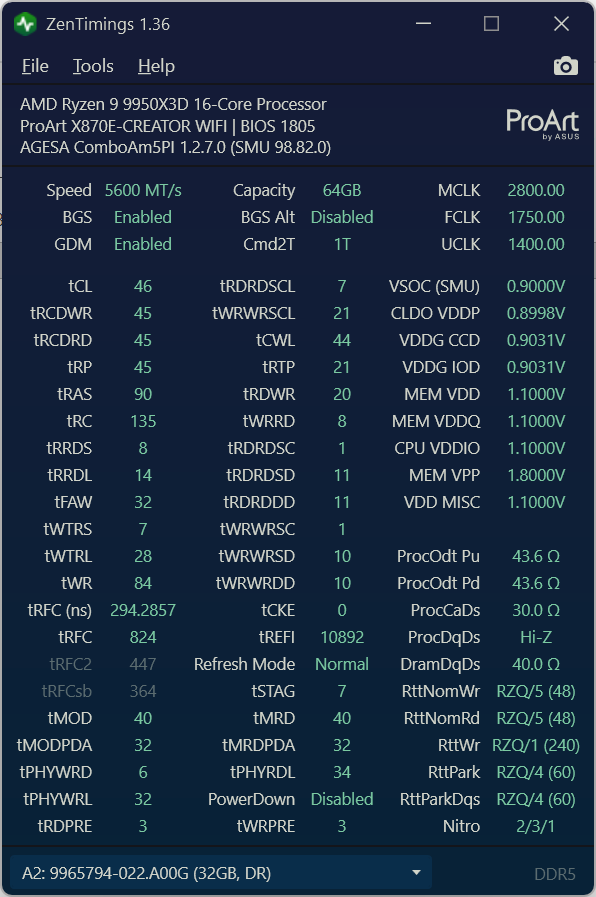
This seems to come up as expected at 5600 MT/s (the stock rated speed of both the processor and memory) using BIOS 1805 or 1715.
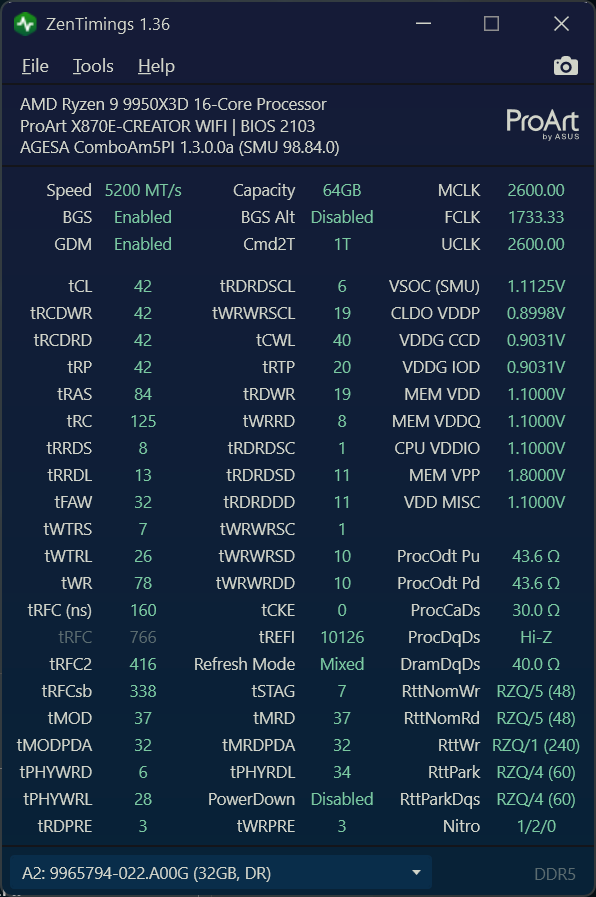
But immediately after flashing either BIOS 2004 or 2103 it comes up at only 5200 MT/s, and using a boatload more CPU VSOC. The BIOS claims the target is still 5600 despite not being able to achieve it. This is before making any BIOS changes from stock/default settings.
There are no obvious warnings or complaints during boot and might not have noticed if I didn’t check the speeds and voltages.
Going back to 1805 and it comes up at 5600 MT/s again and with a much better CPU Vsoc without apparent issue.
I have ECC currently set to enabled (using BIOS 1805) without any apparent issues.
Note that Ryzen 9000 officially supports DDR5-5600 with a 2 DIMM Dual Rank configuration, the JEDEC DDR5-5600 default settings shouldn’t even count as overclocking.
Almost forgot that Zen 6 Epycs are launching soonish and AMD’s BIOS/firmware quality for already released legacy products typically goes down the shitter around this time and for about six months after the wide release of the new generation.
Reminds me of AMD releasing Zen 2 with completely broken RDRAND and no one had noticed:
The fact that the ASUS person noted your RAM isnt in the QVL likely means your problem will be completely ignored by them. unfortunately, I find companies use these lists as a way to get out of helping with problems.
I get your general train of thought but this issue is too severe for them to put their head in sand.
But ASUS end customer tech support is indeed extremely low-quality, that’s why I hoped to speed things up by pushing @wendell into the septic tank with us regular end customers.
Since BIOS 2004, the Proart X870E Creator won’t do 6000MT/s anymore, previously it did. So these are G.Skill F5-6000J3644D64G (64GB), of which I have two installed. The board will now only handle 5600MT/s, even though it shows EXPO 6000.
The only improvement over the older BIOS verisons is that memory training now takes afew seconds instead of about 90 seconds previously. But I was fine with that, and it sucks that the newer BIOSes don’t support the rated EXPO config.
Yes, my understanding is that 5600 MT/s is the official supported 2 UDIMM speed for the 9950X3D.
And, in my case the BIOS thinks it should be able to do 5600, it just apparently fails to do it. And when that fails it adds a whopping 200mv to the CPU VSOC (with no help).
I tried changing the refresh mode and that did not help either.
I could see ECC RAM being harder to drive than non-ECC RAM and bringing down the frequency some on an IMC that was already on the bleeding edge, but the 200mV VSoc bump seems really excessive.
Were you getting corrected memory errors on the previous BIOS with the faster memory timings?
There is some precedent for AMD messing up ECC on AM5 processors with new AGESAs, but if that were the case this should be happening on other motherboard’s that had an OEM that blindly pushed the newest AGESA without in-depth testing.
Have you tried setting the DDR Overclocking Options Refresh Mode from Auto to Normal? The Asus BIOS engineer noted later in the thread I linked that AMD enforced that Mixed mode is now the default setting for Auto (and every time you update the bios, everything gets set to Auto).
Mixed mode is much harder to drive and get stable. What it means in practice is that tRFC2 and tRFCsb is now being used instead of just tRFC1. Unfortunately, memory manufacturers only coded in tRFC1 in EXPO profiles of their older kits of DDR5 in the SPD hub. The Auto setting for these two timings on your memory may need manual adjustment and may need loosening those two timings if you want to revert back to the voltages you were previously using - or alternatively, change it back to Normal mode. However, do note that Mixed mode is apparently a security measure to counteract Rowhammer attacks.
Have you tried setting the DDR Overclocking Options Refresh Mode from Auto to Normal?
When I tried Beta BIOS 2101 for my motherboard, I did try setting Bank refresh to ‘normal’. But it didn’t make any difference I could see. It came up the same way at 5200 claiming it had targeted 5600.
I tried the current Beta BIOS 2202 (as well as the released 2103) for the 870E-Creator Wi-FI and discovered a few things. (How it behaved verses the older 1805).
With the newer BIOSs it looks to me as though leaving the ECC setting as ‘Auto’ or ‘Enabled’ results in my system coming up at 5200 MT/s, Mixed refresh mode, and UCLK=MCLK (by default).
Setting the ECC mode to ‘disabled’ comes up at 5600 MT/s, Mixed refresh mode, UCLK=1/2 MCLK (by default).
So it’s somehow related to ECC mode. I tried a bunch of other things but none of them resulted in using 5600. This includes
*) Setting ‘Normal’ Refresh mode
*) Manually selecting 5600 MT/s
*) Setting TRFC2 = TRFC1. Or both to a higher value then either had before.
*) Manually setting CPU Vsoc to it’s previous value.
*) Manually setting the memory speed to 5600.
Does anyone know if this much of a higher CPU Vsoc is expected going from 5600 UCLK=1/2 MCLK to 5200 UCLK=MCLK (0.900 V to about 1.1125V)?
Here is a new Zentimings screen from testing a newer BIOS. The previous entry was 1805 ECC enabled running at 5600 MT/s.
The one below is using 2103 running ECC at 5200 MT/s (by default) at UCLK=MCLK (the highest memory speed it will do using ECC on the newer BIOSs).
Making arbitrary restrictions on frequency and ECC usage would suck, that had been completely unrestricted before (and it’s very helpful to have the opportunity of overclocking to check if ECC is actually working).
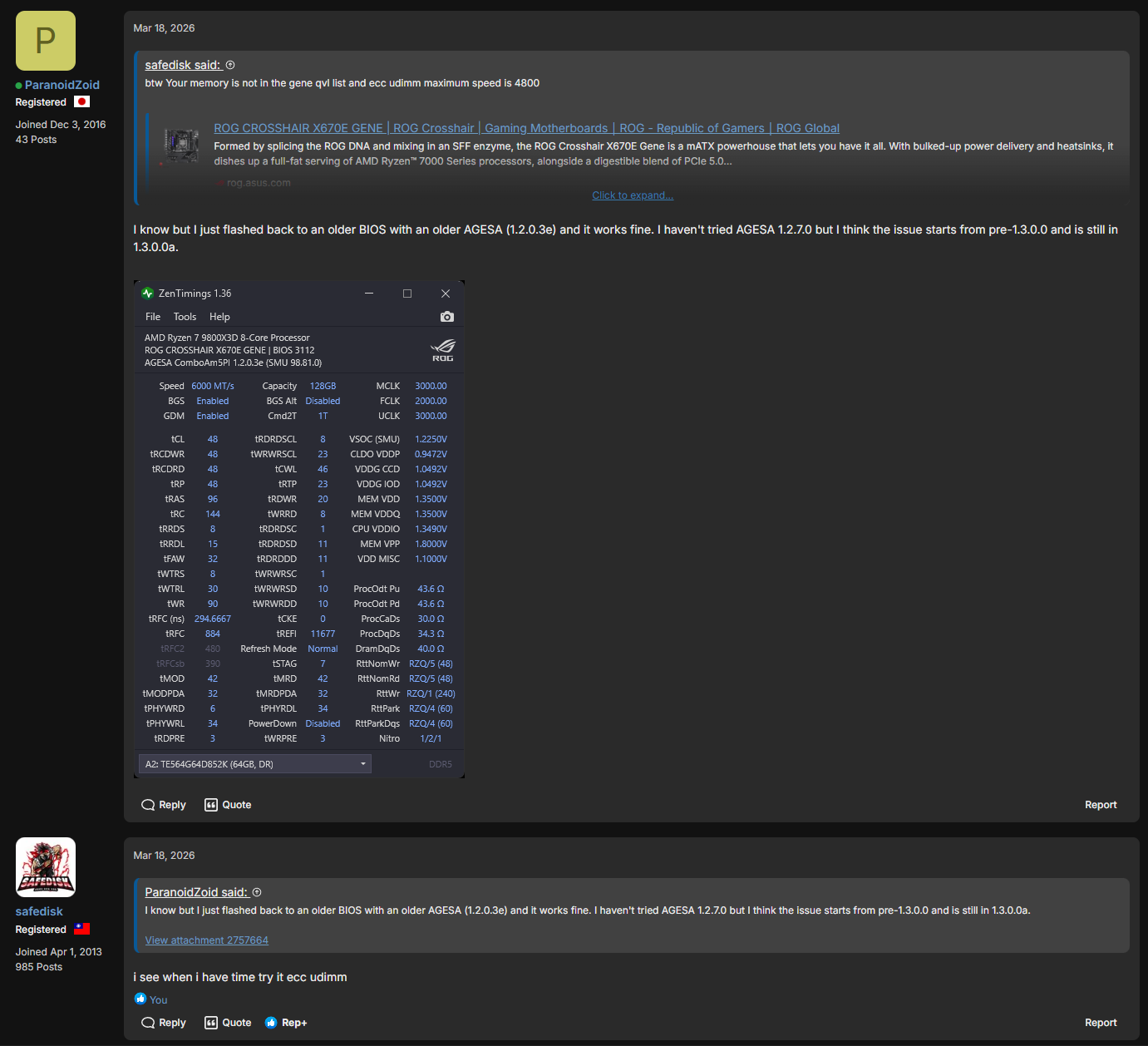
Over in the other forum at Re: X670 / X870 resource thread - Page 585 - Republic of Gamers Forum - 901576 and following posts, it appears that the ‘Safedisk’ guy there is saying that AMD meant to lock the speed to only 5200 and no others for granite ridge CPUs. (Which doesn’t seem to make much sense to me as to why lower speeds would be intentionally prohibited).
Even if true, it would have been nice if they told anyone about it (either AMD or Asus).
And it would have been nice if the BIOS didn’t report the ‘target speed’ as 5600 even when it forces 5200.
But it would appear to the casual observer that we can’t expect much help from Asus…
And I never did see an answer to the question of what happens if your ECC memory only supports less than 5200 MT/s (say 4800)..
If what he claims is true, it could be that this forces you to run without ECC enabled, or overclocked. Who knows.