Just a quick update,
I have now received a new MB, CPU (both the same as before) and PSU (Corsair RM1000x Shift instead of my Seasonic Vertex).
So until the 19th I am able to cross-test components as I please.
Right now I am running on fully new hardware, so new PSU, new MB, new CPU. Re-used the SSD (confirmed OK) and re-used the CPU cooler. I have both ECC RAM sticks in.
No GPU for now, using integrated graphics.
Using a Logitech K400 Plus (wireless KB/Mouse with a single usb receiver) instead of my usual KB and Mouse.
This new system is currently sitting on the cardboard, while the old system remains in the case for now.
The system shipped with UEFI 3.15 and I kept it that way (the only change listed in 3.16 is not related to my system).
The only thing I changed is that I enabled the JEDEC profile for the RAM to go from the default 5200 to the proper 5600.
This has been running for the last 2 hours and I did some USB transfer tests. So far no crashes.
In the coming days I will check if anything suspicious comes up.
Upcoming things I will try out:
Remove GPU from unstable system, check if still unstable.
Check if unstable system is still unstable with the new PSU.
Check if new system is still stable with the GPU.
MAYBE: Check if the new system becomes unstable with the old PSU (although I’m hesitant about this one, maybe not a good idea)
If there’s anything else I should keep in mind or focus on, please do tell, as I have about a week left until I need to return the first parts.
I’ll ignore the new hardware (new MB/CPU/PSU) for now and focus on the system from the OP (previously referred to as “unstable system”).
I pulled the GPU. Still unstable.
I removed the board from the case and put it on a cardboard box. Still attached to the PSU I’ve been testing with for the entire duration of this thread.
First observation: I cannot currently reproduce the crashes. I might be unlucky (or lucky, depending on the POV), but I’ve tried around for an hour now to no avail.
Second observation: I’m having really weird USB errors.
I have an external 2,5’’ HDD that has a USB C cable that I confirmed works with two other devices (my old desktop and my laptop).
I tried this HDD with three different USB ports on the bare MB and got three different behaviors:
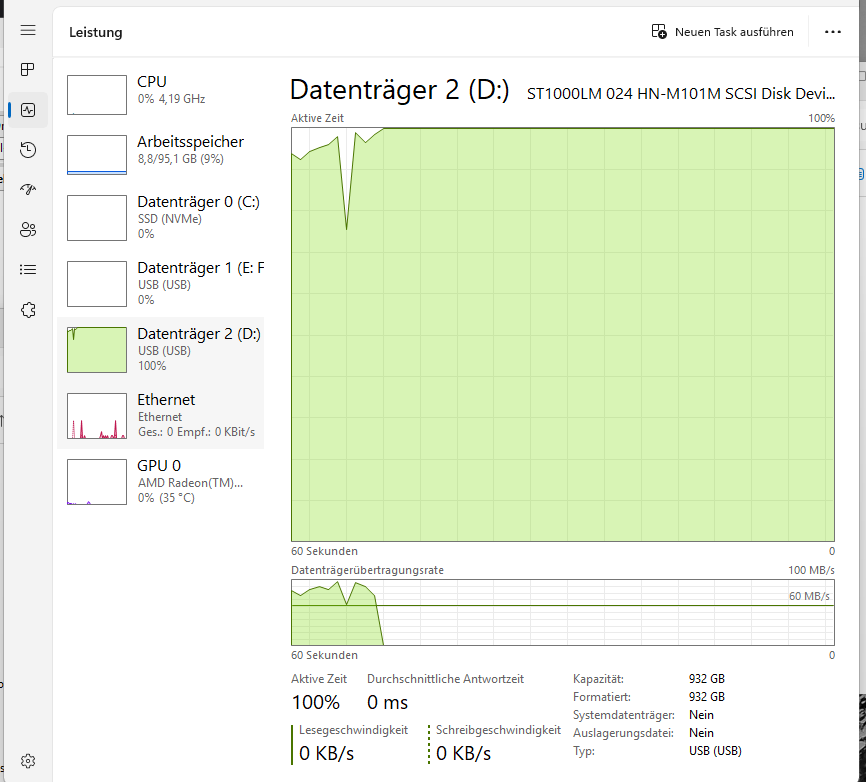
Attached via USB C: Works until it doesn’t. When it stops working, which happens after a couple of minutes, all I/O stops and I get this view in Task Manager:
Attached via a USB-C-to-A Adapter to a USB A port: Constantly connects/disconnects in a loop.
Attached via the same Adapter to another USB A port: Works well, I was able to read and hash all files on the partition. All hashes are correct.
I have not yet tested how the HDD behaves on the new replacement MB/CPU, maybe the USB implementation of the ASRock board is just really bad compared to all other systems I own. To test this I would have to move the CPU cooler over to the new board again, but I kind of want to focus on the crashes for now.
So, in short, I am sitting here with all components that were previously crashing now taken out of the case and I can’t reproduce the crashes thus far.
Right, so I was unable to reproduce any crashes and I proceeded by restoring the exact hardware configuration that I used to get crashes on.
So I took the board as-is (kept the CPU, Cooler and RAM attached) and moved it back into the case. Reconnected all cables (fans, front usb, front audio, front panel) and mounted the old PSU back into the case. This is exactly how the system was just before I took it out of the case, back when I got the sporadic crashes.
This was supposed to be unstable again.
Granted, the crashes have always been sporadic and I have no real way to trigger them, but it is very frustrating that no matter what I do, I cannot get it to crash again. This leaves me unable to figure out what the hell is going on.
Well, at least the Ethernet NIC suddenly stopped functioning, that’s something, right? It just says unidentified network and doesn’t acquire an IP address via DHCP. Heck knows what that’s about, but reinstalling Windows or the Ethernet driver doesn’t change anything. (The cable works fine with my laptop, I tested this obviously.)
In either case the trust is completely broken for me.
It appears to me that AM5 is still riddled with bugs and/or there is so much broken hardware out there that all AM5 gear I test is unstable. This is unacceptable.
I will probably end up sending it all back. Thing is, I now have sworn off both Intel (due to the way they handled the degradation issues and the way my RMA expecience was handled specifically) and AMD (due to two failed build attempts with similar symptoms, years 2023 (7800X3D) and 2025 (7950X), that I just couldn’t get stable).
Since there are no other options but these two, I will have to make a choice to either return back to Intel and hope whatever happened doesn’t happen again or just sell the GPU and PC case and be done with PCs for good. Neither option sound good.
Still open to ideas, thoughts, prayers and all inputs from anyone reading this while the hardware is still here.
It sounds like the board might be defective in a way that causes it to be excessively sensitive depending on how it’s mounted or handled? It’s 1 step away from some kind of dark magic that none of us will be able to figure out. So I would just test the new CPU/board combo.
Sorry to hear about all your stress btw. I was in a similar boat in that I’ve been enjoying using an ancient but bullet-proof-stable system… and then came the time to build something new and I was nervous about potential bugs. On one hand, AMD has the better CPU architecture for the most part… on the other hand, I’ve seen too many weird AMD issues, and the Z890 platform is also more compelling to me I/O-wise. So I built an Arrow Lake system in the end and it has been good to me so far.
Anyway, if your 2nd CPU/mobo combo is also cursed, then instead of giving up entirely, I would consider:
Intel is fine if you don’t care for the best gaming perf, or need AVX-512. But I don’t think the issue you’re having is an Intel vs AMD thing, it most likely is just bad luck with quality control. I would try again with a new set of components, crazy and frustrating as it is.
Getting a workstation from a quality system integrator like Puget, Falcon Northwest, System76, etc. +$$$ but they test and catch some of the quality problems so you don’t have to…
Depending on what you use your system for… the Mac Studio with the M4 Max chip recently got released! Might be a good excuse to try something totally different. I use a Mac for work and it’s pretty nice in terms of reliability and not needing to care about driver or firmware updates or any weird issues - it just works flawlessly. Depending on how much money you’re willing to burn, you can do fun things like loading it up with a ton of unified memory, which is also used by the GPU, so it might be fun for experimenting with LLMs and such…
If that last part sounds interesting but you’d rather stay on x86 and spend less $$$, there’s also the newly announced Framework Desktop, which has a fast APU you can load up with up to 128 GB of fast (soldered) shared memory…
All the additions in the past 2.5 weeks remain consistent with LGA overpressure. Happens with any LGA mobo if cooler or socket torques are far enough out of spec. Could also be underpressure but balance of evidence points more towards over.
I can rule overpressure out. The system was confirmed unstable even after I re-attached the cooler and stopped half a turn before the screws’ stop points.
Yeah this is what I’m thinking. I definitely don’t care about the best gaming perf and I don’t really need AVX512. I do like the idea of finally having ECC RAM in 2025, but I think I rather run a solid conventional system over an ECC-enabled one that I cannot trust.
I will definitely do that since they’re here already and I have a bit more time with their return window, while the confirmed unstable combo’s return window ends tomorrow.
I just don’t know if I feel confident enough to spot comparable errors within the remaining 1-2 weeks given that these errors are very sporadic and I might just end up getting unlucky and not noticing anything until it’s too late.
So I’ll probably just abandon AM5 again as soon as the first fishy thing pop ups with the new combo.
That’s not how torque wrenches work, particularly for the socket screws. If doing things the hard way, apparent improvement from a half turn back off suggests for evaluating another half turn.
Haven’t seen anything linking prolonged operation under overpressure with degradation but past experiences do make me wonder.