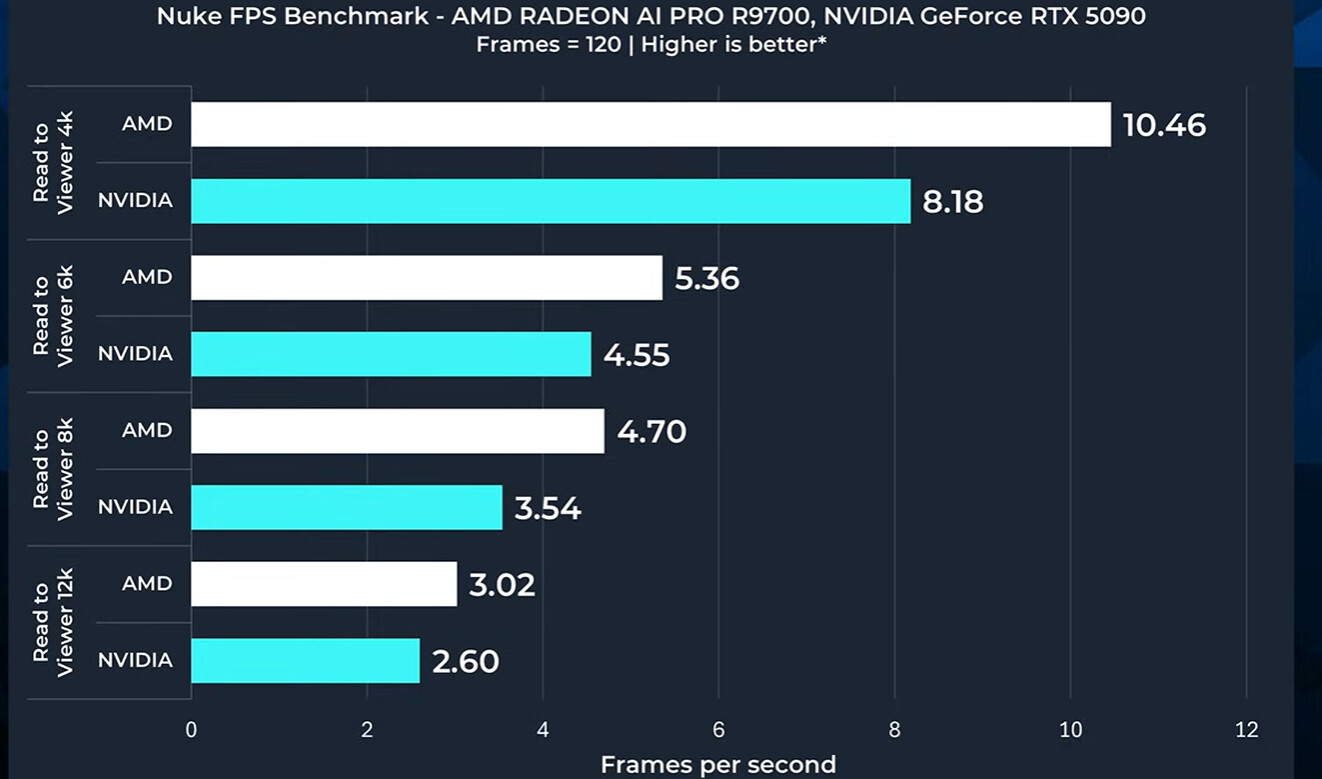
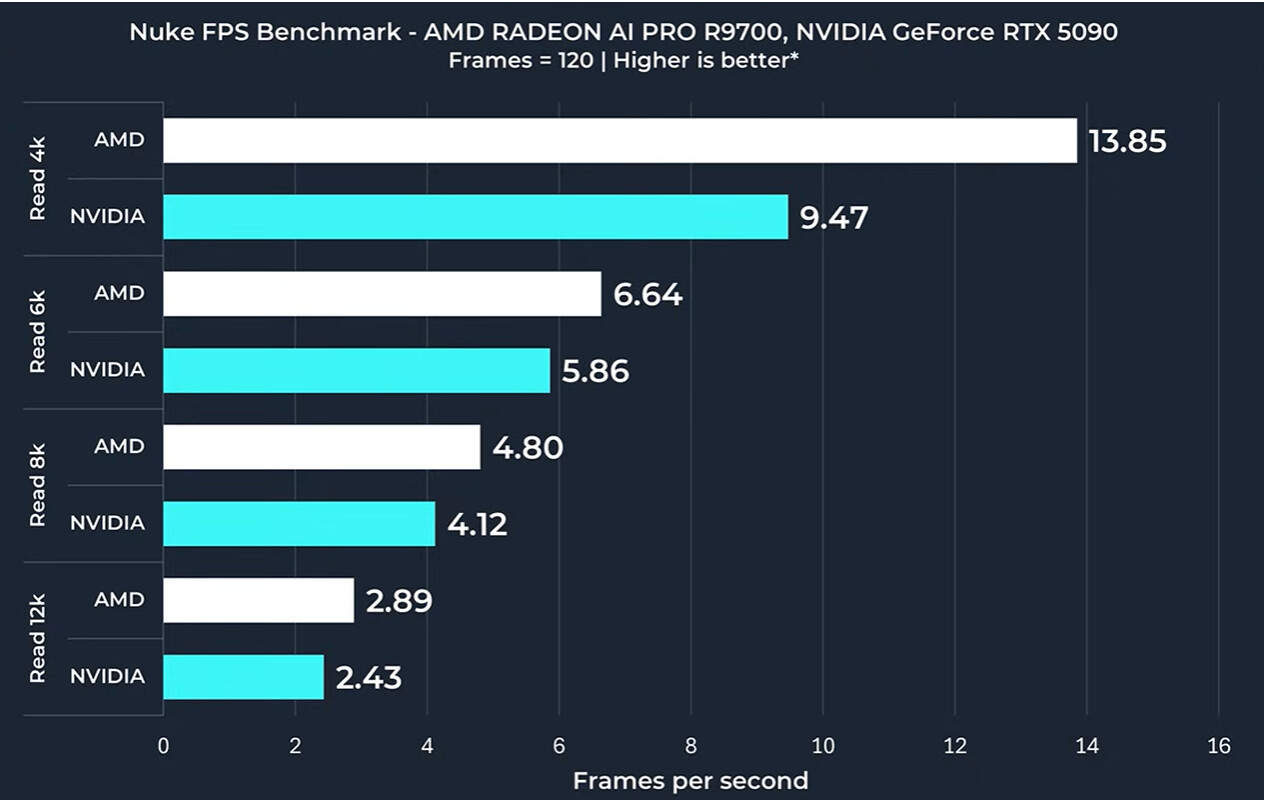
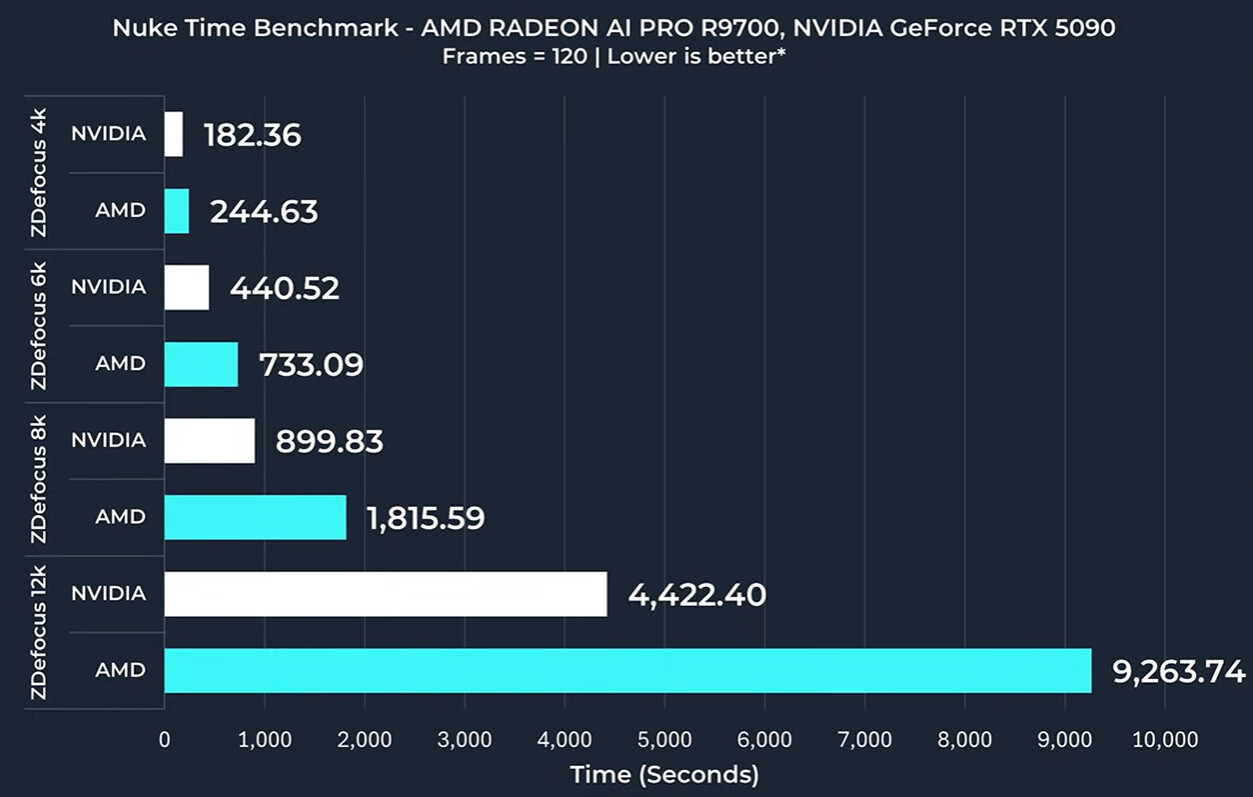
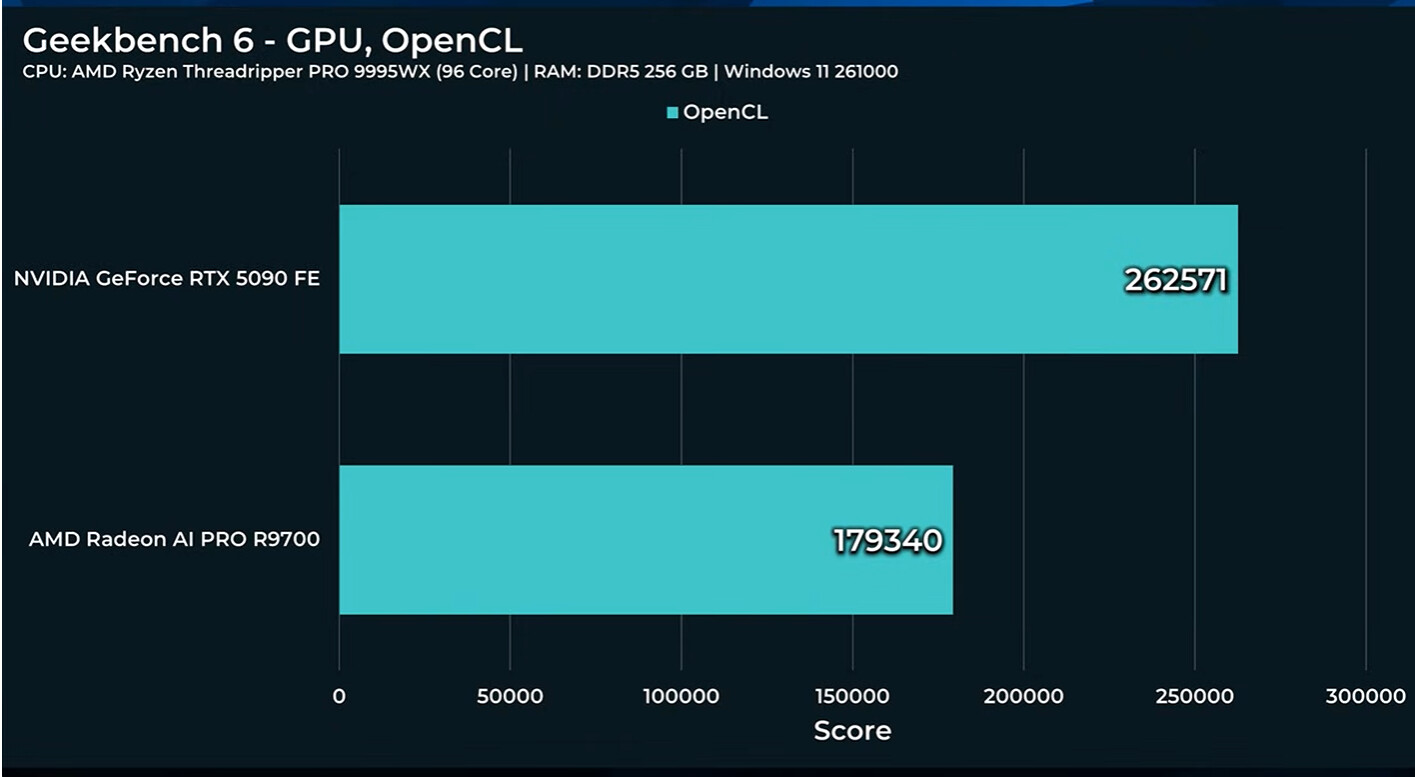
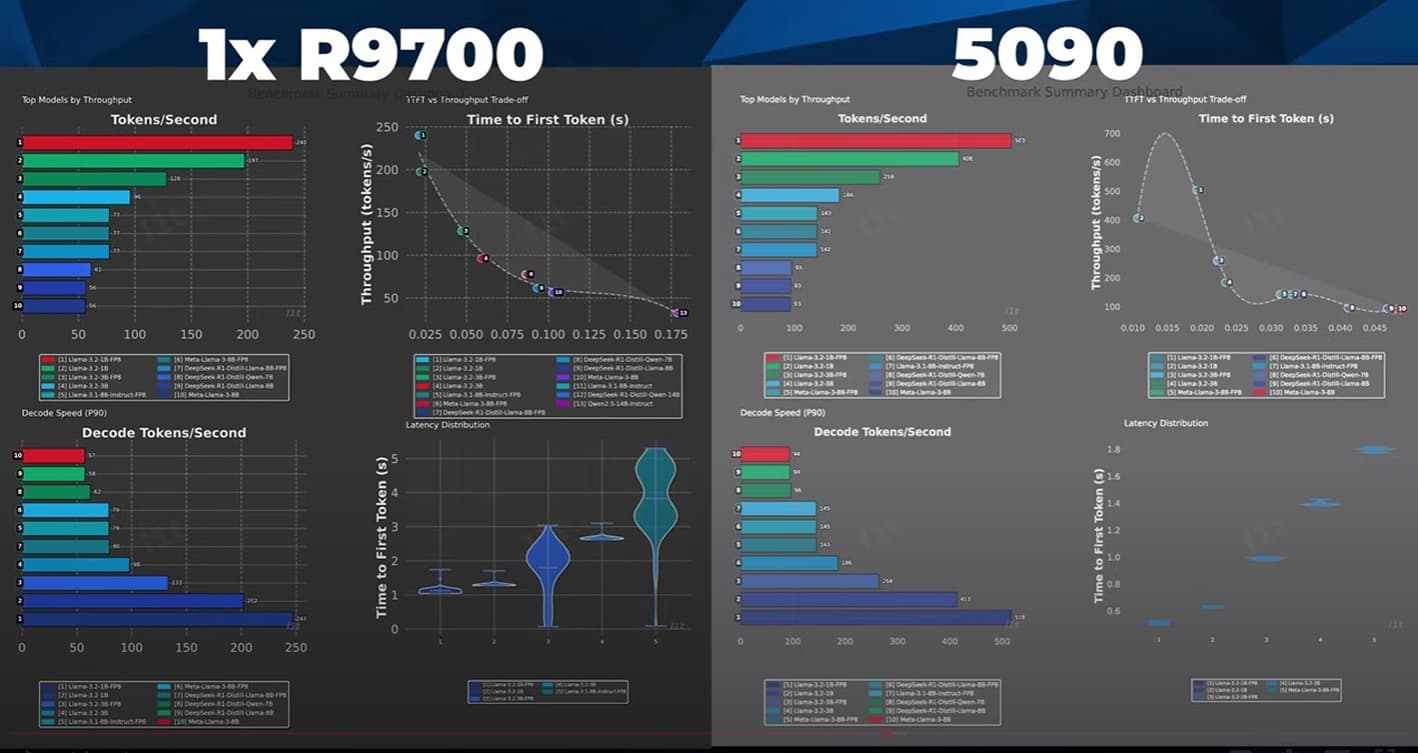
As usual synthetic benchmarks show Nvidia way out in front
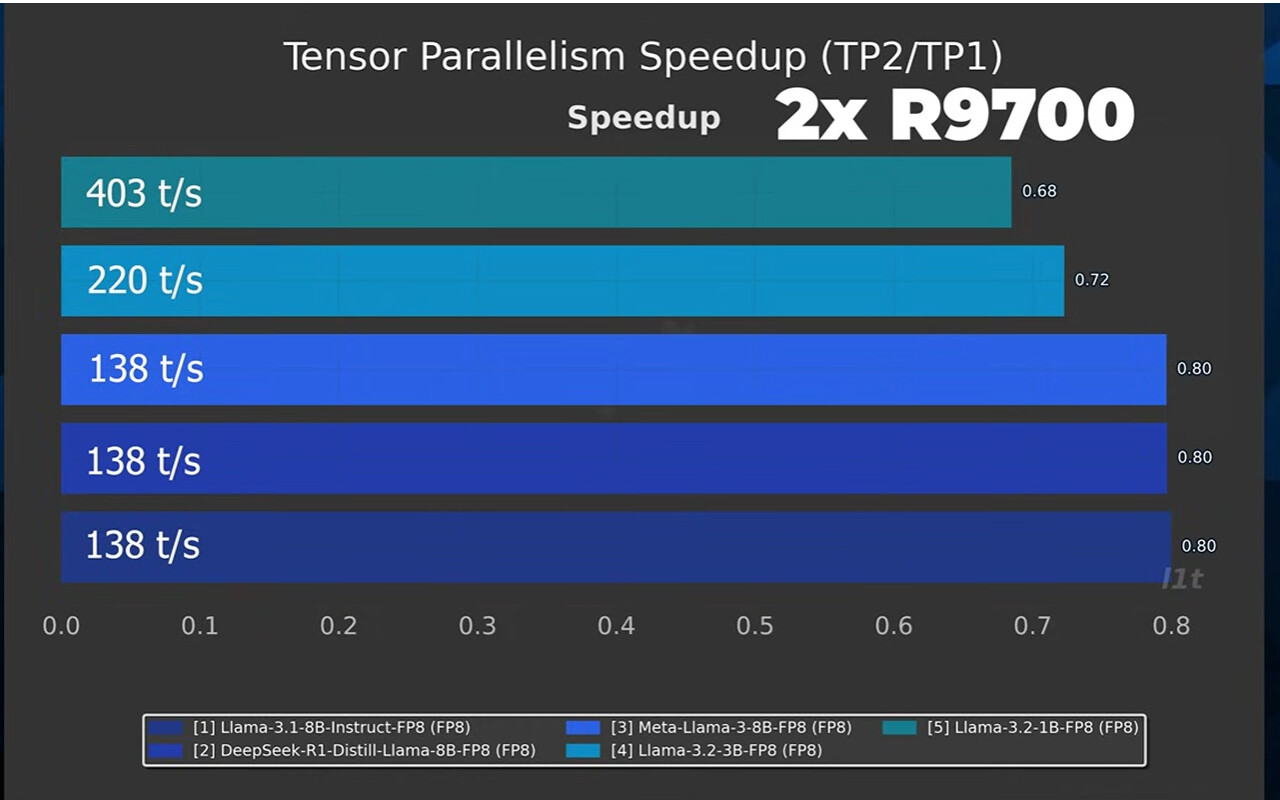
For AI, a 2x R9700 setup can be quite fast on windows, with the Vulkan backend:
I did not have to do much special for ComfyUI and ROCm thanks to changes the last week or so. Our guide here: Minisforum MS S1 Max Comfy UI Guide can work for you, too on 9070XT or R9700 Pro.
over 150 tokens’sec with all the tuning knobs and stops pulled out!
(it was about ~~120 out of the box). That’s using every single byte of vram on both cards in our two card setup haha!!
Very curious how you’re able to use shared vram between two cards over the pcie bus (specifically on linux). How does this work and what configuration qwirks did you have to set to enable this?
for most mdoels, its just standard stuff. In vLLM the layers are assigned to different GPUs.
our custom benchmark script sweeps over a small set of prompts. it ranges from 20 to 1k input tokens. the results are an average but for example one of the test generates 8192 tokens. Total run is about 13k input tokens. depending on the model the answer to the perfect number query, for example, is potentially one of those thousands-of-tokens responses.
theres also a warmup/prefill step. the one thing we have to be careful is also looking at the coherence of the output especially with quant models. one thing we ran into with llama.cpp was the output was “worse” than vllm (while also being faster. but incoherent-worse).
relatively small context windows overall though.
lm studio was either at defaults, or doubling the context window
When/If you have time, it would be interesting to see two other comparisons to the 2x R9700 Pro
Test 2x R9700 on an AM5 platform with (bifurcated) 8x Gen 5 CPU lanes to each card.
1.1 How much impact do these workloads see from the reduced p2p and system RAM bandwidth?
Test 2x 9070 XT on the same threadripper platform
2.1 What speed differences are there vs. the “pro” version? The pro is 2x the price for effectively a few more GDDR 6 chips.
2.2 It’s expected some tests would not be runnable due to reduced VRAM
2.3 Yeah, it’s a clearly a different PCB with probably a higher quality BOM. But the point stands.
I would love to start seeing some benchmarks on each epoch takes when training a YOLO model.
My main professional use case is to train YOLO models on custom datasets; so doing something like using Ultralytics’ packages to train a YOLOv11 model on the COCO dataset would be a good proxy for my workloads and use cases.
I’ve been moving mountains to use my 4070 TS as long as I can, but 16GB is too much of a bottleneck and I’m running up against max parameters in our training set.
I’d love to know how long each epoch takes for something like: yolo train model=yolo11X.pt data=coco2017 batch=-1 imgsz=1024
Seems like this card might be a great cost effective way to expand the capabilities of one of the many AMD AI MAX+ 395 PC’s as an eGPU. Cost, performance, and efficiency would be much better than an RTX 5090 and way less than the 4 GPU Threadripper teased in the video.
I’d love to see how much of a performance bump inference and image generation workloads might achieve with that kind of setup.
This it it right here. Wendell had shown this in the Framework videos and it seems like a test like that with this card would be the perfect follow up. Ever since I saw that video (I have a Framework 128 on order) I’ve been thinking that an eGPU would be a perfect way to pump up the volume on that platform.
Hello @wendell, thanks for the effort!
Are there plans to benchmark larger models at lower precision?
Say Qwen3-30B-A3B (MoE), Seed OSS 36B (dense), Llama 70B etc?
Results from such tests might be more useful although I guess we can kinda interpolate from your existing results to an extent.
Other video ideas -
Comparison with Strix Halo
Larger MoE models on 2x R9700 Pro for a local LLM similar to the existing video for Deepseek
These cards are good VFM if you don’t need CUDA but I would’ve liked to see 48GB of VRAM to run GLM Air 4.5. A four card setup can prove a bit expensive in isolation.
This is really good news, new if only they had something in between Strix Halo and this card, like double the memory, I might not even need more compute. I’d buy 3 or 4 right now.
I guess one of the downsides of the programs using Vulkan as a compute backend is that they have to manage the dual GPU nature of the setup, providing work to each GPU separately.
@wendell Is it possible to get the vulkanCapsViewer profile submitted to the database? Nobody seems to have submitted a R9700 yet on Windows or Linux, and it’d be nice to see how it looks to the system.