A Perspective on Lossless Scaling & Dual GPU

I recently attempted a project of adding a secondary GPU to my main rig, and utilizing that additional hardware alongside a piece of software called Lossless Scaling (available on Steam) with the goal in mind of seeing if I could get more performance out of older & less expensive hardware.

In concept, this stuff is very cool, and it seems to me that it has the potential to be a viable alternative for those few of us interested in high-resolution, high-framerate, high-settings gaming, to the chasing of flagship GPUs.

Yesterday, however, I ended this project. Across two secondary GPUs, an A380 and a 6500 XT, I did not have performance that lined up with the expectations of both the secondary card capabilities (admittedly limited in each case) and the settings tested in Lossless Scaling. In fact it’s that latter element of not really being able to predict performance from the information in the software and it’s online documentation that really struck the killing blow here.

I tested across Doom 4, Doom Eternal, the Dead Space Remake, Jedi Survivor, Space Marine 2, and RE Village, and I used CapFrameX to record frametime data. With HDR generally enabled, a 5120x1440 native resolution, games set to 3520x990 borderless, and the display connected to the secondary GPU. With hours of tweaking across each secondary GPU, I was not able to consistently reach a reliable average framerate of 120 with 1% lows above 100 with LS handling both upscale and framegen even in Doom 4, which of course is the least difficult to run across these games.

Despite this failure, I’m hoping that Lossless Scaling will improve. In 6-12 months, I plan to return to this project, but right now I can only say that unless you are extremely motivated, it’s probably less overall cost (money, time, energy, everything) to ignore this path to better performance in games.

I’ll attach some of my benchmark data for reference. These primarily show that small changes can make wild and unintuitive differences to the performance of Lossless Scaling at this stage in development.
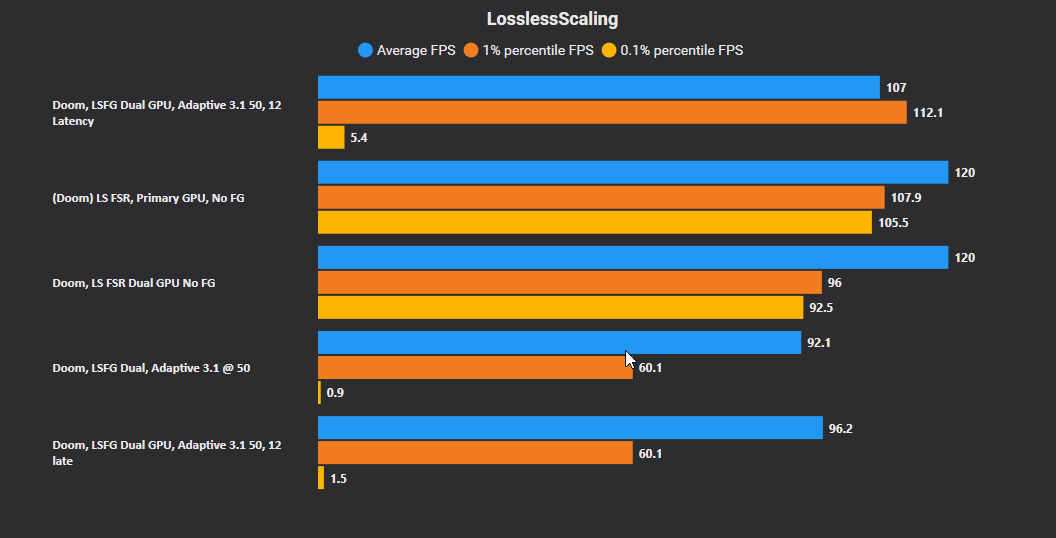
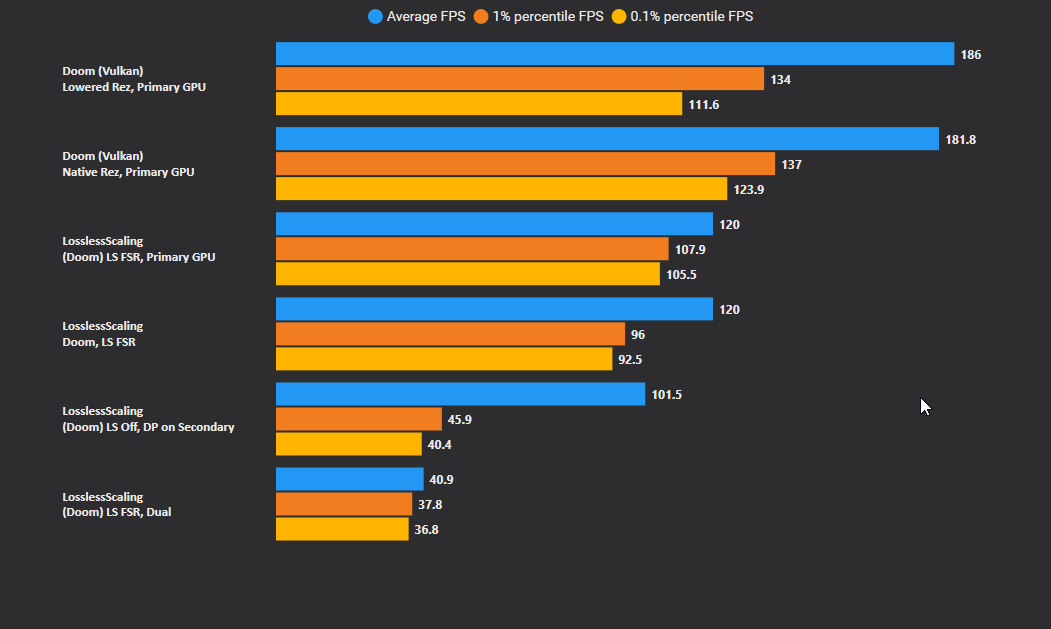
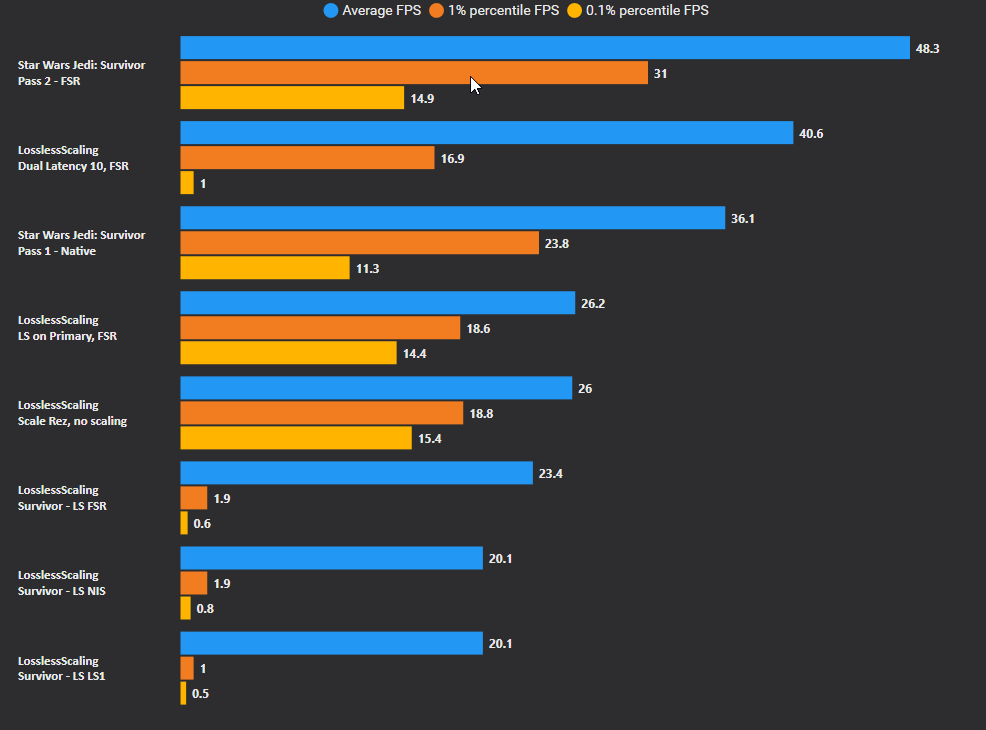
CapFrameX_EOV9M487Zp.png

1 Like

I will credit @rv6502 @PhaseLockedLoop and @SgtAwesomesauce for helping me get as far as I did, as well as a handful of very helpful folks on the Lossless Scaling discord!

@AdamAlgaert also pointed me at PresentMon which led me to CapFrameX, a truly lovely tool that I’ll definitely continue using for benchmarking.

2 Likes

Sir,
may I suggest a read through of these two threads, you may get the answers you seek. I’ve gone deep down this rabbit hole.

IMHO

1 Like

I very much appreciate that, I’ll take a look when I can.

1 Like

Well done for giving it a go

What pcie connectivity was used?

Pcie4x8x2?

Could be bandwidth between cards related?

First of all, I’ve glanced over your threads and you’re doing glorious work. I’ll be commenting specific thoughts on them later (likely after I have slept).

More on topic, though, bandwidth between cards could absolutely be related. It was raised more than once as a concern by those I thanked but loose napkin math suggested it would fine. I am not sure if there is a method to measure or benchmark actually utilized bandwidth: that goes beyond my knowledge.

This particular situation was indeed x8x8 @ gen4 and that could be a large part of the issue. Of course I, I think the Crosshair VIII Hero (Wifi) is just not a good motherboard for this (lovely in general though) and my testing with the AE-7 installed as well was also not optimal.

In the coming months I intend to return to this project, with new GPUs, possibly a better-suited motherboard. I’ve already replaced the AE-7 with an external, USB-based, Startech solution.

1 Like

Suspected as much.

Maybe things will be more viable once pcie5 x8x8 is more common. Or on a board that can do 2x16 like a threadripper.

It seems to me that there are actually non-TR, non-Epyc boards that can do this/

The problem I have is the DDR5 situation, which as I understand is suboptimal.

Example: the Crosshair X670E Hero, which supports Gen5 x8/x8 alongside several m.2 drives.

For now, I’ve upgraded to a 7900 XT and I’ll be looking for a nice deal on a 7800 XT or another 7900 XT, and I’ll try this again, with a much more impressive secondary GPU, and we’ll see what happens.