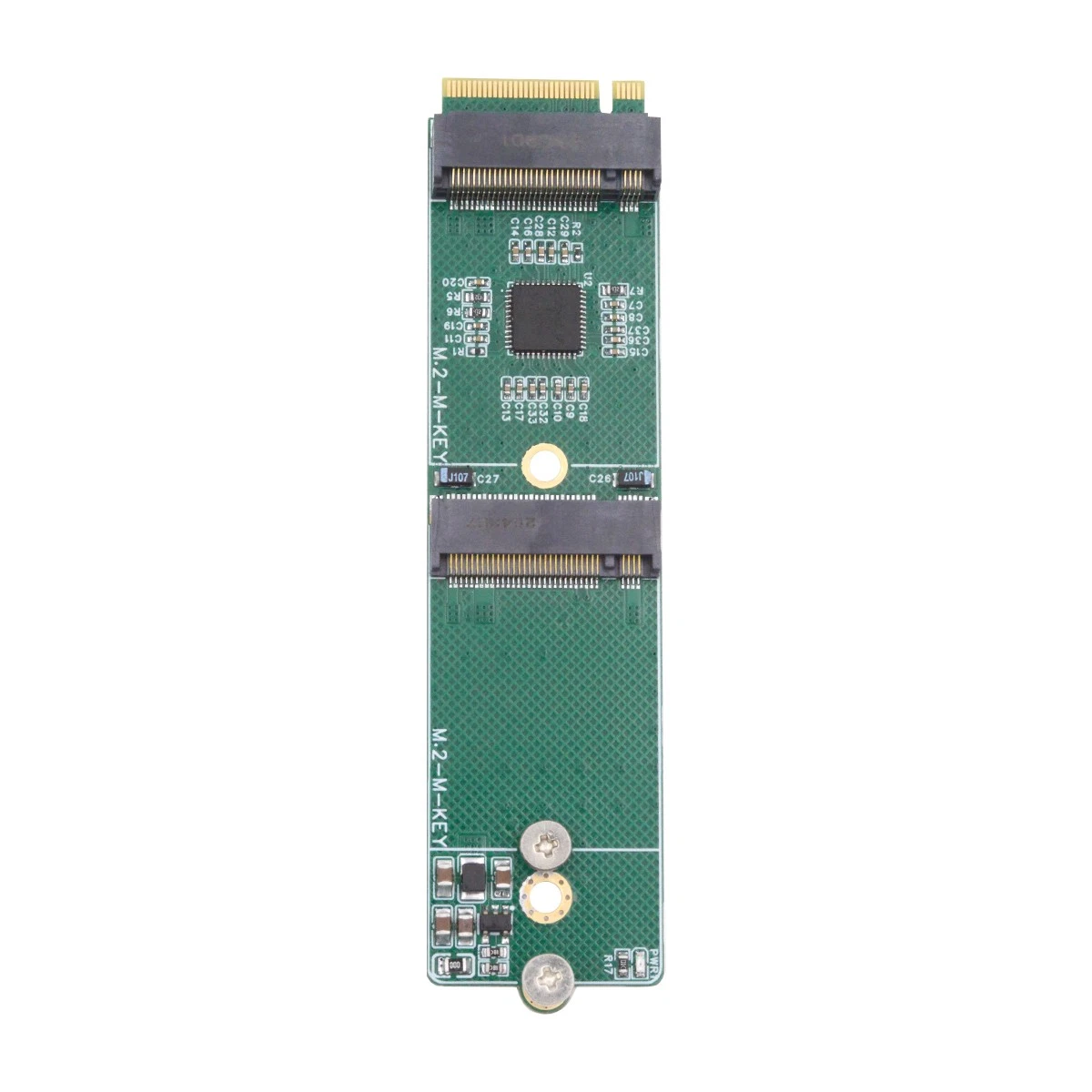
Give me a rank-mounted chassis just for PCIe cards. 
The prices… urgh. I could see something like that being usable as a giant PCIe expansion dock for miniPCs or notebooks, but when the prices are so ridiculous above EPYC levels it makes it hard to justify. Yes, the CopperLink cable and connectors is how external PCIe is done correctly, because OCuLink/MCIO are intended to be for internal short lengths, but I can’t swallow the prices over low end dumb adapters.
Also, did at any point someone tried if EPYC NTB (Non Transparent Bridge) can work to use a big EPYC as a heavyweight PCI Switch? I do recall a thread about that somewhere (Not sure if in this forum) but don’t recall the conclusion.
Lookie here 
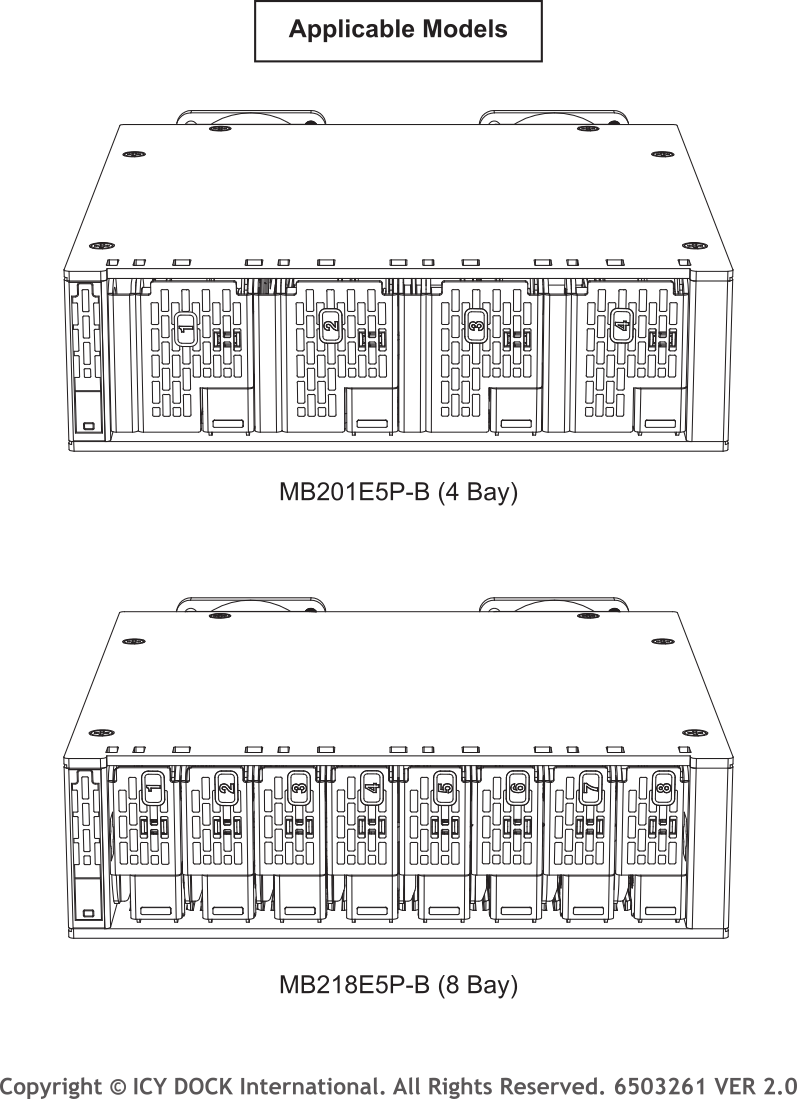
- 4 × E1.S (up to 25 mm thickness) in the
MB201E5P-Bfrom 2 × MCIO 8i connections - 8 × E1.S (up to 15 mm thickness) in the
MB218E5P-Bfrom 4 × MCIO 8i connections
MB218E5P-B_webpage_usermanual.pdf (4.8 MB)
@Carbongrip did you ever resolve this?
Hi guys,
I wrapped up my research on P2P using a PLX switch with consumer AM4 and AM5 motherboards:
TL;DR I only got P2P working on AM5.
AER
I bought the same motherboard as @Panchovix posted about and I can confirm both the PCIe adapters and the switch board work without errors.
With the switch board connected and starting from default BIOS settings, I merely changed the AER option from Auto to Supported (just to be sure). Then this pattern started popping up once I modded the NVIDIA driver:
Jun 05 17:01:14 cle kernel: pcieport 0000:00:01.1: PCIe Bus Error: severity=Correctable, type=Data Link Layer, (Transmitter ID)
Jun 05 17:01:14 cle kernel: pcieport 0000:00:01.1:   device [1022:14db] error status/mask=00001000/00006000
Jun 05 17:01:14 cle kernel: pcieport 0000:00:01.1:    [12] Timeout
Jun 05 17:01:14 cle kernel: pcieport 0000:00:01.1: AER:   Error of this Agent is reported first
Jun 05 17:01:14 cle kernel: pcieport 0000:01:00.0: PCIe Bus Error: severity=Correctable, type=Data Link Layer, (Receiver ID)
Jun 05 17:01:14 cle kernel: pcieport 0000:01:00.0:   device [1000:c010] error status/mask=00002040/0000e000
Jun 05 17:01:14 cle kernel: pcieport 0000:01:00.0:    [ 6] BadTLP
Jun 05 17:01:15 cle kernel: pcieport 0000:00:01.1: AER: Multiple Correctable error message received from 0000:00:01.1
Guess that’s also a good thing, at least now we know errors are definitely being reported. The solution was quite simple. As often it’s because of a difference between consumer and server land. Bad ASPM.
Added the kernel arg pcie_aspm=off. From then on, I haven’t spotted any errors.
or@cle ~$ sudo journalctl -b | grep "PCIe Bus Error" | wc -l
0
P2P
With the PLX88096 board I posted about you get 4 PCIe slots, hooked up 2 more GPUs using both downstream SlimSAS ports.
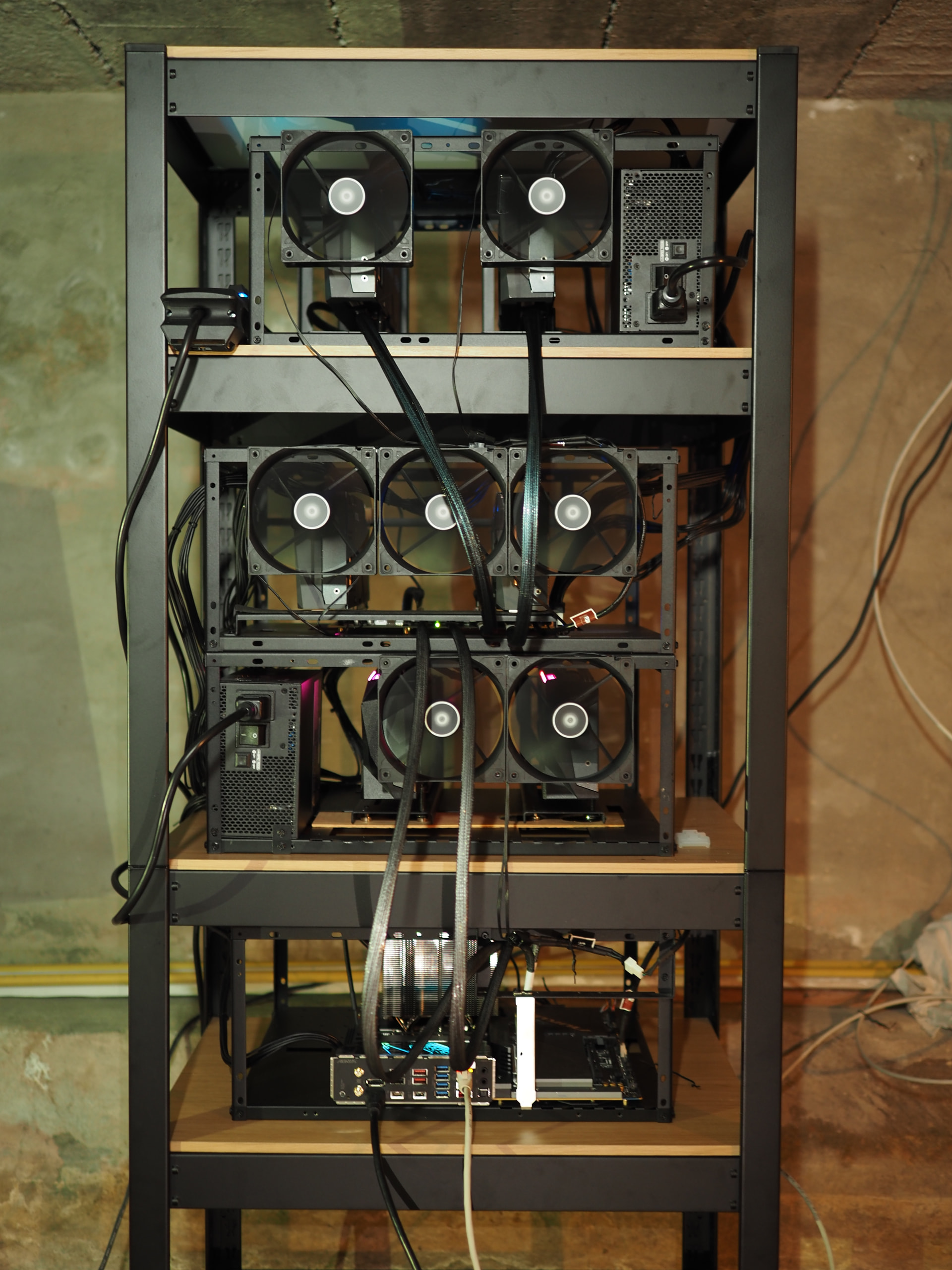
or@cle ~$ nvidia-smi topo -m
	GPU0	GPU1	GPU2	GPU3	GPU4	GPU5	CPU Affinity	NUMA Affinity	GPU NUMA ID
GPU0	X 	PXB	PXB	PXB	PXB	PXB	0-11	0		N/A
GPU1	PXB	X 	PIX	PIX	PXB	PXB	0-11	0		N/A
GPU2	PXB	PIX	X 	PIX	PXB	PXB	0-11	0		N/A
GPU3	PXB	PIX	PIX	X 	PXB	PXB	0-11	0		N/A
GPU4	PXB	PXB	PXB	PXB	X 	PIX	0-11	0		N/A
GPU5	PXB	PXB	PXB	PXB	PIX	X 	0-11	0		N/A

Legend:

  X    = Self
  SYS  = Connection traversing PCIe as well as the SMP interconnect between NUMA nodes (e.g., QPI/UPI)
  NODE = Connection traversing PCIe as well as the interconnect between PCIe Host Bridges within a NUMA node
  PHB  = Connection traversing PCIe as well as a PCIe Host Bridge (typically the CPU)
  PXB  = Connection traversing multiple PCIe bridges (without traversing the PCIe Host Bridge)
  PIX  = Connection traversing at most a single PCIe bridge
  NV#  = Connection traversing a bonded set of # NVLinks
Cuda samples
SimpleP2P
or@cle \~$ \~/docs/samples/cuda-samples/build/Samples/0_Introduction/simpleP2P/simpleP2P
\[/home/or/docs/samples/cuda-samples/build/Samples/0_Introduction/simpleP2P/simpleP2P\] - Starting…
Checking for multiple GPUs…
CUDA-capable device count: 6

Checking GPU(s) for support of peer to peer memory access…

> Peer access from NVIDIA GeForce RTX 3090 (GPU0) → NVIDIA GeForce RTX 3090 (GPU1) : Yes
> Peer access from NVIDIA GeForce RTX 3090 (GPU0) → NVIDIA GeForce RTX 3090 (GPU2) : Yes
> Peer access from NVIDIA GeForce RTX 3090 (GPU0) → NVIDIA GeForce RTX 3090 (GPU3) : Yes
> Peer access from NVIDIA GeForce RTX 3090 (GPU0) → NVIDIA GeForce RTX 3090 (GPU4) : Yes
> Peer access from NVIDIA GeForce RTX 3090 (GPU0) → NVIDIA GeForce RTX 3090 (GPU5) : Yes
> Peer access from NVIDIA GeForce RTX 3090 (GPU1) → NVIDIA GeForce RTX 3090 (GPU0) : Yes
> Peer access from NVIDIA GeForce RTX 3090 (GPU1) → NVIDIA GeForce RTX 3090 (GPU2) : Yes
> Peer access from NVIDIA GeForce RTX 3090 (GPU1) → NVIDIA GeForce RTX 3090 (GPU3) : Yes
> Peer access from NVIDIA GeForce RTX 3090 (GPU1) → NVIDIA GeForce RTX 3090 (GPU4) : Yes
> Peer access from NVIDIA GeForce RTX 3090 (GPU1) → NVIDIA GeForce RTX 3090 (GPU5) : Yes
> Peer access from NVIDIA GeForce RTX 3090 (GPU2) → NVIDIA GeForce RTX 3090 (GPU0) : Yes
> Peer access from NVIDIA GeForce RTX 3090 (GPU2) → NVIDIA GeForce RTX 3090 (GPU1) : Yes
> Peer access from NVIDIA GeForce RTX 3090 (GPU2) → NVIDIA GeForce RTX 3090 (GPU3) : Yes
> Peer access from NVIDIA GeForce RTX 3090 (GPU2) → NVIDIA GeForce RTX 3090 (GPU4) : Yes
> Peer access from NVIDIA GeForce RTX 3090 (GPU2) → NVIDIA GeForce RTX 3090 (GPU5) : Yes
> Peer access from NVIDIA GeForce RTX 3090 (GPU3) → NVIDIA GeForce RTX 3090 (GPU0) : Yes
> Peer access from NVIDIA GeForce RTX 3090 (GPU3) → NVIDIA GeForce RTX 3090 (GPU1) : Yes
> Peer access from NVIDIA GeForce RTX 3090 (GPU3) → NVIDIA GeForce RTX 3090 (GPU2) : Yes
> Peer access from NVIDIA GeForce RTX 3090 (GPU3) → NVIDIA GeForce RTX 3090 (GPU4) : Yes
> Peer access from NVIDIA GeForce RTX 3090 (GPU3) → NVIDIA GeForce RTX 3090 (GPU5) : Yes
> Peer access from NVIDIA GeForce RTX 3090 (GPU4) → NVIDIA GeForce RTX 3090 (GPU0) : Yes
> Peer access from NVIDIA GeForce RTX 3090 (GPU4) → NVIDIA GeForce RTX 3090 (GPU1) : Yes
> Peer access from NVIDIA GeForce RTX 3090 (GPU4) → NVIDIA GeForce RTX 3090 (GPU2) : Yes
> Peer access from NVIDIA GeForce RTX 3090 (GPU4) → NVIDIA GeForce RTX 3090 (GPU3) : Yes
> Peer access from NVIDIA GeForce RTX 3090 (GPU4) → NVIDIA GeForce RTX 3090 (GPU5) : Yes
> Peer access from NVIDIA GeForce RTX 3090 (GPU5) → NVIDIA GeForce RTX 3090 (GPU0) : Yes
> Peer access from NVIDIA GeForce RTX 3090 (GPU5) → NVIDIA GeForce RTX 3090 (GPU1) : Yes
> Peer access from NVIDIA GeForce RTX 3090 (GPU5) → NVIDIA GeForce RTX 3090 (GPU2) : Yes
> Peer access from NVIDIA GeForce RTX 3090 (GPU5) → NVIDIA GeForce RTX 3090 (GPU3) : Yes
> Peer access from NVIDIA GeForce RTX 3090 (GPU5) → NVIDIA GeForce RTX 3090 (GPU4) : Yes
> Enabling peer access between GPU0 and GPU1…
> Allocating buffers (64MB on GPU0, GPU1 and CPU Host)…
> Creating event handles…
> cudaMemcpyPeer / cudaMemcpy between GPU0 and GPU1: 12.08GB/s
> Preparing host buffer and memcpy to GPU0…
> Run kernel on GPU1, taking source data from GPU0 and writing to GPU1…
> Run kernel on GPU0, taking source data from GPU1 and writing to GPU0…
> Copy data back to host from GPU0 and verify results…
> Disabling peer access…
> Shutting down…
> Test passed
p2pBandwidthLatencyTest
or@cle \~$ \~/docs/samples/cuda-samples/build/Samples/5_Domain_Specific/p2pBandwidthLatencyTest/p2pBandwidthLatencyTest
\[P2P (Peer-to-Peer) GPU Bandwidth Latency Test\]
Device: 0, NVIDIA GeForce RTX 3090, pciBusID: 5, pciDeviceID: 0, pciDomainID:0
Device: 1, NVIDIA GeForce RTX 3090, pciBusID: 9, pciDeviceID: 0, pciDomainID:0
Device: 2, NVIDIA GeForce RTX 3090, pciBusID: b, pciDeviceID: 0, pciDomainID:0
Device: 3, NVIDIA GeForce RTX 3090, pciBusID: c, pciDeviceID: 0, pciDomainID:0
Device: 4, NVIDIA GeForce RTX 3090, pciBusID: f, pciDeviceID: 0, pciDomainID:0
Device: 5, NVIDIA GeForce RTX 3090, pciBusID: 11, pciDeviceID: 0, pciDomainID:0
Device=0 CAN Access Peer Device=1
Device=0 CAN Access Peer Device=2
Device=0 CAN Access Peer Device=3
Device=0 CAN Access Peer Device=4
Device=0 CAN Access Peer Device=5
Device=1 CAN Access Peer Device=0
Device=1 CAN Access Peer Device=2
Device=1 CAN Access Peer Device=3
Device=1 CAN Access Peer Device=4
Device=1 CAN Access Peer Device=5
Device=2 CAN Access Peer Device=0
Device=2 CAN Access Peer Device=1
Device=2 CAN Access Peer Device=3
Device=2 CAN Access Peer Device=4
Device=2 CAN Access Peer Device=5
Device=3 CAN Access Peer Device=0
Device=3 CAN Access Peer Device=1
Device=3 CAN Access Peer Device=2
Device=3 CAN Access Peer Device=4
Device=3 CAN Access Peer Device=5
Device=4 CAN Access Peer Device=0
Device=4 CAN Access Peer Device=1
Device=4 CAN Access Peer Device=2
Device=4 CAN Access Peer Device=3
Device=4 CAN Access Peer Device=5
Device=5 CAN Access Peer Device=0
Device=5 CAN Access Peer Device=1
Device=5 CAN Access Peer Device=2
Device=5 CAN Access Peer Device=3
Device=5 CAN Access Peer Device=4

\*\*\*NOTE: In case a device doesn’t have P2P access to other one, it falls back to normal memcopy procedure.
So you can see lesser Bandwidth (GB/s) and unstable Latency (us) in those cases.

P2P Connectivity Matrix
D\\D     0     1     2     3     4     5
0	    1     1     1     1     1     1
1	    1     1     1     1     1     1
2	    1     1     1     1     1     1
3	    1     1     1     1     1     1
4	    1     1     1     1     1     1
5	    1     1     1     1     1     1
Unidirectional P2P=Disabled Bandwidth Matrix (GB/s)
D\\D     0      1      2      3      4      5
0 831.12   5.90   5.92   5.94   5.96   5.92
1   5.91 832.42   5.93   5.95   5.94   5.95
2   5.89   5.91 833.33   5.93   5.94   5.94
3   5.89   5.89   5.95 834.67   5.95   5.96
4   5.91   5.92   5.91   5.93 835.56   5.92
5   5.94   5.95   5.95   5.96   5.95 834.22
Unidirectional P2P=Enabled Bandwidth (P2P Writes) Matrix (GB/s)
D\\D     0      1      2      3      4      5
0 833.33  13.00  12.98  13.00  12.95  12.92
1  13.00 835.56  12.95  12.99  12.96  12.92
2  12.99  12.92 835.56  12.94  12.98  12.89
3  12.92  12.89  12.91 834.22  12.95  12.96
4  12.95  12.96  12.94  12.96 836.46  12.89
5  12.93  12.99  12.92  12.97  12.94 836.01
Bidirectional P2P=Disabled Bandwidth Matrix (GB/s)
D\\D     0      1      2      3      4      5
0 839.15   6.35   6.33   6.35   6.34   6.34
1   6.32 839.60   6.34   6.34   6.33   6.34
2   6.31   6.34 839.60   6.37   6.33   6.33
3   6.32   6.34   6.37 839.60   6.32   6.35
4   6.34   6.34   6.35   6.34 840.05   6.34
5   6.32   6.34   6.34   6.34   6.33 839.83
Bidirectional P2P=Enabled Bandwidth Matrix (GB/s)
D\\D     0      1      2      3      4      5
0 839.60  12.98  12.91  12.96  12.93  12.94
1  12.95 839.15  12.97  12.94  12.94  12.94
2  12.95  12.93 839.59  12.95  12.96  12.97
3  12.93  12.95  12.92 839.81  12.95  12.93
4  12.98  12.93  12.95  12.94 839.60  12.95
5  12.91  12.94  12.92  12.94  12.94 840.05
P2P=Disabled Latency Matrix (us)
GPU     0      1      2      3      4      5
0   1.46  17.50  16.69  17.55  17.44  15.79
1  17.04   1.58  14.64  17.00  17.14  16.73
2  12.57  16.16   1.50  16.08  15.15  16.47
3  14.64  15.83  16.80   1.54  16.47  16.52
4  12.94  15.05  17.86  16.05   1.46  17.20
5  15.33  15.82  17.73  16.91  16.53   1.51

CPU     0      1      2      3      4      5
0   1.52   4.63   4.60   4.75   4.58   4.52
1   4.61   1.49   4.55   4.51   4.55   4.49
2   4.64   4.52   1.50   4.57   4.60   4.49
3   4.61   4.50   4.52   1.48   4.60   4.57
4   4.55   4.55   4.58   4.57   1.48   4.52
5   4.59   4.52   4.56   4.49   4.52   1.49
P2P=Enabled Latency (P2P Writes) Matrix (us)
GPU     0      1      2      3      4      5
0   1.55   1.22   1.33   1.33   1.22   1.32
1   1.38   1.58   1.38   1.37   1.36   1.38
2   1.35   1.34   1.48   1.34   1.35   1.36
3   1.35   1.35   1.35   1.54   1.34   1.36
4   1.36   1.34   1.34   1.33   1.48   1.36
5   1.35   1.36   1.27   1.35   1.34   1.50

CPU     0      1      2      3      4      5
0   1.52   1.19   1.20   1.19   1.18   1.18
1   1.22   1.50   1.19   1.19   1.19   1.18
2   1.23   1.20   1.49   1.19   1.20   1.19
3   1.23   1.20   1.20   1.50   1.19   1.20
4   1.22   1.21   1.18   1.19   1.49   1.20
5   1.21   1.21   1.21   1.21   1.21   1.49

NOTE: The CUDA Samples are not meant for performance measurements. Results may vary when GPU Boost is enabled.
MUX
One more tidbit I thought I’d share here. During my adventures I came across this thread from ServeTheHome about an Asrock Rack board:
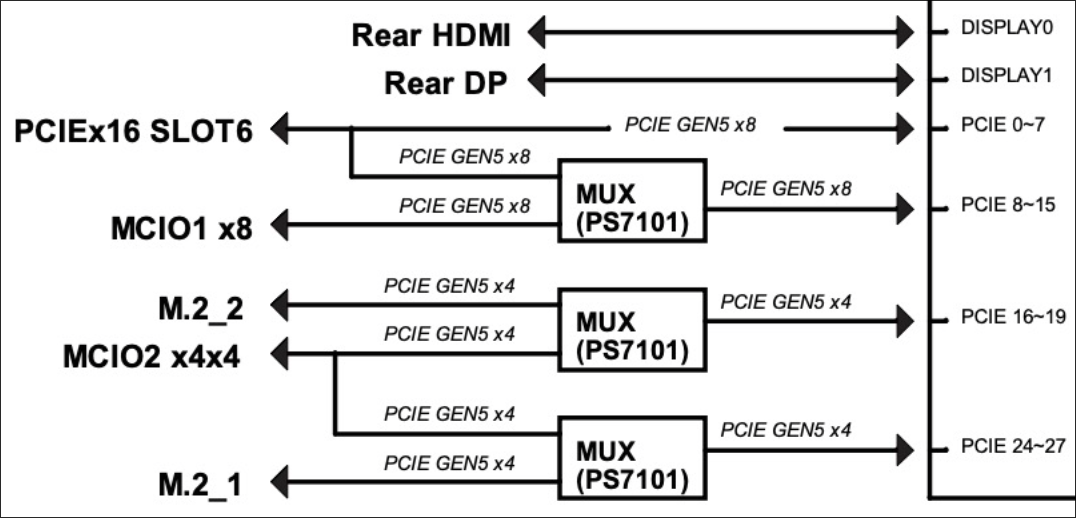
ASRock Rack is providing a lot of flexibility here using those Phison PS7101 chips to mux lanes.
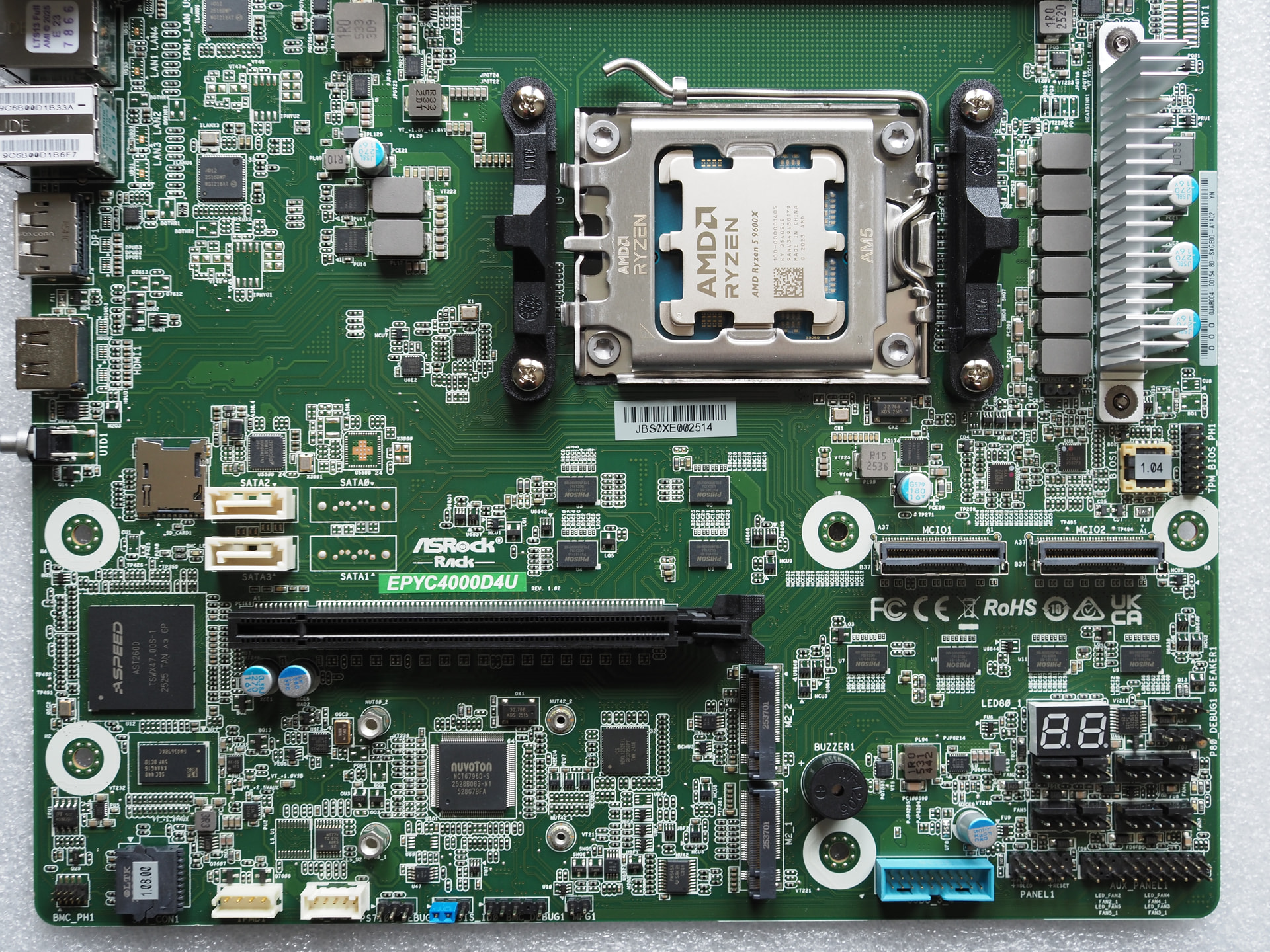
Pop quiz
Looking at the relevant part of the block diagram, how would you arrange full 16 lanes through the MCIO connections in combination with an M.2 NVME drive?

2 Likes
I bought a 10 port PEX88096 pcie card off aliexpress, I also bought an 11-slot board to break them out into, the first 4 graphic cards worked great with P2P on:
265k, Maxsun Z890 pacific
8x arc pro b60 24gb
6/8 work in any combination/slots
I just added another 4 cards and have hit MMIO/D4 boot code, do I need a specific motherboard to swap this platform out or can I just pick up any old AM5?
I’m happy to troubleshoot what I’ve got but it’s a miracle intel got this far. Maxsun only expose a single above 4g decode and no other options of relevance that I can find, I’ve emailed them but I’m not expecting much.
edit:
I bought an asrock X870 pro-A wifi and an am5 cpu, booted fine with all 8 cards once I set mmio limit to 4T
is there anything like umasmokeless in intel land? it might expose settings that your bios does not show
How do you change the mmio limit? I’m having issues with a normal AM5 board. EDIT: Ah it seems Asrock boards can change MMIO limit value and NZXT. But the other AIBs don’t.
Also my Gen5 PM50100 switch died  I’m using the PLX88096 I got from aliexpress in the meanwhile and works perfectly, but half the speed hurts.
Sorry to hear about your C-Payne switch.
I’m also using the Gigabyte Aorus Master. Daisy chained a second PLX88096 over the weekend. My topo with 8x 3090:
or@cle ~$ sudo lspci -t -v
-[0000:00]-+-00.0  Advanced Micro Devices, Inc. [AMD] Raphael/Granite Ridge Root Complex
           +-00.2  Advanced Micro Devices, Inc. [AMD] Raphael/Granite Ridge IOMMU
           +-01.0  Advanced Micro Devices, Inc. [AMD] Raphael/Granite Ridge Dummy Host Bridge
           +-01.1-[01-28]----00.0-[02-28]--+-00.0-[03-06]----00.0-[04-06]--+-10.0-[05]--+-00.0  NVIDIA Corporation GA102 [GeForce RTX 3090]
           |                               |                               |            \-00.1  NVIDIA Corporation GA102 High Definition Audio Controller
           |                               |                               \-18.0-[06]--
           |                               +-04.0-[07-1d]----00.0-[08-1d]--+-00.0-[09]--+-00.0  NVIDIA Corporation GA102 [GeForce RTX 3090]
           |                               |                               |            \-00.1  NVIDIA Corporation GA102 High Definition Audio Controller
           |                               |                               +-08.0-[0a]--
           |                               |                               +-10.0-[0b]--
           |                               |                               \-18.0-[0c-1d]----00.0-[0d-1d]--+-00.0-[0e-10]----00.0-[0f-10]----10.0-[10]--+-00.0  NVIDIA Corporation GA102 [GeForce RTX 3090]
           |                               |                                                               |                                            \-00.1  NVIDIA Corporation GA102 High Definition Audio Controller
           |                               |                                                               +-04.0-[11-14]----00.0-[12-14]--+-00.0-[13]--+-00.0  NVIDIA Corporation GA102 [GeForce RTX 3090]
           |                               |                                                               |                               |            \-00.1  NVIDIA Corporation GA102 High Definition Audio Controller
           |                               |                                                               |                               \-10.0-[14]--
           |                               |                                                               +-08.0-[15-18]----00.0-[16-18]--+-00.0-[17]--+-00.0  NVIDIA Corporation GA102 [GeForce RTX 3090]
           |                               |                                                               |                               |            \-00.1  NVIDIA Corporation GA102 High Definition Audio Controller
           |                               |                                                               |                               \-10.0-[18]--+-00.0  NVIDIA Corporation GA102 [GeForce RTX 3090]
           |                               |                                                               |                                            \-00.1  NVIDIA Corporation GA102 High Definition Audio Controller
           |                               |                                                               +-0c.0-[19-1c]----00.0-[1a-1c]--+-14.0-[1b]--
           |                               |                                                               |                               \-15.0-[1c]--
           |                               |                                                               \-1c.0-[1d]----00.0  Broadcom / LSI PEX880xx PCIe Gen 4 Switch
           |                               +-08.0-[1e-23]----00.0-[1f-23]--+-00.0-[20]--+-00.0  NVIDIA Corporation GA102 [GeForce RTX 3090]
           |                               |                               |            \-00.1  NVIDIA Corporation GA102 High Definition Audio Controller
           |                               |                               +-08.0-[21]--
           |                               |                               +-10.0-[22]--+-00.0  NVIDIA Corporation GA102 [GeForce RTX 3090]
           |                               |                               |            \-00.1  NVIDIA Corporation GA102 High Definition Audio Controller
           |                               |                               \-18.0-[23]--
           |                               +-0c.0-[24-27]----00.0-[25-27]--+-14.0-[26]--
           |                               |                               \-15.0-[27]--
           |                               \-1c.0-[28]----00.0  Broadcom / LSI PEX880xx PCIe Gen 4 Switch
           +-02.0  Advanced Micro Devices, Inc. [AMD] Raphael/Granite Ridge Dummy Host Bridge
           +-02.1-[29-38]----00.0-[2a-38]--+-00.0-[2b]----00.0  Samsung Electronics Co Ltd NVMe SSD Controller S4LV008[Pascal]
           |                               +-04.0-[2c]--
           |                               +-05.0-[2d]--
           |                               +-06.0-[2e]--
           |                               +-08.0-[2f-36]----00.0-[30-36]--+-00.0-[31]--
           |                               |                               +-04.0-[32]--
           |                               |                               +-06.0-[33]----00.0  Intel Corporation Ethernet Controller I225-V
           |                               |                               +-08.0-[34]--
           |                               |                               +-0c.0-[35]----00.0  Advanced Micro Devices, Inc. [AMD] 600 Series Chipset USB 3.2 Controller
           |                               |                               \-0d.0-[36]----00.0  Advanced Micro Devices, Inc. [AMD] 600 Series Chipset SATA Controller
           |                               +-0c.0-[37]----00.0  Advanced Micro Devices, Inc. [AMD] 600 Series Chipset USB 3.2 Controller
           |                               \-0d.0-[38]----00.0  Advanced Micro Devices, Inc. [AMD] 600 Series Chipset SATA Controller
           +-02.2-[39]----00.0  Samsung Electronics Co Ltd NVMe SSD Controller S4LV008[Pascal]
           +-03.0  Advanced Micro Devices, Inc. [AMD] Raphael/Granite Ridge Dummy Host Bridge
           +-04.0  Advanced Micro Devices, Inc. [AMD] Raphael/Granite Ridge Dummy Host Bridge
           +-08.0  Advanced Micro Devices, Inc. [AMD] Raphael/Granite Ridge Dummy Host Bridge
           +-08.1-[3a]--+-00.0  Advanced Micro Devices, Inc. [AMD/ATI] Granite Ridge [Radeon Graphics]
           |            +-00.1  Advanced Micro Devices, Inc. [AMD/ATI] Radeon High Definition Audio Controller [Rembrandt/Strix]
           |            +-00.2  Advanced Micro Devices, Inc. [AMD] Family 19h PSP/CCP
           |            +-00.3  Advanced Micro Devices, Inc. [AMD] Raphael/Granite Ridge USB 3.1 xHCI
           |            \-00.4  Advanced Micro Devices, Inc. [AMD] Raphael/Granite Ridge USB 3.1 xHCI
           +-08.3-[3b]----00.0  Advanced Micro Devices, Inc. [AMD] Raphael/Granite Ridge USB 2.0 xHCI
           +-14.0  Advanced Micro Devices, Inc. [AMD] FCH SMBus Controller
           +-14.3  Advanced Micro Devices, Inc. [AMD] FCH LPC Bridge
           +-18.0  Advanced Micro Devices, Inc. [AMD] Raphael/Granite Ridge Data Fabric; Function 0
           +-18.1  Advanced Micro Devices, Inc. [AMD] Raphael/Granite Ridge Data Fabric; Function 1
           +-18.2  Advanced Micro Devices, Inc. [AMD] Raphael/Granite Ridge Data Fabric; Function 2
           +-18.3  Advanced Micro Devices, Inc. [AMD] Raphael/Granite Ridge Data Fabric; Function 3
           +-18.4  Advanced Micro Devices, Inc. [AMD] Raphael/Granite Ridge Data Fabric; Function 4
           +-18.5  Advanced Micro Devices, Inc. [AMD] Raphael/Granite Ridge Data Fabric; Function 5
           +-18.6  Advanced Micro Devices, Inc. [AMD] Raphael/Granite Ridge Data Fabric; Function 6
           \-18.7  Advanced Micro Devices, Inc. [AMD] Raphael/Granite Ridge Data Fabric; Function 7
Putting some load on it.

So far so good 
3 Likes
Might be a silly question, but does the 88096 work with only a x8 uplink? Looking at a MS-A2 that’s for sale at a tempting price but not sure if it would work with the plx switch.
Did with the switchboard from Poor(er) man's local AI .
Had to revert back to AM4 for some additional benchmarking.
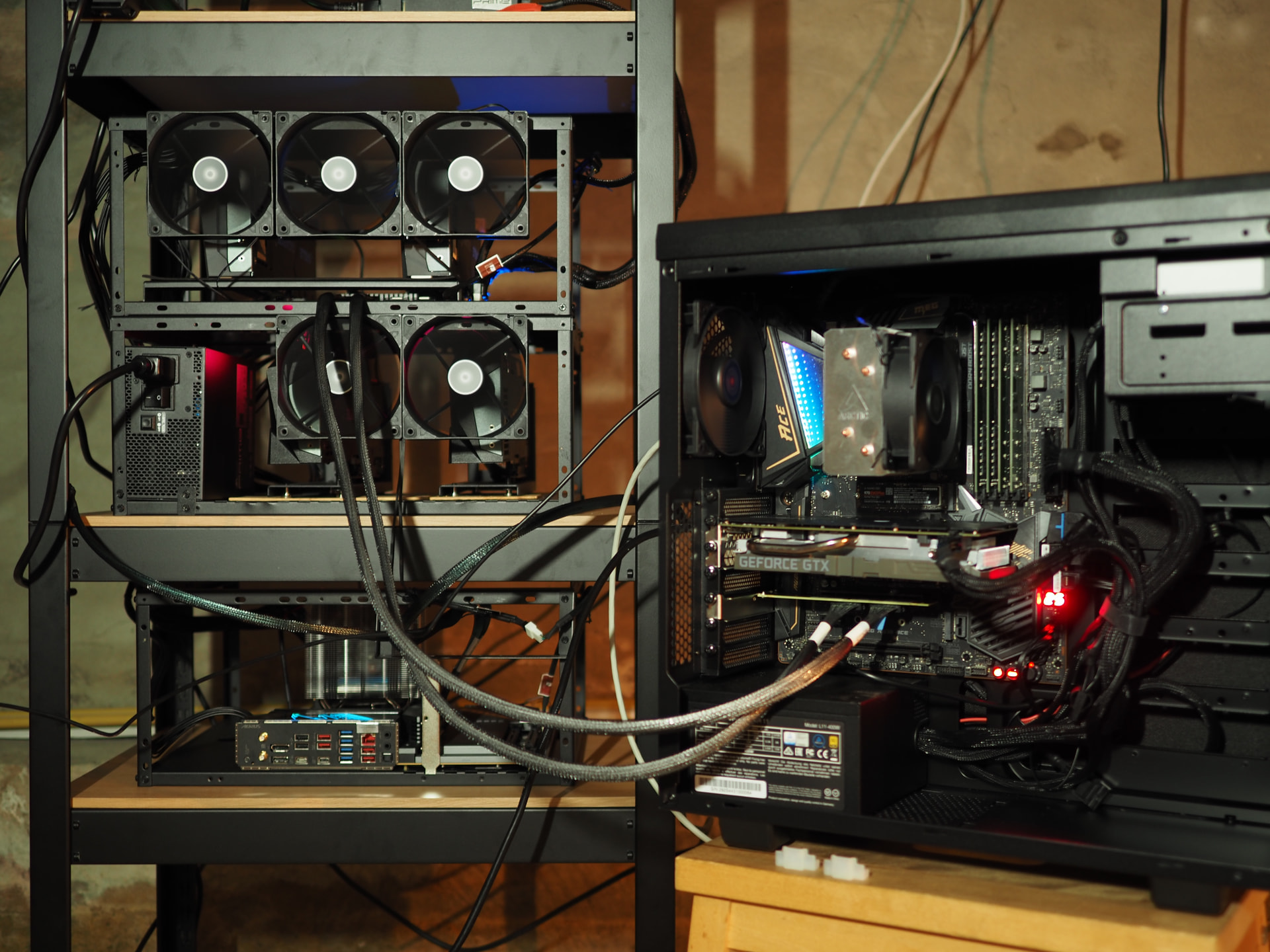
The MSI MEG X570 ACE on the right was at x8x8, so even though I linked up x16 to the switch, only x8 was being fed.
1 Like
First of all, thank you for your in-depth post and follow-ups which convinced me that this wasn’t such a crackpot idea to pursue. Really hoping that the 8945HX being Zen 4 will avoid any of the AM4 P2P issues you experienced.
1 Like
It’s a cool idea (and form factor). The proof is in the pudding 
Should work just fine, for devices inside the switch they can communicate between them at X16 4.0, but uplink will to the CPU will be limited to X8 4.0
Ok, so he hints that he is going to start carrying this PCIe 5 retimer card in the L1T store, but it’s August 7th, and I still don’t see these available. Is there any timeline on this, or is it just not being pursued?
1 Like
Managed to increase the MMIO size for my AM5 Aorus Master from 1TB to 16TB, and now P2P works fine, no D4 QCode error. Basically dumped the ITF info from the BIOS and with Claude managed to do it, posted it here
Also sent my PM50100 switch for service and it arrived just today to C-Payne. Fingers crossed!
1 Like
There’s a new-ish card from Lekuo, the PB65MX3, essentially a B650 on a PCIE 4x4 card. Splits off into four M.2s at x2 or two at x4, four SATA3, one USB 20Gbps and three 10Gbps.
1785486682515.pdf (6.8 MB)
Like the B650 Livemixer special card that Wendell showed off, except in the flesh!
Could be useful for those on boards without bifurcation or not wanting to sacrifice a full x16/8 slot.
Might be cool if you pass the card through to a vm that’s and a gpu is basically a full system
1 Like
With respect to IOMMU, it should all show up under one single group, on account of it essentially being just a chipset.
Theoretically possible to connect a GPU via a M.2 to PCIe riser, to the M.2 port to act as a combo M.2, SATA, and GPU all behind 1 chipset.