I’ve recently ordered a PEX88096 board (same as the one shown by KingKaido [post 855 in this thread] in the first picture; firmware mode set to 5x16). I’ve been trying to make it work on a B550M motherboard, with little luck. Has anyone had any issues with these kind of boards on consumer hardware and managed to make it work?
The board shows in lspci output with the expected topology (at least, the same as Panchovix’s topology), however no downstream devices are visible (tried with all the gpus I have: several amds, one nvidia, one intel). I couldn’t figure out how to use the PEXDeviceEditor from broadcom either to see whether the board is configured properly, as I’ve seen some people doing on some chinese forums (in my case, devices are greyed out and I can’t get to flash editor).
Got it working on AM4 with a PLX88096 switchboard (first pic here).
If your bridge shows, but nothing downstream, I would also suspect the lane splitting. Depending on your setup, some PCI adapters may also expect x8x8 coming in.
I’m still trying to get the NVIDIA mod for P2P to play nicely on AM4 lol.
Did you have to do any bios changes to get it working or did it work from the get go?
I’m using the slimsas to pcie adapters, the ones which take two SFF-8654 8i cables (basically, what was shared here before). I suspect it might be the cables that are too long (0.8m) and the gpus can’t negotiate gen 4. That, or it might be the firmware that’s not set up correctly. It’s hard to say and I don’t have enough time to get different cables before the return window closes sadly.
Hooking up one GPU (with a monitor attached) should work from the get go.
I started out on a B550 with the bifurcation at Auto (x16), that didn’t work. As soon as I set the main motherboard to x8x8 the switchboard showed up, including everything downstream. Given you already see the bridge my main suspect would be the firmware. Most of the BIOS settings are geared towards P2P.
From my (limited) experience with AER, you should still see the GPU’s in lspci, and even get video out. It’s once you put load on it that I saw it crumbling down, vLLM got stuck loading safetensors and wouldn’t even initialize.
Thanks for sharing this, which gives me a bit of hope, as I am also looking to use an asymmetrical mode (GPUx16 + 4 SSDx4). I suppose your 39com card is identical to the LR-Link LRNV9F48?
I’d really like to achieve such thing, but with their Gen5 card (since they turned down my request of a custom configuration), and at the same time, I wonder if it would be possible and if I could manage to do it.
If I understood correctly, you can dump/flash the SPI firmware directly via the PCIe link?
I studied the source code you mentioned, which only refers to older PLX/PLX8000 series, but turned out to be valid for your PEX card.In practice, what is the difference between SpiFileLoad and EEpromFileLoad? And does the checksum you mentioned have anything to do with the CRC used for the EEprom-related functions, or is it something else?
When you say “dumping all SPI flash images you have on your device”, do you mean that the card’s SPI flash contains multiple images? And how did you exactly proceed for finding the values to patch in your binary dumps?
Finally, do you think there is a risk of bricking the card doing so? Or would PlxCm work no matter what?
Check the dip switches if there any. There should only be one on the “Set" Position, since they now require encrypted Firmware to config since PEX880xx; the instructions on what to set shouldn’t be too hard to find (usually on the Board & on seller’s page)
And Check what config your Base Plate uses. 4x4? 16x4? 8x4?
Finally got a new slimsas to pcie adapter from the same seller and this one solved my issue. In the end, it appears that the issue was that the PEX88096 board expected the adapter to have a pcie insertion function, and none of the adapters I had previously had that (at least this is what the seller told me).
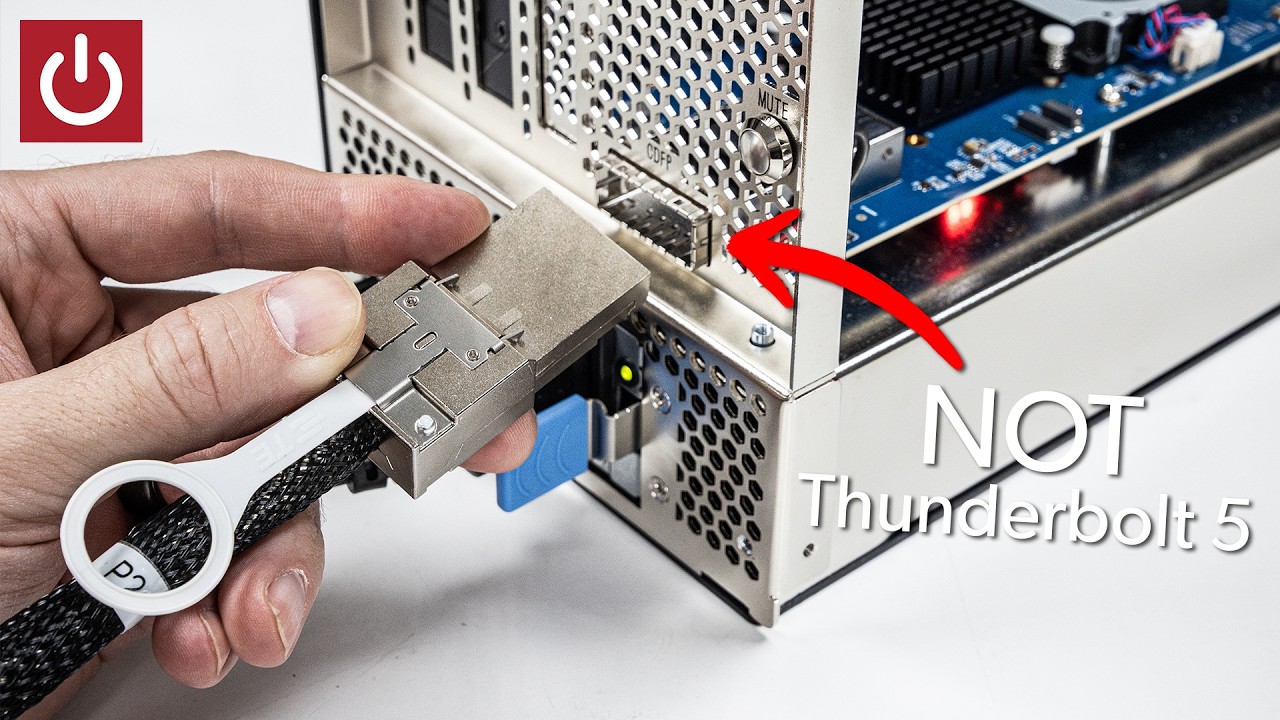
This is the external connection I’ve been waiting for. The satisfaction of inserting a sturdy plug and hearing a click. You know that isn’t falling out by itself or giving signal integrity issues due to a loose connection.
That is some serious stuff. OCuLink was technically some kind of internal PCIe connector for 4 PCIe 3.0/4.0 lanes (Superceded by MCIO 4i for 4x PCIe 5.0), but it catched on to be used externally even though it is not intended because is cheap. Actual external PCI Express stuff tends to be quite expensive, they use some dedicated cards with redrivers or some other funny stuff, which is why you have that heatsink with fan on eGPU chassis PCB instead of dumb adapters. That setup is how the real external PCIe looks like. For internal PCIe (Or external done wrong), there is also the MCIO 16i connector that does the same.
We’re pretty much in external chassis level. Reminds me of the IBM 5161 expansion unit…
Actually, there is nothing that stops from doing a giant eGPU like enclosure but with a PCIe Switch and multiple slots, and either some short MCIO cable or the full CopperLink with transmiter/receiver kit.