I spent 24 hours on this and found almost nothing about mixing DDR5 kits of different capacities on AM5, so here is the whole story with numbers. TL;DR: it works — 80GB at DDR5-5200, 3 full Memtest86+ passes and a Linux stress test with zero errors. But on the way, Auto settings corrupted memory badly enough to crash the OS. Here’s why and how I fixed it.
Hardware
- CPU: AMD Ryzen 9 9900X
- Board: ASRock B850M Steel Legend WiFi, BIOS updated 3.40 → 4.60 (AGESA ComboAM5 1.3.0.1d)
- Kit A: Corsair Vengeance RGB 48GB (2x24GB) DDR5-6000 CL36 1.40V XMP (
CMH48GX5M2E6000C36) — Micron 24Gb dies, single rank - Kit B: Corsair Vengeance RGB 32GB (2x16GB) DDR5-5600 CL36 1.25V EXPO/XMP (
CMH32GX5M2B5600Z36) — Samsung 16Gb dies, single rank - Slots: 24GB in A1/B1, 16GB in A2/B2 → each channel has one of each (40GB per channel)
- OS: Ubuntu 24.04. Heavy use: video rendering, builds, several AI agents in parallel. 32GB was getting processes OOM-killed.
Kit A was bought used. Before mixing, I validated it alone: Auto (4800) and XMP 6000, 15-minute stress test, zero errors.
Problem 1: on Auto, memory got corrupted under load
With 4 sticks on Auto, the board trained at 3600 (AMD’s official spec for 4 DIMMs) and Linux booted fine. Half an hour of light use, nothing odd.
Then I ran stressapptest with ~50GB. Within 2 seconds, 60 processes died with general protection fault and systemd (PID 1) aborted. Hard reset. Afterwards fsck found a corrupted inode on disk (luckily just a temp cache file).
Not a bad stick — each kit alone passed everything. It was the combination.
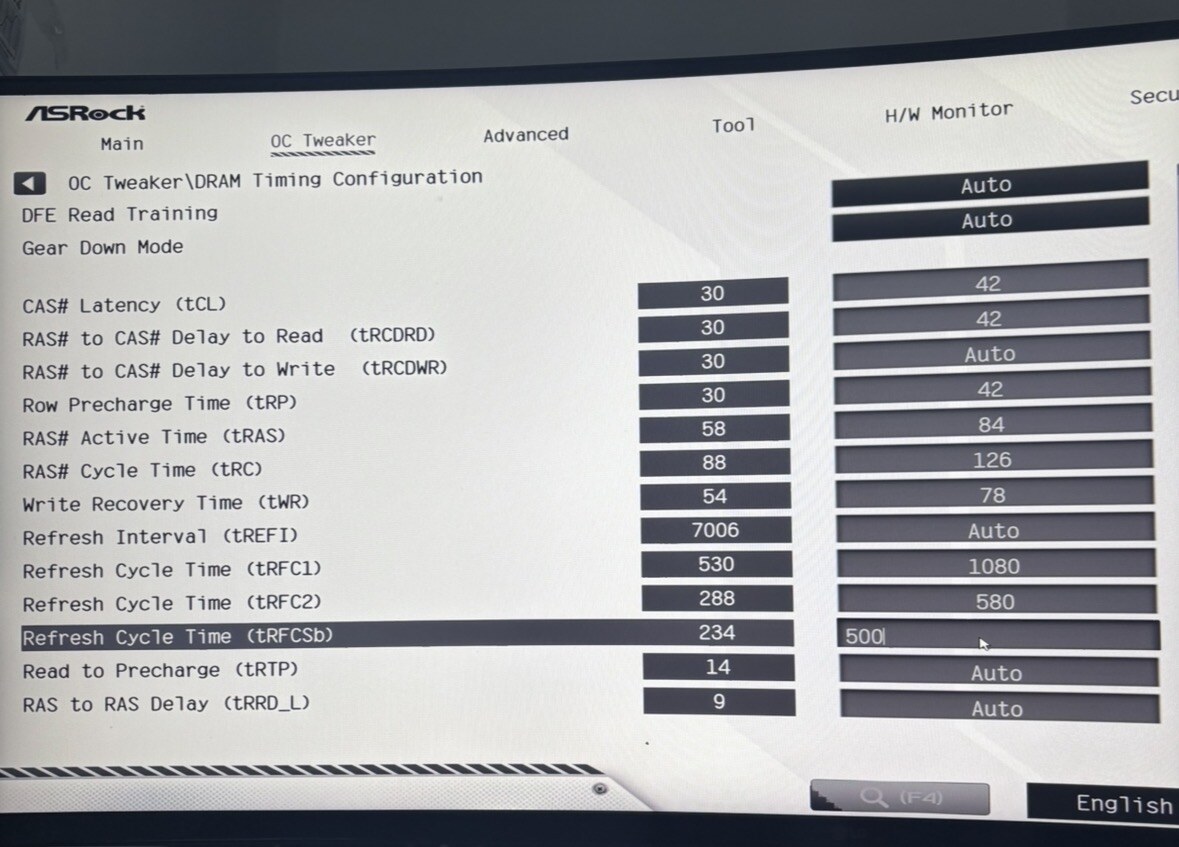
The clue was in the BIOS itself. In OC Tweaker → DRAM Timing Configuration, the left column shows what Auto actually applied. At 3600:
| Timing | Auto | In ns | Micron 24Gb dies need |
|---|---|---|---|
| tRFC1 | 530 | 294 ns | 410 ns |
| tRFC2 | 288 | 160 ns | 220 ns |
| tRFCsb | 234 | 130 ns | 190 ns |
294 ns is exactly the 16Gb-die refresh time. The board took the refresh timings from the 16GB sticks (Samsung 16Gb) and applied them to all four. The 24GB sticks (Micron 24Gb) need longer refresh and lost data as soon as memory was actually used. Light use hides it; heavy load collapses.
The fix: manual timings that are safe for both kits
JEDEC DDR5-5200B primaries (loose), plus the refresh times the 24Gb dies require:
| Setting | Value |
|---|---|
| DRAM Frequency | DDR5-5200 (validated at 3600 first) |
| tCL / tRCDRD / tRP / tRAS | 42 / 42 / 42 / 84 |
| tRC / tWR | 126 / 78 |
| tRFC1 / tRFC2 / tRFCsb | 1080 / 580 / 500 |
| VDD / VDDQ / VDDIO | 1.30 V |
| SoC | fixed 1.20 V, LLC Level 3 |
| FCLK / UCLK | 2000 MHz / UCLK=MEMCLK |
| Everything else | Auto |
First I kept 3600 and only changed the timings: Memtest86+ one full pass, 0 errors, and the same stress test that crashed the OS in 2 seconds ran clean.
Careful: tRFC is in clock cycles, so the real time shrinks as frequency rises. tRFC1 = 1080 is 600 ns at 3600 and 415 ns at 5200 — still above 410 ns. Above 5200 these values become too short (at 5600 you’d need ~1160). Redo the math for your frequency.
Problem 2: black screen on reboots (Memory Context Restore)
With 4 sticks, some reboots hung on a black screen — no video, no BIOS, diagnostic LEDs on. Recovery:
- Unplugged, left only the 2x16GB in A2/B2 — with those the board POSTs.
- Advanced → AMD CBS → DDR Options → DDR Memory Features → Memory Context Restore: Enabled → Disabled.
- Unplugged, reinstalled the 24GB sticks in A1/B1, powered on.
With MCR disabled, the board retrains memory on every boot instead of reusing the saved context. Boot takes longer (black screen for a while is normal), but the hangs stopped.
Results at 5200
Memtest86+ v9.00, DDR5-5200 42-42-42-84: 3 full passes in 4h20, 0 errors over 77.6GB.
Linux stress, 15 minutes, ~51GB:
stressapptest -M 51000 -s 900 -W
Stats: Completed: 48164504.00M in 900.17s 53506.00MB/s, with 0 hardware incidents, 0 errors
Status: PASS
Bandwidth in the same test:
| Config | Bandwidth |
|---|---|
| 80GB @ 3600 (4 sticks) | 39 GB/s |
| 80GB @ 5200 (4 sticks) | 53.5 GB/s |
| 48GB @ 6000 (kit A only) | 60 GB/s |
~11% less bandwidth than kit A alone, for 32GB more. For rendering, capacity wins.
DIMM temperatures (each stick’s spd5118 sensor, read in Linux): 15-minute stress with the case open peaked at 73.5 °C on the two middle sticks. Then I closed the glass, set the Corsair fans to Performance and ran it again for 20 minutes while using the PC and browser: 0 errors, peak 71.5 °C at 8 minutes, then it settled and dropped to 69.5 °C. DDR5’s limit is 85 °C — make sure air flows over the DIMMs.
Two more traps
- Ubuntu 24.04’s Memtest86+ (7.00) froze on Ryzen 9000 — it predates Zen 5 support. Memtest86+ 9.00 from memtest.org worked perfectly. If memtest hangs without errors, check the version before blaming the RAM.
- Never boot your OS on unstable memory. Corrupting RAM writes garbage to disk. I only lost a temp file; it could have been worse. Test 4-DIMM configs in Memtest first.
Takeaways
- Mixing kits can work, but don’t trust Auto. Compare what Auto applied (left column) with what each die needs — especially tRFC.
- Know your dies (Thaiphoon on Windows; on Linux the
spd5118driver exposes SPD). 16Gb and 24Gb dies have very different tRFC. - Memory Context Restore = Disabled fixed the 4-DIMM reboot hangs here. Slower boot, worth it.
- Save BIOS profiles to a USB stick. I keep a 3600 fallback and the 5200 profile. After a CMOS clear the board goes back to Auto, which corrupts memory with these kits — load the profile before booting the OS.
- 5200 with 4 DIMMs is above AMD’s spec (3600). It works on my CPU/board/BIOS/kits; no guarantee on yours.
If you’re fighting unstable 4-DIMM DDR5 on AM5, post your board, BIOS, kits (and dies) and what Auto shows in that left column — happy to compare.
BIOS screenshot — left column is what Auto applied, right column is my manual values: