Just pointing this somewhere since this was a … journey and I know others may have had questions or issues.
I built an EPYC 9274F on an Gigabyte MZ33-AR0 1.x with lots of random hardware plugged in (all PCIe slots used, AMD, Nvidia, even Intel GPUs, MCIO retimers, etc) so I thought that getting a Gigabyte MZ33-AR1 for an 9005 build would be pretty easy/stress free. Totally wrong btw, this took weeks and a lot of patience. Also, Gigabyte support is awful/wrong and not-responsive, so don’t expect much help and be sure to keep track of your return window (I was one day away from just buying a new ASRock or Supermicro board since I had $40K of GPUs sitting around while this board just refused to work).
ASIDE: for anyone building a 4xGPU EPYC system for getting work done, I’d say just pay the premium to Bizon or Exxact or some other SI to put a box together for your instead of faffing around. From my spelunking through forum posts etc, all the retail available EPYC motherboards have issues/aren’t very reliable.
My debug logs:
- BOARD DID NOT POST - Despite the board (and box) being marked 9005 compatible, my board would not POST at all. It came with a first-release R05_F04 as shipped. You can use the BMC to upgrade the BIOS (I did to the then latest R11_F08) however this only loads the capsule that requires a successful POST before it will upgrade.
- I tried a number of things including clearing the CMOS, pulling out the battery and clearing but finally I ended up swapping a 9004 which booted enough to update the BIOS (but still hung), and then I was finally able to update the BIOS and POST swapping the 9005 back in.
- Pro tip: I used 1-stick of RAM in A1 to minimize training times. I had to use arp-scan to find the BMC since it DHCPs around (it’s labeled as “Unknown” device on aprscan
- Here was the most detailed description I found online but a lot of other posts w/ people having the same issue: https://www.reddit.com/r/gigabyte/comments/1muoh15/gigabyte_mz33ar1_wont_post_cant_update_firmware/
- Multiple GPUs - the next issue is that while I was able to get 1 GPU booting, even 2 GPUs would cause the board to hang
- Gigabyte US server support suggested that multiple GPUs might not be support (lol WTF are you talking about) and that I should make sure Above 4G decoding is on (not even an option in production BIOS my guy). The correct answer for enabling support is that Resizable BAR must be enabled for multi-GPU booting (This is disabled by default). I manually set PCIe Gen speeds and disabled I/O ROM to minimize link retraining/boot speeds during debugging, but this should not affect things.
- Note: others have had REBAR causing its own errors: https://www.reddit.com/r/LocalLLaMA/comments/1mnevw3/pcimmiobar_resource_exhaustion_issues_with_2x_pro/ - luckily I didn’t have the issue
- One annoying thing is that every time you have a hang you will need to clear your CMOS if you want any hope of it coming back up. Reboots take about 4-6 minutes BTW, but I ended up leaving it longer in the hopes that things would come up when working through these.
- UPDATE YOUR BIOS (again) - while I was dealing with these issues a new R17_F11 BIOS was released. I highly recommend updating to this as it for example exposed PCIe Gen5 as an option properly (again, GIGABYTE Support was giving bunk here, blaming lack of Gen5 on the cards, which absolutely support Gen5). This BIOS update fixed it.
- Tensor Parallelism - For those coming from other cards, 2 things to note - you need to us the Nvidia Open kernel drivers for PRO 6000 support. That’s fairly obvious. The other one wasn’t - while the cards were working individually, I was getting iommu page faults when trying to tp multiple cards:
[44799.003766] amd_iommu_report_page_fault: 1016 callbacks suppressed
[44799.003773] nvidia 0000:09:00.0: AMD-Vi: Event logged [IO_PAGE_FAULT domain=0x001d address=0xe0826200 flags=0x0020]
- The solution for this for me was obvious - booting with
amd_iommu=offto side step that hole mess.
After quite a few long working sessions (I used the RTX PRO 6000s in pairs on other machines while getting this sorted) I was able to get a working setup
❯ nvidia-smi topo -mp
        GPU0    GPU1    GPU2    GPU3    CPU Affinity    NUMA Affinity   GPU NUMA ID
GPU0     X      NODE    NODE    NODE    0-47    0               N/A
GPU1    NODE     X      NODE    NODE    0-47    0               N/A
GPU2    NODE    NODE     X      NODE    0-47    0               N/A
GPU3    NODE    NODE    NODE     X      0-47    0               N/A
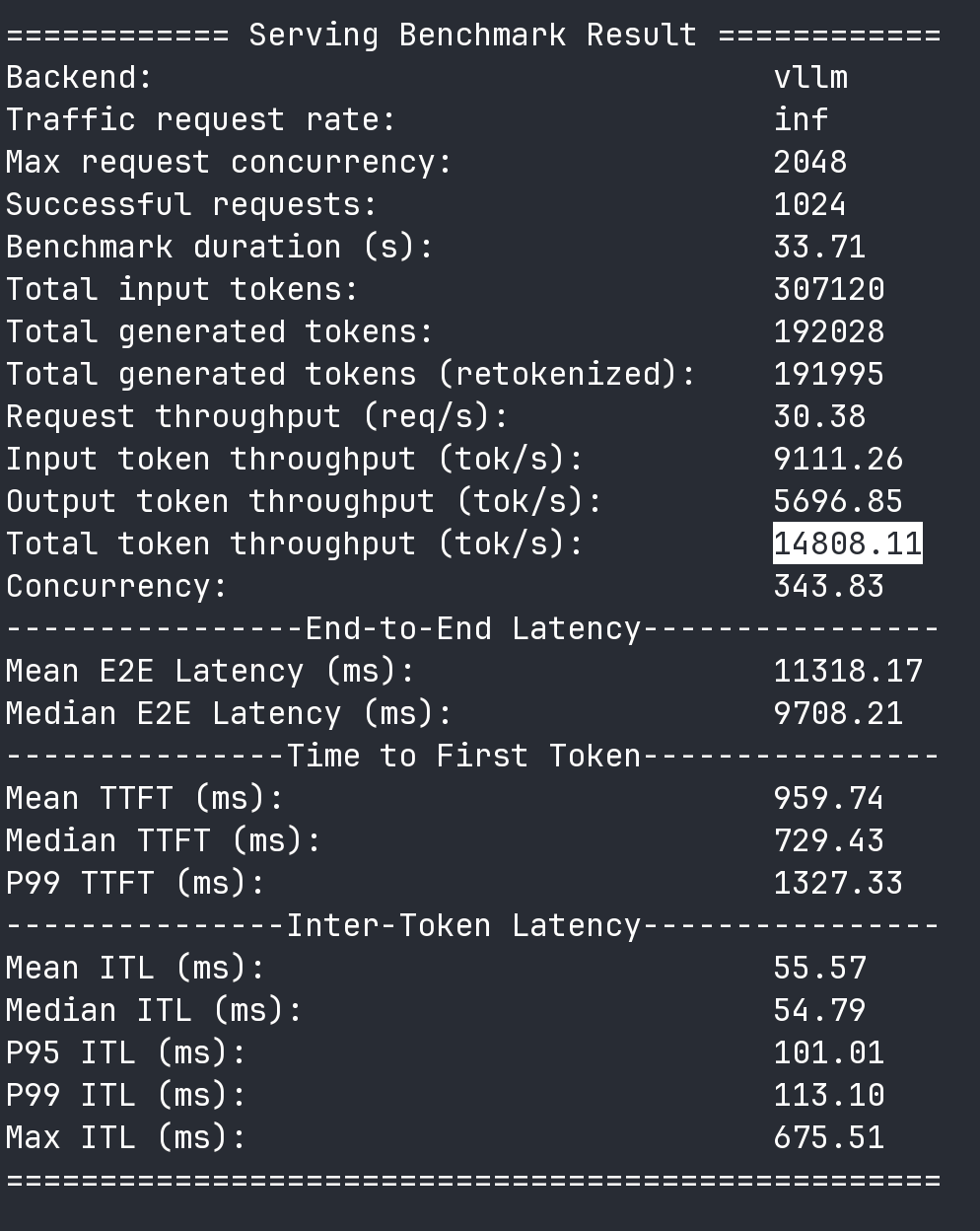
What running vllm/sharegpt bench looks like with llama3-8b and 4 x RTX PRO 6000s going full tilt:
Just in case it’s useful, my parts list:
- EPYC 9275F (cheapest part for maximum MBW for future CPU inference)
- Gigabyte MZ33-AR1 (not great, but is there anything better? Maybe I’d try an ASRock Rack TURIND8UD-2T and deal w/ 8 RAM slots
- COOLSERVER SP5-4U M99 heat sink (given clearance issues, I probably would go w/ one of the AliExpress (or much more expensive Silverstone) SP5 water coolers
- a few temp random sticks of RAM atm
- 4 x LINKUP AVA5 PCIe 5.0 riser cables (careful with your sizing and install, this crimp very easily, but they do all work at PCIe 5.0 x16)
- Open Frame PC Case + 650mm zip ties (heat sink didn’t allow for support bar/easy mounting)
- 2 x SilverStone Hela 2050W PSU (+ ATX24 jumper plug)
- 4 x PP14-EPS75 12VHPWR cables (SST-PP14-EPS75)
- 4 x RTX PRO 6000 Workstation (600W) cards (most of the cost of the system
 )
)
Additional reference:
- Amd epyc 9005 series SP5 single slot or dual slot motherboard suggestion? - #7 by Crestmont_Enjoyer
- Users of GigaByte MZ73-LM2 & MZ33-AR1 - comprehensive list of all issues and solutions | ServeTheHome Forums
- Epyc Turin server will not post with GPU attached
- WIP: Blackwell RTX 6000 Pro / Max-Q Quickie Setup Guide on Ubuntu 24.04 LTS / 25.04