Thanks for the input the main thing was getting the vram assignment just right. Thanks again
Hello again Im busy trying to limit the vram usage to 25% with the following configuration but With 2 vms the usage will go over 2GB and when i Just for testing in super position i exceed the gpu memory like benching at 5k the vram goes to 5GB or was it less cant remember it begins to swap out of system memory here is my configuration
$vm = “Windows 10 1”
Remove-VMGpuPartitionAdapter -VMName $vm
Add-VMGpuPartitionAdapter -VMName $vm
Set-VMGpuPartitionAdapter -VMName $vm -MinPartitionVRAM 0
Set-VMGpuPartitionAdapter -VMName $vm -MaxPartitionVRAM 250000000
Set-VMGpuPartitionAdapter -VMName $vm -OptimalPartitionVRAM 249999999
Set-VMGpuPartitionAdapter -VMName $vm -MinPartitionEncode 0
Set-VMGpuPartitionAdapter -VMName $vm -MaxPartitionEncode 18446744073709551615
Set-VMGpuPartitionAdapter -VMName $vm -OptimalPartitionEncode 18446744073709551614
Set-VMGpuPartitionAdapter -VMName $vm -MinPartitionDecode 0
Set-VMGpuPartitionAdapter -VMName $vm -MaxPartitionDecode 250000000
Set-VMGpuPartitionAdapter -VMName $vm -OptimalPartitionDecode 249999999
Set-VMGpuPartitionAdapter -VMName $vm -MinPartitionCompute 0
Set-VMGpuPartitionAdapter -VMName $vm -MaxPartitionCompute 250000000
Set-VMGpuPartitionAdapter -VMName $vm -OptimalPartitionCompute 249999999
Set-VM -GuestControlledCacheTypes $true -VMName $vm
Set-VM -LowMemoryMappedIoSpace 1Gb -VMName $vm
Set-VM -HighMemoryMappedIoSpace 32GB -VMName $vm
Start-VM -Name $vm
gigabyte gtx 1070ti with nvidia driver 471.96
Hi There,
has anyone successfully partitioned an AMD I-GPU, and used that with parsec? I managed to get the IGPU virtualized, visible and working in the VM but neither parsec nor rainway can access the hardware video encoding.
Also has anyone managed to install the AMD IGPU drivers on hyper-v core? The drivers are only available for W10 and they fail to run on hyper-v standalone. I’ve tested the partitioning with windows 10 pro client but it is not really an end state solution I want.
Hi,
The problem I’m having might be the same as the question above mine but I have a secondary AMD GPU that is unused (aside from a dummy plug) and I can partition it just fine to a VM (and can confirm it works via benchmark tools) but when attempting to use parsec, the encoder is not kicking in (and yes I do have a virtual monitor granted by the paid version) – Has anyone been successful in using parsec or any other remote access tool with an AMD GPU?
I recommend looking through the System 32 folder on the host computer, there may be some AMD Encoder DLLs, I don’t have a modern AMD GPU from within the past 5 years so it would be probably different from the ones in my storage. Possibly trying to copy all
One thing to try and search is what is the encoder DLL for AMD or product code name for their encoder for the GPU you have. I apologize but this is the best I can do.
@Bogey_Biggs hope this gives you a place to start as well
Thanks! you’re a legend!
The paid virtual monitor didn’t work for me. I had to use the usb hack one. I had to make a little script for it in task scheduler.
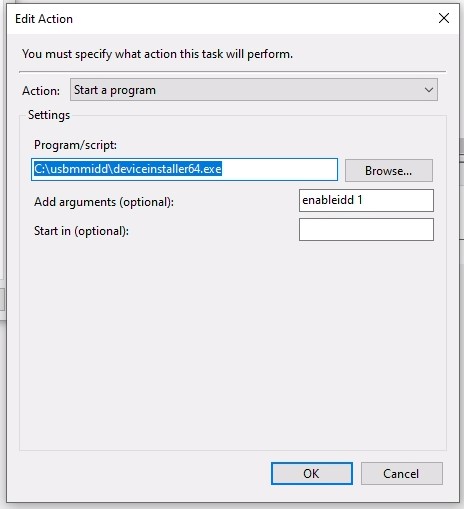
You’re very likely right, I’ve tried to partition my main GPU that is an NVIDIA I initially didn’t follow all the instructions, didn’t copy the nv* files in the system32 folder (just the hostdriver) and got exactly the same problem. I think searching for and copying some enc file would do the trick.
Unfortunately I’ve now re-istalled hyper-v core on the machine where I have the IGPU and have a much bigger issue since AMD drivers do not install, I’ve tried installing them manually with pnputil but no luck so far. Without the drivers get-vmpartitionablegpu does not return anything…
Hello there another topic, has anyone managed to install nvidia geforce experience? In theory moonlight has (much?) better streaming performances than parsec but it requires nvidia streaming services that come with geforce experience. Clearly nvidia installer refuses to run as it does not recognize the virtual GPU… any way to force installing just to give it a try? I was thinking to clone the host PC windows where I have it installed, could that work (in case anyone tried I won’t waste time on that).
Meh replying to myself, at the end I managed to install AMD drivers on hyper v 2019 core (with pnputil) but something key must be missing. I am able to get an output from get-vmpartitionablegpu but then the VM fails to start complaining that the partition have insufficient resources. I think this is pretty much a dead end… I will try again installing windows 10 client and see if with the proper adrenalin drivers and copying everything that starts with AMD in the system32 folder I can get parsec to work. Bummer.
Correct, “instancePath” isn’t available on windows 10, however there is a hack workaround.
On the host, go to the device manager and disable the GPUs you don’t want Hyper-v to “see”.
Leave only the GPU that you want “Hyper-v” to see, watch out though …
make sure your monitor is also connected to the GPU you want to keep enabled, otherwise you will lock yourself out.
This is happening because Hyper-v looks only at the first GPU available to it. you can see that when you run Get-VMPartitionableGpu
In a nutshell, disable GPUs until you get the GPU you want to be at the top when you run Get-VMPartitionableGpu
Warnning: keep in mind which GPU is your monitor is linked to… also in your host display settings choose “duplicate” display, so when you disable the wrong GPU you can still hook your monitor to another one.
Having error with Parsec [error-14003], I have installed usb monitor but it just can seems to capture the screen. Any fixes or anystep did i miss out? Having the same problem on 2 laptops. Able to run Haeven smoothly, but i just cant get Parsec to work.
Same problem here, were you able to find a fix for this?
I did this as well but for some reason, it would randomly just select a different card when i restarted the host OS.
Probably just Windows 10 limitations
U can check out this comment that was posted here within the void of comments.
hope this gets you started 2 Gamers 1 GPU with Hyper V GPU-P (GPU Partitioning finally made possible with HyperV) - #106 by funk192
GeForce Experience is sorta a hit and miss even through it can get installed in a hacky way.
Hi, new inquiry, and I have kind of a crazy application here, but here goes.
I am attempting to run two iterations of a game that supports desktop and VR crossplay on the same machine (Phasmophobia, me and the wife). My thought has been to run Phasmo in VR natively on the physical machine, and another copy on desktop-play using the virtual machine. I have a background in IT but am playing a lot of catchup as I am a younger guy who never had to touch powershell for my jobs. I did follow along and get the VM running my GTX 1080 however and benching well at this point, but the issue is with the native machine being unrestricted on GPU usage, it immediately prioritizes resources over the VM as soon as I run anything 3D on the local machine, killing the VM’s performance until I close said 3D application. I am unsure about running 2 VM’s as I’m not sure I can run steamVR to my HTC Vive through a VM in this way. Is there any setting of allocation on the VM gpu partionining or restricting of gpu resource allocation I can do to make this setup want to split my 1080’s resources more evenly? Or is this even possible? I also am not using any streaming software as I wanted to do this all locally, unless I’m misunderstanding the necessity of doing so.
This is a wild one boys, but thank you for any and all input.
For anyone interested I got the IGPU on my rizen 5600G partitioned and parsec is working on it. I had to use windows 10 pro as host and I’ve followed the procedure as described but I had to copy the entire system32 folder files (just files) into the guest system32 folder. I couldn’t figure out what is the encoder driver that is missing. It is not something named AMD*.
It would be great if anyone can post the right files for AMD video cards… Unfortunately I couldn’t get the partition to work on hyper-v 2019 core, driver package does not install and installing the drivers with pnputil only partially works. I was able to partition but the VM didn’t start. I wonder if driver installs under windows server 2019.
But is your server headless or? I was having the problem with the usb virtual display installed, removing it made it work just fine. My server is headless, I have the HDMI output connected to a pikvm tough… that probably count as a monitor.
Does riva tuner works in limiting VR framerate?
I think you should try multiseat software such as ibik Aster instead, they have a free trial that you can mess around with. You’ll need 2 monitors and 2 pairs of keyboards and mice though, and you can do things such as allocate CPU cores to each user account. I never had much issues running 2 games or 1 game + 1 VR app that way but I do have a GTX 1080Ti. It was working that way using my Oculus CV1 while my gf could play other games on the secondary screen.
It’s a bit trickier if you want to use Nvidia Gamestreaming though(that requires the streaming monitor to be the primary. I’m not sure how SteamVR handles that using a HTV Vive. For me if I wanted the secondary screen to run alongside VR I had to manually run the oculus service under the second screen. I might not be able to help but P.M. me if you run into any issues should you try that option.