2 Gamers 1 GPU with Hyper V GPU-P (GPU Partitioning finally made possible with HyperV)

I know it’s not meant to be a competitor to parsec and it’s not what I’m looking for. Nvidia graced upon us the gift of gpu partioning in hyper-v but for now the only way to get an output out (high performance output, not counting remote desktop) seems to be streaming with the likes of parsec

Copying the frame buffer like looking glass does would be imo a better option but as it seems it’s not currently possible

I might have to finally jump ship to linux but getting the gpu unlock, “license server” and my board to work in a proper kvm presents another can of worms (and is limited to equal partitions while hyper-v does schedulling)

I also did a same test on AMD 6700XT, Unigine Heaven runs ok, win10 3D viewer also work, task manager at host has GPU utilization graph.

But it’s very strange that some applications cannot be launched, like furmark / gpu caps viewer, no window appears. After Remove-VMGpuPartitionAdapter and restart VM or disable GPU using device manager in vm, only hyper-v video adapter left, furmark and gpucapsviewer has a windows !

There are no errors in the windows event viewer and applications, just no response. I suspected that some dll files in the system32 directory were missing. Windows Sandbox maps host drive, system32 is fully mapped, when Enable configuration is assigned to windows sandbox, it should be ok, but actually furmark still cannot be opened.

Nvidia RTX 3060 does not have this problem, I don’t have a clue and don’t know what’s wrong with AMD driver.

I saw the problem you’re describing while running Heaven, only had a black screen. I closed the remote session and opened it again and there it was heaven running (real performance was fine, my viewer naturally capped at ~30fps with a lot of stutter)

Uh cool, so displaylink works, that’s a cool solution. I don’t know why raytracing wouldn’t work thought, did you try a different benchmark for example?

I dwelved intro trying to get Geforce Experience working inside of Hyper-V. Initially I would get and error code when trying to load geforce experience. Then I tried installing drivers via spoofing the hardware and compatible IDs of the GPU into the VM through regedit (Computer\HKEY_LOCAL_MACHINE\SYSTEM\ControlSet001\Enum\PCI). Also having copied over the drivers into the HostDriverStore folder into the VM.

Sometimes it would load Geforce Experience on first driver installation but without Nvidia shield option showing.

After reboot definitely error code when trying to launch geforce experience.

Tried copying registry setting “Computer\HKEY_LOCAL_MACHINE\SOFTWARE\NVIDIA Corporation\NvStream” into the VM

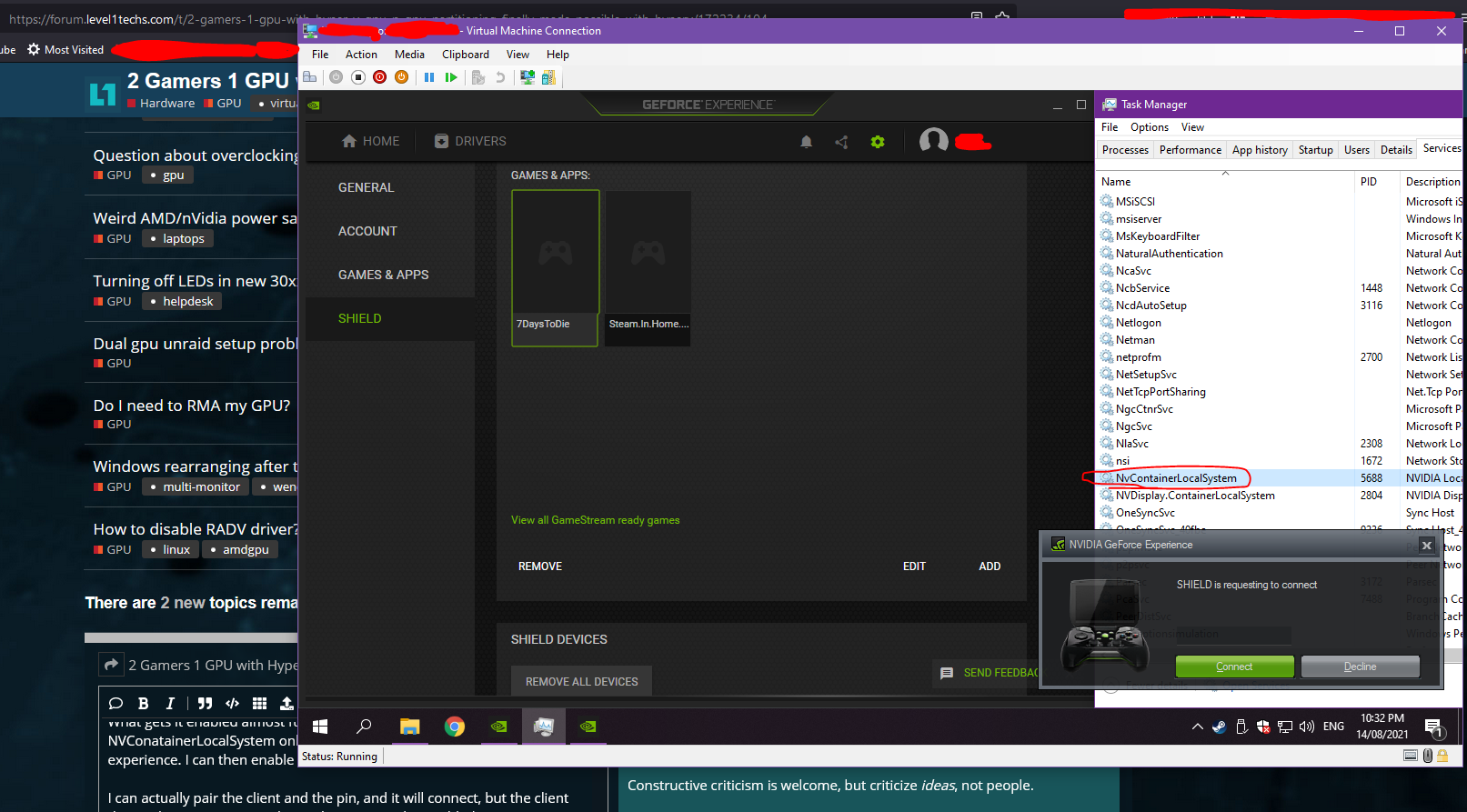
What seems to get Geforce experience opening up is to disable your GPU in the device manager inside of the VM first, then restart both NVContainerLocalSystem and NVDisplay.ContainerLocalSystem services while the GPU is disabled.

From there Geforce Experience loads and states that Drivers have to be downloaded.

Then after enabling the GPU inside the VM’s device manager, and then restarting geforce experience it shows as detecting the driver installed and the settings and general section shows as all detected and supporting all features except VR but no SHIELD option showing. I think after re-enabling the GPU though it removes the spoofed hardware ID, It also gets removed on driver installation.

For whatever reson going into Enhanced session shows the Shield option but inside that menu it shows “information not available” and no option to enable gamestream.

Going back to basic session shield option dissapears.

What gets it enabled almost fully is to then restart NVConatainerLocalSystem only, don’t need to close and re-open geforce experience. I can then enable NVidia Gamestream.

I can actually pair the client and the pin, and it will connect, but the client doesn’t list any games, or the Desktop option that I added as a game.

It shows nothing inside the client for me to connect and start a game streaming session.

Other things to add, I tried using the USB monitor thing, but that doesn’t seem to help.

Perhaps Geforce experience needs an actual monitor connected to the VM GPU.

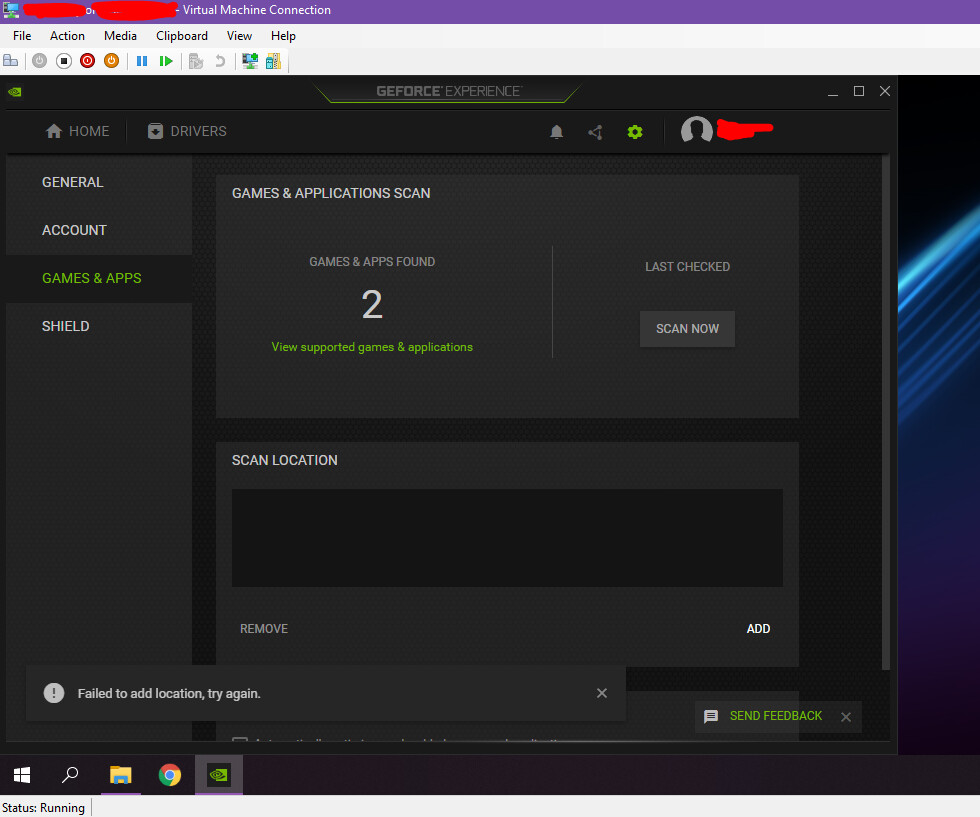
Forgot to write, that Geforce Experience errors and doesn’t seem to list any folders for games after I do the thing to get Shield option showing, it was showing before during the process, as soon as you do the option to get shield showing it loses the folder listings. Trying to add folders gives an error.

I also messed around with trying Win_1337_Apply_Patch_v1.9_By_DFoX on the host and VM but have no idea what that would do lol, or even affect the result.

I made a .cmd file batch script to get Geforce experience loading without Shield enabled:

pnputil /disable-device "PCI\VEN_XXXX&DEV_XXXX&SUBSYS_XXXXXXXXX&REV_XX\X&XXXXXXX&X&X"
net stop NvContainerLocalSystem
net stop NVDisplay.ContainerLocalSystem
net start NvContainerLocalSystem
net start NVDisplay.ContainerLocalSystem
pnputil /enable-device "PCI\VEN_XXXX&DEV_XXXX&SUBSYS_XXXXXXXXX&REV_XX\X&XXXXXXX&X&X"

…and one that has the extra steps to get Shield kind of half working:

pnputil /disable-device "PCI\VEN_XXXX&DEV_XXXX&SUBSYS_XXXXXXXXX&REV_XX\X&XXXXXXX&X&X"
net stop NvContainerLocalSystem
net stop NVDisplay.ContainerLocalSystem
net start NvContainerLocalSystem
net start NVDisplay.ContainerLocalSystem
pnputil /enable-device "PCI\VEN_XXXX&DEV_XXXX&SUBSYS_XXXXXXXXX&REV_XX\X&XXXXXXX&X&X"
start "" /D "%PROGRAMFILES%\NVIDIA Corporation\NVIDIA GeForce Experience" "NVIDIA GeForce Experience.exe"
timeout /t 6
net stop NvContainerLocalSystem
net start NvContainerLocalSystem

You will have to change the Device instance path hat the PNPUTIL app uses as it would be different for each GPU type, you get the path from device manager property details. Hopefully someone else can mess around and actually get Shield streaming working.
1 Like

Long time lurker but always love this community but that’s besides the point just wanted to post my config. Its great the we have “license free version not really :grin:”. Now if we can get something like hyper-v on linux that is this easy it would be great.
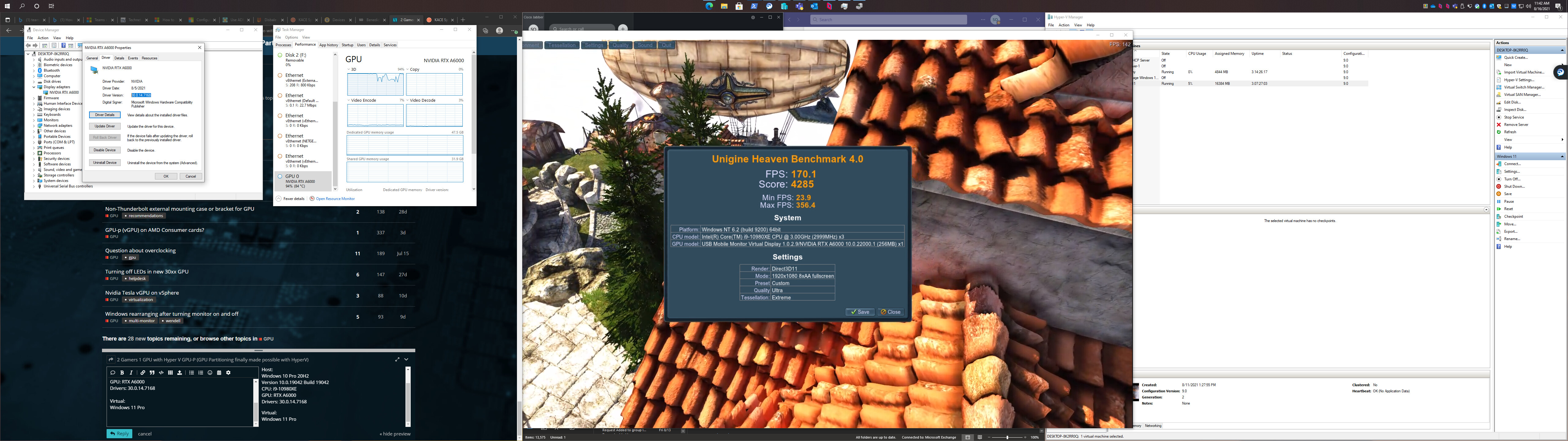
Host:
Windows 10 Pro 20H2
Version 10.0.19042 Build 19042
CPU: i9-10980XE
GPU: RTX A6000
Drivers: 30.0.14.7168

Virtual:
Windows 11 Pro

2 Likes

GPU-p not works on Windows Server 2022.
All scripts success. But GPU device not found on Guest Windows

Nice work on this! Way further along than I ever got.

Have to give this a shot sometime myself.

Thanks for this update!

1 Like

Have you tried sunshine which is an open-source moonlight server?

Yeah, tried most streaming options before. The one that streams the best when it works is the one that comes with Geforce Experience. It’s less laggy and less jittery and much smoother fps. If you set up your host PC’s refresh rate to the same as the client and select the correct FPS Shield streaming is the best. You can test the smoothness of this aspect for example if you search and open up “UFO test” in Chrome Browser and then compare all the streaming options.

Sunshine, Openstream are the same, and give a jittery stream. Steam in home streaming, Rainway is also jittery. The only one that comes close is Parsec while testing using that UFO Test for jitter, but I found that its performance was bad while playing a game.

That’s why I really put alot of effort trying to get Geforce EXperience working lol, oh well.

You can passtrough a whole GPU with Discrete Device Assignment, DDA.

The Last Time i checked you need Windows Server 2012 and above to use it. It is possible to passtrough nearly any PCie device to an guest OS.

Hey guys, new member here. Been trying to mess with this but with a twist, and maybe I just haven’t seen the answer or it hasn’t come up to anyone yet. But I’m wondering if there is any way to set the host to use a dedicated gpu, and to gpup a secondary gpu to the VMs? I currently have a Tesla m40 24gb and a 1070, and would love to partition the Tesla only if possible. I’ve don’t everything on this thread and can only get the 1070 to show up. On the host machine, I’ve gotten both cards to show up correctly in device manager with no errors with the Quadro driver’s for the p4000. I’m just not sure what to try next. Win 10 pro 21h1.

Thanks mate. This fixed a bunch of problems for me. After though i had to delete nvapi in the VM though or a few games tried to use it and i didn’t work.

Thanks again.

Afaik put the 1070 in the first PCie Slot and Connect your Monitor to it. It will be your primary GPU and the Tesla should just be there, rdy to be partitioned.

@Domrockt This is how I currently have it set up.

I go into power shell and check partitionable gpus, and what I get is the ID of the 1070 and nothing else. I just checked nvidia smi, and tesla was set to tcc mode, not wddm. just set to wddm and reboot. now my tesla card has errors in device manager. code 31. (Driver)

Do I need the m40 in the first slot and the 1070 in slot 2 maybe?

I’m running into some weird hiccups and would like to get this working without building a dedicated server for this if possible as this is a setup for a couple of friends of mine who can’t afford a gaming rig. (Especially now)

Allright try this, Install all gpus so that no driver Errors accur, what you already achieved.

Then disable the Tesla in your device Manager, you should still be able to GPU-P that GPU.

Or you can try to set the 1070 in your Nvidia settings as your Main Driver.

Third Option should be under your “right click Desktop —> Display settings” and you should be able to choose there to.

My bad, Quadro driver’s weren’t what worked. I had to install Tesla driver, and then let windows install the 1070 driver. When this happens, the Nvidia control panel won’t open to allow me to change the Tesla from compute to graphics (Tcc to wddm). No matter what I do, I can’t seem to get the Tesla to be partitionable between any VMs.

Has anyone had any luck with Nvidia drivers in the VM. I’ve got a lot of things to work, most games are working. But i can’t get cuda machine learning to work or plex hardware encoding to work. plex hardware decode works though. Thanks heaps for everyone helping on this thread.

If using a Tesla and another GPU in the system. HyperV will just randomly assign a card. recommend using a server board or something that can provide a minimal integrated graphics solution to not be partionable by hyperv to make the tesla a first choice dedicated card.

Also Jeff from craft computing mentioned the tesla cards were causing some issues with GPU-P. Recommend you watch his starting at 8:30 on the timeline https://youtu.be/Z5Isf6Airo0?t=509

Some point I hope that this card series will work but I haven’t got one to use and troubleshoot.

For my setup, if I had another system, that wouldn’t be an issue. I’m trying to get mine all set up through 1 system if possible with a usable host is running on bare metal. Otherwise, I would just run a hypervisor that allows dedication of different parts like proxmox or something. I do see he had issues with gpu-p on his k80, although, being a card that doesn’t share a chip with a workstation or consumer card, I feel like that card wouldn’t have as much of a workaround that others may have on the table like modding a card to show up as another.