Zen 4 workstation Workstation

What do you think about the following Workstation:

Komponente Bezeichnung Stück Referenz
CPU AMD Ryzen Threadripper Pro 7975WX 1​ AMD Ryzen Threadripper PRO 7975WX, 32C/64T, 4.00-5.30GHz, boxed ohne Kühler ab € 4023,83 (2024) | Preisvergleich Geizhals Österreich
RAM Kingston Server Premier RDIMM 64GB, DDR5-4800, reg ECC 8​ Kingston Server Premier RDIMM 64GB, DDR5-4800 ab € 263,00 (2024) | Preisvergleich Geizhals Österreich
MoBo ASUS Pro WS WRX90E-SAGE SE 1​ https://geizhals.eu/asus-pro-ws-wrx…html?hloc=at&hloc=de&hloc=eu&hloc=pl&hloc=uk
GraKa MSI GeForce RTX 4060 Ti Gaming X 16G, 16GB GDDR6, HDMI, 3x DP 1​ https://geizhals.at/msi-geforce-rtx…html?hloc=at&hloc=de&hloc=eu&hloc=pl&hloc=uk
SSD Western Digital WD_BLACK SN770 NVMe SSD 2TB, M.21 1​ https://geizhals.at/western-digital…html?hloc=at&hloc=de&hloc=eu&hloc=pl&hloc=uk
NT Seasonic Prime PX-1300 1300W ATX 2.4 1​ https://geizhals.at/seasonic-prime-…html?hloc=at&hloc=de&hloc=eu&hloc=pl&hloc=uk
Case Fractal Design Define 7 XL Black, schallgedämmt 1​ Fractal Design Define 7 XL Black Solid ab € 189,90 (2024) | Preisvergleich Geizhals Österreich

Since CPU and RAM sizes are fixed and there is only one motherboard that can do this, it leaves the GPU, choice of case, etc.
Storage is not much, but I have a SAN 10Gbit network with an SSD NAS and a few HDD NAS, so the storage is external.

RAM, yes, 512 GB is a lot, but I currently have 256 and they are mostly over 75% full, and the workstation should have reserves. CPU, yes, 32 cores is not that much, but the more core CPUs are not significantly faster: AMD Ryzen Threadripper PRO 7975WX vs AMD Ryzen Threadripper PRO 7985WX vs AMD Ryzen Threadripper PRO 7995WX [cpubenchmark.net] by PassMark Software
There, the 350W is the limiting factor, and overclocking an 8k€ CPU seems a bit irresponsible, I believe.

I have considered an AIO water cooling system, but that’s more because of the noise level; otherwise, I would almost prefer air because it never fails except for fans that can be quickly replaced, whereas with water cooling, the pump can fail, etc.

The intended use for the workstation is development in C/C++, many VMs, and some CAD (not enough to buy a Quadro card).

The GPU should be rather affordable; I do play games occasionally but not that much.
Or maybe an RTX 4070, what I mainly want is a lot of VRAM to make the GPU more future-proof. Or a 4080, given the price of the other components, it doesn’t matter much…
Games I like include DeusEx MD, Witcher 3, CP 2077, Horizon Zero Dawn, just as a reference for what will run on it.
I would then install the GPU in the case with a riser to keep as many of the other slots free for future expansions.

The power supply is only platinum; is it worth paying the extra for the Titanium variant?

So, what do you guys think?

1 Like

First off, that is a DRAM less drive, so performance will suffer. Second, 2TB is allright but 4TB means a lot more capacity for VMs. I strongly recommend a 4TB drive for €300:

But if you insist on 2TB, atleast get this:

Compiling and VMs are both a use case that loves cores - the more you have the faster you can build most stuff, and similarly, you can have more and/or bigger VMs with more cores. 32 cores are quite a lot, but you could definitely benefit from more, especially if you have a few tied up in VMs. That said, 32 cores is already pretty good.

You have Threadripper money but not 4090 money? Just get the 4090 or Quadro already, I mean come on :stuck_out_tongue: Only reason not to go for a 4090 is because they are sold out at the moment, AMD cards are pretty much 10% performance loss for 20% less cost so a 7900 XTX could be argued to be worth it and especially over a 4080 Super. Not going for the 4090 means you need to replace the card that much sooner though.

I am arguing from the point of the 4090 at $1600 though, if it’s $1800-$1900 then yeah, not worth it, just get a 7900 XTX or 4080 Super. Or bite the bullet for an A4000:

Platinum is good enough. Hope that help you a bit! :slight_smile:

1 Like

Very similar to what I’m planning to build. I have the F.D. Meshify 2 XL for better airflow and can recommend it, however I have problems with dust accumulating quickly and noise, the Meshify version is slightly louder. I doubt you should buy a Titanium PSU, it is 2% more efficient, but costs much more.
About this PassMark scores - you should take into account 4 factors: Amdahl’s law, Memory wall, core to core latencies and “less cores more frequency”. Depending on your workloads, the 7985wx could actually benefit much more than these meaningless numbers.
4060Ti doesn’t shine in system of such level (i have 4090FE) but i understand your budget is not infinite.
And last - don’t rush! The WRX90 boards are very raw, just wait a month for beta testers who bought it for 1300$ find all bugs, and purchase rev 2 :smile:. (Gigabyte TRX50 had THREE revisions in only a month…)
2 Likes

Don’t get a A4000, it’s very old and the new version is really expensive.
I’m not sure what cad you want to run, but anyting autodesk does not need quadro and The price differential is so large that for example Creo runs better on a RTX4080.

(The A4000 is based on a 3070. The replacement is the A4500 that runs for 2000 euro.)

4 Likes

You may receive a lot of differing opinions, largely because it is in many respects unclear what drives the decisions for these components or to purchase a new workstation at all (there is a reference to an existing system).

You explain the desire for 512GB Ram. That justifies the investment into a workstation level platform. But there is a selection of platforms to choose from, it’s not immediately clear why the WRX90 platform is the best choice (not saying it isn’t).

Similarly, there is no documented expectation for performance. Why wouldn’t a CPU with a lower core count (at much improved price/performance ratio) support your needs?

A premium CPU/workstation can only achieve its top performance when fed quickly enough with data. That is certainly true when compiling C/C++ code. @wertigon comment in this regards is important and spot-on. I would try to run as much workload as possible from fastest affordable local storage. A 10gb attached NAS does not even start to suffice here for anything other than backup storage.

Another conundrum is the question about the choice in power supply. The potential desire to use a titanium variant indicates concern about power consumption. The links to “Preisvergleich Geizhals Österreich” suggest high middle-European power costs.
We should be mindful that the current-gen workstation platforms are among the highest power guzzling computer platforms ever released. Certainly at load. Also, the additional costs for a better certified power supply (titanium) typically is not recuperated over lifetime use.
Depending on the priority of saving power, a prolonged use of the existing system could be the preferred option.

In retrospect, it reads like a workstation designed based on wants rather than needs. There is nothing wrong with this other than being potentially wasteful.

1 Like

So the current workstation is an old Dual Xeon System which reaches 2000 points in single thread and 24500 in multi thread PassMark benchmark and has 256 GB of RAM.
So a new 7975WX would be quite exactly 2x as fast in single thread and 4x as fast in multi thread workloads.
This is IMHO a decent bump in performance, after 10 years what one would expect 15 years ago after only 2 LOL, mores law is dead!!!

My workflow is to have variously configured IDE’s confined in individual VM’s with currently 32 GB RAM which is often borderline for a couple Visual Studio instances per VM, 64 GB/VM would be better.

I have in my current workstation a 8x4TB SATA SSD RAID, was thinking of reusing it as one more NAS but if you think over the network it will be to slow, that I’ll move it to the new workstation.

I did not notice the WD_BLACK SN770 had no dram cache, then I’ll pick something else.

About the GPU I have reviewed the options and think I’ll go with a RTX 4070 Ti SUPER 16G not much more expensive but much more performance.
A 4090 has twice the performance but for more then twice the price, I don’t think it is worth it.

If I would want to spent excess money I would buy a 4x8TB M.2 SSD’s to replace the old 8x4TB SATA SSD RAID, however I have recently tested a 2x8TB M.2 SSD’s (using the SSD’s from my laptop) and while the synthetic values are more impressive, when comparing resuming/suspending VM’s and compiling large projects at least on my current system the differences were < 10% in time saving so I don’t think its worth it. I guess I should re test it once I have the new workstation though.

I’m not that much worried about the energy costs, my line of thought was the less waste energy the less heat in the PSU and the more reliable/long lived it should be, especially in summer, I like it warm and run AC only if temps are >35°C LOL, like 10 years ago I had a sea sonic (probably gold) fail on me during summer, all good I got a new one for free after 3 months of waiting or so it felt at least, but I would rather that does not repeat.

PS: Also I like the IPMI on my current board, so would like a new workstation which I can remotely manage also this time, so one more reason for a PRO option.

PPS: after reading the ASUS WRX90 motherboard came in… and is DOA thread i wonder if I should wait for a asrock board, is ASUS really know for being so unreliable?

1 Like

Depending on the price difference, get the biggest card you can reasonably see yourself fully utilizing this year.

Seasonic PX-1300 to TX-1300, you spend 170€ more. With the 2-ish % that is going to save you, you will have to put A LOT OF HOURS into that system for the difference to matter.

If you just want speed, Crucial T700. More reasonably priced yet still darn quick, Kingston KC3000.

1 Like

Ever worked with a Pro card on a CAD machine, vs a non-pro card?

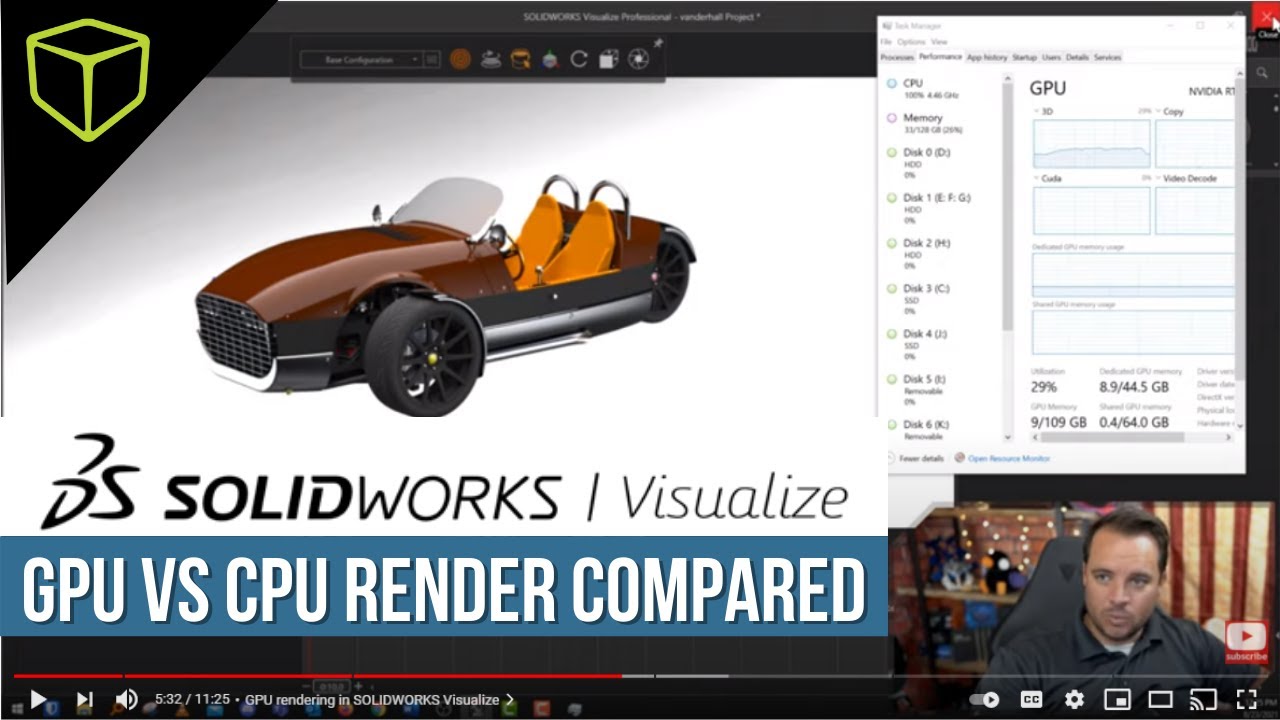
Things may have changed recently but 5 years ago there was a BIG difference between a Pro Nvidia card and a consumer card. The reason is because companies behind products like SolidWorks only support Pro cards for GPU rendering - otherwise it is CPU rendered. Or atleast it was this way. I have not touched SolidWorks CAD since 2018.

And yes, this sucks giant donkey balls and yes, you shouldn’t have to use Pro cards because it is literally the same hardware. But it is the unfortunate reality we live in today. This is why I, for this use case, can recommend the A4000.

Here is a video showing the difference:

Please tell me I am wrong about this, because I would love to be. :slight_smile:

1 Like

Yes, the artificial FP64 gimping is really bad now.

You are not missing out.
This here works: https://www.reddit.com/r/SolidWorks/comments/ootiqw/has_anyone_managed_to_get_realview_graphics/

put into .reg, change the year to taste and off you go!

You may also have to Process Lasso SolidWorks in particular away from Intel E-cores.

Get a cheap AMD Pro W6600 or do the above registry-tweak, save 600€

2 Likes

Did not know about the registry tweak!

@wertigon I agree with a workstation GPU on a basic recommendation.

As i said it depends on the software, solidworks is kind of notorious for needing it. But other programs are different. Autodesk stuff it really doesn’t matter.
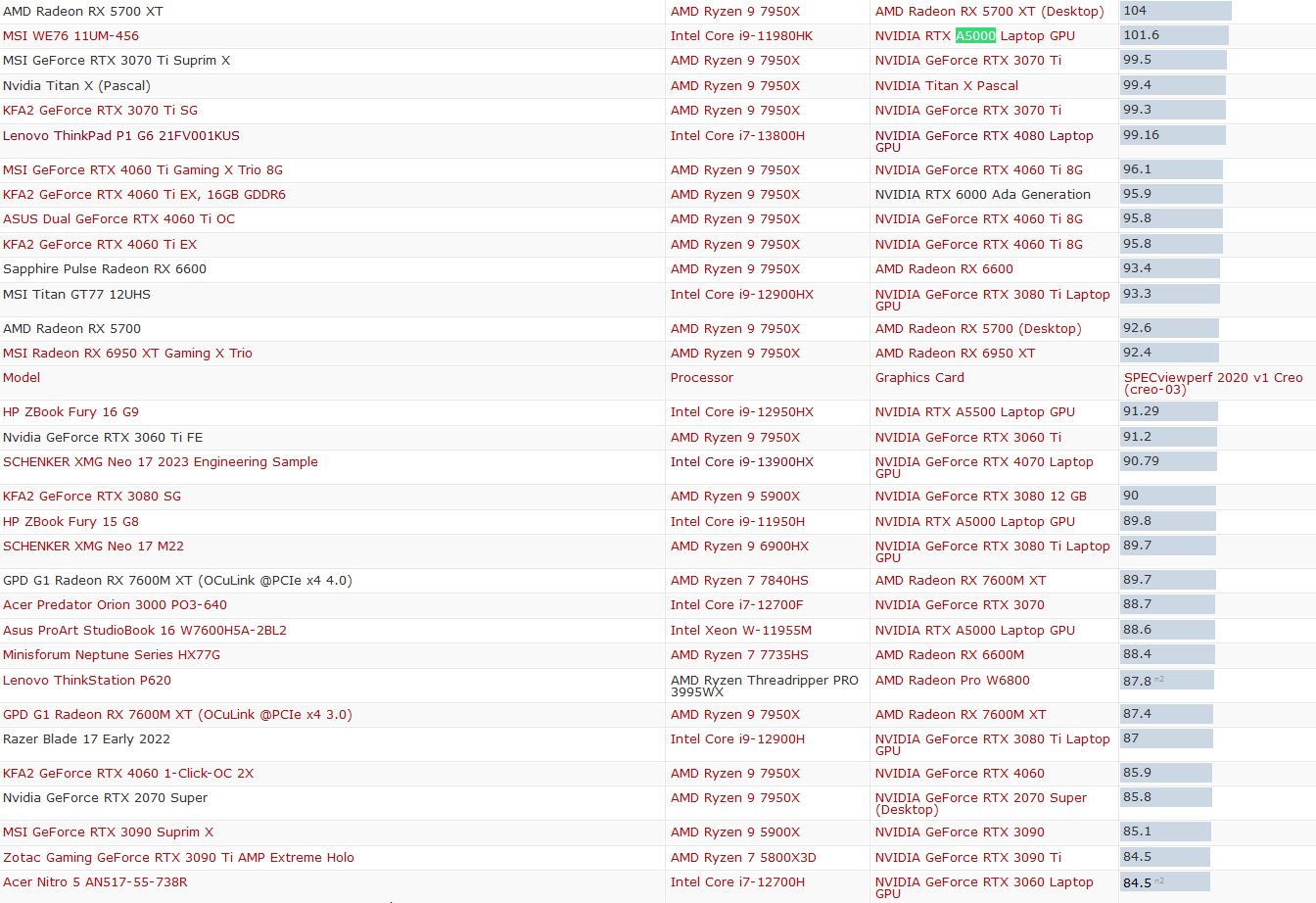
Even if you look at specviewperf results on different gpu’s. The ones that give an advantage for workstationg GPU’s like Creo, Catia and NX, they also give better results on a better consumer card. If you look at this list, The RTX A5000 laptop GPU performs simiarly to a 4080 Laptop. The variance is also quite high because the cpu dependancy. It performs well for what is a 3080 laptop gpu on the inside. But throwing in a faster geforce gpu will yield faster results.

This is really dependant on the cad application you run, But if this is a workstation for rare cad use (which means you are not dependant on cad supplier support). For most software there is no need for a workstation gpu.
Because the performance is mostly how smooth your viewport is, If you don’t use cad much then you probably don’t have these insane automotive assemblies that need big gpu’s just to show a lot of stuff on the screen.

1 Like

We are in agreement here, no real reason to splurge on a workstation card if all you do is cad the occasional flower pot for your SO :slightly_smiling_face:

At the same time I have created 300 piece assemblies (including a 150 piece chain) and those can really bog down CPU rendering. Though this was back when 4 core was still in high end rigs (atleast older ones) so the situation might have changed.

If you include screws, bolts, nuts etc CAD assemblies get really big really fast :pensive:

3 Likes

So what do you think is a https://www.asrock.com/mb/AMD/WRX90%20WS%20EVO/index.asp#Specification a better choice as mainboard?

2 Likes

Dat five probably noisy little fans… Looks like marketing BS for me, Asus has only 2 with more power phases. However it has 2 MCIO connectors. If u plan to use PCIe-5 server grade ultra expensive SSDs this board should be considered.
Also it has only 1 gen5 M.2 slot and one additional gen4!!! I didn’t pay attention before.

1 Like

2 MCIO connectors… are these needed cant i get a PCIe x16 to many 2 MCIO connectors adapter?

2 Likes

You could ask the same question about almost any other PCIe appliance:

  • 10GbE NIC… can’t I get a PCIe xyz GbE card?
  • SAS HBA… can’t I get a PCIe SAS HBA?
  • M.2 ports… can’t I get a PCIe x16 bifurcation card?

So my 2 cents:

  • Signal integrity will be better at native MCIO, otherwise you may need redrivers that add some latency.
  • With all these motherboards you are limited to 7 add-in cards. If you use a dedicated GPU (always?), likely 6 or even 5 cards, unless you use a riser (or have a case that can accommodate 2+ slot GPU in 7th slot). Those slots quickly dry up as you sart adding cards :slight_smile:

Well yea fair point, though as i wrote earlier a riser is planned also the case has 9 slots so putting a 3 slot card in the lowest 7th slot of the main board would work as well.
The 10GbE nic is a price poitn a use nic is what 60€ new probably 120 getting it included is preferable.
But more important 2 MCIO connectors is not much so if i want to go all in on expensive server SSD’s I would need probably 4 or 8 and then I need a adapter card anyways.

In any case booth boards have their pros and cons, the ASUS can pass in Displayport into the USB 4.0 it has the Asrock can not, then for example I don’t need that.
On the other side the Asroc’s IPMI as a HDMI port while the ASUS is still using analog VGA and I would definitely prefer HDMI.

For more then one m.2 SSD I would go for a adapter in any case just to have fast and easy access if I would need to for whatever reason.

I think the only really relevant question here is about the reliability of these boards how good is it?

1 Like

Then the question is, do you want to have 6 or 10 instead :wink:

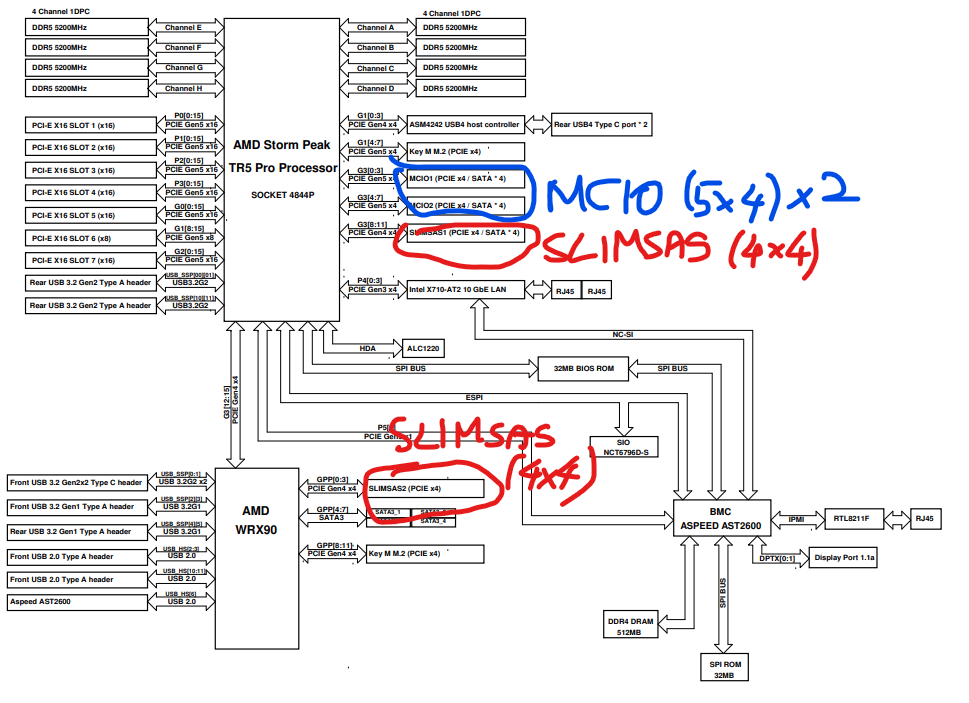
A quick look at the board diagram shows that the 2 MCIO are connected to the chipset, which only connects to the CPU at 4xGen4 lanes.
I think he wants 4 or 8, maybe 5 or 9 :slight_smile:

1 Like

Ah, forgot its a TR, not an EPYC :rofl:

Are you sure about that?

CPU:

  • 1 x Blazing M.2 Socket (M2_1, Key M), supports type 2260/2280/22110 PCIe Gen5x4 (128 Gb/s) mode*
  • 2 x MCIO Connectors (PCIe Gen5x4 or 4 x SATA3 6.0 Gb/s)

Chipset:

  • 1 x Hyper M.2 Socket (M2_2, Key M), supports type 2260/2280 PCIe Gen4x4 (64 Gb/s) mode*
  • 1 x SlimSAS SFF-8654 Connector (SLIM2) (PCIe Gen4x4)
  • 4 x SATA3 6.0 Gb/s Connectors
1 Like


Are we looking at the same block diagram? :smiley:

That’s 4 ports from motherboard only.

2 Likes