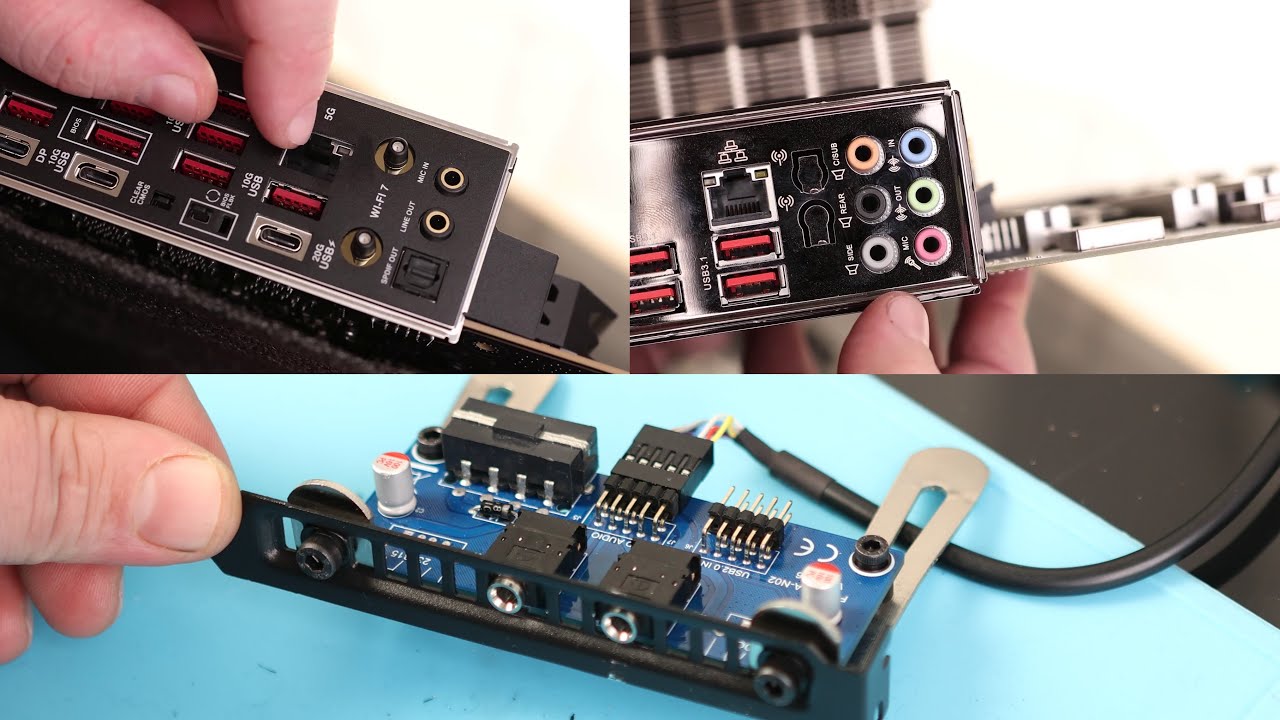
I’m noticing a lot of the Z890 boards don’t have 6, or even 3 audio ports in the back.
That means if you’re running a 5.1 system like a Z906, you now have a 2.1 system.
According to ASUS
A chassis with an HD audio module in the front panel is required to support 7.1 Surround Sound audio output.
** The LINE OUT port on the rear panel does not support spatial audio. If you wish to use spatial audio, make sure to connect your audio output device to the audio jack on the front panel of your chassis or use a USB interface audio device.
It seems very odd to me that a flagship motherboard would cheap out on audio ports. I was initially looking at this one because it came with Thunderbolt 5, but I’m having a hard time justifying a motherboard that I have to downgrade my audio on, or wrap a cable around the front of my computer.
Is that RCA? I use adapters to RCA anyway.
Fuck spacial audio.
We have spacial audio at home, it’s called stereo.
2 channels, 2 ear holes.
I use more channels, but not for surround. EQ crossover between subs and other speakers.
EDIT: Software controlled crossover. Basically a 2.2 setup.
That’s true, though I got sick of my AVR making new problems like breaking VRR on the display and went with a USB DAC.
If you have the means, I highly recommend picking one up.
I wasn’t talking about using it as a DAC, just an amp.
Many of them run the speakers at 60 volts; one I measured closer to 90.
I have theories about that being why soundbars are a thing, safety regulations around voltages; convenience of setup being secondary.
300 ohm headphones don’t need the current, but do need the voltage to not be quiet.
And receivers (AVRs) run the main speaker outputs through a relay (to switch between headphones and speakers), then a 300Ohm resistor (I think I’ve seen 330 and 470Ohm too) per channel, then right to the headphone jack. That’s how that works in every single one I’ve ripped open; that’s at least dozens of them.
I’m surprised they kept them for this long… the number of people who have 5.1 audio connected to their computer is small and even those who do tend to use HDMI not analog.
That’s just marketing… motherboard audio is workable at best but you’ll always want something external for actual hi-fi.
If you have a digital receiver you can probably connect to it using a free HDMI port and get better audio quality; if not just pick up a USB DAC.