Ensure you’re running the latest stable (no beta) UEFI update available for your motherboard, those updates ship with AGESA updates for better memory compatibility.
And enable Memory Context Restore in the UEFI for faster boot times, so it does not retrain on every boot (should be enabled by default).
Given your processor is a X3D, there’s little perceivable gain between 5600 MT/s and 6000 MT/s.
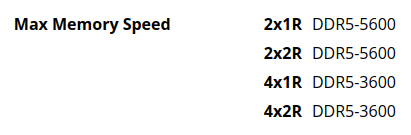
I’d recommend setting it to 5600 MT/s with a CL (CAS Latency) of CL 36 and calling it a day, should boot without issue after that. Give it some time for memory training on first boot (takes ~20 minutes max).
If you’re really dead set on sacrificing warranty for a 2%-4% imperceptible gain; then try re-seating the RAM (ensure no single speck of dust is anywhere near the traces), research the specific RAM cell types (“dies”) and the potential it has (Buildzoid/Actually Hardcore Overclocking on YouTube has good info on this) with very specific DDR5 parameters. If it’s a cheap Corsair DRAM kit, yeah, that’s not gonna be stable in the optimal scenarios. Samsung/Hynix dies, maybe.
Little compatibility matrix (assuming “cheap” Corsair DRAM kit with
“bad” memory cells/dies):
Yeah don’t do that, unless you like burning/exploding X3D CPUs. Not worth the potential risk and trouble, for imperceptible gain in FPS. Lower CL (CAS Latency) instead. See matrix and explainer above.