I hope I have not made an expensive mistake by overlooking something obvious (please be gentle). I assumed all PCIe slots on this board would behave the same, but POST now hangs when I add a 25 GbE NIC. Is this behavior specific to the X12SAE‑5? Why does this happen?
Questions (TL;DR)
Has anyone successfully run an Intel E810 (or any 25 GbE NIC) in CPU‑attached slot 7 on the X12SAE‑5?
If that slot is hopeless, which dual‑ or quad‑port SFP28 cards have been used reliably with this MOBO?
Would moving to a dual‑port SFP28 card in slot 7, then bonding everything through an external SFP28 switch, avoid the POST issue? (QSW-M7308R-4X)
Background
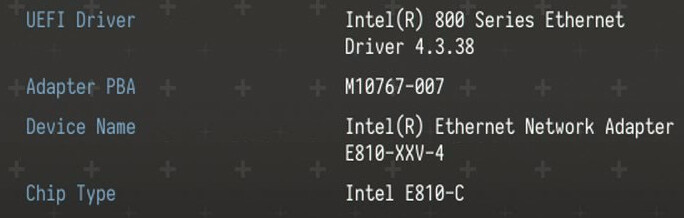
I speced my own SAN that will run TrueNAS to serve storage to two XCP‑ng hosts, but I ran into a problem once everything was assembled and I started configuring each system. The SAN uses a Supermicro X12SAE‑5 W580 board and an Intel Xeon W‑1370 CPU. My plan was to connect each XCP‑ng host to the SAN over dual DAC SFP28 cables and aggregate them into a single LACP bond on a four‑port Intel E810‑XXVDA4 in the TrueNAS box. Unfortunately the motherboard hangs during POST.
The Problem
System is stable until the E810 is plugged into SLOT 7.
First power‑on after install: POST stops at “Entering Setup…”. Keyboard is dead, can’t reach BIOS.
Power‑cycle → same hang.
Pull the NIC → board boots normally, I can get into BIOS once.
Next reboot (still no NIC) hangs again until I clear CMOS.
I bought the NIC used at a good price, first assuming the POST hang was just outdated firmware or BIOS. After updating the card’s firmware and confirming with Supermicro that the board was already on the latest BIOS, their support told me slot 7 is not supported for this NIC, so I stopped further testing. A quick search shows other E810 owners hitting the same POST freeze, so it appears to be a widespread issue.
Supermicro Support ticket:
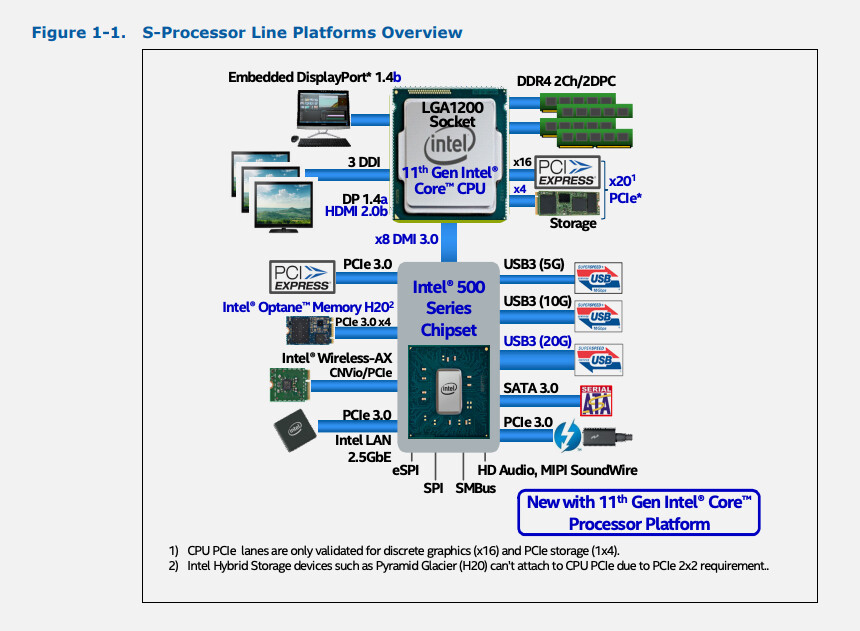
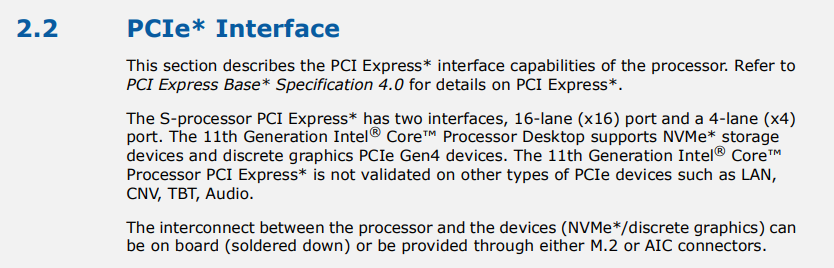
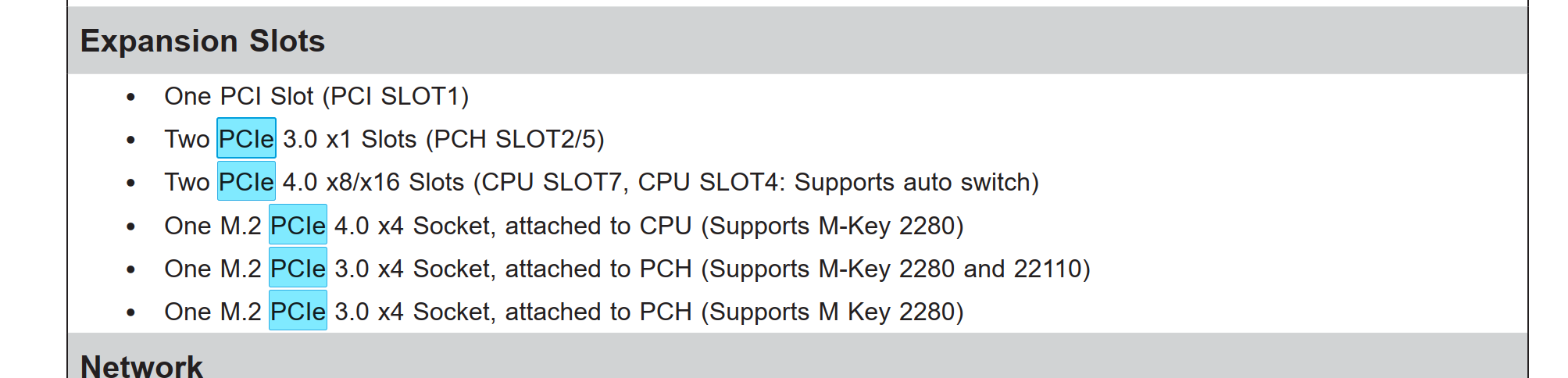
“…According to Intel, the PCIe slot which is controlled by CPU only support GPU and storage device like the PCIe slot #4 and #7 on this model. As a result, the AOC LAN card should be installed on either PCIe slot #2 or #5 which are controlled by PCH on this model…”
“According to Intel” was the only justification Supermicro gave. I asked for the Intel document behind it, but they could not provide one. Slots 2 and 5 are PCIe 3.0 ×1, so they cannot handle a four‑lane 25 GbE card.
Current PCIe
PCIe / PCI Slot on board
Component installed
CPU SLOT 7 (PCIe 4.0 ×16, routed to CPU)
Intel E810‑XXVDA4 – 4‑port 25 GbE SFP28 NIC
CPU SLOT 4 (PCIe 4.0 ×8 in ×16 slot, routed to CPU)
That’s crap. I wouldn’t use anything other than a 4x1Gbit card on those slots.
I don’t think I’ve heard “GPU+storage”-only for some PCIe slot before. My ConnectX cards run fine in all CPU PCIe slots I have across my machines (I do not consider any PCH-backed slots appropriate for my latency). That’s some wierdness indeed.
Really sorry to hear. I upgraded to 25Gbit recently myself and stuff like that would really upset me, so I can relate to your situation.
But if Supermicro support says it…don’t know.
I heard that some AsRock Rack boards have problems with MUX and shared PCIe lanes, depending on whether the lanes run the M.2 slots or are available to the PCIe slots. And cards don’t work if they’re x16 cards and put in a x16 slot with only 8 lanes available.
And with your SAS controller on the other slot, the slot in question is technically just PCIe x8 with the second slot populated (16/0 or 8/8), so this may be an issue related to that.
Pull out the SAS HBA and check BIOS for x16. Easy to check, could work. Or put a different, but x8 NIC in Slot 7 (if you have one)
I’ve reviewed the manual, and it contains no published warnings about PCIe‑slot incompatibilities or restrictions limiting those slots to GPUs or storage devices. I’m not sure what the support tech is mentioning and they wont provide documentation.
Is my understanding of PCIe’s incorrect? I didn’t think that PCIe slots were limited to certain device functionality, i.e., GPU/Storage only.
I still have not tested the card in the system after i updated its firmware. I’m just worried about instability and it’s my only SAN with no redundancy so I need this card to be rock solid.
I’m not sure what my best options are to work through this problem. I’m waiting on a response from Supermicro again about using a 2-port SFP28 card in this slot and then I’d get a switch. I’d rather not do that.
This 4-port E810 was my way around getting an expensive SFP28 switch and still having LACP between two other hosts.
Also, I do have every M.2 slot occupied. The only PCIe slots that are not populated are SLOT1 and SLOT2/5.
4-port node comes in handy for switchless setups. Either for 5 servers or LACP as you mentioned. cables are cheap, switches aren’t.
I know. Ain’t cheap But I eventually settled with that and spent a whole lot of money on a switch (there goes the money for another planned node). Switchless setup works good for 3 nodes, but I also need some proper public network with bandwidth and good latency and so this doesn’t work for me. 850€ for that Mikrotik switch at least gave me peace of mind and ports and LACP for days and in the years to come.
I’ll be in front of the rack again later this evening and can test it out. I still haven’t tested the system after i updated the firmware in the E810. My plan is to install the E810 in pcie #7 with the HBA and see if it posts. If it doesn’t then I’ll remove the HBA card and see if it posts. If that doesn’t work I can CMOS the bios again. Take out the HBA card install the E810 and see if it hangs on post…
I need the HBA card though as it’s my SAN and I have 12 drives connected through the backplane.
What would booting with the E810 installed and the HBA removed show me?
I have an Intel XXV710‑DA2 I can test in this PCIE slot. I’d just install that with my HBA card in this PCIe slot and see if it posts normally and then that would mean my system is stable?
What is the best way for me to guarantee stability?
Well, at the moment both cards run on x8 (because both slot 7 and slot 4 are populated (auto-switch to x8/x8 instead of x16/x0). But your E810 is a full size x16 card and some boards have trouble with x16 cards in that MUX switch configuration. I know my board has. Workaround on my EPYC4000D4U is taping off the pins so the board only sees an x8 card, but that is probably board-specific. I just use a x8 ConnectX-4 card, so I didn’t face this issue.
If it boots without the HBA in slot 4, and thus without the MUX x8/x8 auto-switch in place (and slot 7 running full x16), it will probably be something related or similar to the issue I described above. And that an x8 card in slot 7 will probably be fine alongside the HBA in slot 4. And that your board doesn’t like a full x16 card running just 8 lanes when slot 4 is populated.
If it boots and you can see stuff in BIOS or lspci, it’s as stable as it can be.
edit: always check what link is negotiated between CPU and the card. lspci -vvv under linux shows stuff like LnkSta where you can see what speed, PCIe gen and lanes are actually running atm. With MUX switch and possibly Bifurcation settings in place (and that W580 isn’t any different in that department), things can get confusing very quickly.
I double check this now, because I use both MUX switching AND bifurcation on my servers (both Ryzen/consumer server boards with “creative PCIe lane setups” I generally appreciate a lot as it allows for x4x4 on the second slot (which is physically the only slot, but block diagram and BIOS says otherwise and they ultimately decide what works ).
The supermicro support agent actually called me over the phone. We spoke about the issue. He said it’s an NDA disclosure direct from intel about the CPU. They have no idea why, but they can’t do anything about it because it’s a limitation from the CPU not anything to do with the board. That this CPU will not support any NIC in these slots.
It might be possible that I get the system to boot but they cannot guarantee the stability based on intels release.
It’s strange because you can find there is a hardware vendor that is selling this board with all the NICs that reportedly do not work…
I’m on team red, I’m afraid. They always had the best boards for me in the last years. I had a crush with a W680 board 1-2 years ago that I almost bought, but atm AMD-only.
Ok, tried my best to make sense of this with the experienced I had with these kinds of problems. But if Intel has (more or less) artificial/intentional limitations on otherwise hardware-agnostic PCIe lanes…nothing you can do about other being angry for very good reasons.
Wouldn’t be the first time the OEMs and SIs get special treatment regarding firmware. But you don’t mess around lighty with corps like Supermicro even if you’re Intel. Not sure what to make of it.
Very sad news indeed. Storage needs proper networking
I’m wondering if there is some kind of miscommunication here, like Intel’s design rules state that the motherboard manufacturer can’t design a motherboard with an integrated NIC hanging off of the CPU lanes (which I have heard of happening before) versus not being allowed to install a PCIe card on the CPU (which I have never heard of before).
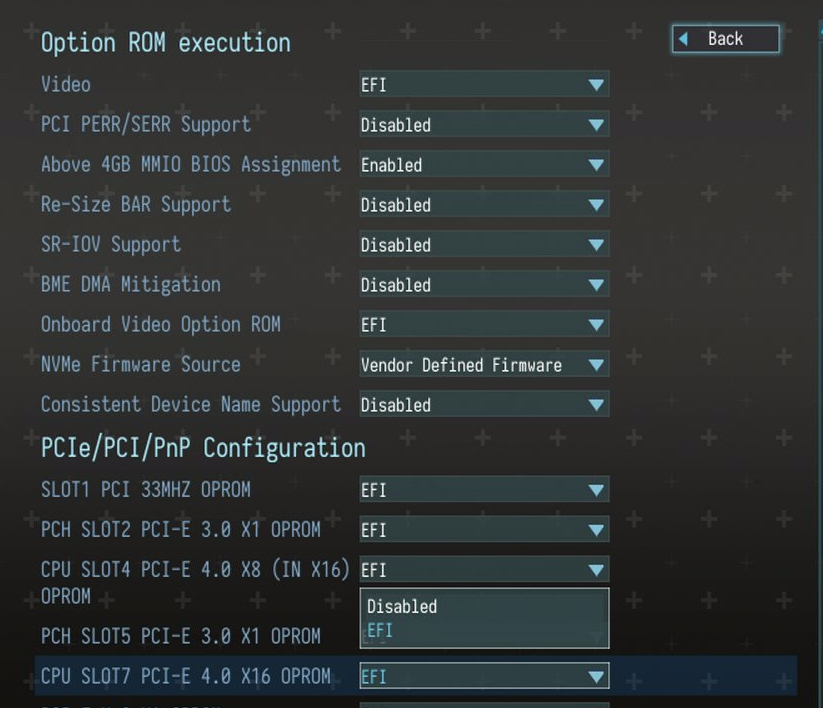
Have you tried changing slot7’s oprom?
Also bifurcation interacting with the storage driver might be causing strangeness here too possibly.
I got off the phone with him again a little while ago. This particular motherboard (X12SAE‑5) is a workstation‑class board. The tech who’s helping me is in that division, and he said he only has access to workstation‑class documentation. When I first spoke to him, he mentioned that this CPU wouldn’t work with NICs in these PCIe slots. The second time we talked, he said the limitation applied to the entire platform and suggested that I open another support ticket with the server department to see whether they have a compatible motherboard for this CPU + NIC combo. It may be that Supermicro’s workstation‑class boards with this socket officially support only GPUs or storage devices in those PCIe slots.
Can you elaborate more?
No, I haven’t tried that, but I did see the option in my BIOS, and its default was EFI (if I’m remembering correctly). I can upload a screenshot later with the available settings. Does this need to be toggled before I install the NIC?
INTEL DOCS
I also found this in the intel documentation related to my CPU.
I’ve tried several configurations. The only way I could get the x16 slot to clear POST was with an Intel I350‑T2V2BLK dual‑port 1-GbE NIC…
x8 HBA + x16 (updated E810) → POST hang
x8 (no HBA) + x16 (updated E810) → POST hang
x8 (no HBA) + x16 Intel XXV710‑DA2 → POST hang
x8 Intel XXV710‑DA2 + x16 empty → POST hang
Verdict: with this CPU, the board appears limited to 1 GbE networking.
I have one more thing to try. This motherboard supports 10th/11th gen intel CPU, and I have a 10th generation W-1270 CPU. I checked the 10th gen documentation and it looks like the W-1270 does not show any NIC limitations or similar wording where storage and GPU are the only supported cards. So, maybe i can get a reliable system just with a 10th gen intel and a Gen-3 x16 slot.
I’ve learned some valuable lessons, but it’s still disappointing. I’m considering just throwing in the towel and joining Team Red. However, that would force me to return or sell what I have and switch my motherboard and CPU to AMD. If my plan of swapping to 10th gen doesn’t work I will be making the switch.
Is Intel’s approach here a bit extreme? This is my first fully‑spec’d server build. I have experience working on Dell office machines, some Dell rack‑mount servers, and modifying my own gaming system. I may have been overly ambitious and missed some details, but sheesh this still feels frustrating.
Was it unreasonable to assume every PCIe slot would behave the same? I guess fiber networking is a very different beast. This limitation basically makes this board useless with an 11th gen CPU.
I’m not sure. What is that? Supermicro support said there are no options that can be changed to make these cards work as this is a limitation from INTEL.
The grass isn’t always greener on the other side. I’m agnostic and decide on a per-purchase basis what to get. And that board just looks great just by checking the specs and back then, I certainly would have been in my top3 list for boards and building a system around it.
Using both x8 slots for HBA+NIC is a very common thing for homeservers, that’s why people usually want that x8/x8 split. HBA+NIC, HBA+GPU, or 2xNVMe+NIC.
And getting a 4-port NIC (because you don’t have two slots available for 2x dual port) to use a switchless network to save a lot of money is just normal and reasonable to do.
This is a great server setup and good choice of hardware as far as I’m concerned. From what I’ve seen here, the problem is on Supermicro+Intels side, not yours.
1G networking is certainly underwhelming, especially if bonded 25Gbit is what you want. Buying a new board+CPU+memory, basically half the server, is certainly a very costly workaround.
Whatever you do, keep us updated. We need more TrueNAS+virtualization+25Gbit threads here #25Gbitfanclub.
And if there are some “BIOS/board hacks” possible (as other mentioned), that would be great, but I wouldn’t bet on that.
While I am not able to offer any help I would like to thank you for sharing your experiences with Supermicro’s Tech Support.
I really don’t get it how the “serious” enterprise manufacturers like Supermicro (or ASRock Rack) can get away with such sloppy behavior.
It reenforces my current policy to avoid these manufacturers if it’s somehow possible and get “premium consumer” high-volume motherboards that get years of bug fixes and BIOS updates.
Basically Intel will impose design rules for the motherboard manufactures to follow, sometimes they seem silly but at their core they are designed to keep the platforms stable (or in the more nefarious cases, product segmentation) by avoiding things like bad VRMs, bad signal integrity, “weird” configurations with PCIe lanes that might not be accounted for in future BIOS updates from Intel that would break a “weird” motherboard.
There are probably only 2-3 settings for this, ignore any auto settings and switch between legacy and UEFI. I’d change the setting before installing the NIC since it seems to cause the system to hang before you can get into the BIOS.
To me that line doesn’t mean alot, just because they didn’t validate a configuration doesn’t mean it shouldn’t work… I suppose should should be emphasized here.
I’ve heard of other people having no-boot issues with e810 on other platforms and it seems like they always end up solving their problems by just getting a 25GbE broadcom card which magically works.
IT WORKED!! I got the 10th Gen to boot and the E810 is recognized in the bios w/ the HBA card.
Thank you, I appreciate that. This build came together iteratively, with each idea leading to the next. I chose this board because I could find relatively inexpensive used components, and I thought that a storage SAN for two hosts didn’t need much for a CPU. When I bought it, I planned to pair it with a 10th‑gen Xeon, but after reviewing the documentation I learned that an 11th‑gen CPU would enable PCIe 4.0 x8/x16 and activate the third M.2 slot. I planned to mirror NVMe drives in the two M.2 slots for fast VM storage and use the third slot as a SLOG for my HDD vdev. This obviously wont be happening anymore unless I can get the 11th gen working.
When I configured this build, this was the only component I bought with warranty coverage. I’m glad I did, as it let me debug the issue. It’s frustrating that the necessary information wasn’t available anywhere, even under an NDA, but I was happy I could reach someone directly by phone. The support agent called me proactively, and when I returned the call, the same person answered, so I avoided the usual call‑routing nonsense. This is my first Supermicro motherboard, and when I build another system, will I choose Supermicro again? I’m not sure. That’s interesting about the consumer boards, I hadn’t considered that. I know these server companies give longer upgrade periods, but I’m not sure how true that is.
These are all my BIOS options everything here is default. I haven’t changed anything. I can only disable and turn on EFI for OPROM. Do you see any setting in “Option ROM execution” that I might be able to enable to get it to work? I’d really like to be able to use all my NVMe drives and get PCIE 4 working.
Yeah, I was thinking maybe they were just limiting their liability. I haven’t found any reasonably priced, low‑profile Broadcom four‑port SFP28 NICs. I was able to pick up this E810 on eBay for a great price, and it even has a BradyID.
I did read that a Broadcom card might work, and I found switches that would pair with this setup the MikroTik CRS504‑4XQ‑I9 or CRS510‑8XS‑2XQ‑IN but I’d really like to avoid the extra heat and cost.
Thank you everyone for taking the time to craft your responses and help me out with these issues. I really appreciate it!
Nice! I was skeptical about the different processor solving the issue, but you learn something every day.
The fact that this CPU change fixed POST makes me less inclined to think the issue is oprom related now. It does make me curious to see what would happen if you forced PCIE 3.0 on slot7 with the 11th gen.
Some more spaghetti to throw against the troubleshooting wall:
I’d also try toggling PCI Express Native hot plug support off and see if that helps it post.
Another possible issue is the PCI chipset might also be interacting with the PCIe subsystem in a strange way, I’d try turning off PCI memory remap to see if that makes a difference
unfortunately, there is no way to force PCIe 3.0 in X12SAE‑5 bios. You can set it to auto / enable / disable and that’s it.
I found the time to try just about everything and nothing gets it to post with an 11th gen. The 11th gen gets you PCIE 4.0 x16 + PCIE 4.0 x8 which would fit perfectly with what i have . I guess it’s going to be 10th Gen NIC+HBA at PCIe 3.0 x8 for now.
I could buy a Broadcom card or a Mellanox ConnectX-5 but I’m not sure that will work either. I also tested all the different disable / enable configs with my Intel XXV710‑DA2 which is PCIe 3.0 x8. I had the same issues as the E810 frozen before post. If it was only a PCIe 3.0 issue then I’d imagine this card should be able to post. Is there some reason the Broadcom or Mellanox cards would work when my Intel PCIe 3.0 x8 wouldn’t?
The issue is that I have two hosts connected to this device and i wanted to give each host the full 50gb.
I have a BPN-SAS3-826E w/ a AOC-S3008L-L8E HBA and the following drives.
5x 8TB HDDs SAS3
4x 1TB SSDs SAS3
2x 2TB NVMe
My plan is to keep the speed critical VMs on the NVMe w/ VMs that are less critical for speed on the SSDs. Then I’d have the HDDs for backup and some bulk none-speed critical storage. The 3rd NVMe slot activated from 11th gen CPU was going to be a SLOG for my HDDs.
My board still does have 2x PCH 3.0 x1 slots. I could put a PCIE to m.2 in one of these slots for my SLOG. I’m going to follow up in the trueNAS forum if this is feasible.
Will the storage throughput on the VMs on either host be throttled with the E810+HBA at PCIE 3.0 x8?
Not appreciably, PCIe 3.0 x8 is still 8GB/s which is pretty close to 100GbE, and waay faster than the HBA will ever go
An even more esoteric troubleshooting route you could take is to start loading older bioses that might not have the problem. drunkencat is a good resource for this, but even their database isn’t exhaustive and doesn’t have every release.

 But I eventually settled with that and spent a whole lot of money on a switch (there goes the money for another planned node). Switchless setup works good for 3 nodes, but I also need some proper public network with bandwidth and good latency and so this doesn’t work for me. 850€ for that Mikrotik switch at least gave me peace of mind and ports and LACP for days and in the years to come.
 .
.