Workstation for Monte Carlo Simulations

Current gen AMD Epyc for cpu compute tasks
96 core zen4, 2.4ghz idle, 3.1ghz all core under load
768GB ram ECC DDR5-4800 12 channels of 64GB each
6.4TB u.2 enterprise SSD
12GB nvidia current GPU rtx 4070

Epyc genoa cpu compute system 10k budget
800 Motherboard supermicro with 10g and ipmi eatx
70 heatsink up to 500w (includes thermal paste)
5300 96 core epyc genoa, 3.1ghz all core
400 6.4tb u.2 drive intel d7-5600, 3x to 20x m.2 speed
50 cable for u.2
600 4070
170 power supply
70 case silenced with sound insulation and baffles

800+70+5300+400+50+600+170+70

7460 +10% tax = 8200

1800 for ram
$190 for 64 gig sticks on server supply, ebay is more than that now.
2280 for 12 sticks
2508 for 12 sticks with 10% tax

10708 total with 10% tax

I configured an identical system as a dell server.
the gpu they supply is 1/4 the speed
they require water cooling for an additional $1.2k, but the button went away.
$57k
I can’t attach a PDF of the config

1 Like

Hope you all are well, Exard3k, greatnull, Lt.Broccoli, MikeGrok, twin_savage, and wendell. Apologies for my delayed reply. Work and people keep me busy. On the upside, I can consider something like this project. Let me try to respond to all the main points I see. Apologies for the long post!

I am most humbly grateful for the offers to run some tests on this software! A pleasant surprise! A little preview/testing helps before plunging with such an investment.

I am still going to look for an EGSnrc example to run. The GEANT4 package comes with some test examples; one of which approximates one of the types of simulations I want to run; though it uses an old machine and orders of magnitude fewer voxels and particles. While I compiled it for my desktop and ran it, the executable seems to not be totally self-sufficient. It still needs the GEANT4 libraries installed on my machine. So it seems that testing will require compiling those libraries first then compiling the examples to run them. That makes for more than a simple run and see situation so I am not sure how much I can ask. This post is long enough. I will post information for anyone still interested.

From the few compiled runs I did, I learned that I might need between 0.5 - 25GB file size (text file of numbers) depending on whether I want to simulate upto a whole 4-room suite. My i7-7700, GeForce 1080, 8gb ram desktop struggles.

I did try some online configurations. Here are the results. Not sure how to insert a link on this forum to the respective webpages. Interesting similarities and differences. Seems like the main issue I need to figure out is choosing Threadripper or Xeon-w. I am not sure of a similar website for Epyc so that was not included. I have been thinking I could add 1-2 gpus for additional value and variety of work – kind of liking the additional possibilities: render 3D resulting images rather than just 2d, gpu accelerated simulations via PyTorch, AI inference for go (game), image generation, etc
 Maybe going with a generation old is worth thought. Not sure about future proofing or upgrading then though.

  • System76: 11 182$
    • Threadripper Pro 59995wx, RTX A4000 16GB, 128 GB RAM, 2x 1TB SSD
    • I happened across this vendor. Apparently they are less than 100 min away from me. Who knew! Do any of you have a good experience with them?
  • PugetSystems: 11 672$
    • Threadripper Pro 59995wx, RTX A4000 16GB, 128 GB RAM, 1x 1TB SSD
  • Lenovo: 11 708$
    • Threadripper Pro 59995wx, T400 8GB, 128 GB RAM, 2x 256GB SSD
    • Quote includes a 45% discount (via a code?). I am not sure how much I can rely on that. Though my work seems to have suddenly fell in love with Lenovo so maybe I can get a deal through them.
  • Dell: 10 915$
    • Intel w9-3475x, RTX A4000 16GB, 128 GB RAM, 1x 512 GB SSD
    • Lenovo seems to sell a generation prior of these cpus.

I am not sure on RAM total. Initially I thought that 2GB/core would be fair. Given that I may have to ultimately write upto 25GB, I am not sure.

The EGSnrc Fortran code is officially known/intended to compile for gcc-fortran. I will have to read about Nvidia’s Cuda Fortran. There are some academic papers claiming to run it on a GPU with upto 60x performance (2011-2013) though without links or code included. I am hoping to get that working if I can on my machine. Maybe that means I should think about GPUs too? EGSnrc is better for my therapy-oriented simulations while GEANT4 is more shielding-oriented and general purpose.

Not sure if MHz*cores is enough. Seems like number of channels, bandwidth, and bus speed(?) are important judging from the posts here. Thanks for the notice on the F line. I had not heard or seen it. I will look into whether anyone mentions optimizations for Intel/AMD. There is no vendor. Both are open source libraries.

MikeGrok, I think we will have to discuss these configurations more. 96 cores is enticing. You seem to demonstrate the economic power of building myself.

I expect more cache means that each core is better able to hold the data needed and the computation results. As twin_savage says, big cache may be a hindrance if it cannot be moved back and forth well.

Which one? Would be helpful for people to know what to test. Can the test be easily modified to approximate your simulation?

There is a bit more to it. Threadripper and Threadripper Pro have different memory configurations: Threadripper Pro has double the memory channels, which can really matter. Xeon-W is power hungry (and hot), but does have some accelerators that Threadrippers don’t. In recent generations of hardware, Threadripper is better for things that aren’t accelerated, but testing is truly needed.

The new Threadripper 7000 series have been announced. They should perform similarly to the Epyc 7004 series. You may not have the time to wait. How soon are you looking to purchase?

I would try to get a GPU with more memory if you’ll be doing computation on it. But if you don’t know what you’ll do with it, you can upgrade it later provided the system integrator has put a powerful enough power supply in and given the extra cables. This is a good argument for building your own.

Most general purpose machines will have 4 to 8 GB of memory per core these days. You are building a machine to fit a specific need, but I would still aim for 4 GB per core if you can. It will give you more flexibility for future uses. Also, you want to make sure all memory slots are populated to give yourself maximum memory bandwidth, which is likely to be a bottleneck on the high core count machines like the 64 core 5995WX.

I would! If it runs on a GPU, try to get someone to benchmark for you. Sometimes GPU can be way more cost effective, but not always! It largely depends on how parallelizable the data processing is, and how few branches the code takes.

Definitely not.

Yes! I run one application that can fully saturate a memory channel with just two cores! If I were building a system for that, I’d get a 16 core with 8 channel memory. General purpose machines tend to start hitting bottlenecks around 8 cores per channel. Some applications have small working sets of memory (like Blender) and are fine with 16 cores per channel. Memory bandwidth has not kept up with CPU performance, but those ratios roughly work between generations and vendors.

In general open source will adopt any performance enhancements available by either vendor a few months after CPUs are out. You may need to recompile the software to enable those enhancements as often software from distributions will be compiled for generic hardware for broader compatibility.

Cache effectiveness really depends on the size of the working data. It also depends on if the cores are working on the same data so they aren’t fighting over L3 cache. If L3 isn’t big enough to hold all the data for all the cores sharing that L3, it doesn’t really help much, and this is where main memory bandwidth really matters. Having a bigger L3 cache is rarely harmful, but it may or may not be beneficial. I would only spend money on a bigger L3 cache if you know your working set across all cores fits. Benchmarking will show that.

1 Like

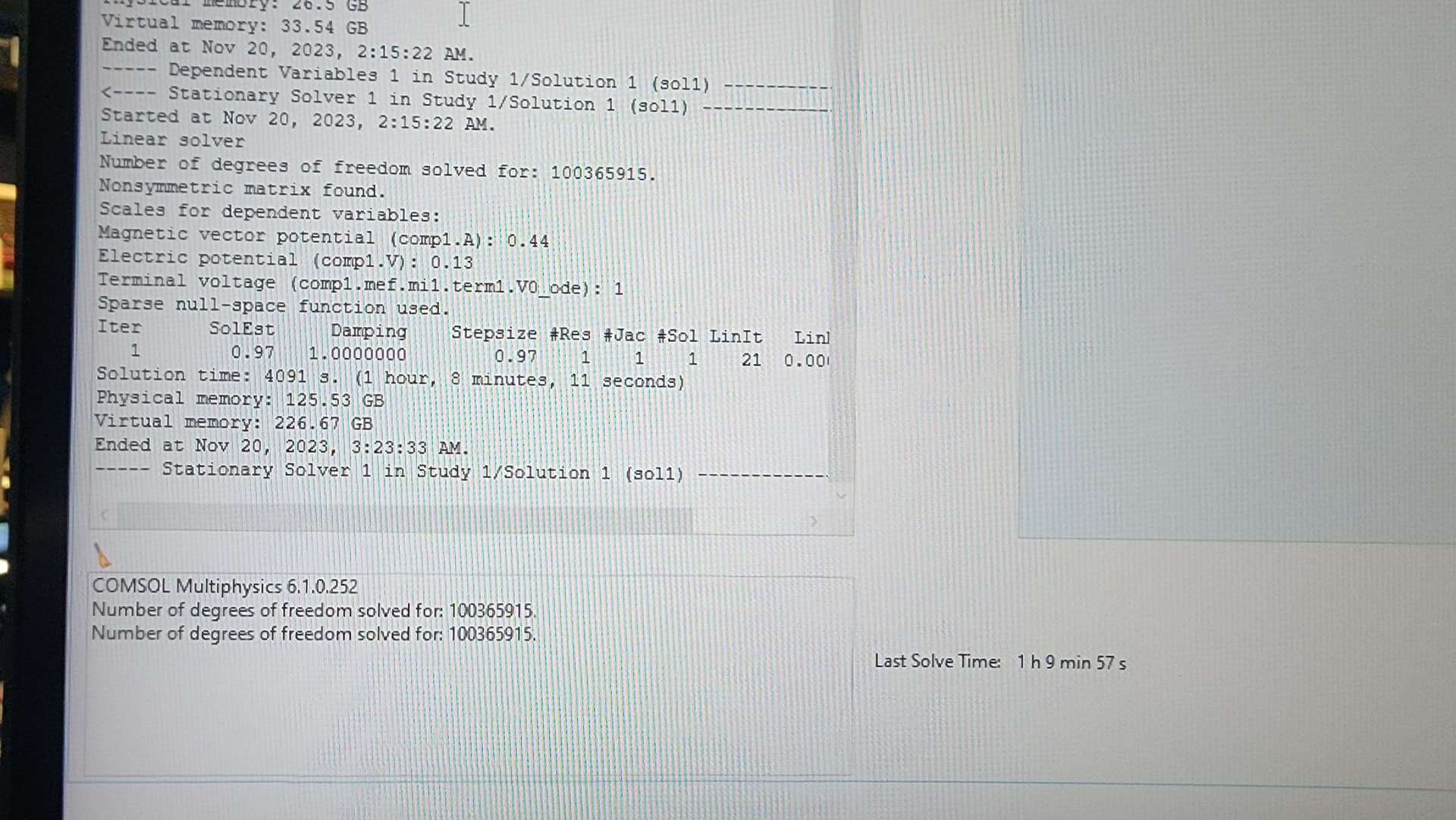
64c tr is 1 hour 6 mins with 128gb ram

thanks yall

6 Likes

nice! that is fast.

One small gotcha, which is my fault because I introduced two separate comsol benchmarks without really giving them a sufficiently different name is that the W5-3435X ran a 17m25s in the “200GB” benchmark that you ran on the TR.

I think I might have caused confusion by introducing a second “50GB” comsol benchmark that the W5-3435X scored a 3h08m13s on.

The difference between the benchmarks is that the “200GB” benchmark has a very large mesh and only solves for magnetic and electric fields so its very memory bandwidth intensive.
The “50GB” benchmark solves for magnetic and electric fields and turbulent fluid flow (k-Δ model) and is much much more compute intensive and less memory intensive.
Running the “200GB” comsol benchmark on this TR is probably alittle unfair because it doesn’t have enough memory for the problem to completely solve in RAM and it is likely going out to the swap file repeatedly.

1 Like

I might be able to take it to 256gb of slower 4800 memory later, then retry.

What’s the conclusion of the confusion? 1 hr vs 3 valid comparison or not exactly apples to apples? w3435 is only 16 cores so

well the W5-3435x actually scores a 17m25s on the same benchmark as the 7980X’s 1h9m57s (because it’s likely thrashing swap).

It’d probably be easiest to just run the “50GB” comsol benchmark on the TR, it’d really shine there because the problem will entirely fit within the 128GB of memory and is more compute heavy; this “50GB” benchmark is what the W5-3435x scored 3h08m13s on.


^^^ there’s only 2 actual benchmarks in that folder, just a bunch of different versions of the benchmark for different processor architectures and OSes.

5 Likes

Hope you all had a great Thanksgiving!

The general idea of the EGSnrc and GEANT4 libraries is to:

  1. Have some geometrical data to set up shapes with material in 3D space; like a giant voxelization/mesh with a distribution of materials.
  2. Define a set of particles, their positions, energies, and directions.
  3. Follow their trajectories and interactions through the voxels.
  4. Tally up certain quantities such as count of particles per voxel, total energy absorbed per voxel, etc

  5. Parallelization is per trajectory. So the same geometry data and initial conditions are used by each trajectory. Output is a file listing each voxel’s index coordinates and corresponding tally quantities.

I have mainly been using Python since 2006 plus some work with Arduino and friends. The C++ and Fortran world of these libraries is new to me. I hope to share setting up an example for each sooner rather than later.

I tried running the GEANT4 example that resembles one of my goals. It is the medical linac code in the advanced examples. The example would need to be boosted to 10 billion particles and 1200x1200x1200 voxels. I thought I could just adjust those settings in its input macro file (using lesser values so my desktop could finish it). The results were not reasonable. So I know I have more work to do with respect to getting it running right.

The EGSnrc library seems to be GPU accelerate-able so I am trying to read those papers and see how that works. I have not seen mention of running GEANT4 with a GPU though.

Thanks for the clarification on Threadrippers, Threadripper Pros, and Xeon-ws. I do not need to purchase immediately. Not sure if it is better to get a deal this holiday season. I can wait if needed.

I found that the RTX A4000 with 16GB was higher than the base model and still within my budget on the configurations I worked up. Perhaps multiples will help spread the load. I am open to a better option. If more memory is advised then what would be a good threshold to keep in mind?

At least 4GB of RAM per core
 thank you for that threshold. I may have to fiddle with the configurations some more.

This idea of cores per channel is new to me. I thought the total RAM mattered most and the portions just get used where needed. Are cores tied to access certain channels for efficiency?

I did not see any specific compile flags for any hardware on either library. These libraries may have 0-2 releases per year. So they might be on the more generic side vs specialized. Their installing/compiling instructions just say to have gcc/g++/gfortran/make to compile them in case that leans one way or the other.

1 Like

The AMD zen4 CPUs ie AMD cpus which use ddr5 memory are significantly better than the previous generation.

If you want to build with the previous generation, the current gen epyc servers have been shipping in quantity for about 6 months. The threadrippers have been announced, and review units have gone out, but you can’t buy them retail yet.

here is an epic equivalent to the systems you were looking at:

The previous gen epyc is 2ghz
The previous gen threadripper isruns at 4.5ghz
The current gen epyc is 3.5ghz
The current gen threadripper is 5.3-6ghz

In geek bench, My 16 core 9124 gets about the same benchmark as the 64 core 7002 based cpu. It has a clock speed about 50% higher, faster memory, and apparently a much faster interconnect for core to core communications.

Also on tasks that have not been heavily optimized, on the same CPU, the processing speed goes up linearly with the frequency of the cpu, but often only goes up at the square root of the number of cores. There is often a single threaded process which limits the calculations and other threads cannot proceed until that task is complete.

Until you perform some experiments, or tell us a bit more about it so we can perform experiments, you will not know if you need a 5.7ghz 16 core cpu or a 3.5ghz 96 core cpu.

Several of us are perfectly comfortable with compiling software or assembling packages from several sources.

2 Likes

In NUMA systems, some memory channels will be tied to specific CPUs or cores. But what I was talking about is simply a rough ratio between memory bandwidth and cores, using the fastest supported memory.

For planning your system, I’d get no more than 8 cores per memory channel if you don’t have benchmarking data. On Threadripper non-pro, that would be 4 channels and 24 or 32 cores (and 128 to 256 GB of memory), and on Threadripper Pro, 8 channels and 64 cores (and 256 GB to 512 GB of memory).

3 Likes

Good rule of thumb!

AMD sees this in a similar way. When increasing core count from 64 to 96, they also went with 8 → 12 channels.

2 Likes

Ie on the ddr4 epyc and threadripper the memory controller is on the CPU die. With ddr5 the memory controller is on the central io die.

Also on ddr4 epyc fully populated it has 80GB/sec bandwidth to ram. I think this was an amd slide, it may be referring to 7001.

On ddr5 epyc fully populated it has 400GB/sec bandwidth to ram.

This is the windows 200GB benchmark.

36 min 54 s with the Threadripper 7970X (32-Core) and 256GB DDR-5 4800 RAM.

4 Likes

It seems not to want to use all the cores no matter which CPU you have

1 Like

It should be using exactly half of the threads available on a system with hyperthreading, or if SMT is turned off in bios it should use all the cores/threads (it will automatically detect between the two scenarios and schedule accordingly). There is actually a slight performance regression if you force it to use all the threads available on an SMT system because there is a small overhead to creating more worker threads that is not “overcome” by the amount of memory bandwidth increase that occurs from using SMT.

Normally you can force the number of threads used using the -np[#threads] startup argument, but this is disabled for the self contained comsol apps.
turns out this works fine, I had just neglected to put a space in between -np and [#threads]
Interestingly enough you can switch between which Basic Linear Algebra Subprogram (BLAS) that it will use to solve, Intel’s MKL or AMD’s AOCL at startup. In my experience in most senarios, Intel’s MKL is actually faster than AMD’s AOCL even on AMD processors (but might not be the case for all AMD processors/architectures).

by default the MKL is always used to solve, but if the program was run using: ./comsol61_benchmark_50GB_linux.sh -blas aocl it will using the AMD Optimizing CPU Libraries

Edit: on Windows you’d probably use a shortcut to pass the argument to it:

1 Like

d’oh, I knew this but forgot, no wonder I am like why this this so weird and slow. Do you think its not using mkl even on xeon-w?

It definitely always defaults to using MKL if you don’t give it an argument. I’d imagine a W9-3495X would be in the 3 hour solve time ballpark, it’s kind of a long benchmark because it’s doing a ton of computation
 but I did notice pretty big performance disparities between Linux and Windows on this benchmark on my W5-3435X, which at this point I’m just assuming is some quirk of the windows scheduler. For awhile I gaslighted myself into think DSA was somehow enabled in Linux without me knowing to explain away the difference but that turned out to not be true.

Edit: to gauge how close the benchmark is to being done, you can look at what iteration of segregated solver it reaches, it should end on iteration #82 in that left-hand pane’s text output.

I don’t know what to make of these benchmarks


They seem backward. Weird. Also the benchmark on Linux kept crashing like half way through lol

1 Like

Were the first 5 results benchmarked on Windows?

All of these were on windows