Windows isn't displaying 'Windows' Help?

So.. I got done playing BF1 and went to open Origin.. opened it, all that showed up was the icon in the task bar. didn't show up, tried to alt tab into it, I could see a preview image of it but no dice. So I resart my pc at which point it decides to update... Get back into windows and try again, no dice. try to go into file explorer (which was working previous boot) and now that's doing the same thing except I can't even see a preview when I try to alt tab into it I can see it now but It still won't maximize/show up

System restore throws an 'unknown' error regardless of which point I choose and I really don't know what to do other than nuke it all which I REALLY don't want to do... help please?
I won't be able to try any of the suggestions until late tomorrow unfortunately :/

have you tried opening explorer.exe from run, taskmgr, cmd, etc?

yes, same thing happens.

you could switch to linux /s

could you upload a screenshot or something?

idk how a screenshot would help? it's litterally just the icon in the task bar highlighted like it's maximized but it isn't showing up.

so i could get a better visulize what is happening

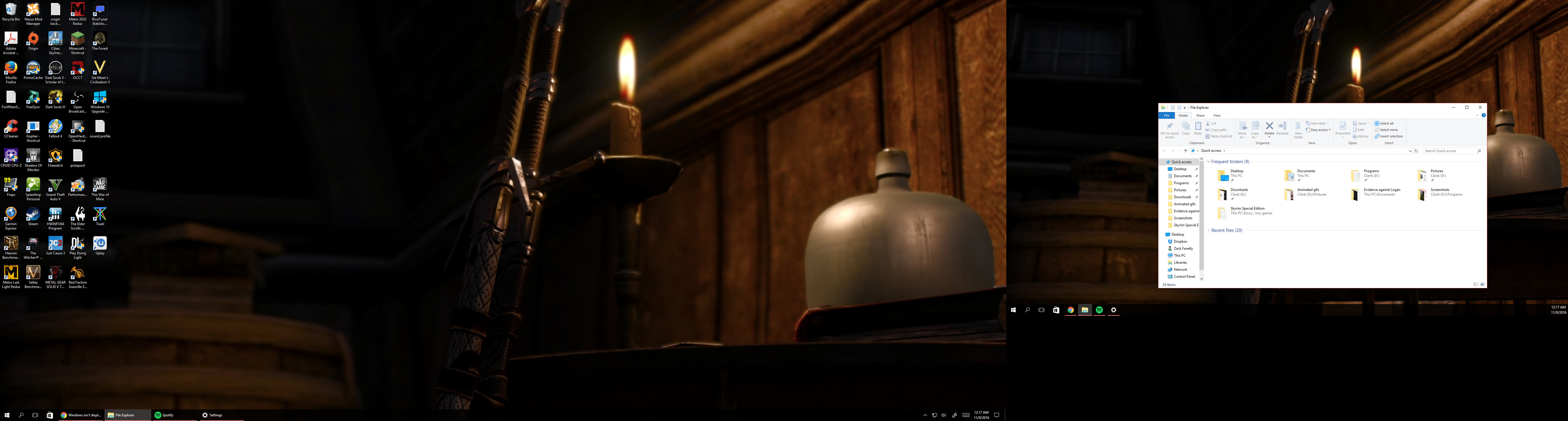
WTF it showed up in the screenshot!?!??!

On a second... what?...

second monitor? I can't even???

I HAVE ONE MONITOR LOL

reboot safe mode and reinstall graphics drivers

lol

way ahead of you. Would have never caught on to this had you not suggest I take a screenshot. thanks.

1 Like

considering you work with pcs you are being vague as hell
also

1 Like

I work with the physical bits not the software bits so pardon me :P

1 Like

i was just having a hard time trying to fiqure out what the hell you were talking about. so a screenshot so i could see it with my own eyes

also microshill just hardcore trolled you
invisible displays, they make everything better
lol

2 Likes

@moderators can lock this thread if you wish, My problem is solved...

Damn AMD and Windows trollin me with ghost displays...

Thanks again @Dje4321

thats broken.

@Destroyed007 is on right now though

I've had something like this happen when I connected a home theater receiver via HDMI (for audio only, my monitor is connected via DP). The receiver just acts like a second display with multi-ch audio.
My mouse cursor often ended up in this void.

ok, all done