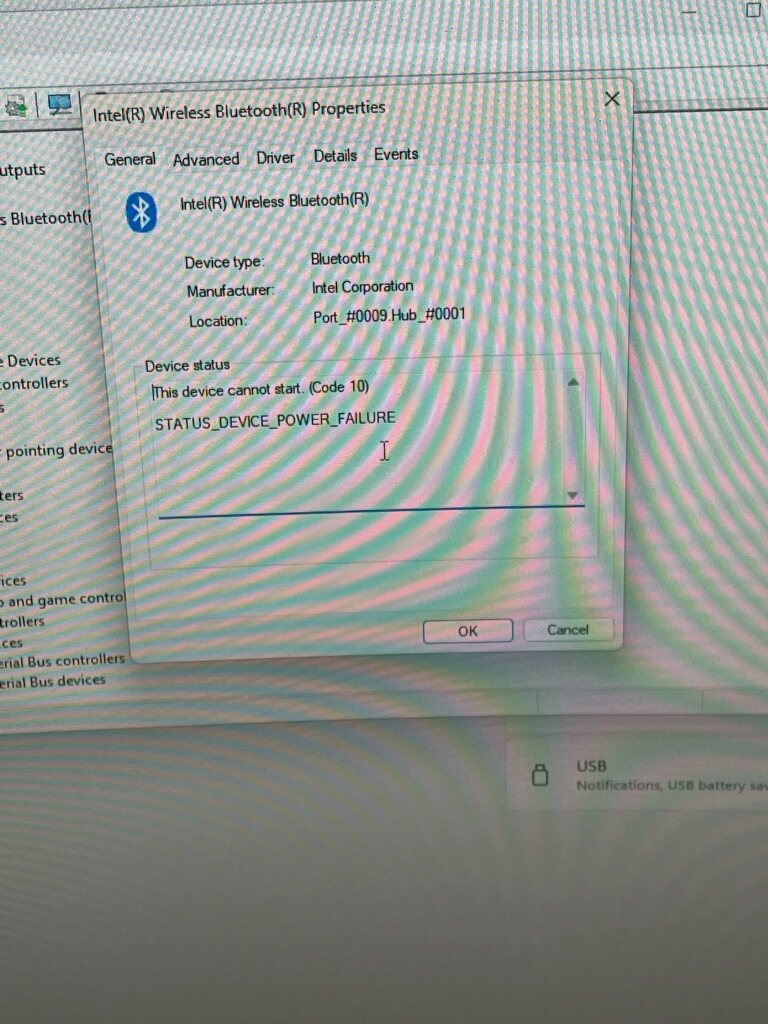
My buddy whom I helped build a PC has recently had intermittent Bluetooth driver failures when updating to Win11 25H2.
Bluetooth option in the bottom right hand corner dissappears and he cannot connect headphones. Then, somehow, the Bluetooth option magically comes back on a reboot.
CPU: Ryzen 3500X
Mobo: Asus ROG STRIX B550-I Gaming
Upon checking the device manager, he sees this error Code 10: STATUS_DEVICE_POWER_FAILURE
I had him update the Bluetooth drivers and BIOS from Asus, but the problem still happens intermittently.
Someone recently posted a similar problem with an Asus mobo on X:
https://x.com/manoj76807/status/1978552377029414923?t=VXxap3ZUqnFP4zkYakN6ag&s=19
Have you observed a similar issue?
ECC Fetishist! I love that!
Yes, I had him update to BIOS 4001. I had some issues with the encryption keys for secure boot, but I think that is resolved.
When it goes out again, ill have him install the latest Intel drivers from those links. Thanks for the tip!
1 Like
Please tell your buddy to update to the latest wireless drivers for Bluetooth and Wi-Fi regardless of any issues (and continue to do so in the future, might be helpful to bookmark those Intel download links).
There have been severe security issues in the past that could compromise a device with wireless connectivity that required updated drivers to fix them.
ALL device drivers listed on most of motherboard manufacturers’ support download websites are generally a joke regarding how up-to-date they are.
If possible download the latest drivers for those components directly from their own manufacturer’s website.
As far as I know except for MediaTek every other chipset manufacturer offers public driver downloads for anything one might find thrown onto a consumer motherboard.
You can try disabling the sleep / power saving feature on the Bluetooth module itself (it should be a tab dedicated to it while the device is working or the one up above the device connection tree) in the meanwhile
I had no idea! This is good to know. I am usually using Linux for personal productivity and gaming. I don’t track all the driver versions on my Win11 work computer… I might need to start doing that
Yes, that sucks a lot (especially the issue with MediaTek not having an official public-facing download portal since you then have to go on a “hunt” for updated drivers on the open Internet).
But I have to say that ever since I switched to ECC memory and installing drivers that way I basically have 0 system stability issues caused by Windows.
The only remaining times I ever have crashes is due to BIOS or component firmware bugs which basically only happen when I configure new systems where the motherboard isn’t on its 10th or so BIOS update.