Given he posts prices in €, I’m pretty sure he does not live near a Microcenter.
1 Like
Sadly i do not 
Motherboard and processor are bought. Now all that is left to buy is ram and ssd.
-
ram - deciding between 2x8GB or 2x16GB. Right now 2x8GB is plenty enough, 2x16GB is for future. Wondering if prices of second hand will drop enough to make it worth the wait. Prolly 3200Mhz is my best bet though ?
-
nvme - deciding between 512GB and 1TB. I never have more than 1 game installed, for other things i have separate disks. Since im on 250GB right now im guessing 512GB will be plenty. Unless GTA6 is like 400GB :S . As far as speed goes, even PCIE 3.0 disks are insanely fast for my needs. Im on Samsung 840 evo right now and i dont ever remember being seriously slowed down by SSD. But then again, i will be using faster cpu now.
On the RAM side, DDR4 availability has gotten “weird” from what I’ve seen recently, but 2x8 kits aren’t cheaper-enough to justify today either, and depending on your specific CPU, the “oh well I can just add 2 more” doesn’t /always/ work as AM4 gets weird with some 4-stick configurations.
SSD I would strongly suggest overprovisioning. My SATA SSD doesn’t seem to care much about how full it is, but both my NVME drives absolutely jump off a cliff at >50% “full”, and once near-full they start to drop to where the old SATA drive matches or outruns them in benchmarking.
Well, i ordered 2x16GB 3600Mhz CL18 G.Skill Ripjaws V. The cheapest 2x16GB i could find was 70€ and this ram was 75€ so it was worth it. 60 month / lifetime waranty.
Now all that is left is to buy a NVME drive, either 512GB or 1TB. Since i went completely wacko with money so far, i might aswell get a 1TB for 60-70€-
So far i spent motherboard 106€ MB, 132€ CPU, 75€ RAM, if i add 70€ for NVME that will be 383€. Well, it’s a lot for me but hopefuly im good for 7 years. Considering the last time i bought a whole computer was this i5 2500K build, i think it’s ok. Other components i will use from previous computer. Right now i have gtx 1060 6gb graphic card. I will probably buy a new graphic card when a game i wanna play comes out, from the looks of it, it will be GTA 6.
1 Like
Make sure whatever drive you do buy has TLC and a DRAM cache  Otherwise, glad to see everything coming together!
Western Digital SN850X, Kingston KC3000, Samsung 980 Pro and 990 Pro are a few models. Teamgroup MP34 was a really good one but seem to have gone Out Of Print. MP44L, the successor, has decent speed and throughput but crap random writes.
That can seem like a lot, I suppose, but remember you basically replaced all of the “wearables” in your computer (provided your PSU is high quality). I have a Linux box that runs a 5600G, A520, 32Gig 3200 RAM, and a 512Gig NVMe drive that for a similar amount (though that was in 2023 when prices were cheaper). It runs great - drastically faster than the i7-920 that it replaced (yes, a first gen Nehalem)+12gb+1TB HDD, and at much lower power draw (about 30W when running the several docker containers used to host Minecraft and Valheim services). So I’m happy with it. People warned about the “PCIe 3.0 only!” speeds, but nothing I do needs anything faster than that. Not even on my gaming computer, now that I think about it. I remain skeptical of the value of even PCIe 4.0 or 5.0 for now.
More cores really only helps if you have something that takes advantage of it. Otherwise, you should be good for a while.
I think that’s wise. I’m also broadly skeptical over the long term. At work we mostly do sizeable sequential IO and, recently, I benched a range of the tools we use. All but one are too slow to reach even SATA III limits. The one which can utilize NVMe transfer rates doesn’t necessarily spike over 3.0 x2 and averages only 350 MB/s.
It’s enough of an issue I write more performant implementations of core tasks when I can. While certain operations with multithreaded IO and light compute max more capable 4.0 x4 NVMes, like the SN850X and 990 Pro, most run out of cores or data before 3.0 x4’s any meaningful limitation. I don’t look at IOPS much but the 500k IOPS typical of a 3.0 x4 drive is 2 GB/s of IO. Real world workloads which issue that many randoms appear rare.
So PCIe 4.0 and 5.0 seem well into diminishing returns, particularly with the cost of the low loss materials and backdrilling needed for 5.0 motherboards. They’ll get less diminished over time but, given a lot of software’s at least a couple decades behind current hardware, it’s not at all clear to me that’ll be a big deal over a 6-10 year life for a build used for mainly moderate tasks.
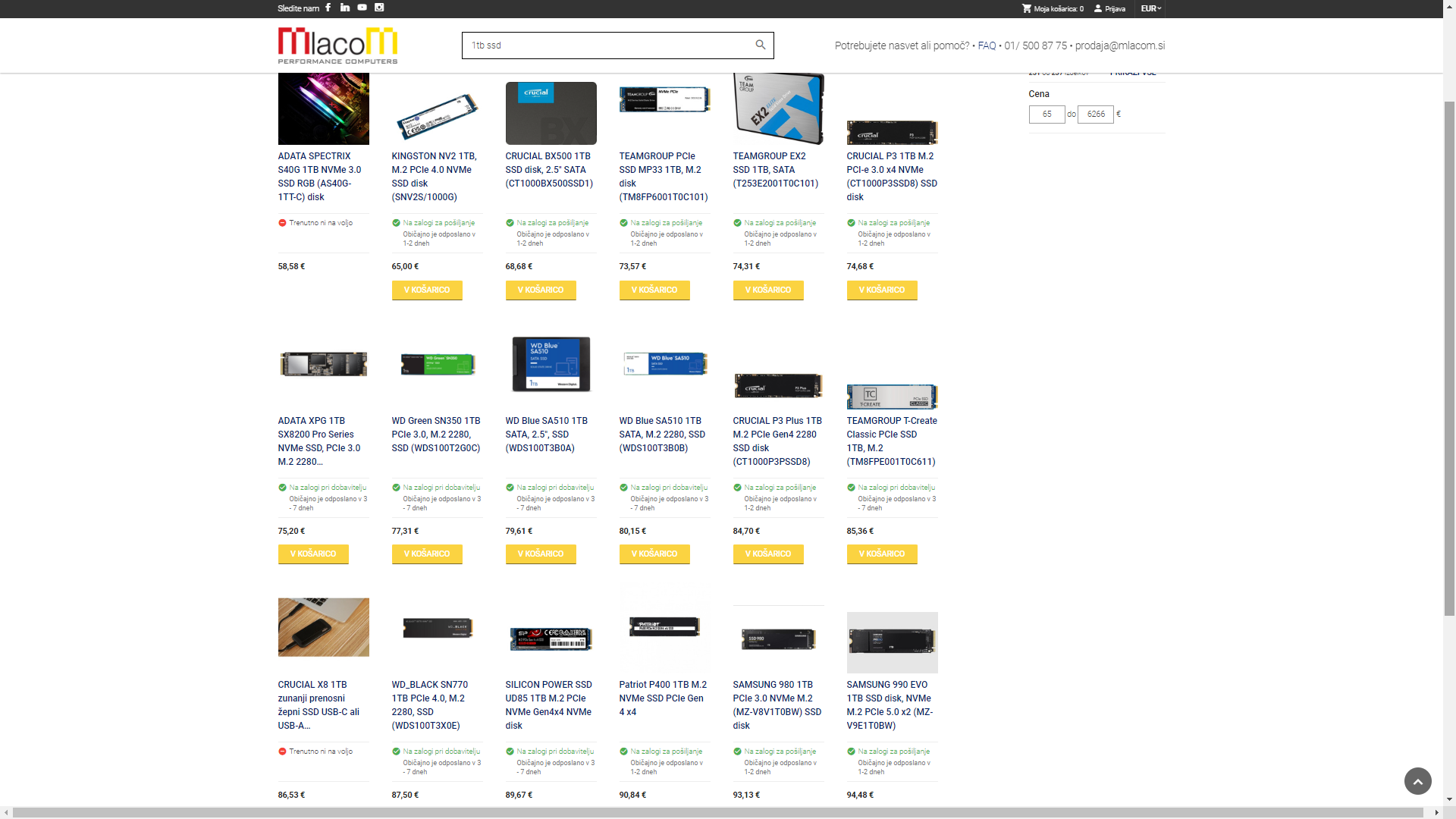
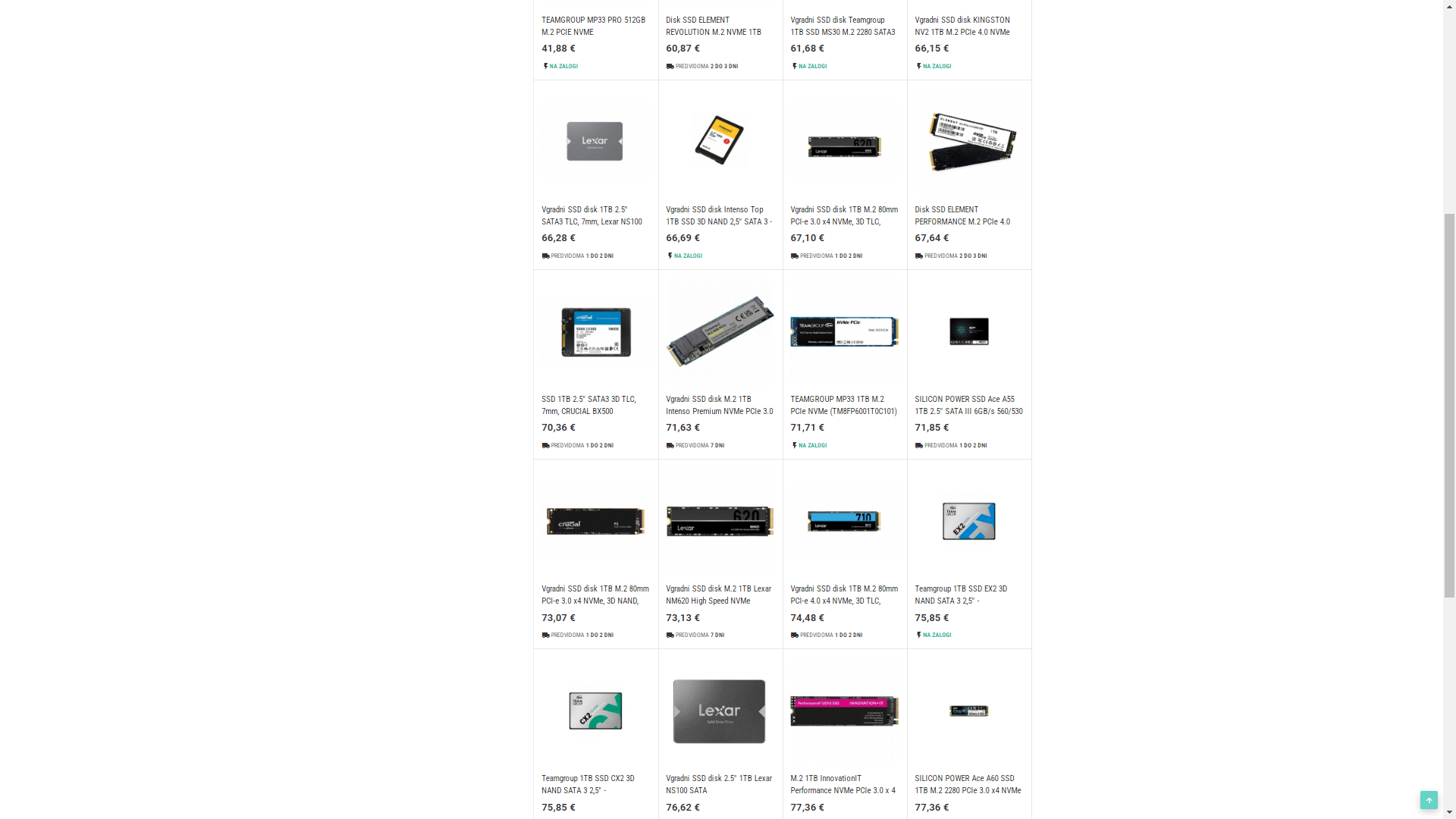
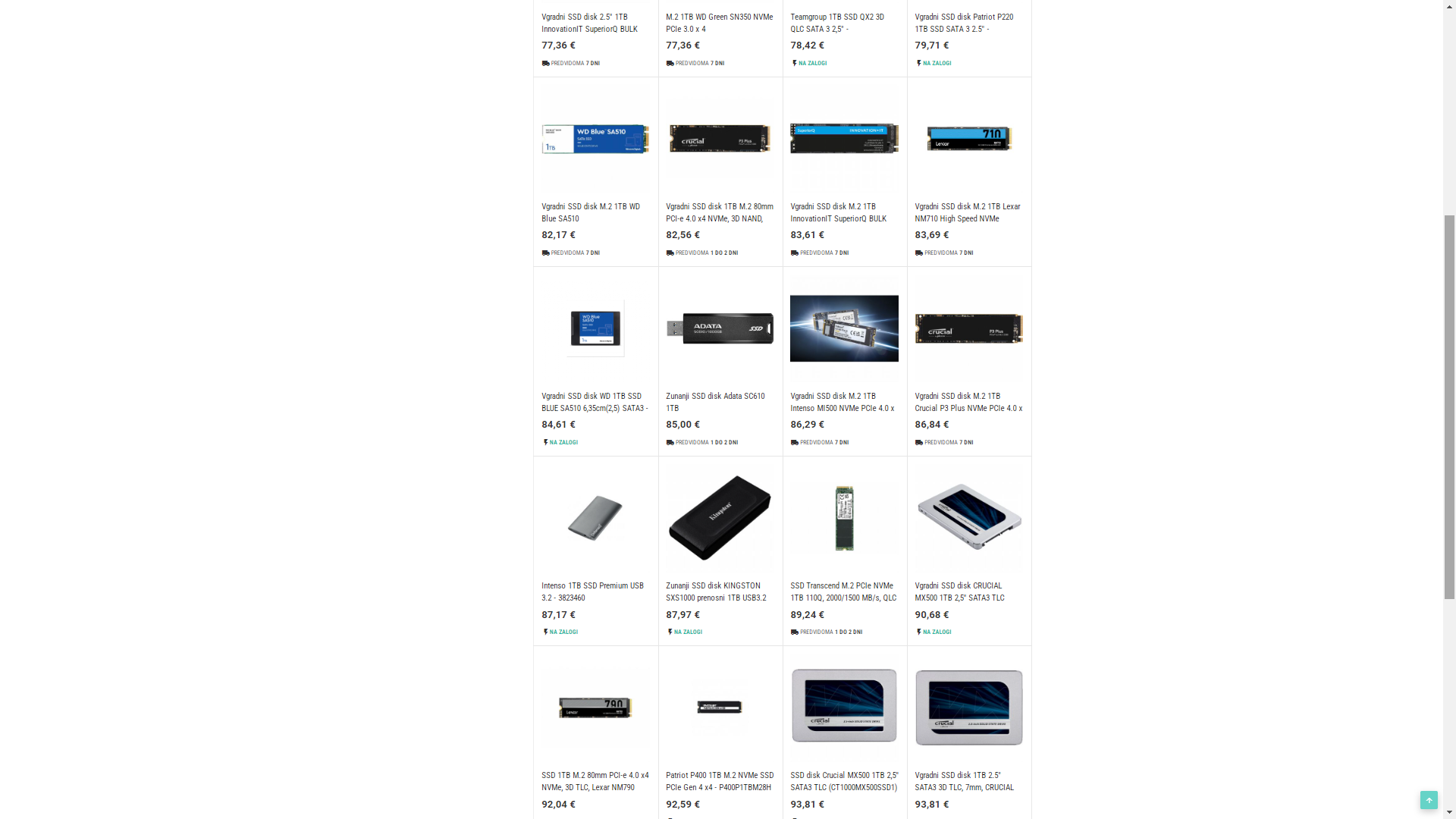
Now for the last part, ssd ! I did a bit of searching, this is in my price range. I also made some screenshots if anyone has time to see whats for offer in my shops and suggest among those. I want it as cheap as possible but if its really worth it, i could stretch it up to 90€.
- TEAMGROUP MP44L 1TB- 81€
- KINGSTON NV2 1TB - 65€
- TEAMGROUP MP33 1TB - 73€
- CRUCIAL P3 1TB - 76€
- CRUCIAL P3 Plus 1TB - 84€
- WD Black SSD SN770 - 81€
Yes it can be with certain boards.
But it just depends on what your future cpu upgrade plans are.
If your plan is to upgrade to a 5950X in the future than just buy a proper board really.
Because vrm wise the Gigabyte B550M D3H won’'t really be great for a Ryzen 9 cpu.
However if you stick to like a Ryzen 5600 cpu than that board will be totally fine.
I am leaning towards WD Black SSD SN770 for 87€ right now
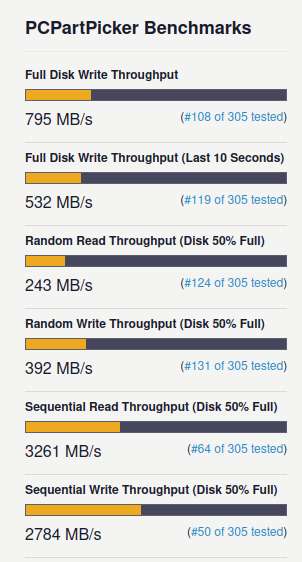
That is a bit disappointing given that the Samsung 990 is only ~10-20% more for a huge performance boost. Here are the benchmarks of the SN770:
And here is what you get from a 990:
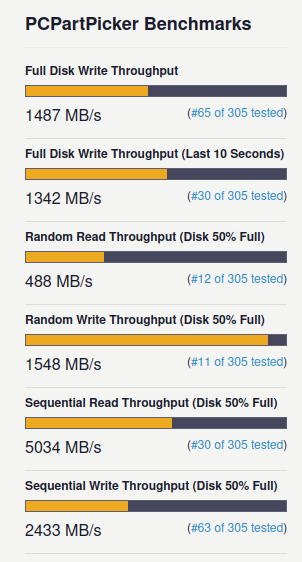
I rest my case, but your budget, money and use case
Samsung 990, you mean samsung 990 evo ?
EDIT: I see you meant 990 pro. Cheapest i could find is 125€ for 1TB version. I am having second thoughts regarding ssd anyway, this all seems over the top for me. Im coming from 250GB 840 EVO and i dont ever remember being held back by this ssd. I still run 2x 2.5" 5400rpm 1TB disks, those limit me occasionaly. I think any SSD i pick will be a huge improvement for me. I could go 512GB and pick a better disk or cheaper 1TB. Right now 512GB would be plenty for me but hell if i know what will change in next 5 years and i dont wanna run out of place in the future.
990 pro is a lot better. But it just seems crazy spending that much money on ssd, while running a gtx 1060 gpu and sticking to 6 cores. I am thinking about my use cases trying to figure out if there is anything where a faster ssd would be good for me. Though things like that are known to come back and bite u in the ass, like in 4 years i start using an app where i wish i had 990 PRO instead of WD SN770
Your motherboard has two m.2 slots, so you could always get a bigger one later, and that one could be of cheaper quality, too. Also, here is something that will blow your mind:
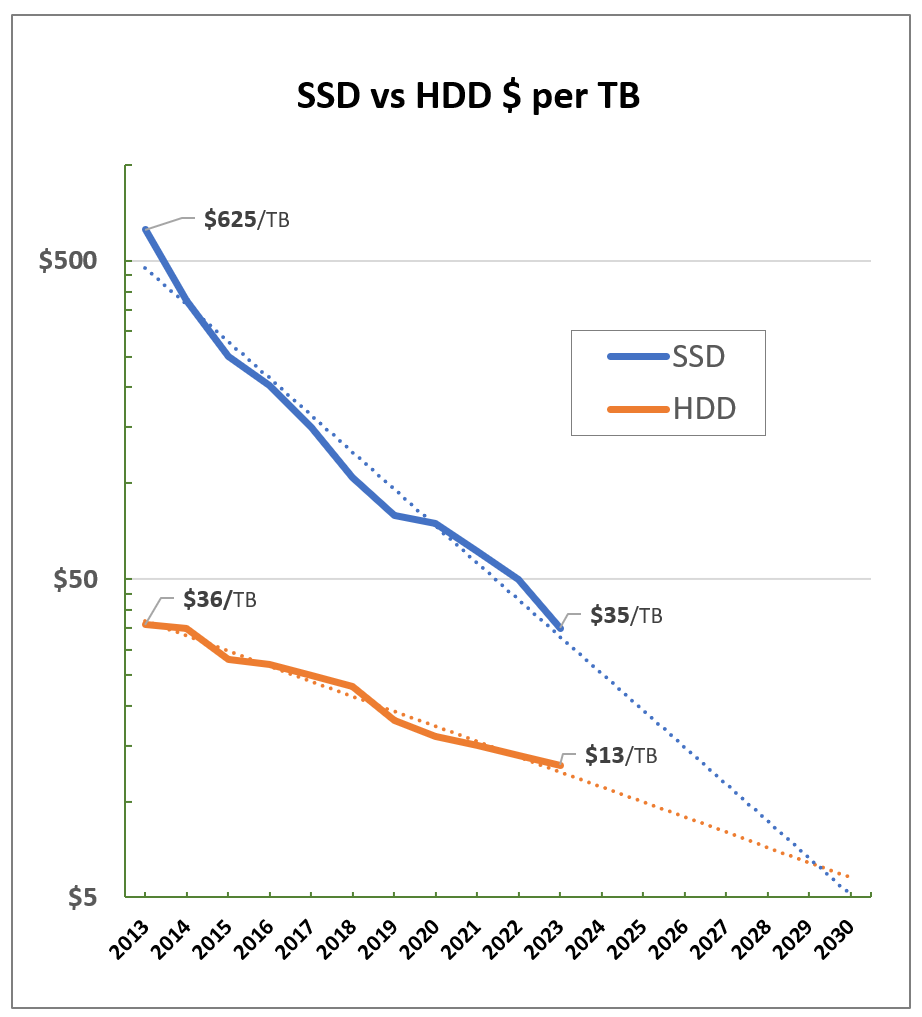
According to that graph you will have 8 TB SSDs under $100 by 2027. Atleast the cheap no-brand SSDs will be that much. So I wouldn’t worry about today too much…
Yeah, i can always install games on second M.2 if i run out of space.
The problem though is that i could find no good 512GB SSD’s for a price that makes sense. The best ones cost as much as the cheap 1TB. So paying 60€ for good 512GB vs 80€ for decent 1TB is a no brainer for me.
Right now i am still thinking that the SN770 might be the best bang for buck out of the one’s offered. It’s supposed to be faster than Crucial p3/p3 plus and Teamgroiup MP44/MP44L.
Though funnily, tomshardware has 2024 updated SSD buying guide and under budget they still list Crucial P3. It’s about the same price as SN770 and MP44L, both are supposed to be a lot faster.
As long as it is TLC it is ok, I always recommend TLC + DRAM drives since that DRAM makes more of a difference than you would think. That said, if it is a question of 10-20€ extra might as well go DRAM but if we are talking 50€ extra then, nah.
This link might help.
Just wanted to say i ordered 1TB WD black SN770 for 87€. Maybe in a while i will be sorry i didnt stretch to 990 pro, but for now i think i will be happy with performance coming from 840 evo sata ssd. I read a lot of reviews and all seemed to be very pleased with the disk, except sustained sequential write, which for my usecase doesn’t matter, the only time i will do anything with much data is when i download a game.
In a few days i will pick up my ssd and then put this computer together. Tnx everyone for your input !
Since i will be changing windows, does anyone have any last tip ? I installed this windows 8.1 in 2013 so it has 11 years of data on it. Im just afraid i will forget to move something and regret it later :S
2 Likes
The best tip I can give; just keep your old system around for a few weeks and transfer what you need / want at your leisure. Go through your documents and downloads folder. Discard everything that is junk.
Most of everything else is discardable; maybe some old saves from some old games, but if it is not in your documents folder chances are it aint really worth saving.
Once you are daily driving the new system, take your last one for one last spin before you realise what a piece of junk it was compared to your current system. Then sell it for $200 on ebay. 
[edit]Just realised you’re just building half a system. In that case, just keep your old drives unformated and again just copy at your leisure.[/edit]
Yeah, i will just put new mb into a system. I have an old cooler master centurion case from 2008 but i really like it since its mostly an empty case that i can modify to my liking.
I have most my data either on desktop or on other non system disks, so thats not a problem. Im more worried about various tweaks i installed and dont even know im using them. So im gonna keep my old SSD attached to a new computer for a while. If i need to check installed tweaks i dont even think i can log into that old installation with new hardware. So after a while i will put it into an old laptop and keep around so i can login and check various sh*t. Im very anxious about new install, i hate changes, hence i had this install for 11 years. But at the same time im looking forward to a new faster hardware. I will be sure to post here how i like it
I have very similar “loss” anxiety as you with my last rebuild. I (sorta) cured it when circumstances ended up forcing me to re-assemble the old system temporarily, and realizing yes there HAD been stuff I “lost” in the transition, but I didn’t actually care that it was “gone” in the year or so I didn’t have access to it. Or even remember that I had it in some cases.
Beyond that, the ‘cure’ is to just copy over your entire drive to an out of the way “backup” folder somewhere on your new install. This was more or less the state for that ~1 year as described above. It’s technically all there if I at some point in the future decide there’s something I REALLY need, but otherwise out of sight, out of mind. I think some people refer to this as data hoarding
Today i built the new computer ! But i left my old one intact and i am infact still writing from my old one. I just assembled the new one and went into bios. Tomorrow i will install windows 11 with that nice guide - its really very simple. Hopefuly today was my last game of supreme commander on my old pc. I decided that i will keep my old pc near my new pc for at least a month, just to make sure i transfer everything. I will post when i see some performance difference.
1 Like