What low-cost hardware should a network novice buy for self-hosting?

I am going to rebuild my home servers. But I am missing the networking hardware to do it and don’t know what to buy. Hence I need the assistance of all the knowledgeable folks.

I pre-order a Mikrotik hAP be3 in March. There is still no shipping date. I will cancel my order. I am done waiting, my current set up is bad and needs fixing.

Current set-up:

-250/250 Mbps coax
-ISP provided modem/firewall/router/switch/AP combo
-Using only 5ghz WIFI
-Flat network

Servers:

One under utilised Truenas box and one Proxmox machine with too little RAM

Truenas Xeon-e3 v6 RAM:64GB

  • SMB Fileserver
  • PBS in Incus container
  • Tailscale exit node
  • Tailscale subnet router
  • B2 for backup

PVE N150 RAM:16GB

  • Immich LXC
  • Cloudflare tunnel in LXC for making Immich public
  • Tailscale subnet router LXC
  • Some VMs

Goal:

  • Get hardware for a secure network for self-hosting.
  • Acquire the knowledge to set everything up in a secure way.
  • Keeping it simple, I am willing to maintain it. But networking is overwhelming for my prefrontal cortex.

Budget: Hopefully less than 150 euro. Can very reluctantly extend to 300 euro if needed.

This is how far I have got in my network plan. I have yet to decide on how to segment the network.
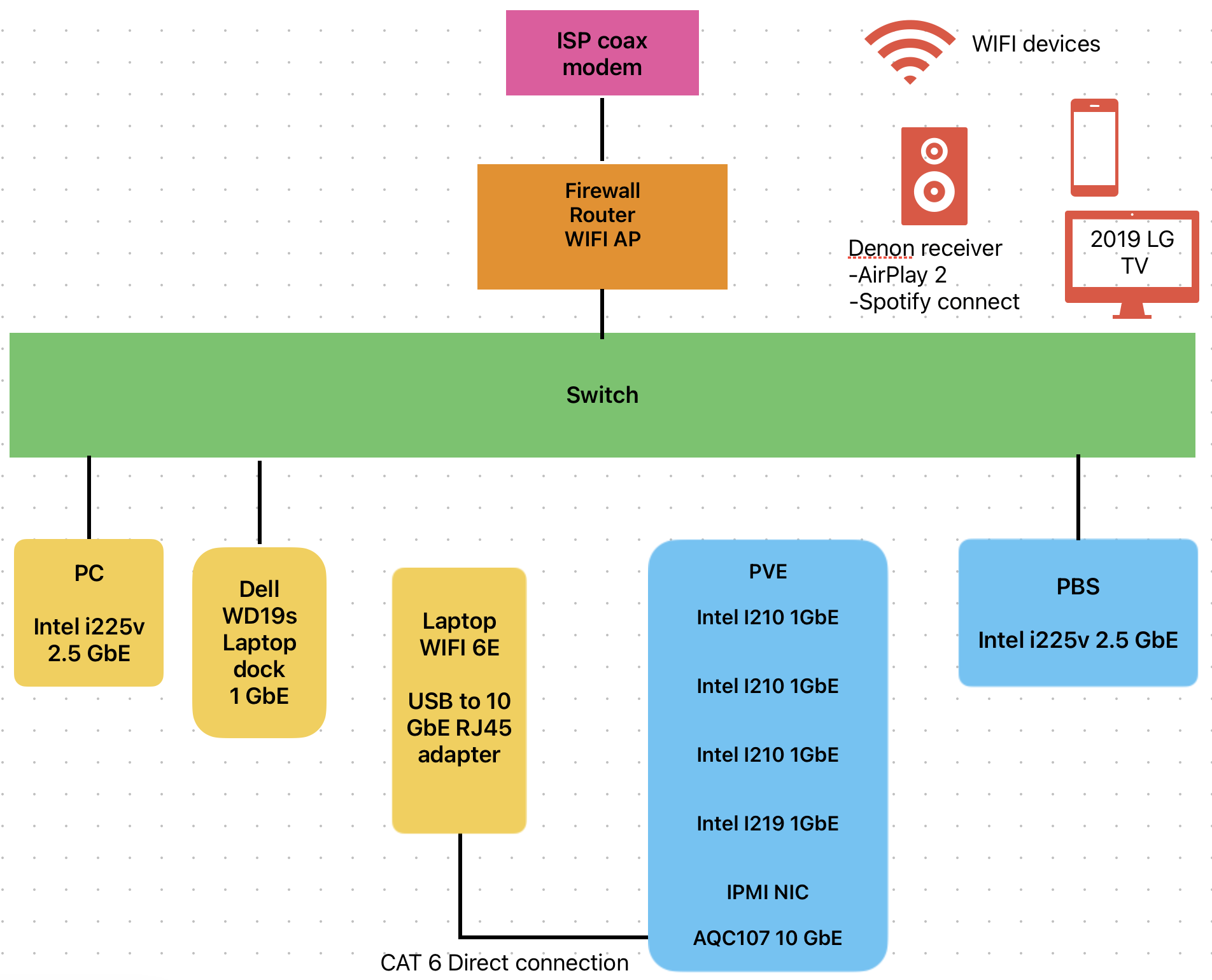
Changed server deployment:

To use the available RAM better. Hence Truenas will make way for Proxmox

PVE Xeon-e3 v6 RAM:64 GB

  • SMB Fileserver with 45drive cockpit in LXC
  • Immich
  • Cloudflare tunnel
  • Tailscale exit node
  • Tailscale subnet router
  • VMs
  • Minecraft server by port forwarding
  • Future addition of GPU for hosting LLM MOE models
  • More self-hosting once I got networking figured out.

PBS n150 RAM:16GB

  • Full Local backup
  • Full Remote backup by continuously alternating ZFS polls between on-site and off-site location

Firewall/AP/Router: With taking into account the recent Level1techs videos on unpatched security vulnerability on many consumer devices I do not know what brand to trust.

Asus, Netgear, Tp-link all seem to play fast and loose. Are Zyxel, Cudy, or GL iNet any better? If going with Ubiquiti UniFi I would have to shop new and used to fit my budget. I am a bit put off by Mikrotik not shipping the device, but maybe I should buy one of their older devices.

After consuming all the threads on the internet and In particular Amber’s Networking Thread . I do not seem to get any wiser. But at least it makes me consider whether I should buy an OpenWRT supported device. If I understand OpenWRT correctly each release needs to get patched and tailored to the specific device. That would mean I am up to the grace of the community for security patches.

WIFI:

  • For aesthetic reasons I prefer built in antennas.
  • 6 ghz is completely empty in my location. 6 ghz would be good but not strictly required.
  • Guest WIFI that can use my speakers with Spotify connect or Airplay 2.

Switching:

  • I know it needs to be a managed in order to tag ports to VLANs. Beyond that I cannot point to what makes one device better than the next.
  • 8 ports is probably the minimum I need. With that I could use all the 4 NICs on the Proxmox Host. I believe that would make it easier to configure VLANS.
  • Fast networking is cool but realistically 1 GbE should be fine. 10 GbE direct connection for SMB will help move video/photos.

I do not fully understand my needs yet. But someone else might know what I need and is able to recommend some hardware that can work for the next 5 years.

Not sure what the issue was with Mikrotik, but they do offer the most config options (to a fault). The software is basically the same across all the models, but you do need to look at the block diagrams to see how the ports are wired. Aka, ports 1-5 are on one switch chip, and port 6-9 are on another, with the CPU bridging the chips. So a device plugged into port 1 can talk at wire speed to port 5. But a device plugged into port 1 needs to cross the CPU to talk to port 9 and might be slower because of that. Just something to be aware of especially with older slower models.

You can run your own router like OPNsense inside a VM on your Proxmox server. I don’t really recommend it because if your server is down, so is your internet. Makes googling the issue harder.

Whatever you pick, the key to hosting internet accessible services is putting them on their own vlan, and isolating them from your internal network. The router can be setup to make another vlan, say 192.168.4.1/24 is the DMZ lan with a vlan ID of 4. The router controls what goes into and out of this network. Aka, your home network (192.168.1.1/24) is allowed to access (192.168.4.1/24), but the DMZ (192.168.4.1/24) is not allowed to access the home network.

Proxmox can pickup on vlan tag ID 4 and you can assign that to VMs. So your Mindcraft server will be inside the DMZ and get an IP in 192.168.4.1/24. Only one physical cable is needed.

Then if your Mindcraft server gets hacked, they are trapped inside the DMZ vlan.

Same goes for any other service that you want to expose to the internet. Put them on their own VM, inside the DMZ vlan.

1 Like

I had similar goals, I found the following things:

  • Upgrading beyond 1GbE was going to cost a lot of money, and I don’t think it would change much
  • I found no off the shelf routers brands with good enough security reputations
  • The above included managed switches, which like routers have their own OS connected to the network
  • Some managed switches can have OpenWRT installed, though they are hard to get in my part of the world
  • Dumb 1GbE switches are very cheap
  • I’ve have had very good experiences with OpenBSD and good experiences with OpenWRT

I ended up not buying any new hardware and just using stuff I had laying around already. The backbone of my network is thus two multi NIC OpenBSD hosts handling routing and network ACL duty and the wifi AP handled by OpenWRT.

VLANs are fun and all, but in my instance I don’t think I’d have gained any security, given I had dumb cheap 1GbE switches already I just used non-V LANS and OpenBSD’s firewall to block/allow traffic between things.

If you can get 4-8 NICs into an x86 box you already own you can get a lot of networking functionality with Linux/*BSD :slight_smile:

Having said all that the real thing that motivated me to post was to say…Is that 2019 LG TV able to reach the Internet? I’d deny that thing all network access! and plug in an rpi or the n150 into it or something…Anything other than letting it on the network :smiley:

1 Like

Thank you Porch and ack for the response.

Maybe my grudge should be with the Mikrotik official partner I pre-ordered from that constantly changes the expected delivery date. Mikrotik might not be to blame for the disappointment of shipping april turning to shipping maybe in Q4.

I have enough NIC ports available to at least try the “forbidden router” and see if it works for me. I use my phone for hot-spot daily so that would be no issue. It is not my preferred solution. But it could work.

Looking at cheaper managed switches they seem to give the option of 1 VLAN per port or trunk port. Is it any issue to connect the Proxmox machine with a trunk port? Or would it be better to use dual NICs, one for DMZ VLAN. One for trusted VLAN?

I have a hard time visualising the setup. Do I get this right? Both OpenBSD boxes do ACL, only one is used to connect to WAN? You don’t need VLANS because everything is strictly locked down with ACL?

I don’t have any more hardware to spare. So everything will have to be bought new/used. From what I understand x86 based routing is not that power efficient and ads more delay.

Yes it is. It is a high end oled so it still gets security updates from LG. But I don’t trust it and should do better.

Most switches supported by OpenWRT are available for me to purchase in Europe.

I found a testimony of using a Cudy M3000 (AX3000) with OpenWRT. It seems doable for me. They can be found for about 50€. Maybe the router/AP/firewall does not have to be more complicated than that?

Then for switching I am unsure. They are all fanless and has some management. I cannot tell what makes one better or worse beyond the number of ports and ports speed for my use case.

  • 180 € Zyxel XGS1250-12 stock or openWRT
  • 120 € MikroTik CSS318-16G-S+IN
  • 120 € Zyxel XGS1210-12 stock or openWRT
  • 80 € Tp link TL-SG2008P
  • 60 € Zyxel GS1900-8 stock or openWRT

If you are going with running the router as a VM inside Proxmox, then inside Proxmox, you define one of the physical interfaces as a bridge (WAN) with no IP address, then in the firewall VM, connect this WAN bridge to an interface of the VM. Then plug your ISP router into this physical WAN interface, and it will be like plugging your ISPs router into the VMs firewall WAN port.

Then you have another bridge for the outbound LAN traffic. This can or can not have vlans on it.

In theory, with a the right managed switch, you can do most of this over one physical port to the Proxmox server by setting up a WAN vlan and then the VM firewall routers between VLANs, but I really like the physical aspect of the WAN being isolated as much as possible and on it’s own physical port and not part of any other bridge or way to easily miss click and bridge LAN and WAN by mistake.

One VLAN per port (often called a switch port, but terms vary) and an option for a trunk port is fine and what you will need 95% of the time. In your VM firewall, you define a VLAN (say #4) on the LAN port bridge. Then in Proxmox, if you want another VM to only have access to VLAN #4, when you assign the network interface, you set a VLAN tag of #4. The VM itself has no concept of VLANs and does not need to know.

Same thing on the cheap switch. The trunk port will connect to the LAN interface on Proxmox/VM firewall that will also have VLAN #4 in it. You assign VLAN #4 to one of the ports of the managed switch, and anything that is plugged into that port is on the #4 network.

3 Likes

Looks a bit like this:

           obsd0
           eth0 ............................. switch0
wan ...... eth1       obsd1
           eth2 ..... eth0
                      eth1 .................. Hypervisor
                      eth2 .................. wifi AP
                      eth3 .................. switch1 

The hypervisor runs a bridge that has filtering rules.
obsd0 and obsd1 have packet filter rules.

Generally there’s a zero trust approach between endpoints on the network.

It would have been much much nicer to have a single obsd box with 5-8 NICs but I made do with what I had.

Latency wise, the only thing that adds significant latency is going over the wifi.

obsd0 and obsd1 are low wattage quad-core AMD64.

Doing things in software sure is less performant, but the wan connection is only 500mbps, and a 1gbE network puts a relatively low ceiling on the performance anyway.

Above networking hardware is all 6+ years old :smiling_face_with_tear: Isn’t AI great!

2 Likes

The best and easiest future proof option; fiber everywhere. Something like this:

Draw fiber once and you should be good to go. The drawbacks is that we are looking at around a 500€ budget here, so this is perhaps not feasible 100% at the moment.

So for a better approach I would buy a 2.5Gb switch and a router with four network ports (one out, one to the WiFi, one for the LAN and one for the Homelab).

Something like this combo perhaps? It will be a dent in your budget for sure, but it is better than nothing. And the Banana Pi has proper SFP ports so you can use RJ45 or Fiber interchangeably.

Hardware

Because I need an AP I will pick up the Cudy M3000 and run OpenWRT. I will first try using it for tripple duty router/AP/firewall. If the processor can’t handle it I will go with the solution @Porch has provided for VM firewall.

Mikrotik CSS318 will be the switch I go for. I find the documentation better than the Xikestor @wertigon recommended. Zyxel web-managed switches will not be joining my self-hosting journey after reading this fine post/thread.

VLAN

This is not set in stone. The TV and speakers needs access to the internet and WIFI for me to have any use with them. So putting them on the guests VLAN seems like a reasonable compromise. Will try and limit them with firewall/ACL/DNS to the best of my ability.

VLAN Name Subnet Gateway Purpose
10 MGMT 10.10.10.0/24 10.10.10.1 PVE UI, PBS, switch UI, OpenWrt UI, admin access
20 DMZ 10.10.20.0/24 10.10.20.1 Public self-hosted services
30 Trusted? 10.10.30.0/24 10.10.30.1 Workstations, phones, internal self-hosted services
40 GUESTS 10.10.40.0/24 10.10.40.1 Internet access and media devices

AI is at least something. Hopefully medical advancements can come to benefit to someone. I had a harder time accepting the previous hardware shortages due to crypto and DRAM price cartel.

Thanks for the advice! Alot of content on the internet make it look like one needs to spend 1k euro for anything decent. Glad I can achieve a good enough network set-up for about the same amount the average r/Ubiquiti poster spends on OCD panels.

1 Like

Not a bad choice. Do be aware it has only 2 RJ45 ports, so you will need to be creative with VLANs if you want to split your network into zones. I still recommend something with a few more network ports, but the Cudy should be good enough for your task besides that.

1 Like

Its made in China State Surveillance TM.

I care mostly about power consumption, so my recommendations will (pretty much always) be biased towards that. There’s a quick trick to make this possible without using VLANs (so no managed switches). Buy a couple of 5-8 port dumb switches (which generally use peanuts for power, like 5W each at full load) and have your router have 4 (or so) ethernet ports.

@HaaStyleCat and @PhaseLockedLoop I believe had the ProtectLi FW4B (w/ coreboot) running pfsense or opnsense (I don’t recommend pfsense and if you don’t want to run something like openbsd or freebsd, at least make the sensible option to use opnsense). That’s an old model (still capable) and probably not sold anymore, but on their site I see stuff like Vault Pro VP2420, which might do the job.

It doesn’t have to be a ProtectLi, just something with 4 or more ports. As far as I can tell, you can get away with 3 LANs for now, 1 for external / untrusted servers (it’s not quite a DMZ, because DMZs imply 2 routers and it’s the network between them), a trusted LAN (wired + wireless all on the same dumb switch) and an offline (IoT) network. The 4th port is for WAN.

You can do this in a forbidden router as well, but I’m biased against that. But because you’re planning to have the server probably running 24/7, I’d probably not make too much fuss about it (yes, if you’re planning a maintenance on your host, your internet connection goes down with it and a router will have fewer patches generally speaking, compared to a hypervisor - but it’s not the end of the world, just not ideal in case your hypervisor breaks on an update).

The setup would be dead-simple as well. Port 1 (LAN) allow it everywhere. Port 2 (IoT) allow inbound traffic from LAN, block all outbound traffic. Port 3 (internet exposed servers) allow inbound on specific ports and IP addresses (I wouldn’t do it at the whole subnet) and allow all inbound traffic from LAN. Port 4 is WAN, traffic is generally blocked, unless otherwise specified (like going to exposed servers subnet).

As you can see, no VLANs involved. Every physical port will correspond to a port switch. If this will be running on a dedicated router, then you might need 2 ports on proxmox (1 for internal / management interface of the host and some trusted / internal VMs and the other 1 for VMs in the “exposed servers” net). Cheap, should be really low power and you can expand later, when you have the money, but repurposing 1 of the ports on your router to use VLANs and go to a managed switch, so you have some expandability.

I hope this helps.

2 Likes

If noise and power was not something to consider in this hobby. How easy life would be. I think the CSS318 I ordered with 13 W is a bit high but still it will be good enough.

If the OpenWRT and on the Cudy does not work out the way I expect for being a firewall/router/AP. I will make sure to checkout ProtectLi or other “high” port firewalls. It seems like a common and good solution.

I ordered everything yesterday. I will have to be patient because I was for once able to find all I need outside of the Bezos empire.

EDIT: Everyone has been very helpful. I am marking this work in progress solved for now.

2 Likes

It does do the job but it’s week. If you can find one of the workstation grade multiple ethernet multiple gigabit minis forum pc’s. They are far more performant

3 Likes

To do a follow up.

The Mikrotik is a fine enough appliance. But I am not very happy with OpenWRT for my use case. It is entirely a skill-issue on my side. If I did not break the clause for return by flashing it with OpenWRT I would have returned it.

There is just a too-steep learning curve, together with a lack of interest from me, to make it a good match. I am starting to understand the appeal of Ubiquity.

After having learned what is included in the EU Cyber Resilience Act regarding routers. I would be more trusting of any western based brand to do a good enough job for my use case. But it only comes into effect on the 11 December 2027.