Wayland does work and does stuff people claim it can't

I personally know very little about either Wayland or X11, but I want to pipe up to point out that, according to people who do know about these things, X11 has far better accessibility support than Wayland.

Setting back Linux accessibility decades by adopting Wayland and dropping X11 should be a nonstarter, and given that accessibility is a legal obligation in many contexts (particularly educational and corporate), it’s hard for me to fathom that any distro, let alone one with support contracts, could consider it.

In short, if what I’ve read is accurate, Wayland absolutely doesn’t work in one of the most important ways it must in order to be a viable replacement for X11.

1 Like

This is why I said Wayland will likely be just fine for most people in ten years. :wink: (Ten years is possibly giving the team a lot of credit, that’s pretty fast.)

As for my above “rantsplenation” I always worry things aren’t fleshed out well enough to understand but if I go “all detail” it becomes tl;dr and everyones eyes glaze over. So I will reframe with this…

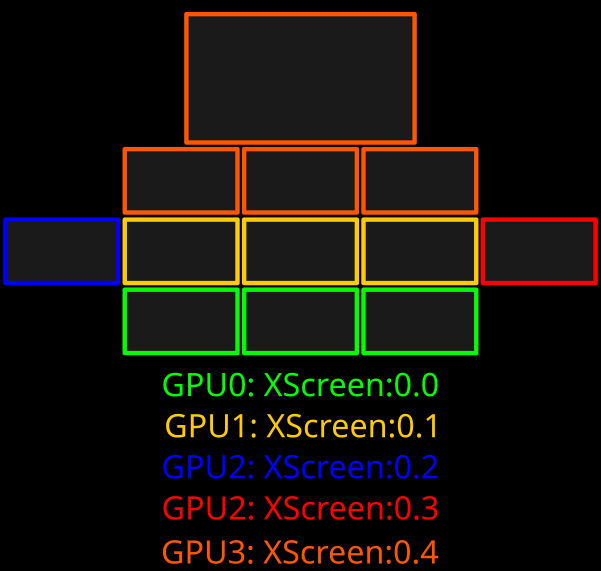
For my use case Wayland outside all the basic “X Forwarding” and basic application use cases must be able to run this configuration. Keeping in mind the Wayland compositor can not be allowed to group the GPU’s or it will nuke performance. So please, Wayland “experts” explain to me how Wayland will cope with this setup. By “cope” I mean recreate functionaly with feature parity.

3 Likes

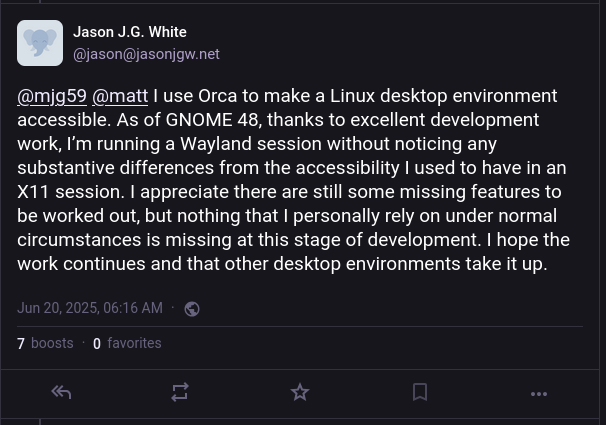
Ya the people in that thread have things a bit wrong things aren’t flat out broken under Wayland, at least not anymore not since GNOME put money and time towards getting it fixed. This was a blocker when they talked about dropping X years ago.

The linked blog post also links to this blog post, from a blind user.

"Wayland used to mean losing access.

AT-SPI was fragile. Orca was inconsistent or silent. Flat review didn’t work. Login greeters didn’t speak. There were no logs, no fallbacks, no recovery paths.

X11 was ugly. But it was predictable. I stuck with it because it let me work — not well, but reliably.

Then I tried GNOME on Wayland.

And… it works. Orca is responsive. Focus tracking behaves. That ancient modifier bug where Caps Lock would stick after Orca commands? Gone. That was an X problem — and Wayland fixes it.

It’s not perfect. But it’s progress I can feel."

He points out as it sits right now only GNOME has this working and i assume much of those commentators are not running GNOME.

We need consistency.
We need a minimum set of working portals and interfaces that every compositor supports — not just on paper, but in practice.

And to be clear: this isn’t GNOME’s fault.

I know hating on GNOME developers is popular. I’m not doing that today. GNOME is the only reason Wayland accessibility is usable right now. The work they’ve done is real, and it’s miles ahead of anyone else.

No one else is quite on GNOME’s level.
KDE is trying — seriously trying. COSMIC too. I know that because I’ve spoken to the people behind them. They care. They’re listening. But GNOME is still the only desktop where accessibility isn’t a maybe — it’s a working reality.

It is important to note this stuff was hardly ideal on X and stuff was broken there we are more trading a different set of broken stuff for another, but with hope of it being fixed.

image

It is not as broken as some people in that thread claim and i bet by the time whatever Fedora release RHEL11 the issues will be solved. The real change happening is more that X will be left for stuff like RHEL10 to be supported rather then in Fedora or other stuff running the newest version.

For the same reason I go out of my way not to run pulseaudio apps in a pipewire-pulse wrapper, I hesitate to run my entire X desktop session in an xwayland wrapper.

Although using Gentoo, I don’t feel the same pressure to update as a Fedora user might.

Yeh, ubuntu dropping X11 for wayland is going to be what pushes me back to something like gentoo

Whatever gripes people might have with Wayland, X11 is simply not an option.

If nothing else, it’s a security nightmare. Or more like cart blanche invitation for remote pwning one system by strangers.

There are plenty of exploits to capture user’s every input in every app through owned browser etc.

Well given Wayland has no ability to run my hardware config it’s “simply not an option.” More so your statement rests upon some magical unspoken “reality” that Wayland will somehow NOT be a security nightmare as if the dev team is clairvoyant and will not accrue exploit after exploit over time. This is magical non-sense. Perhaps don’t allow your browser to be “pwn3d” first…:stuck_out_tongue:

3 Likes

Also just as a matter of opinion, people trying to ram wayland down my throat despite it not being what I need is motivating me to go out of my way to avoid that shit.

2 Likes

I’ve seen it happen on my system.

WRT to “security” of X11, there is nothing to debate.
X11 “Issues” are well known for ever.

I wouldn’t touch it with a barge pole.

You are ofcourse free to stay ignorant, I certainly don’t have an itch to search for data and documentation for you.

You waving a strawman security argument as the sole reason to migrate to wayland regardless of any other details is hilarious astro turfing at its worst.

1 Like

People who say Wayland is fine and works often don’t do anything advanced. They use stock Gnome or stock KDE with the stock applications. You do anything more advanced and everything breaks down. I’ve spent weeks configuring a system for both Sway and Hyprland and in both cases I just had to go back after a few months or weeks because it was just too frustrating. I’ve written two posts on it:

Hyprland is far better at really trying to fix things and get things right, but it’s still limited a lot by the Wayland protocol.

Here is one big issue. You have one of those fancy Level1Tech KVM switches? I have two. If you have one monitor and Hyprland or Sway, and switch to another machine, both of those manager crash. They cannot handle every monitor being disconnected.

If Hyprland has two monitors, it will move all your workspaces to the other monitor. This crashes Librewolf and a few other applications 50% of the time. So switching to Windows meant I might have to restart some things.

i3/X11 can handle monitor disconnects without moving all your workspaces. xrandr also shows all of your display adapters. swaymsg, wlrandr and whatever the Hyprland tool was could not show your disconnected adapters. I really want to see my disconnected adapters and I couldn’t find a way to do this with any tool. Why is this very basic information entirely inaccessible in every Wayland environment I tried?

X11 might have been a steaming pile of technical debt under the surface, but it was the right separation of concerns. You had a Window Manager that handled windows. It talked to a display server. Applications talked to the display server and were moved around by the window manager. You wrote a screenshot program and you only had to write it once. It would usually work on Enlightenment, XFCE, KDE, Gnome, IceWM and everything else without issue.

I’ve never gotten Flameshot to work with Sway or Hyrpland and all the slurp/grim combinations are a poor replacement. There are xdg-portals that need to be implemented on each display manager. Protocols may or may not be implemented on different composers. Combining the window manager with the composer is absolutely insane. It’s like Itanium combining the compiler and scheduler. It’s too much.

Sure my last attempt was last fall and you might say, “well you should try now with the bleeding ed–” They’ve had literally over a decade to make something that isn’t hopelessly broken.

XLibre has already fixed the xrandr and nvidia ABI issues people pointed out. If Wayland was so wonderful, we wouldn’t be having this debate at all. I would love to use it. I have tried. Every time it’s pain and agony and I switch back so I can have a system that works! If you say it’s a problem with x composer, so now issues have to be fixed with each an every individual composer?

I hope Xlibre succeeded, add BT.2020/HDR support, additional security and all the crap Wayland promised, and we see GTK and Qt backtrack and add X11 support back in to their roadmap. I’m tired of Wayland people telling me it works fine and I’m just mad because “my favorite apps don’t work.” Gnome Keyring is not my favorite app! I do not want to use it! But every chat application and build tool feels like they had to depend on it, and if it doesn’t popup to unlock my keyring because I’m using Wayland, that is a show stopper!

6 Likes

I do run stock GNOME because it does all that i want though i do sometimes add a weather widget and that all works fine.

My work machines have been running Wayland since Fedora went with it default in 2016, our security camera software and 100% of software i need for work runs fine. Which granted my job is 60% looking at a vim or ssh window sometimes both.

X11 was already moving to the window manager handling everything to work around the issues with X. The main Wayland dev worked on DRI, and mostly just went ok but what if we did this but just handed over the last few things over to the WM.

No one is “forcing wayland down anyone throat” developers don’t want to maintain the x11 stuff anymore it is why for x11 constitbutions and maintainers collapsed now about half a decade ago. Why KDE moved x11 session into maintenance only mode and mostly only working on critical bugs in 2018, and GNOME earlier then that really.

Wayland’s biggest issue is that X11 was already most of the way to becoming it in terms of just handing work off to the compositing window managers, and so the benefits are mostly in making life easier for GNOME/KDE maintaining the compositors. Keeping both maintained has split dev resources and it seems people are getting tired of it.

GNOME has been pushing to finally fully kill it for years at this point, Fedora has more or less removed it fully. RHEL dropped it with version 10. On x86 the benefit is mostly for developers and that makes it a harder sell to end users. But on like Apples ARM chips the way the whole thing works is not very in line with some assumptions made in X which is why the devs for that never really got it fully working.

I game, I run my work applications, sure I do run stock GNOME. Screen capture and screenshots built into GNOME work, and that is all i have ever needed. OBS and Discord work for capturing the screen. I have never used a KVM on a desktop machine before only on servers, but idk that could be broken i guess I don’t have one to try. I feel I do plenty of advanced stuff.

1 Like

If you, or someone you know, are at risk of such exploits, run your browser in a sandbox; that should mitigate a large number of such exploits as well.

I’m sorry but that sounds pretty much like the definition of ‘forcing Wayland down people’s throat’. Want to use GNOME, or any part of it? Use Wayland then.

Not sure whether that is so correct. According to what I read in the context of the XLibre fork, contributions and pull requests were piling up, which would tell me that at least some people were willing to work on it, but the maintainers chose to ignore the lot, and concentrate on Wayland instead. They were actively trying to kill X11 by actively ceasing the necessary maintenance activities.

1 Like

This is a GNOME-specific extension to their own compositor, not available for anybody else (as they are not using GNOME’s Mutter compositor).

KDE is working on their own copycat of the same thing, GitHub - KDE/krdp: Library and examples for creating an RDP server.

I don’t know the state of that project but afaik it’s not out of beta yet.

Everybody else is boned, because of wayland’s architectural limitations for security and the lack of concerted effort to make a single protocol a generic “remote desktop” application can plug into, as is often the case for Wayland.

In general, a lot of the stuff “works better” on the bigger DEs because they add their own non-standard extensions or workarounds, while the smaller ones that try to rely on the standardized parts of the protocol suffer.

Oh yeah, choosing what do do on your own free and opensource application is literally a warcrime. By the same logic, any application developer choosing arbitrarily what he wants in his own application is “forcing X down people’s throats”.

It’s not like there are dozens of other GUIs for Linux you can choose if you don’t like GNOME for any reason.

A sandbox cannot mitigate the fact that X11 allows all applications access to key and mouse and screen.

If you run with Wayland you can install the browser with Flatpak and then use Flatseal to operate flatpak permissions to lock off any access it does not need, then it’s really sandboxed and can’t just screen record and keylog everything.

2 Likes

Are people required to maintain code they don’t want to so they can avoid “shoving it down someones throat”?

A lot of GNOME is very much made by volunteers there are some people paid to work on it, but if they don’t want to support something they don’t have to.

Where does this logic end are all developers required to maintain alternatives they don’t want to?

The xlibre guy only started working on x last year it has been suffering from a lack of maintainers for 7-8 years at this point, there is a big difference between someone willing to make some contributions and someone knowing enough and the time to help take over maintenance.

If I want to shutdown a project I own in favor of working on a replacement. I have no obligation to work on it or turn it over to people, they can fork it and do what they want.

GNOME/KDE devs have both seemed to say similar things in git issues and merge requests when it comes to splitting out and removing X11 components and that they find it much easier to work on Wayland, and that is why they have no interest in dealing with X11 anymore

Ya, but i run GNOME at home and work, and more or less only care about it. Plus in all my years of running Linux and managing Linux servers I have never once had a need to RDP or VNC into a Linux machine. So also just not something that has bothered me at all

Whether you like it or not, you can’t require anyone contributing to FOSS to do anything. However, whether or not removing choices/focusing on one main component (here Wayland) is equivalent to ‘shoving it down someone’s throat’ is orthogonal to the first question. Either way, it makes the user who depends on others to develop the features they want/need powerless. Unless the user can and wants to contribute themselves.

the fact that you only care about GNOME is probably why you are so flabbergasted by people claiming wayland can’t do some things.

GNOME != wayland, as I said they do work around things that wayland protocol has no standards for.

another example, OBS on gnome had extensions like this GitHub - fzwoch/obs-gnome-screencast: GNOME Screen Cast OBS Studio plugin that allowed to use screen recording since like 2019, while OBS was not working on other DEs with Wayland

so you can refuse to contribute on something, but it is equivalent to “shove it down someone’s throat” because the users are powerless?

When the users start actually financing the development and not just using something for free they can have more say about it.

Recycling the same arguments used for windows (where the user is paying for a product) with a FOSS software the user isn’t even paying for is kind of apples and oranges.

I will say that I don’t do many “advanced” things to my linux or anything like that BUT I can say from recent experience I ran Linux Mint with X11 and it felt jittery and a few games refused to work right or at all. I switched back to Arch with wayland and all of those issues are gone completely. It’s very obviously not an apples to apples comparison but I feel that for the overwhelming majority of users, which likely don’t even know what X11 or wayland is but still have to deal with their issues whenever they present themselves, this is what matters. I install linux, I am presented with an immediate feel of the system. Does it feel smooth or does it already feel off. If we want linux to grow we should make sure that whenever a new user installs linux things generally work. My experience from watching friends make the change is that more often than not they will work around something not working and not really spend a lot of time thinking about why it’s not working.
In my dreams how things will end up is that both X11 and Wayland get completely fixed and it just remains a choice but both somehow support each other so that it just depends on which one you like more :smiley:

This thread comes off all wrong, as trying to convince people to use Wayland despite it not being a best fit for them. As a developer who has to develop around x11 flaws and waylands flaws, they’re both BROKE in a number of interesting ways, same as windows. This is nothing new and fan-boying anything which is what appears to be happening here doesn’t help anything. Telling people to use wayland or x11 over the other is about as effective as telling someone to use gnome or kde over the other.

Lets let everyone use what they want the whole point of linux/gnu and stop trying to force everyone to use the same things, lest you want to turn linux/gnu into windows.

7 Likes