Analog Out and Microphone Input on the Wave XLR don’t work on MacOS when connected to the KVM but does work when the Wave XLR is connected directly to the Mac Mini
Products
2-monitor KVM with 10 Gigabit from the level 1 techs store.
Mac Mini M4
Wave XLR - Microphone Interface
Desktop PC Dual Boot Windows and Linux
Monoprice Essentials USB-C to USB-A 3.1 Gen 2 Cable 10Gbps 3A 30AWG Black 1m (3.3ft)
Wave XLR USB-C output to KVM USB-3 A Input on KVM (tried both front and back inputs using the Monoprice USB-C to USB-A 3.1 Gen 2 Cable.
KVM USB-C output to Mac Mini M4 USB-C Input using the Monoprice Ultra Compact USB-C 3.2 cable.
Tested Conditions
Analog Out, Volume Control, Microphone Input work on:
linux
windows
Analog Out and Microphone Input on the Wave XLR don’t work on MacOS when connected to the KVM but do work when the Wave XLR is connected directly to the Mac Mini.
I purchased new cables to ensure it wasn’t that. Any advice?
I have a Focustite Scarlett that also doesn’t work though a hub. I never did come to any technical understanding of what the reason was but while I was looking it seemed the general consensus was to always try and connect audio interfaces directly which is the workaround I ended up using.
I did find reports of hubs out there that worked with at least the Scarlett interfaces but never anything but guesses about what sets the hubs that work apart from the others that don’t…
Not very useful I know but maybe the bump will help.
can you take a pic of how you have it cabled? the wave xlr needs to go in a usb3 port and you will have to power cycle the kvm if you had it plugged into a hid port (the wave xlr is not hid)
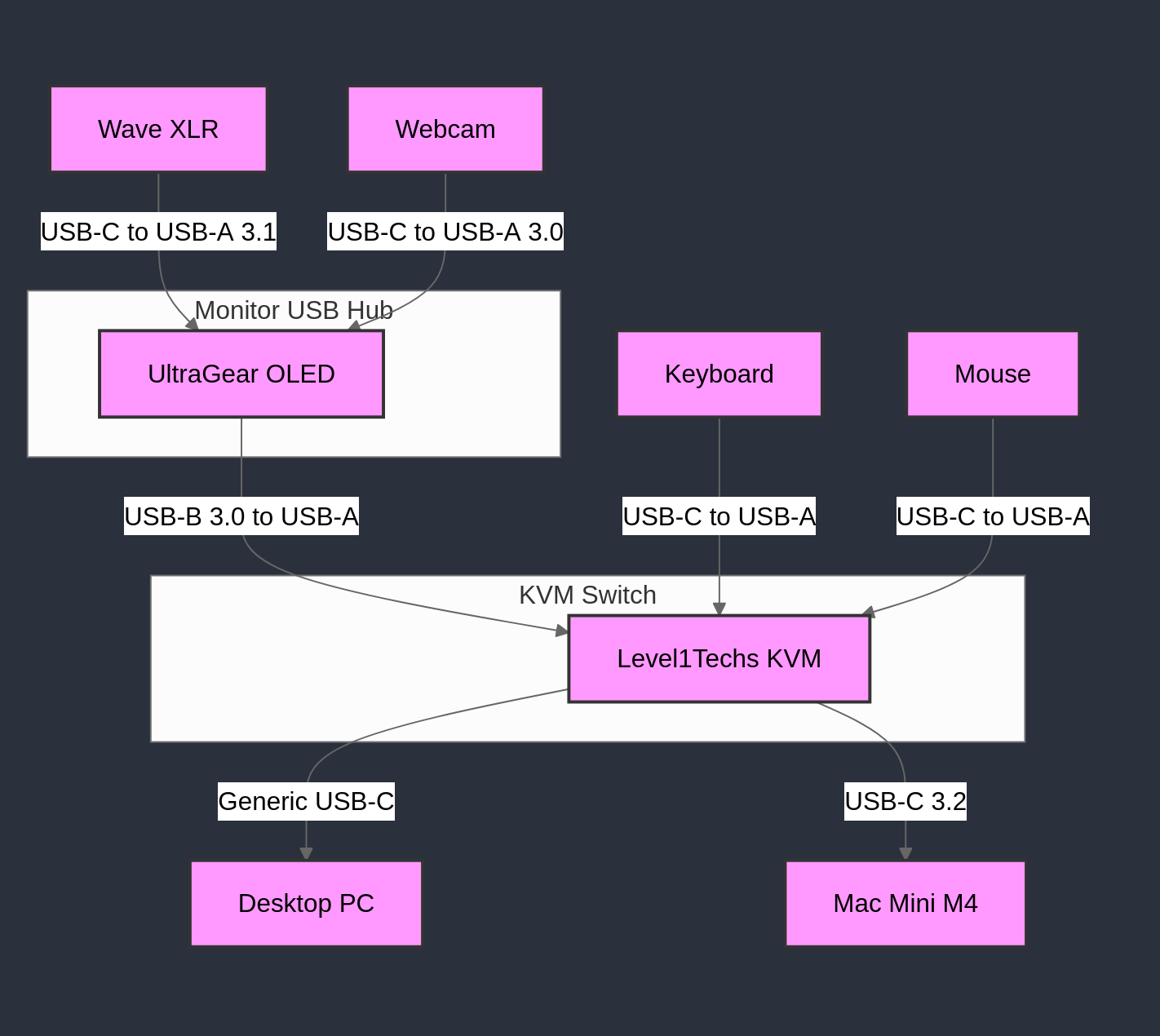
I followed Amber’s advice of hooking up the KVM to a powered hub on my monitor, and that worked to fix the issues of audio-out not working and of audio-in not working. I’ve attached a wiring diagram so people can see my solution for themselves.
User Feedback / Requests
In future versions of the KVM providing power to the USB A inputs would be much more ideal at least for my use case.
Having one or two additional USB-A (non-HID) inputs on the back of the KVM would be nice. Only having one is quite limiting, and plugging in hubs adds another point of failure as well as bandwidth limiter.