My goal is to build a workstation that supports multiple virtualized Linux systems for work, and one or two Windows systems for gaming. Generally, I was hoping to have lab that I could launch the VMs from he host system. I have read many articles suggesting this was possible with Proxmox, but no matter what I have tried, I cannot get Proxmox to install. I get this error “waiting for /dev to fully populate”. Which according to the forums means the VGA drivers are not loading. I haven’t found way around this, even connecting to the onboard VGA port.
I know there are options like Hyper-V or VM Workstation, but have always gotten poor performance from them in the past. Is there anything that could be recommended for what I am trying to do? Or perhaps a workaround for Proxmox?
Well, that’s some swank-ass parts you got there, good going for a home lab, it’s gonna be pretty slick.
Now the bad news, I don’t think you are going to enjoy trying to use EPYC as a daily driver computer. There is no chipset for audio/normal people comforts, it’s pretty much just all raw PCI-E lanes.
Try this?
" Issue – fresh Proxmox install stuck with /dev to be a fully populated error during node reboot. This issue occurs when the OS tries to boot with a non-standard VGA driver . To prevent this issue, we need to add and modify some grub options. Restart the node, and then press the E key from the Proxmox boot menu."
Ain’t that the good part though? Now there’s no question what can or can’t be passed through to the guest. If it’s a PCIe device and hanging off the CPU lanes, it’s all up to the user. Arguably better than a USB audio device dangling off a bus that could be part of a very bad IOMMU group. But PCIe sound cards are still on PCIe 2.0 I think—a pretty poor use of PCIe lanes which have many times more bandwidth in 2023, IMHO.
I did use GPUs HDMI when I was running my gaming VM on my server. I was about to plug-in a bluetooth USB stick and connect my bluetooth hardware, but HDMI port saved my ass. Yeah, servers don’t have audio And the HDMI isn’t a recommendation for anything advanced as far as I’m concerned.
Depending on the board, you may be even limited on that side. USB 2.0 that are designed for plugging Keyboard and mouse into a KVM isn’t suited for all hardware. But I guess you can always add a soundcard in your x16 CPU lane server PCIe slot
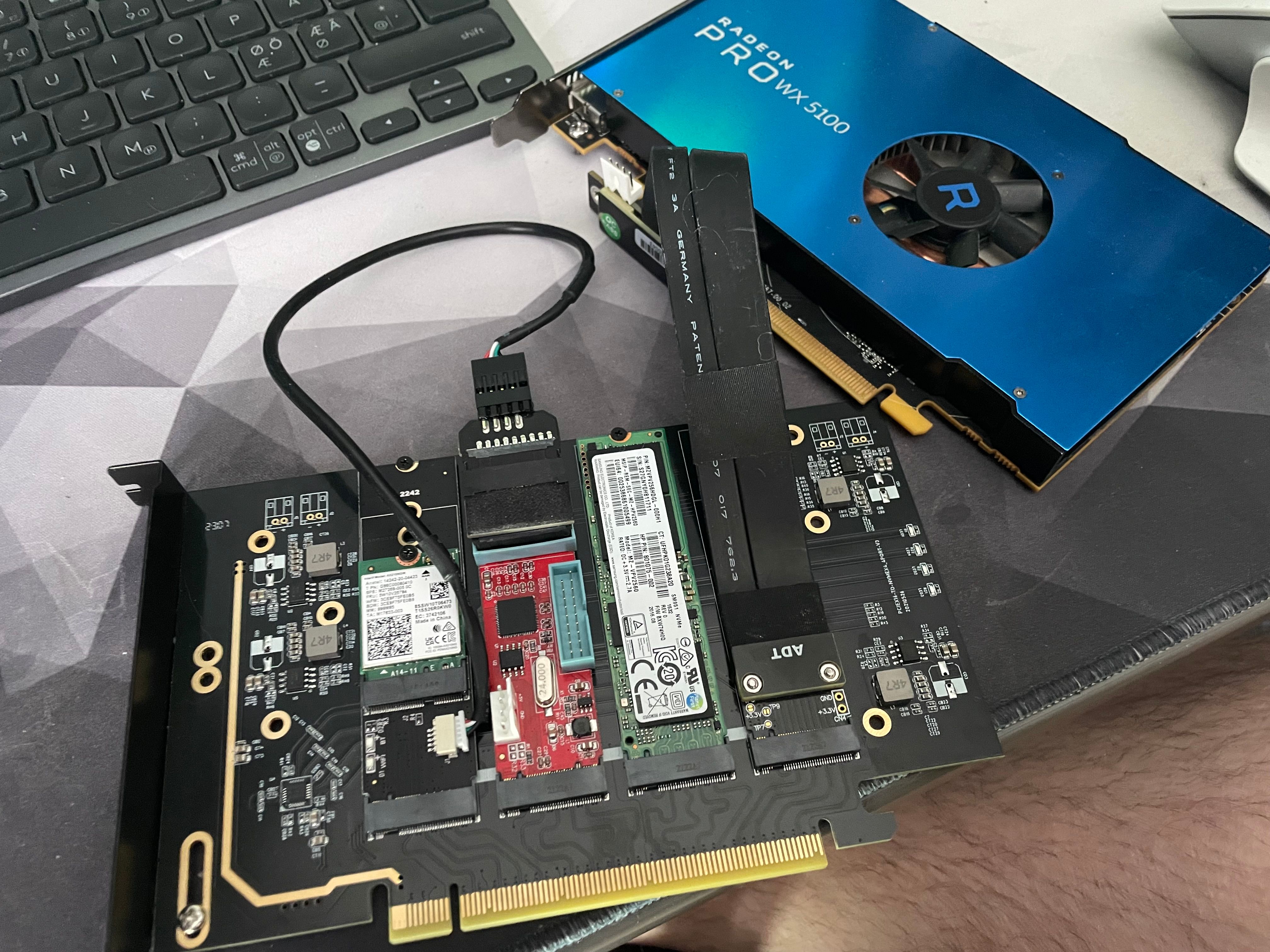
M.2 to M.2 whatever the wifi key is with AX201
M.2 USB card with Renesas chipset
Samsung SM961 or something cheap OEM drive
M.2 to PCIe 4x riser with MAD WX5100.
Those use the berg power connector so yes, it is janky.
 And the HDMI isn’t a recommendation for anything advanced as far as I’m concerned.