I have a bit of a special case, maybe you are in the same situation and don’t want to waste money and time with trial and error, so I detail my experiences and what works and didn’t work for my setup.
Situation:
- I own two older PC-Systems with VGA out and want to connect them to my current TV and Soundbar. Audio (Stereo) and Video should be outputted fullscreen on the TV, I want to use my old gameport peripherals on these PCs
- My TV is a Samsung QN95B and a Samsung Soundbar Q950A without any anlogue inputs
- I have one modern HTPC/Gaming-PC connected to the TV
- I have a flat mate who is a bit finicky and wants the TV + already connected appliances working full time, so I cannot simply leave things unplugged or in a general messy state in the living room
Failed attemps:
- I got the systems and converter set up. The soundbar has 2 HDMI-inputs which can pipe video and audio to the TV. But it won’t process / switch to sound-input from another source (optical-in for example) while one hdmi input is active. The hdmi-in from the soundbar are a hassle to use and require multiple switching of sources in the TV settings to provide any video output. (I also tried hdmi native devices with the same result)
- I also tried some “cheap” (heh, 50 Euro) chinese hdmi-audio embeder (the only models I found with a 3.5mm audio-jack) to get audio via hdmi but they won’t accept the digital video output from the Aten VGA-DVI converter
Solution (short):
- I bought a Elgato HD60 X and use the preview/USB output with OBS and mix in the audio via the analogue line-in of the PC
Solution (long):
-
Display-chain:
I have setup a display-chain which converts VGA to hdmi with low latency and enables me to switch between different analogue and digital sources. This is uncommon and took me lots of trial and error and longer research because most VGA > digital converter solutions simply suck or introduce to much latency or are really expensive. It also should fit in my audio rack. -
Setup:
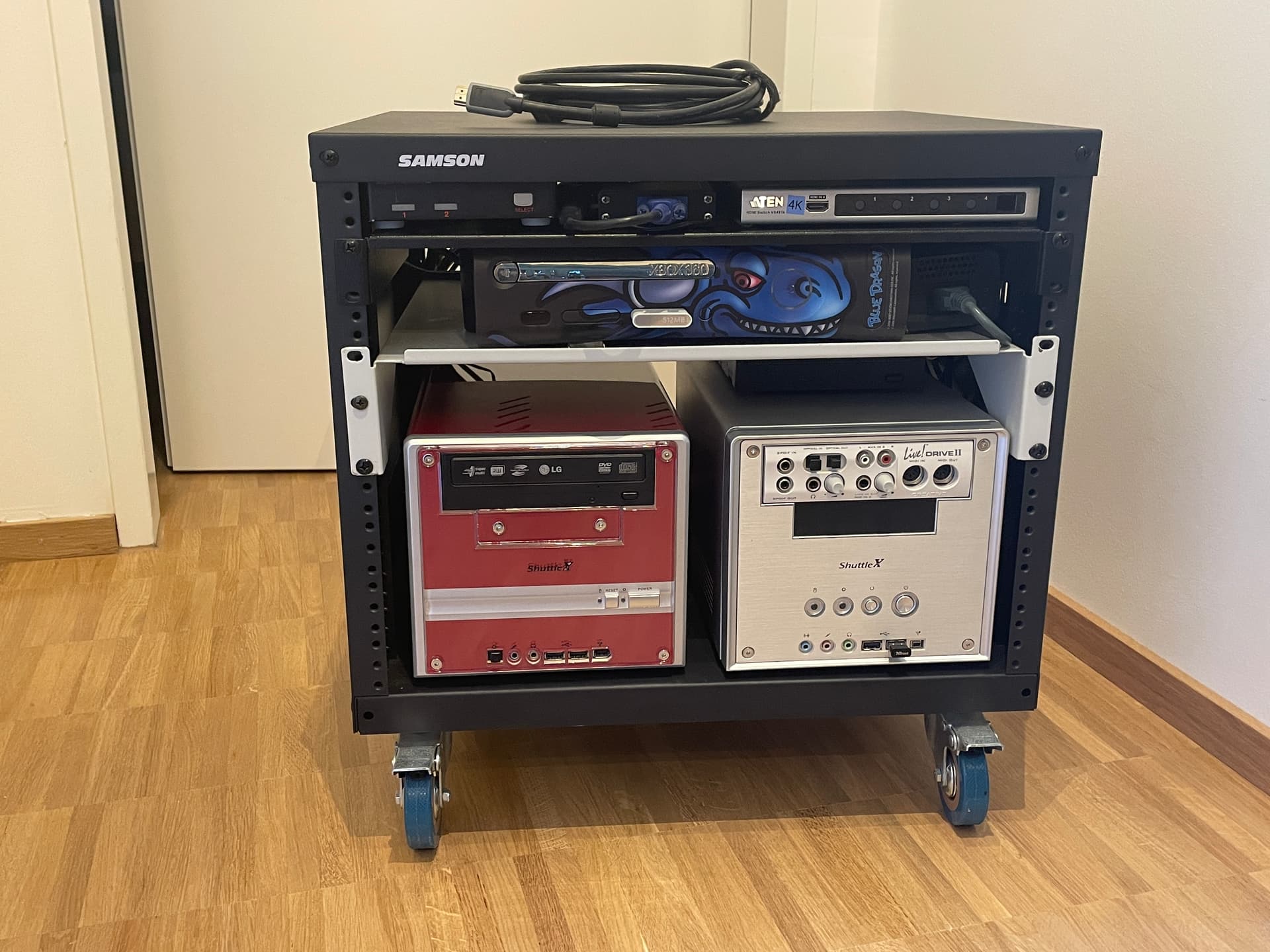
Audio rack on wheels:
PCs with 3dfx Voodoo 3 > Roline VGA Switch > ATEN VC160A VGA to DVI-D Konverter > DVI to HDMi passive adapter > Aten VS481B Switch (1080p) > Elgato HD60 X -
Option for VGA switching:
I also use a discontinued Roline DVI-i/VGA switch + DVI-i-to-VGA adapters to switch between 2 VGA sources, but there many good solution for VGA input switching. Another advantage of my particular device - it can be powered with the PS2 connectors. Old KVM VGA cables which combine PS2 and VGA output are recommended for this, to keep everything tidy. A gender changer for VGA (male to male etc.) is also a good investment to keep cable length short. Unfortunately I cannot find any details of this appliance, but it is a 20+ year old device after all. -
VGA DVI/HDMI conversion:
ATEN VC160A - VGA to DVI - This is the device I use. Handled all resolution I threw at it, mainly 320x240; 640x480; 640x400; 800x600; 1280x1024. It blanks out for ca. 1-2 seconds after a resolution change, but this seems to be the default behavior. I must admit, I run mostly common 4:3 resolutions, nothing to exotic. It doesn’t add noticeable lag. -
ATEN VC182 (alternative) - Aten has also a version which has direct hdmi out and line-in too. I just recently found out about this device. Can’t say if this works better. It also has an internal scaler according to the description so it should have a steady output resolution.
-
hdmi Switch:
ATEN VS481B is a hdmi 1.4 switch and still on sale. ATEN hdmi switches have been very reliable for me over the last 10+ years. It features automatic input switching if a new source gets powered on, thus it is really convenient. We are dealing with 1920x1200px resolution max and no special sauce (no 3D; VRR; HDR), so most hdmi switching solutions should suffice. -
Video Capture / Display:
Elgato HD60 X - According to some streamers with OBS the latency of the video-stream over USB is ~30ms and overall it should be the only USB HDMI capture device with the lowest / playable latency (ignoring the pass through hdmi-out port). I must admit, I don’t notice much latency at all - but everyone has different perception. In OBS I set the display space to 1920x1080, added a video device as source. I edited the video source and chose the Elgato HD60 X as capture device. I chose “default/standard” as resolution. I edited the OBS option and also selected 60fps as video output. I think you have to do this for the video capture element as well. You can then put OBS into fullscreen (projector mode) via the right click menu. I duplicated the scene, added 4:3 filter to the video element and centered it. This enables me to switch between 16:9 and 4:3. Quality: The colors appear less saturated compared to connecting the PC directly to the TVs HDMI inputs. I also notice some color banding in darker areas (this might be the result of the 16bit color mode of the voodoo 3 card). Its possible to play with the color space setting within the video source element in OBS to correct this. I didn’t notice many obvious compression artifacts.
Some things to note: My PC in the living room has a nvidia RTX 4080, runs Windows 11, OBS uses nvenc and my refresh rate is set to 120Hz. It might be that another HW base introduces more latency (USB port, encoder types are variables). -
Storage
I use an 19 inch audio rack, “Samson SRK8” with Delock 19 inch rack shelfes, and a Secomp powerstrip with the receptacles facing inward. I use it to store the whole video setup and the PCs very neatly.
This rack is available in German/EU Amazon. It can fit under a regular office desk, can house 2x Shuttle Mini PCs and at least another ~4U device. The goal is to roll it in, connect the hdmi plug and audio and roll it out when done.
The whole rack can also be disassembled completely put away very flattened for long term storage.