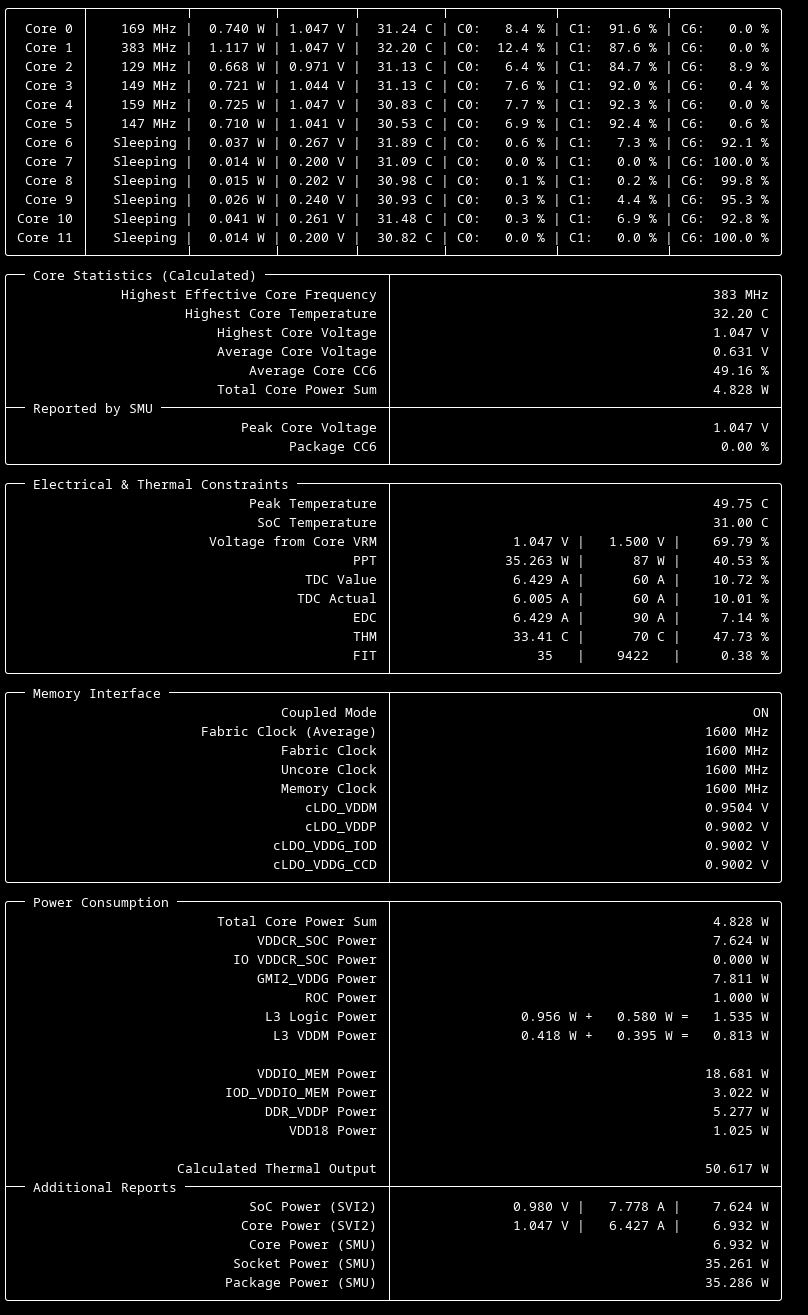
CPU power looks normal. Something else in your system is causing your high idle use.
You don’t need a thermal camera. Air gets warm around sources of heat. Feel where the air is warm.
I’m guessing you’re using a stock/included CPU cooler or something to get those wild CPU temps, so that might make it difficult to tell where the power is coming from. You’re only measuring the tower, right? Just the one plug going into it? There’s something accounting for enough power to match your CPU, so it’s going to be pretty dang hot whatever it is, or whatever they are.
I’m using a Thermalright AXP90-X47 cooler
Yes. I am only measuring the tower
40W package power for a CPU under no load is odd.
THanks, seeing all that values at once is helpful.
- cpu is definitely using way more more that it should use for given workload @ stock configuration
- voltages seem to higher than expected for cpu cores, but I have no reference
Try disabling xmp/expo and remeasure and compare the results here.
CPU is certainly using more than it should, which might be explained by way to aggressive auto-overvolting when using XMP/expo profile.
That does not explain overall system consumption, just part of it though.
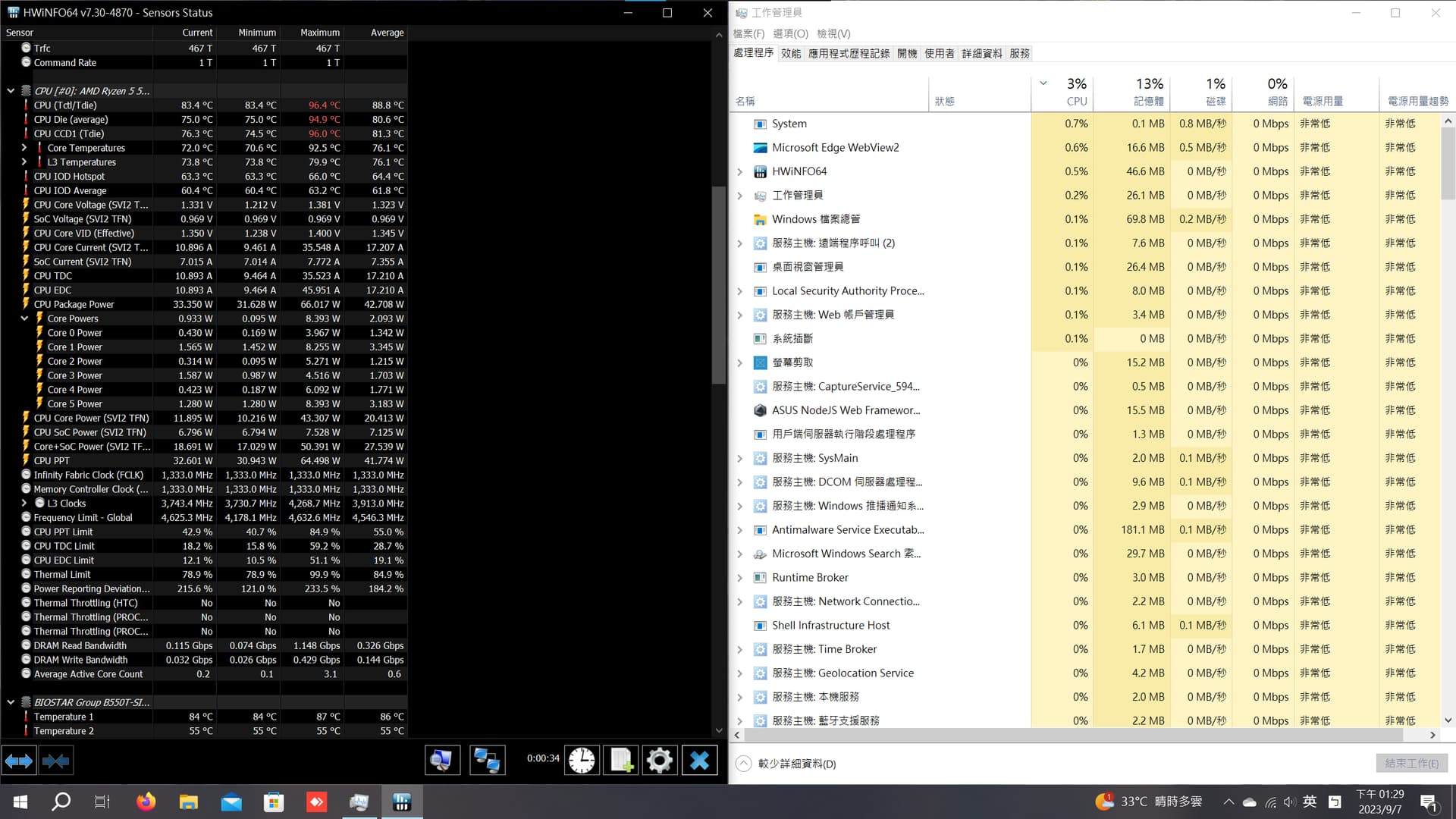
Also check your cooler setup, you are hitting very high temperatures.
At this point, I would reccomend doing bios update and reset to defaults afterward, just in case.
OEM bios support page link https://www.biostar.com.tw/app/en/mb/introduction.php?S_ID=1010#download
Board review with even old cpu show power use between 55-250W depending on load. So we are not entirely wrong about high idle power consumption.
Have you remounted your heatsink? Fans spinning? Good paste coverage? Its way too hot to be idle and nothing wrong with the cooling
Hot silicon makes for inefficient silicon
2 Likes
I have already updated to the latest bios and the behavior persists
I don’t think this is relevant to the problem today.
Attached below is HWiNFO64 screenshot with XMP disabled. Whole system power consumption is still in the 140~150w range when idle.
One thing I do notice is that the GPU fins feel quite warm to the touch
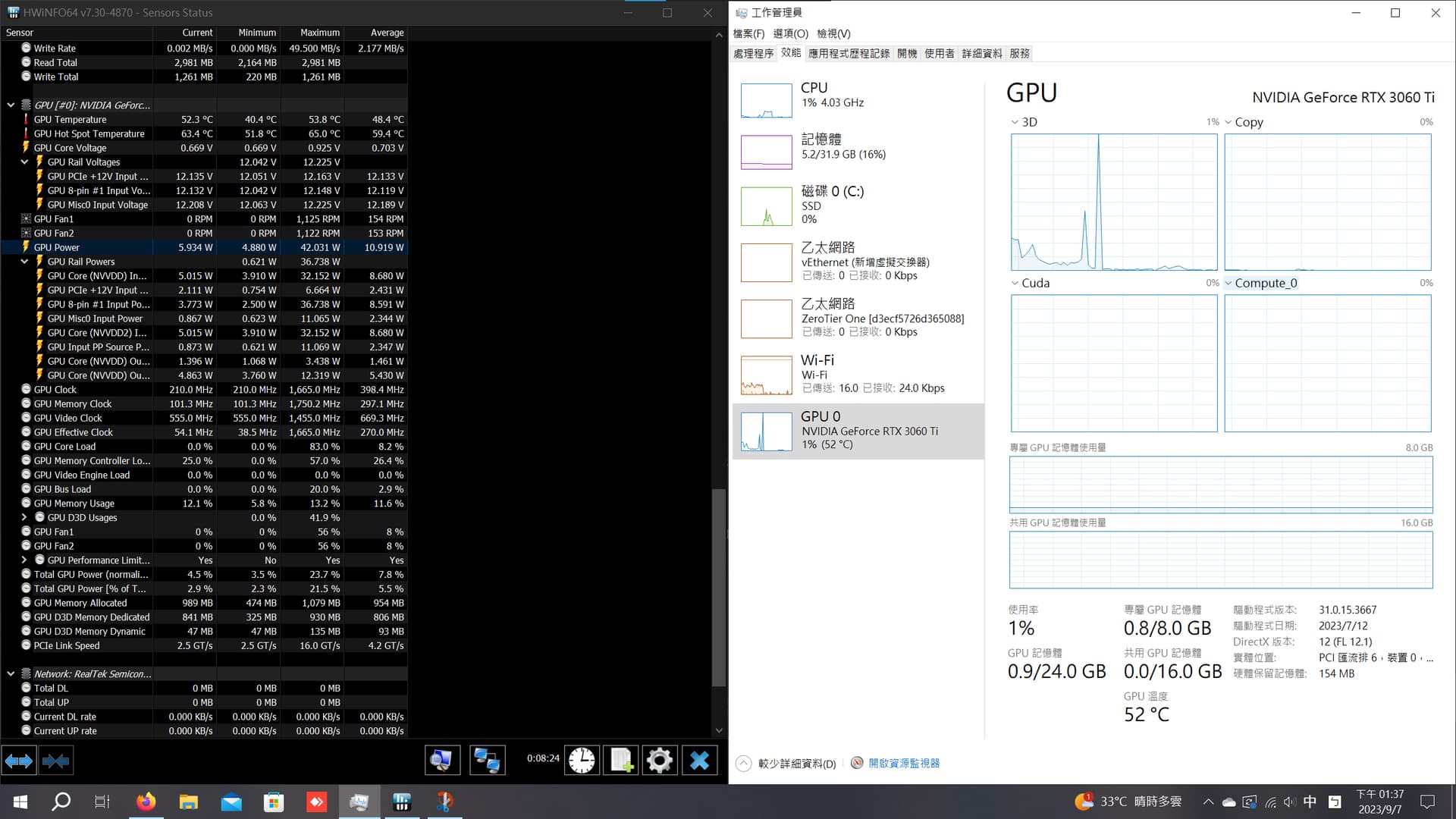
Below is a screenshot of HWiNFO64 GPU readings
M.2 heatsink and CPU VRM heatsinks are also VERY toasty.
1 Like
I don’t have time to look at the numbers right now, but what I can say that I like your current methodology much better now and I think you should continue down this road for a bit.
Neither m.2 or vrm can be the culprit here. You would be seeing smoke if they were the ones pulling the mysterious power draw.
If you have bootable usb drive handy, boot something like fedora live image and use your power meter again.
If power draw remains at similar level even in separate boot enviroment, then this hardware or hardware+uefi config related.
Also have you tested accuracy of your power meter on some know load? Like phone charger or similar?
It would be sad yet hillarious, if all this effort were due to faulty meter.
Have you measured with all peripherals removed, including any that you think don’t draw power?
Are there any other minor parts plugged into the motherboard?
I have tested it and it is accurate to within a few watts
I unplugged everything from the back of my PC except the Displayport cable for my monitor and the power cable. It resulted in a reduction of less than 10w
CPU "idle "PPT of ~30W is normal, GPU idle of 5W is also pretty normal.
Problem is something else other than CPU and GPU, maybe it’s the motherboard, but hard to tell without the machine in front of you.
Your CPU temps are kinda high for idle though, are the heatsink and case fans on?
if your CPU is hot then its going to use more power than it would need if it was cool, using more power means more heat, more heat means more power and the cycle continues,
your problem is its using a lot of power and its hot right, I’d say that’s pretty relevant
have you double checked your cooling yet?
I grabbed a ubuntu 22.04.1 bootable usb I had lying around and it was behaving exactly the same when booted into this USB
The CPU is only using <60w out of the total 150w so I don’t see why it’s the CPU’s problem
Damn, this is getting strange.
To summarize what we know:
- system power use is abnormally high, with about 70-80W unaccounted for
- wall meter unknown provenance, but trusted so far
- cpu power use is also higher than expected, but cannot explain the discrepancy
- gpu power consumption is nominal, does not explain the discrepancy
- system is actually idling as it should, and we used live environment to eliminate any possible workload causes
Personally I would now focus on power supply itself, since its the only remaining component that could reasonably waste that much power and yet not go pop instantly.
Possible approaches:
- temporary replacement with know good older psu, or new one
- step by step disconnection of noncritical power rails, like GPU and monitoring what happens. Maybe one internal power stage is fucked.
1 Like
yeah PSU is what I’d think at this point too.
According to reviews the PSU has an abnormally low power factor at low wattage, and I’m pretty sure the UPS is only measuring apparent power and not real power.
1 Like
So we might have been debugging faulty power reading after all, just not due to power meter failure.
What is even the methodology to measure something like that. Are there professional meters that can switch between sensing modes for resistive vs inductive load? Some autocorrection?
There is test equipment that will give you real and apparent power readings, I think even a run-of-the-mill killawatt meter does; VA for apparent power and watts for real power. As to how that is actually calculated, it is based on the load’s phase offset from the source, I’m pretty sure they are just using a microcontroller and quantizing to measure that, no fancy analog circuits.
This came out of a bilibili review of the power supply in question, power factor listed in the blue column and percent load in the light green column:
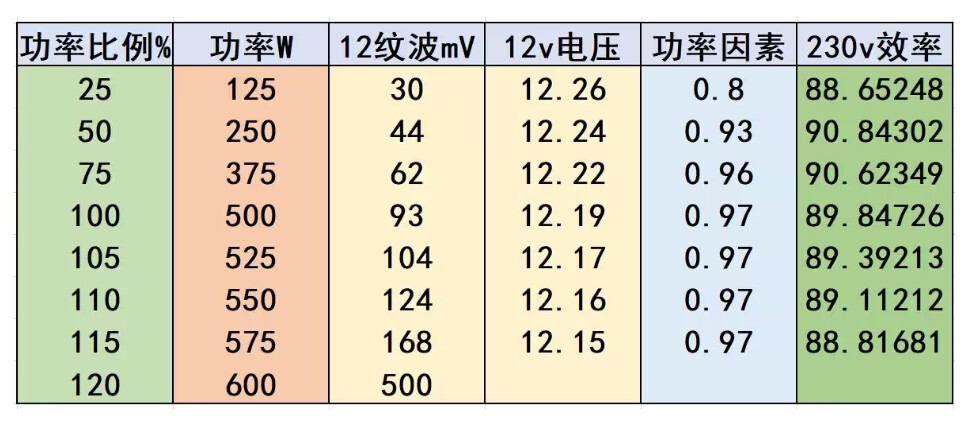
since the real load is likely less than 125 watts, the power factor is probably even lower than 0.8
2 Likes
IIRC they can display power factor
Does european (german shuko) plug 240V kill-a-watt exist? There are references that it does, but I cannot find it.
Locally available watt meters,. i.e near noname chinese junk, do not measure apparent power or power factor.
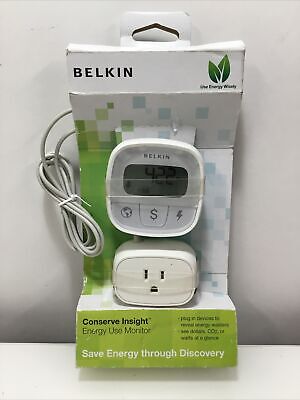
I use basic belkin with remote display unit. Its reasonably precise from 1W up, but thats it.
For some reason even the belkin energy insight disappeared from the market.