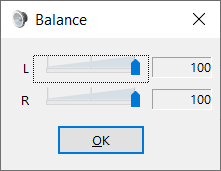
Does anyone have a recommendation of a USB headphone DAC that has left/right balance control?
It can either be a physical knob on the DAC or a control within the Windows OS.
The hearing in my left ear has reached a point where I absolutely need to balance the left and right with some additional amplification to be able to play games where positional audio is important.
Not every driver exposes a balance control. Unfortunately.
Even Windows hides the balance control for BT and forces you to find it and re-enable it in the registry.
Take for instant, my Steelseries Arctis 7 wireless headset. No balance control within the Arctis software or the Windows sound control panel. Not that it would help for that headset as the amplification in them is lacking now (especially on the left side) hence the search for an external DAC or a reliable add-on to the Windows sound architecture that allows for balance mixing.
If it’s a stereo audio out: Sounds → Playbck → {device} → Device Properties → Levels → Balance. At least in 10, haven’t checked 11.
Audio being audio, probably there’s other stereo outs besides Bluetooth which don’t have the option because they don’t implement it for some reason.
I found that Bluetooth does have balance, but its disabled by default on Windows and can only be re-enabled by editing the registry.
This is the exact problem and why I asked if someone knew of a DAC that either has a balance control on the DAC or knew whether the driver exposes the control. Windows leaves it up to the make of the device to implement balance. If the device mfg doesn’t expose that capability, that button on the levels tab will not be there.
See, this is what I was hoping for. Why something like a universal plug-in from the OS doesn’t already exist is maddening.
I will definitely give this a look.
On Linux, at least for pulse which I am familiar with, you can change the levels for all channels at each step in the source → sink pipeline if need be. The controls may not be exposed but the values can be added/altered in the pulse config file.
I think you need to see a physician for that and not aggravate the damage by making your hearing go bad faster with loud sounds? I know healthcare is an issue but please seek help with hearing?
Been there, done that. This is something that was diagnosed in 2008 and has been in steady decline since. Specifically, my left ear is afflicted with Meniere’s diseases. The nerve has become increasingly damaged over the years. The ear and its structure are perfectly normal (according to an updated MRI done this year) while the nerve continues to degrade. Along with hearing loss, it comes with tinnitus that used to be intermittent and became permanent in May 2011. Yes, that is correct, I’ve been listening to rining in my left ear for 13 years. It varies in loudness to some degree but is ever present.
Just wanted to come back and thank you for this. Works like a charm.
Turns out I only needed to reduce the right by 2db to achieve reasonable balance. Also, being able to apply a different EQ to the left and right channels has allowed me to reduce some of the higher frequencies that tend to make my tinnitus ring louder. For me, this is a game changer.
I’m using ADI-2 DAC fs from RME. It’s not cheap, but it serves my needs for many years already and I’m more than happy. It’s a great sounding and versatile DAC. I have pretty the same ‘imbalance’ issue with my ears but I can adjust the balance with a physical knob on the DAC or via “ADI-2 Remote” app. Plus current “ESS” version of the DAC has a bit sophisticated physical remote control with dedicated “balance” button (not present on my “AKM” version).