I thought that was just for websites but reading up it looks like it might be possible with an email server. I would want to practice with Apache on a throw away VM first.
1 Like
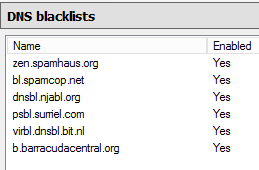
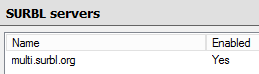
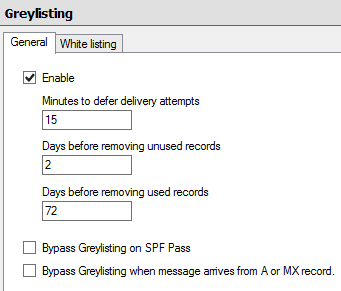
I run a variety of mail servers for myself and my clients. One of the more unique configurations I have running is based around a software called hmail. Its a Windows based (yeah I know, that part wasn’t my choice) SMTP, IMAP, and POP3 server application which runs as a system service. Hmail has support for DNS blacklists, SURBL lists, grey-listing, white-listing, various anti virus / spam application integration (in my case SpamAssasin and ClamWin), DKIM signing, SSL/TLS, and MORE! This server is located over in Switzerland on a relatively inexpensive VPS, $16.00/month. Backups are handled by hmail nightly, which takes a snapshot of the MySql database and all generated data-files, and shoves all that into an .7z archive. From there the .7z file uploaded to an offsite server via SFTP. The SFTP is handled by script I wrote, which is executed nightly by a Windows task, and will only run if a successful backup for that night is detected, if that check fails, I receive an email. In this particular installation I have configured hmail to store all generated data files in an encrypted partition, and have taken similar precautions with MySql.
When I’m not running a weird edge use case setup like that though, Webmin, Postfix, Dovecot, and MySql is my email stack of choice.
Cheers,
-Z-
1 Like
I’ll have to add a couple of the entries on your URI Blacklist to my own.
So I figured I’d try setting up my personal/family mail server on amazon’s EC2 using Modoboa/nginx.
Eventually I will switch the DNS servers from .tech to Amazon’s Route53 (as suggested by the post on arstechnica)
I know I can have [email protected] through their service but i feel the security is not top-notch: got my password by email in plain text and the connection is not secured on the admin platform so I want to build something better.
I’d like to hear what would you guys do in my position.
- Is Modoboa/nginx/pg the best combo? Since it’s built upon Django i guess encryption will not be too obscure to implement
- How about mainteinance?
- I chose ubunu 14.04 since it was there out of the box but I guess I can switch to debian, should I?
- How would you attack it?
- I’m still a student so according to @Roemer i could get the DigitalOcean VPS, should I? maybe I’ll look it up if this thing takes off

I experimented with Heroku deployments in the past but I want to get my hands dirty (and good) over ssh and I think setting up this (web?)mail server is a good exercise.
@wendell if you’re reading (thanks) and more shell tricks please
Honestly any post at this point is appreciated.
In the cloud server area, I think DigitalOcean is worth a mention too. Masses of info their website on installing software onto your Linux server.
A short ideas list, to add to yours:
How about a short introduction on every Linux admins favourite tool Tmux, certainly mine. i3 is pretty cool too, but there’s no way there going let me put it on a server at work. Great for home servers though.
The wonders of SSH. Absolutely essential.
How about something Webmin. Used in the ever popular, super lazy way of getting a Linux server up and running from Turnkey Linux.
Nagios Core. I love being woken in the middle of the night, about a server problem, NOT! However, it is free.
Alright, I wrote a few focusing on compiling an index of pre-existing guides. After watching the “Your Linux Server: Intro 01” I thought it might be helpful to repost it here.
I created a thread here: Everything You Never Wanted to Know About Fansubbing - #2 by Peanut253
The seedbox section towards the end focuses on setting up a Debian system (like a raspberry pi) with an HTTP file server and as a Seedbox.
I also wrote a post expanding on Wendel’s explanation of DNS but focusing more on the commerce aspect of the internet and how the technology interacts with various vendors, but also included an slightly detailed TLS section since it’s free now with the Let’s Encrypt C.A. and painless to set up using the EFF’s certbot.
There is a link to it in the seedbox section but here is the direct link: Esoteric Tek: The Internet and Hosting Providers
A video that expands on how to set up TLS with certbot might be nice for the channel since it expands on the existing emphasis on DNS the previous Linux videos had.
1 Like
I setup and owncloud server and the fork happened . Owncloud or Nextcloud i’m not sure who to go with.
NextCloud, they are the team behind the old OwnCloud, NextCloud is where the further development happens. OwnCloud is old at this point, it’s pretty much a dead project.
2 Likes
I would love to see more on PFsense maybe a setup video on a home use scenario setup. I have one setup and working but I’m just unsure if I’m really protected or not…
I switched to linux when ubuntu 12.04 was new because my windows starter didn’t allow for multiple monitors. Microsoft wanted me to shell out cash for something that should honestly come with any OS. I dual booted that machine and haven’t booted on windows in a couple of years now.
It would be kinda nice to have an interview with someone from Intel about the many many problems Intel has had and is still having with power management. The WiFi adapters from Intel have been cutting out since 801.11n now, and now on ac it’s still a major problem, even on the latest kernels, independent of the hardware or WiFi chipset, etc… same with their iGPU’s and with almost all of their CPU’s.
These problems have been so very prevalent for so many years and throughout so many kernels and kernel firmwares that most bug listings have just given up hoping for a solution, they just automatically adapt the version numbers of their software because they know the bugs are still going to be there.
I would like to know what has caused this serious quality issue of generations (since Haswell) of Intel CPU’s and why did Intel never adapt it’s NIC’s and WiFi adapters after seeing these do not work reliably with CPU’s with the newer power management. The power management features in those NIC’s and WiFi adapters that were put there by the old Intel development team, were never even implemented… they are present in the adpaters, you can manually activate them in linux, but they were never enabled by default as Intel moved to the completely broken power management concept that they’ve been trying to sell since Haswell, which is only getting worse in terms of reliability and - since the power state has to be locked to 1 to make the systems run reliably - which renders the expensive while “power saving” Intel chips into useless marketing bullshit, as a 6 year old AMD part is more power saving for the same reliability, and pulling thermal constraints and practicality into the equation, offers the same performance, but without spiked RNG’s, without spiked TPM and without built-in Intel ME backdoor. Because that’s actually the situation right now for the bulk of the Intel SKU’s in the consumer/SME realm.
1 Like
Personally I try to stay the hell away from intel wifi. It has given me shit since the bloody Banias chips and associated chipsets (pentium M) were more common. And thats the OLD team. I just have a little check in the back of my head that says “Intel wifi is trash” and whenever I see people preaching it I just stare at them and wonder if theirs even works.
It probably doesn’t.
I just get frustrated sometimes by the whole Intel drivers ordeal. It’s not just on linux, it’s also on Windows… like why if you want working wifi and bluetooth does one have to desinstalled the WHQL drivers from the MS repos after every bloody update to install old Intel drivers from Intel or OEM repos (and probably those working drivers do nothing else but disable the power saving features, like people do manually in Linux by configuring the kernel modules, but Intel can’t just admit that to MS so they keep sending in the broken power saving drivers as “official” drivers)?
It’s super stupid, and it goes on and on, for years, and it stinks, because why would Intel not give functional drivers to MS or to the Linux Foundation? Why? It’s a complete mystery. It would be very interesting to hear from someone at Intel what the fuck is going on there. Is it just big corporation brain rot, or is there some vicious evil behind all of that. It’s too crazy and has been going on for too long to be coincidental… Intel had the best working system on the planet, they had the power saving technology working perfectly and implemented in their hardware, but they didn’t do any thing with it, instead they decided to ignore all that and make something new that never fucking worked and looks very much like it’s never going to work.
I know im late to the party, but check out some of Steve Gibsons work. He is the host of “Security Now!” which is a show on the twit.tv network. If you have never heard of him, look him up. He is a real cool guy.
Anyways, he has a port scanning tool that I have used on many occasions. Check it out:
Sorry if it has been posted before, im still catching up on the thread.
1 Like
Looks good to me.
I’d specifically like to see how to integrate ownCloud with other stuff. I’ve used it in simple test installs and it seems really powerful, I just need it to tie in with other things for it to actually be useful. Like being able to access the same set of files from Samba, ownCloud, and NFS, and have them all stored on FreeNAS or similar, that would be AMAZING! And integration of ownCloud with Plex Media Server would be THE BOMB.
And some info on Let’s Encrypt will be a very useful thing; I want to use it to fix the self-signed cert that comes with Proxmox but I’m a clueless noob with SSL and such.
General opinion though, your plan looks awesome! Can’t wait to see where this goes.
I’ve back-pedalled on Ol’ GRC of late… I don’t agree with his views on some topics.
Another video idea:
Like a zombie apocalypse, but different:
Imagine World War 3 breaks out.
Imagine the power grids go down, all proprietary hard- and software that contains backdoors and rootkits gets completely destroyed because of total cyber war.
How does a computer nerd survive? With only solar power or other sources of alternative power, only open source hardware (meaning open source ARM board like the OLinuxino for example), only open source software (completely open source) that is compiled with open source compilers only.
What can actually be done with such a system, including, given the power envelope, stacking multiple of these open hardware boards. Can a solar LAN party be held with these devices, for example playing Red Eclipse on linux?
That would be a very interesting experiment in my opinion.
I think that most people would be surprised how well this would work, and what they would be able to do with such a system.
2 Likes
I like the series ideas, but I think a good series would be a where you show each others setups and maybe “cooler” side to Linux, like how customizable Linux is and what you can do with bash.
Also a gaming on Linux series would be pretty nice. I think that’s what’s stopping a lot of people from making the switch.
I’d like to see a tutorial on configuring targetd in centos 7.
Nevermind I figured it out.