I’ve seen some mention of PCI-e P2P and that it can help running LLMs on multiple GPUs in the same system. So far I’ve found out that you need to enable Above 4G decode and Resizable BAR. I haven’t really seen a comprehensive list of what you need, when you should use it and what pitfalls to avoid. Are there other requirements? Does enabling these settings in BIOS also enable PCI-e P2P for VM’s if I pass through the cards? (I’m using Proxmox in case that matters)
1 Like
What cards are you looking to run and what’s your current CPU/MB combo?
I started this topic to get a more comprehensive understanding of PCI-e P2P in general, so that I can make decisions without having to ask for each use case.
But if you need a concrete spec, I have a ASRock WRX80 Creator R2.0 and a 5955WX on the way and I will be building my new LLM rig with that soon. Currently I have two W6800s, but I might get another pair of either W6800s or AI9700s to max out the total to 4 GPUs.
I hope you can have more luck with this than me, my setup is a more modest x570 asrockrack with dual r9700’s in case it helps here’s my kernel opts:
HOST:
BOOT_IMAGE=/boot/vmlinuz-7.0.2-2-pve root=/dev/mapper/pve-root ro quiet amd_iommu=on iommu=pt pcie_aspm=off amdgpu.ras_enable=0 pci=realloc=on amdgpu.runpm=0 amdgpu.gpu_recovery=1 pcie_acs_override=downstream,multifunction, default_hugepagesz=1G hugepagesz=1G hugepages=52
Client with passthrough:
BOOT_IMAGE=/boot/vmlinuz-6.17.0-1023-oem root=UUID=bd316974-37a3-4065-9d1c-4b0893696903 ro quiet amd_iommu=on iommu=pt pcie_aspm=off amdgpu.ras_enable=0 pci=realloc=on amdgpu.runpm=0 amdgpu.gpu_recovery=1 pcie_acs_override=downstream,multifunction
I gave up since the conventional wisdom is that if the motherboard manual doesn’t say it’s achievable it probably isn’t, and after having tried all of the BIOS switches and kernel args i just couldn’t get it to work, hope you have more success!
Right, so one of the potential pitfalls is that the motherboard needs to explicitly support this feature? Is P2P something which is optional in the PCI-e spec?
@jamiej seems to have gotten it working on his platform which i believe was a WRX80?, he might be able to chime in on this
I had a discussion about it back in my completely (but pleasantly) derailed VLLM thread Dual R9700's AMD VLLM-Container woes - #35 by flockman
I just wonder what role the motherboard has to play in this if all the lanes are direct-cpu attached, just rubs me wrong that it could still block it somehow
but probably i just don’t know enough, and i just want to believe it is still possible on my consumer tier equipment 
If you haven’t seen it, I have a whole thread on this topic.
Granted, I’m using a PCIe switch card to sidestep the p2p bugs entirely. But if you are looking for a good central place to find the configs you need, this is a good place to start:
### The core problem
RCCL hits a reproducible `hipIpcGetMemHandle failed: invalid argument`
crash at src/transport/p2p.cc:256 when attempting P2P on RDNA 4.
Documented in ROCm/rccl-tests #162 and ROCm #6148. No merged RCCL fix
as of May 2026. This is a software bug in RCCL's IPC handle export —
it happens regardless of platform (consumer or workstation).

The common workaround is NCCL_P2P_DISABLE=1, which forces shared-memory
fallback. Works, but you lose real P2P bandwidth.

The only hardware workaround that preserves true P2P: a Gen 4 PCIe
switch (e.g., PEX88096) between the GPUs. The switch changes the
topology enough that RCCL's IPC path doesn't crash.

### Known-good BIOS settings (tested on TRX40, should apply to WRX80)
- Above 4G Decoding: Enabled
- Resizable BAR: Enabled
- CSM: Disabled
- APBDIS: 1
- DF C-states: Disabled
- SOC: P0
- 10-Bit Tag: Enabled
- NBIO: 600MHz

### Kernel boot params
iommu=pt amdgpu.runpm=0 pci=realloc amdgpu.cwsr_enable=0

- iommu=pt — required for GPU passthrough/P2P
- amdgpu.runpm=0 — without this, GPUs fail to initialize
- pci=realloc — enables full 32GB ReBAR per card
- amdgpu.cwsr_enable=0 — stability fix for gfx1201

### ACS (Access Control Services) — critical and counterintuitive
ACS on PCIe switch downstream ports MUST be cleared for P2P to work
at full bandwidth. This was the single largest improvement in my
testing: 5.41 GB/s → 19.60 GB/s (3.6x jump).

Needs a persistent systemd unit to clear ACS on every boot — the
BIOS re-enables it each time. Without clearing ACS, P2P technically
works but at a fraction of the bandwidth.

### Bandwidth results (dual R9700 through PEX88096)
- RCCL: 19.60 GB/s (70% of theoretical ceiling)
- Raw P2P: 28.07 GB/s
- Three stacked fixes got here: switch (crash fix) → pci=realloc
  (ReBAR) → ACS clear (3.6x bandwidth jump)

### What does NOT work on gfx1201
- hipDeviceCanAccessPeer returns 0 (RCCL uses HSA dmabuf imports instead)
- hipMemcpyPeer hangs
- NCCL_DMABUF_ENABLE=1 — no measurable effect
- NCCL_NET_GDR_LEVEL=LOC — no measurable effect
- GPU Direct RDMA is not wired to RCCL P2P on gfx1201 despite
  rocminfo claiming DMAbuf Support: YES

### Container requirements (vLLM)
- --shm-size=16G (or /dev/shm will choke)
- NCCL_IB_DISABLE=1 (skip InfiniBand probe)
- NCCL_SOCKET_IFNAME=<your real NIC> (docker bridges misroute)
- disable_custom_all_reduce=True in vLLM
1 Like
Of course, the bit you quote is helpful, and I don’t want to be dismissive of your suggestion at all. The reason for starting this discussion is that the info in that thread is rather circumstantial and specific to the 9700 and a certain scenario. Reading that thread leaves me with more questions than answers. What I’m looking for is building a more generic understanding of what P2P does exactly; when to apply it (or not) and which problems etc to look out for.
Some questions remain:
- Is what is posted there applicable on other systems as well?
- Does it work the same on intel CPU/Motherboards or does intel use a different mechanism or naming scheme?
- Does it work the same on intel or nVidia GPUs?
- How does inter-card communication get established and is the communication brand specific?
- Does it work with VM’s?
1 Like
I’m tracking now.
This is great and I’m happy to try and test theories on my system. You’re running into the same issue that I did where it’s a handful of people hotwiring it to work on their system.
It’s an uphill battle because the default response to people wanting to run more than one AMD card for anything other than chatbots is: “Just buy Nvidia cards.” So, not a lot out there, and AMD has not really shown any genuine effort to patch their non-Instinct cards. Why bother with poor people? (yes, I’m being bitter)
about use case:
Obviously two-card accelerator setup for local AI inference. P2P speeds up data transfer between the two cards, and reduces latency. Both in a significant way.
about pitfall:
Reportedly IOMMU has to be disabled. That also means no VMs.
1 Like
oh man, that kills my hopes and dreams hard XD
is this something that can even be fixed in software? or is this a hardware limit?
i suppose running a plx chip would still fix this issue though right? since it becomes its own seperate little bubble?
I mean theres a triple 16 available from alieexpress, if i can get a third gpu slot and have p2p working that might be enough to pull the trigger for me……i’d probably need to fab a custom case somehow though
Just as an addendum to this…there’s a significant software component, in that P2P won’t necessarily be used by default, the local AI engine needs to explicitly make use of it. And there are a lot of caveats that go along with that.
Basically, that means tensor parallelism. In vLLM, that’s a given (I think), but in other software it’s a specific mode you need to enable, and it doesn’t always come with performance benefits. For example, in llama.cpp there’s a heavy decode performance penalty using -sm tensor with the Vulkan backend, so ROCm is the only option for tensor parallelism with AMD cards. However, ROCm is about 30% slower when using MoE models (while being slightly faster for dense models), and tensor parallelism only gets you about half of that performance back. MTP (and other speculative decoding strategies) can help, but it comes with the limitation of no parallel requests, and hits prefill performance hard.
It also, oddly, isn’t as fast as -sm layer with ROCm when it comes to prefill even on dense models, so it’s entirely possible that tensor parallelism isn’t really ready for prime time on llama.cpp when it comes to agentic work.
On top of that, you have the problem that single-request performance under vLLM (and up to 4 parallel requests) is actually slower in vLLM/ROCm than llama.cpp/Vulkan, so that’s further muddying of the waters - just moving wholesale to vLLM doesn’t necessarily bring performance benefits commensurate with the amount of extra time you’ll spend just getting it running.
Basically, tensor parallelism (and thus PCIE P2P) is not a panacea, and whether you see any benefit from it will depend heavily on your specific use case and the models you intend to run.
2 Likes
yeah that tracks with my experience vllm was an absolute dragon to set up for multi-gpu rocm, and performance was tanking hard with single user use just not worth it for home/family setup unless you have really spicy hardware, it burns VRAM like crazy to ensure higher throughput,
I’ve also since switched back from tensor to the standard splits, it helped decode a bit but it was nowhere near what MTP added, maybey p2p would have made it more worthwhile?
Extensive p2p dma, as well as rdma over rocev2 user.
The requirement for direct memory access between cards is actually pretty simple, but hard to do on BIOS that obscure or outright hide the right options.
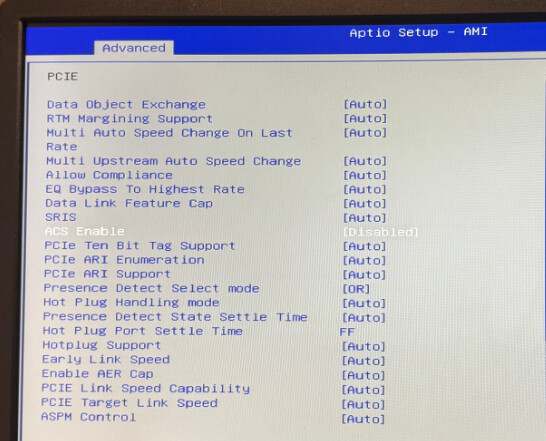
PCIE ACS is access control, it forces traffic from pcie devices through the CPU. BAD! BAD BIOS! Yes its a security feature, yes its probably useful in some weird corner case where the bad guyZ have physical access to your box and can jam a rogue PCIE device in or something equally weird.
Going p2p means you can effectively bypass sending every message between pcie devices through your dram, which is terribly slow by comparison. even when traffic crosses your io tile its way faster than hitting main memory.
Anyways, pcie acs off. easy to test with most cards, in nvidia the nccl tests will show you p2p enabled/disabled. this is the actual bios setting for me:
My IOMMU is on but in passthrough mode:
GRUB_CMDLINE_LINUX_DEFAULT="nosplash text pci=realloc amd_iommu=on iommu=pt
This is amd epycs on an asrock turin board.
yes you want rebar, >4g decoding, etc.
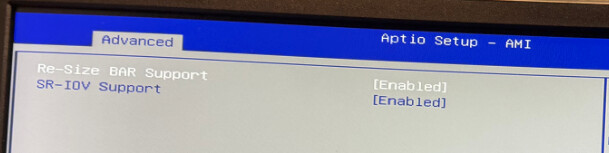
But thats the only hardware→bios/efi→grub stuff required.
Now you are into the software hellscape. drivers need to allow you to DMA between pcie devices. You can DMA from gpu to gpu, gpu to nic, gpu to nvme storage… think sega blast processing. huge performance bumps in terms of way lower latency.
You can and should use the geohotz nvidia open driver that enables p2p dma for consumer cards like 3090’s 5090’s etc. Check the pcie megathread with panchovix and myself flipping this stuff on and performance testing. Yeah, we both have PCIE switches, but the drivers work without that just juggling traffic between pcie roots on the cpu.
After the drivers come the libraries and the inference engine, NCCL is the gold standard and can support multiple different topologies between cards, rings stars purple hearts and moons and clovers and all the shapes of lucky charms. most TP8 setups inside a single system are actually forming a ring topology, and it works well for inference. when you get into training and massive spikes in all-gather all-reduce etc. things get trickier.
One interesting note is if you are running dual socket, or even single socket, you can actually max out the double wide xgmi links between cpus, or the infinity fabric inside a single cpu.
Do you NEED this for a pair of GPUs? probably not. Do you need it for TP4… TP8… TP16 builds? Yeah, gonna want that. The performance gainz from true tensor parallelism in VLLM with flash inference are kind of nuts. not going back to pipeline parallel and lousy kv cache management now that i have tasted freedom.
edit a sample launch command i use in VLLM:
cd /nfs/ai/vllm/nightly

source venv/bin/activate

export NCCL_P2P_LEVEL=SYS
export NCCL_IB_DISABLE=1
export NCCL_MIN_NCHANNELS=8

export VLLM_WORKER_MULTIPROC_METHOD=spawn
export VLLM_MARLIN_USE_ATOMIC_ADD=1
export OMP_NUM_THREADS=8
export CUDA_DEVICE_ORDER=PCI_BUS_ID
export CUDA_VISIBLE_DEVICES=0,1,2,3

vllm serve \
    /nvme/models/safetensors/Qwen3.6-27B/ \
    --served-model-name qwen3.6-27b \
    --tensor-parallel-size 4 \
    --load-format instanttensor \
    --enable-auto-tool-choice \
    --tool-call-parser qwen3_coder \
    --reasoning-parser qwen3 \
    --max-num-seqs 128 \
    --max-model-len 262144 \
    --gpu-memory-utilization 0.45 \
    --disable-custom-all-reduce \
    --mm-encoder-tp-mode "data" \
    --limit-mm-per-prompt.video 0 \
    --trust-remote-code \
    --async-scheduling \
    --enable-prompt-tokens-details \
    --host 0.0.0.0 \
    --port "${SERVE_PORT}"
if u go VLLM, instant tensors makes ur load time like 90% faster lol so dont forget to pip install that little nugget and load using it.
qwen 3.6 doing inference at TP4:

another nugget during an all-reduce test: every gpu can and will blast at 50GB/s both directions at the same time. i have been meaning to publish a whole article on the last ~3 month journey to create my own custom image to text model… hm… i should start writing my jokes for that so its entertaining.

6 Likes
Thanks for posting this. It is really helpful. 

Wendell just posted this which feels relevant?
1 Like
It’s very adjacent, but not quite what OP is asking for. Still good info!