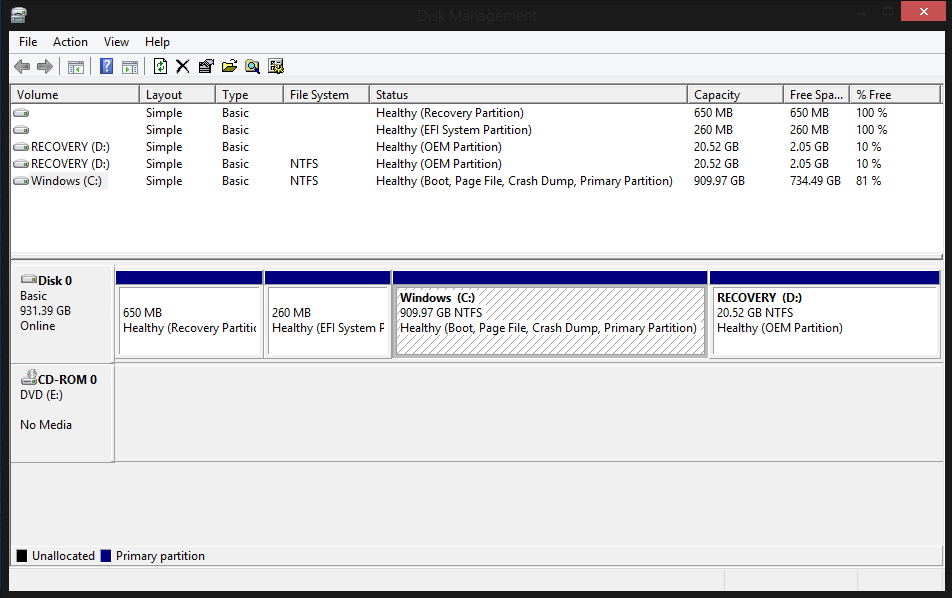
Recently I have been trying to understand my computer in more depth, one of my short term goals is to upgrade from a HDD to SSD as the disk is a major bottleneck. With that in mind I first want to make a complete backup of my HDD (yep I know, I've never backed up before shocking but like I said i'm getting into it) looking at windows disk management I found I had 4 partitions, I also noticed that the (D:) drive is listed twice can anyone explain why this is, what these are used for etc.
What do you see in My PC/My Computer?
This PC looks normal, it just has the Windows (C:) and RECOVERY (D:)
Looks to me like you have a traditional "store bought" machine, like a Dell, Lenovo, or HP. These OEMs generally no longer ship a restore media (DVD) with their systems. They create a hidden partition on the drive and use that in case you need to do a system restore. Most of these OEMs give you the ability to save your recovery partition to a flash drive or an optical disk and remove those partitions from you hard drive to free up space.
Do some research on Windows System Restore, and "File History". I would also suggest creating a System Image Backup under "File History" to get the feel for how it works. You can also use a "System Image" to restore your pc to a new drive..... You said you were going to get a new SSD right? Do some experimenting with this to get a better in depth understanding of your computer.
(DISCALIMER! BACKUP YOUR DATA IN A WAY YOU KNOW HOW TO RECOVER FROM)
1 Like
yep I have a HP laptop, thanks for your help I was looking into Windows system restore but hadn't heard of file history so I will take a look.
Once I am more comfortable and have a functional back up I think as a test it would be good to duplicate the drive onto an external drive and then try to boot from the external drive, does that sound reasonable.?
Yes sir! That should work, as long as it is an external hdd or ssd. Flash drives not so much. Look around and you should be able to find some cheap refurb drives that are great for testing with.
Thanks, I may post here and let you know how it goes.
I have an Advent Torino X100 laptop and its the same with me. I have a 320GB hard drive that has 5 partitions. My system didn't have backup media, but had/has a program that enables me to make a backup set (which I did when I first got the machine) :O)