U.2 Drive Bay - Needs work

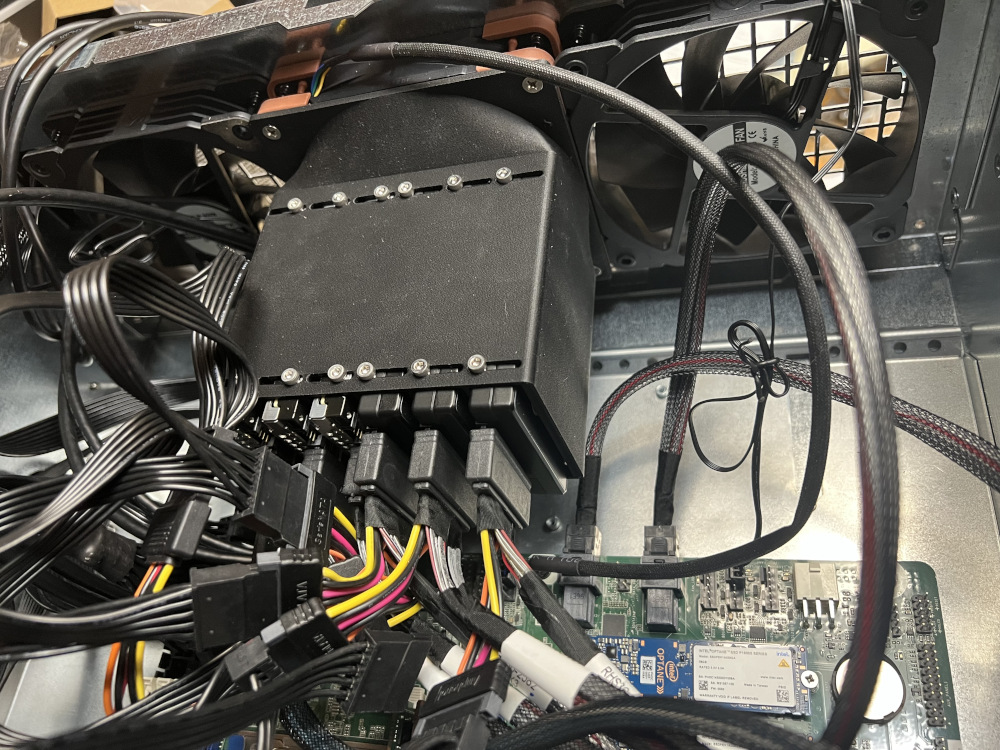
I am building 2 sans for my rack, 3d printed a u.2 drive bay for a 4u case with 120mm Fans.

It needs work because I can easily change drive because I cant access the screws on the bottom without taking the whole fan/drive assembly out. If anyone has Ideas let me know thanks!

Thingiverse Upload


3 Likes

just dont use the bottom screws.

the drives are [always going to be] SSD’s? so don’t have vibrations to worry about like HDD’s have…

cool bay though

Those look like SATA SSDs. Which ones are you using? Also see a fan hooked up there…is heat going to be a issue with them there?

Never had more then one in a system(some friends had two-three)

1 Like

there is a bar between where the power and data would separate on SATA.

could be SAS tho, as the connector is mechanically the same

also, not sure they do U.2 HDDs? I have heard of “NVMe HDD’s” but not seen any around

Look at the connector, it’s clear it’s not SATA, but SAS or U.2 :wink:

@LumpyPotato I would make the 3d-printed separator/channels a bit longer and use top screws only. I used to have a similar problem.
How tight is your cage?

2 Likes

Maybe you are right… don’t see the other connector for a SATA SSD. But the connector did look close to it. Good catch

1 Like

U.2 drives generate about 25-30W of heat, each. Admittedly when pressed hard and much less when idle, but still something to take into account.

2 Likes

Didn’t know about that…that all adds up and understand why a fan would be needed

1 Like

Sorry didnt describe enough, these are pcie 3 nvme, 25ish watts each, 5 nvme one p4800x optane drive. I used a noctua 3000rpm fan on this one, took some playing with to find an adequate fan. I could leave the bottom screws out its very ridigid. PLA CF plastic

I’d go with PETG or ABS for this as the drives can get pretty warm. You won’t see it immediately, but PLA may start deforming with time.

it def could if the fan isn’t enough to cool it.

I have to Say, a HPE DL380 G9 U.2 bay with backplane would have been a SHED load easier and better in everyway…

1 Like

Just ordered a couple of the HPE DL380 G9 U.2 cage & backplane’s as its exactly what I was looking for! Was wondering if you knew what type of cable I need to power it? It looks like a 6 pin pcie?

I agree lol but this also only cost $3 to print.

1 Like

What cage & backplane are you talking about (link)? I did a cursory search for "HPE DL380 G9 U.2"and all the results were for regular “2U” SFF SAS cages and not for U.2. I don’t even know if DL380 G9 has any support for U.2 storage.

I was looking for backplanes to start as well, I just couldnt find anything. Then just print the trays and cage.

1 Like

G9 used 6SFF NVME cage (780978-001) and G10 used 8SFF NVME cage (872971-001)

1 Like

Many drive of older gen do run hot, but many are under or around 16w. not that much. But a noctua will be ok, just not this one. the industrial version at 1700 will do best.

1 Like

the one on there is the industrial 3000 rpm

1 Like