HI I’m new here! I’ll cut to the chase. I’m building a NAS using an ASUS Prime J4005I-C board, which is a bit old and slow, but also very nice, low-power and adequate for what I need it for. I need more SATA ports, (5 more), and this board limits me to m.2 adapters because it has no PCIe slots.
It seems to be a dud: it produces random errors, most consistent issue is that port0 is now 1.5Gbps only (I have tested this with various cables and drives with and without a backpane in play), booting with drives connected is a roll of the dice.
It doesn’t seem to do staggered spin-up, which will be needed with my 200W PSU with a single 12V connector (I have not tried doing anything about this, some sort of firmware- or linux-level fix probably exists) - same drives spin up… staggeredly… when connected to my desktop B550 board.
Any tips for finding an adapter that works? ASM chipset models were my second option, but now I’m worried. If anyone has a recommendation for a specific model that worked for them, that’d be cool. I want to skip the proper HBA route for this build, I know I know, I have one, but that’s a different build.
I got a ASMedia 1166 that looks similar to the one I linked there, works fine since over a year.
The Realtek is slightly newer and is rumored to use a bit less power, but we are talking about 1-2 Watt.
Pretty sure the jmb585 should support PUIS… I wonder if 1 and 2 are related… eg. You get errors/downthrottling because PUIS is not configured correctly (or your psu just can’t cut it). Not that sata controllers can downtrottle due to low power but i imagine that voltage instability might manifest as 1.5gbps in a sufficiently insensitive test…
@daemond In theory, it does support PUIS, I did check the docs before ordering. But it just spins all drives up at once.
I’m testing with some WD5000AAKS drives (so I don’t mess with my real drives). These WD blues, when connected to my B550 board spin up one at a time.
I have tried connecting the PUIS jumper pins on the WD blues but that doesn’t seem to make a difference.
Tested separately, If I just power the drive, the PUIS pins work as expected (no spin if shorted, yes spin if not), but when I plug into the backpane, no spin either way - so that’s weird. Could be related to the “pin 11” thing from the 45drives post, I’ll have to sleep on this and figure it out tomorrow. But regardless of the hows and whys, the connections allow for SSU with a different controller (on my desktop mobo), so the issue is most likely with the controller firmware. Could be linux too, but I use the same Debian everywhere so there’s no difference there.
@mietzen@Purple-Wolf seems like I bet on the wrong horse with the JMB… ASM1066 looks great, especially since I can flash different firmware.
I’ve seen some mentions of PUIS in the long thread, will dive into this a bit more. I’m not even sure if I need PUIS with 5 drives tops… The PSU has 2 sata connectors on one cable and 2 “molex” on another - the backpane is connected to these “molex” connectors. Even if it’s all one rail internally, 5 3.5” HDDs and one 2.5” SSD should be fine even at once, right? Or not? I’m a software person I genuinely don’t know.
(p.s. so good to be back on a real forum, it’s been years of search engines and reddit, feels like finding an oasis in a desert)
…but once it’s not held up by various cables I’ll post some shots. The Jonsbo N2 is real nice, but it’s a pain to find a mini ITX board that has enough SATA ports (other than the amazon/ali mobos, Topton, CWWK and such, a bit overkill for this project).
BTW errors are somehow gone now…. with 3 drives connected some spin up before the OS boots, some during… This adapter is gaslighting me.
afaik a 3.5 drive spinning up will need around 20w on 12v (for a short time). Electric motors doing electric motor things. 2.5 drives are whatever, it’s on 5v and they are much smaller so it’s not that big of a deal.
If the PSU isn’t lying about the 200w power rating it should be ok to just power up 4 3.5 drives without PUIS. I think I was running 4x 3.5 drives and a mini itx trashy low power board on a 180w beefy laptop psu with a similarly rated picopsu.
Afaik the PUIS you can do with a sata controller is not using the pins (which are on the sata power connector so would require some communication between the sata controller and a backplane or an interposer, which is usually something only SAS cards do)
The PUIS you can do is to set the drives to “power up in standby” with a software setting, i.e. they will be powering up electronics but not spinning up the drive motor until receiving a special signal through the sata data port.
sudo hdparm -s 1 /dev/sdX
This will print you a warning calling the operation “dangerous” and tells you to write an additional flag to send this hdparm command.
It’s “dangerous” because if you don’t have hardware that can send the right wakeup signal on the sata port the drive stays sleeping and you won’t be able to send it a command to cancel this mode until it’s actually spinning again. So the drive is “soft bricked” in a way because this setting is remembered by the drive and can’t be reset until the drive spins up again.
In my experience the Linux kernel on boot will wake up and stagger the spinup of drives on the native sata ports of the motherboard, and some additional sata controllers that support PUIS. Sas HBAs often don’t support this feature (but may offer staggered spinup of their own) so the drive may stay dead on a SAS card.
Support from additional sata controllers may vary, I had success with an asmedia m2 card with 4 ports a 1064, this one from my old post in that other thread Short Review: Edging ASMedia 1166 PCIe Gen3 x2 M.2 to 6 x SATA HBA Chipset. It doesn't suck 👍 - #20 by starshipeleven
For obvious reasons, since this disk wakeup activity is done by the Linux kernel during the boot sequence, you cannot set this power up in standby enabled on the boot drive because otherwise the disk will stay dead and motherboard won’t see it nor boot from it. Only server boards have PUIS support in the BIOS, usually.
I suggest to try this first on one drive, possibly a less important one you can afford to softlock, and connect it to the sata ports of the motherboard first to test if what I said works on your board.
Then once that test is passed you can try on the jmicro sata controller and the world is your oyster.
Or to not bother if you see it boots fine without, 200w should be enough for 4 3.5 drives
It’s “dangerous” because if you don’t have hardware that can send the right wakeup signal on the sata port the drive stays sleeping and you won’t be able to send it a command to cancel this mode until it’s actually spinning again. So the drive is “soft bricked” in a way because this setting is remembered by the drive and can’t be reset until the drive spins up again.
…well let me tell you the story of my trusty old 500gb WD Green drive…. It’s this. I’m yet to find a controller that can wake it up, although I just got a HPE with some LSI chipset, that might do the trick. I live I learn.
In my experience the Linux kernel on boot will wake up and stagger the spinup of drives on the native sata ports of the motherboard, and some additional sata controllers that support PUIS. Sas HBAs often don’t support this feature (but may offer staggered spinup of their own) so the drive may stay dead on a SAS card.
I’m genuinely not sure anymore what did this on my desktop, but IIRC it happened during POST (or after that and before the kernel loads, not sure if that part is still POST). With this j4005 board, according to dmesg, everything comes up all at once, and drives spin up as soon as the I press the power button.
The desktop board is a B550 with a staggering amount of options in the setup menu, with support for anything my Ryzen pro can throw at it, so I’m not surprised if it did staggered spin-up, too.
My PSU is pretty anemic - that’s why I got it, I’m going for a silent, low-power build. It’s a Chieftec salvaged from some older office PC. Super quiet and with just the right amount of connectors for this build, nothing left dangling. And despite that I went for Seagate Constellation ES3 drives for the final build, which are loud hot and hungry, and at some point I’ll have 5 in the bay, so I’ll need to figure this out
I think I’ll go for an ASM board, try some firmware flashing if needed, and if that fails, will try to hunt down an ITX board with 6 sata ports. One popped up recently (Gigabyte GA-H97N) and I regret not getting it ever since.
Itx boards with mobile processors (like n95, n100, n150) and 6 SATA slots abound on AliExpress. Some come with sff8087 instead or whatever. But you’d need to verify what the controller chipset used is, since it’s ultimately going to be (likely) one of the one mentioned here. And most of those use sodimms which may or may not be a dealbreaker
There are even a few with actual processor sockets since the mobile processors tend to be quite limited for PCIe slots (and I think the modt boards often over-provision these lanes)
Pretty tight budget over here, and the j4005 board cost me the equivalent of 40 bucks - that’s like 1/10th of what the Ali boards cost. But those would be nice, for sure! Or an ASRock Rack board… there’s a complete build for sale with the Asrock C236 WSI4-85 locally as we speak. About the same price or less than a Topton board for the whole thing with 32GB RAM. But I’m not getting that, which should tell you about the levels of broke I am currently
So that’s why I’m sticking with the cheapo adapters. But I have to admit I also like the idea of these, they are really smart designs. Piss poor firmware and iffy quality control, but the one I have is a genuinely nice piece of kit. Imagine for a minute if this Shanzai stuff came with open drivers/firmware… One can dream.
And these j4005 and similar pre-N100 boards are a dime a dozen, suitable for NAS-only duty. I kinda like the pairing. If I can get it to work lol.

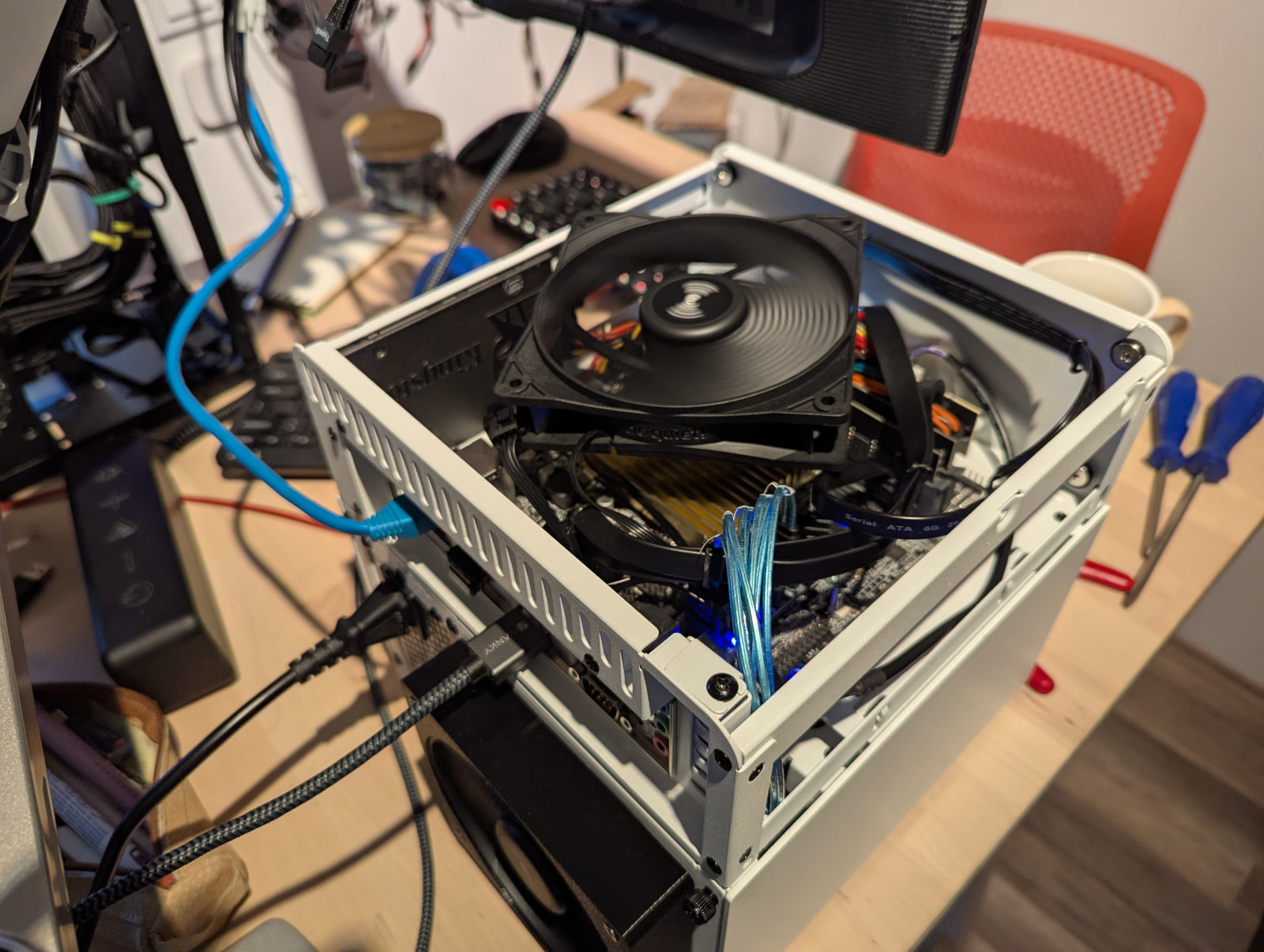
 It’s this. I’m yet to find a controller that can wake it up, although I just got a HPE with some LSI chipset, that might do the trick. I live I learn.